MITRE ATT&CK Navigator Operation
The web format of this guide reflects the most current release. Guides for older iterations are available in PDF format.
Integration Details
ThreatQuotient provides the following details for this integration:
| Current Integration Version | 1.0.4 |
| Compatible with ThreatQ Versions | >= 4.30.0 |
| Support Tier | ThreatQ Supported |
Introduction
The MITRE ATT&CK Navigator Operation enables ThreatQ users to export supported objects and their related Attack Patterns as JSON layer files for visualization in MITRE ATT&CK Navigator. The operation generates ATT&CK Navigator 5.1.0 layers using layer format 4.5, providing a standardized view of ATT&CK techniques associated with ThreatQ intelligence.
The operation provides the following action:
- Generate Layer - exports related Attack Patterns as a Navigator layer format 4.5 JSON file
The operation is compatible with the following system objects:
- Adversaries
- Campaigns
- Events
- Malware
- Reports
- Tools
Installation
Perform the following steps to install the integration:
The same steps can be used to upgrade the integration to a new version.
- Log into https://marketplace.threatq.com/.
- Locate and download the integration file.
- Navigate to the integrations management page on your ThreatQ instance.
- Click on the Add New Integration button.
- Upload the integration file using one of the following methods:
- Drag and drop the file into the dialog box
- Select Click to Browse to locate the integration file on your local machine
ThreatQ will inform you if the operation already exists on the platform and will require user confirmation before proceeding. ThreatQ will also inform you if the new version of the operation contains changes to the user configuration. The new user configurations will overwrite the existing ones for the operation and will require user confirmation before proceeding.
The operation is now installed and will be displayed in the ThreatQ UI. You will still need to configure and then enable the operation.
Configuration
ThreatQuotient does not issue API keys for third-party vendors. Contact the specific vendor to obtain API keys and other integration-related credentials.
To configure the integration:
- Navigate to your integrations management page in ThreatQ.
- Select the Operation option from the Type dropdown (optional).
- Click on the integration entry to open its details page.
- Enter the following parameters under the Configuration tab:
Parameter Description Enable SSL Certificate Verification Enable this parameter for the integration to validate the host-provided SSL certificate. Disable Proxies Enable this parameter if the integration should not honor proxies set in the ThreatQ UI. - Review any additional settings, make any changes if needed, and click on Save.
- Click on the toggle switch, located above the Additional Information section, to enable it.
Actions
The operation provides the following action:
| Action | Description | Object Type | Object Subtype |
|---|---|---|---|
| Generate Layer | Export Adversary and related Attack Patterns as JSON following the MITRE ATTACK Navigator 4.5 specification. | Adversaries, Campaigns, Events, Tools, Malware, Reports | N/A |
Generate Layer
The Generate Layer action retrieves Attack Pattern objects related to the selected ThreatQ object and generates a MITRE ATT&CK Navigator layer. The resulting JSON layer file is uploaded to ThreatQ as an attachment related to the source object.
Attack Patterns are identified using their Technique ID attribute or an ATT&CK technique ID contained in the object value. When an Attack Pattern contains multiple Tactic attributes, the action creates a separate annotation for each technique and tactic combination. If no Tactic attribute is present, MITRE ATT&CK Navigator displays the technique under all applicable tactics.
Sample Response:
{
  "description": "Generated: 2026-08-06 15:20:36",
  "name": "Sidewinder",
  "domain": "enterprise-attack",
  "sorting": 0,
  "techniques": [
    {
      "enabled": true,
      "color": "#ff6666",
      "techniqueID": "T1027.013"
    },
    {
      "enabled": true,
      "color": "#ff6666",
      "techniqueID": "T1027.010"
    }
  ],
  "legendItems": [
    {
      "color": "#ff6666",
      "label": "Is part of 'Sidewinder'"
    }
  ],
  "versions": {
    "layer": "4.5",
    "navigator": "5.1.0"
  },
  "filters": {
    "platforms": [
      "PRE",
      "Windows",
      "Linux",
      "macOS",
      "Network",
      "AWS",
      "GCP",
      "Azure",
      "Azure AD",
      "Office 365",
      "SaaS",
      "Google Workspace",
      "Containers"
    ]
  },
  "hideDisabled": false
}
The operation generates the following Navigator layer fields:
| Data Path | Source | Examples | Notes |
|---|---|---|---|
.versions.layer |
Operation |
"4.5" |
Navigator layer file format. |
.versions.navigator |
Operation |
"5.1.0" |
Compatible Navigator application version. |
.name |
Source object |
"Sidewinder" |
Uses the supplied Layer Name or the source object's value, name, or title. |
.description |
Action/source |
"Generated: 2026-08-06 15:20:36" |
Uses the action description, the ThreatQ description, or a generated timestamp. |
.domain |
Action option |
"enterprise-attack" |
Enterprise ATT&CK or Mobile ATT&CK. |
.filters.platforms |
Operation |
["Windows", "Linux"] |
Includes the platforms configured for the selected domain. |
.sorting |
Operation |
0 |
Sorts techniques alphabetically in ascending order. |
.hideDisabled |
Operation |
false |
Displays disabled techniques in Navigator. |
.legendItems[] |
Layer name |
{"label": "Is part of 'Sidewinder'"} |
Included when Navigator scoring is disabled. |
.metadata[] |
Source attributes |
{"name": "Sector", "value": "Finance"} |
Included when object attribute metadata is enabled. |
.techniques[].techniqueID |
Attack Pattern |
"T1078" |
Uses the Technique ID attribute or extracts the ID from the Attack Pattern value. |
.techniques[].tactic |
Tactic attribute |
"initial-access" |
Normalized to an ATT&CK tactic short name; one technique entry is generated for each tactic. |
.techniques[].score |
Score attribute |
75 |
Uses a numeric MITRE Navigator Score; defaults to 50 when scoring is enabled and none exists. |
.techniques[].color |
Operation |
"#ff6666" |
Applied when Navigator scoring is disabled. |
.techniques[].enabled |
Operation |
true |
Enables the technique annotation. |
.techniques[].metadata[] |
Pattern attributes |
{"name": "Source", "value": "ThreatQ"} |
Included when object attribute metadata is enabled. |
.techniques[].showSubtechniques |
Action option |
true |
Expands annotated subtechniques by default. |
Run Configuration Options
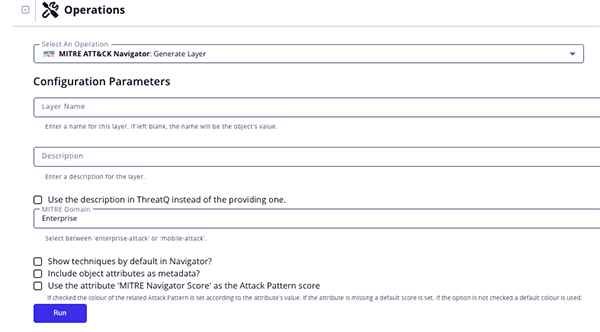
These configuration options are set after selecting the action to run against an object and are not set from the operation's configuration screen.
The following configuration options are available for this action:
| Run Option | description |
|---|---|
| Layer Name | Name for this layer. If left blank, the name will be the object's value. |
| Description | Enter a description for the layer.
A description is not needed if you have enabled the Use the description in ThreatQ instead of the providing one option. |
| Use the description in ThreatQ instead of the providing one | Enable this option to have the integration use the description in ThreatQ opposed to the one entered in the Description option. |
| MITRE Domain | Select the MITRE Domain for the layer. Options include Enterprise and Mobile. |
| Show techniques by default in Navigator | Enable this option to show techniques by default in Navigator. |
| Include object attributes as metadata | Enable this option to include object attributes as metadata. |
| Use the attribute 'MITRE Navigator Score' as the Attack Pattern score | Enable this option to use the value of the Attack Pattern's attribute MITRE Navigator Score to color the technique. |
Change Log
- Version 1.0.4
- Added support for MITRE ATT&CK Navigator 5.1.0 and updated the generated layer format to version 4.5.
- Version 1.0.3
- Updated the integration to prevent crashes caused by duplicate uploads by ensuring file contents are unique and adding improved error handling.
- Added the following configuration parameters:
- Enable SSL Certificate Verification - determine if the integration should validate the host-provided SSL certificate.
- Disable Proxies - determine if the integration should honor proxies set in the ThreatQ UI.
- Version 1.0.2
- Added the Run Parameter, Use the attribute 'MITRE Navigator Score' as the Attack Pattern score, to set a score for each Attack Pattern.
- Version 1.0.1
- The operation is now compatible with Tools and Events object types.
- Version 1.0.0
- Initial release
PDF Guides
| Document | ThreatQ Version |
|---|---|
| MITRE ATT&CK Navigator Operation v1.0.4 | 4.30 or Greater |
| MITRE ATT&CK Navigator Operation v1.0.3 | 4.30 or Greater |
| MITRE ATT&CK Operation v1.0.2 | 4.30 or Greater |
| MITRE ATT&CK Operation v1.0.1 | 4.30 or Greater |
| MITRE ATT&CK Operation v1.0.0 | 4.30 or Greater |