MITRE ATT&CK Navigator Operation
The web format of this guide reflects the most current release. Guides for older iterations are available in PDF format.
Integration Details
ThreatQuotient provides the following details for this integration:
| Current Integration Version | 1.0.3 |
| Compatible with ThreatQ Versions | >= 4.30.0 |
| Support Tier | ThreatQ Supported |
Introduction
The MITRE ATT&CK Navigator Operation for ThreatQ allows an analyst to export an Adversary, and its related Attack Patterns, for use in the MITRE ATT&CK Navigator.
The operation provides the following action:
- Generate Layer - export Adversary and related Attack Patterns as JSON following the MITRE ATT&CK Navigator 4.2 specification.
The operation is compatible with the following system objects:
- Adversaries
- Campaigns
- Events
- Malware
- Reports
- Tools
Installation
Perform the following steps to install the integration:
The same steps can be used to upgrade the integration to a new version.
- Log into https://marketplace.threatq.com/.
- Locate and download the integration file.
- Navigate to the integrations management page on your ThreatQ instance.
- Click on the Add New Integration button.
- Upload the integration file using one of the following methods:
- Drag and drop the file into the dialog box
- Select Click to Browse to locate the integration file on your local machine
ThreatQ will inform you if the operation already exists on the platform and will require user confirmation before proceeding. ThreatQ will also inform you if the new version of the operation contains changes to the user configuration. The new user configurations will overwrite the existing ones for the operation and will require user confirmation before proceeding.
The operation is now installed and will be displayed in the ThreatQ UI. You will still need to configure and then enable the operation.
Configuration
ThreatQuotient does not issue API keys for third-party vendors. Contact the specific vendor to obtain API keys and other integration-related credentials.
To configure the integration:
- Navigate to your integrations management page in ThreatQ.
- Select the Operation option from the Type dropdown (optional).
- Click on the integration entry to open its details page.
- Enter the following parameters under the Configuration tab:
Parameter Description Enable SSL Certificate Verification Enable this parameter for the integration to validate the host-provided SSL certificate. Disable Proxies Enable this parameter if the integration should not honor proxies set in the ThreatQ UI. - Review any additional settings, make any changes if needed, and click on Save.
- Click on the toggle switch, located above the Additional Information section, to enable it.
Actions
The operation provides the following action:
| Action | Description | Object Type | Object Subtype |
|---|---|---|---|
| Generate Layer | Export Adversary and related Attack Patterns as JSON following the MITRE ATTACK Navigator 4.4 specification. | Adversaries, Campaigns, Events, Tools, Malware, Reports | N/A |
Generate Layer
The Generate Layer action exports Adversary and related Attack Patterns as JSON following the MITRE ATTACK Navigator 4.4 specification.
Sample Response:
{
    "versions": {
        "layer": "4.4",
        "navigator": "4.8.0"
    },
    "hideDisabled": false,
    "description": "Generated: 2026-03-05 08:29:05",
    "domain": "enterprise-attack",
    "legendItems": [
        {
            "label": "Is part of 'None'",
            "color": "#ff6666"
        }
    ],
    "sorting": 0,
    "filters": {
        "platforms": [
            "PRE",
            "Windows",
            "Linux",
            "macOS",
            "Network",
            "AWS",
            "GCP",
            "Azure",
            "Azure AD",
            "Office 365",
            "SaaS",
            "Google Workspace",
            "Containers"
        ]
    },
    "techniques": [],
    "name": "FIN6"
}
ThreatQuotient provides the following default mapping for this operation action based on each item with the .adversary.
| Feed Data Path | ThreatQ Entity | ThreatQ Object Type or Attribute Key | Examples | Notes |
|---|---|---|---|---|
versions.layer / versions.navigator |
Integration Layer |
Hardcoded values |
{ "layer": "4.4", "navigator": "4.8.0" } |
Always set by plugin to match MITRE Navigator spec. |
.hideDisabled |
Integration Layer |
Default value |
false |
Defaults to False unless explicitly changed. |
.description |
Source Object |
Object description or generated timestamp |
"Generated: 2026-03-05 08:29:05" |
Uses ThreatQ description if use_tq_description is enabled, otherwise timestamp. |
.domain |
Integration Layer |
User parameter |
"enterprise-attack" |
Selected between Enterprise or Mobile domains. |
.legendItems |
Integration Layer |
Derived from config |
[{"label": "Is part of 'None'", "color": "#ff6666"}] |
Added when add_technique_score is False. |
.sorting |
Integration Layer |
Default value |
0 |
Always set to 0. |
.filters.platforms |
Integration Layer |
Domain filter map |
[PRE, Windows, Linux, macOS, Network, AWS, GCP, Azure, Azure AD, Office 365, SAAS, Google Workspace, Containers] |
Populated from filter_map dictionary in script. |
.techniques |
Attack Pattern |
Related Attack Pattern attributes |
[] (empty in FIN6 sample) |
Built dynamically from linked Attack Patterns. |
.name |
Source Object |
Object value |
"FIN6" |
Uses obj.get("value"), obj.get("name"), or obj.get("title"). |
.metadata |
Source Object |
Object attributes |
[{"name":"Sector","value":"Finance"}] (if present) |
Only included if attribute_metadata option is enabled. |
techniques[].techniqueID |
Attack Pattern |
Attribute: Technique ID |
"T1078" |
Extracted via regex or attribute. |
techniques[].tactic |
Attack Pattern |
Attribute: Tactic |
"defense-evasion" |
Lowercased and hyphenated. |
techniques[].score |
Attack Pattern |
Attribute: MITRE Navigator Score |
75 |
Used if add_technique_score is enabled; defaults to 50 if missing. |
techniques[].color |
Attack Pattern |
Default color |
"#ff6666" |
Used when scores are not enabled. |
techniques[].enabled |
Attack Pattern |
Hardcoded value |
true |
Always set to true by the plugin. |
techniques[].metadata |
Attack Pattern |
All attributes |
[{"name":"Source","value":"ThreatQ"}, {"divider":true}] |
Added if attribute_metadata option is enabled. |
techniques[].showSubtechniques |
Attack Pattern |
Derived from technique ID |
true |
Ensures parent techniques expand properly when subtechniques exist. |
Run Configuration Options
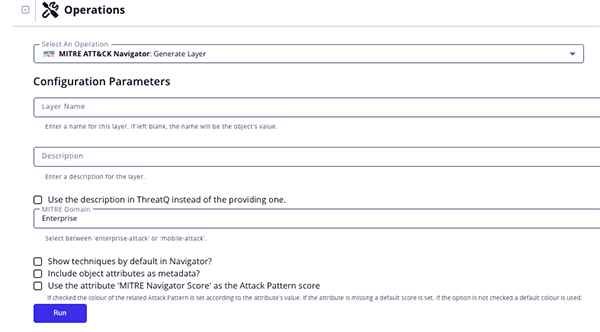
These configuration options are set after selecting the action to run against an object and are not set from the operation's configuration screen.
The following configuration options are available for this action:
| Run Option | description |
|---|---|
| Layer Name | Name for this layer. If left blank, the name will be the object's value. |
| Description | Enter a description for the layer.
A description is not needed if you have enabled the Use the description in ThreatQ instead of the providing one option. |
| Use the description in ThreatQ instead of the providing one | Enable this option to have the integration use the description in ThreatQ opposed to the one entered in the Description option. |
| MITRE Domain | Select the MITRE Domain for the layer. Options include Enterprise and Mobile. |
| Show techniques by default in Navigator | Enable this option to show techniques by default in Navigator. |
| Include object attributes as metadata | Enable this option to include object attributes as metadata. |
| Use the attribute 'MITRE Navigator Score' as the Attack Pattern score | Enable this option to use the value of the Attack Pattern's attribute MITRE Navigator Score to color the technique. |
Change Log
- Version 1.0.3
- Updated the integration to prevent crashes caused by duplicate uploads by ensuring file contents are unique and adding improved error handling.
- Added the following configuration parameters:
- Enable SSL Certificate Verification - determine if the integration should validate the host-provided SSL certificate.
- Disable Proxies - determine if the integration should honor proxies set in the ThreatQ UI.
- Version 1.0.2
- Added the Run Parameter, Use the attribute 'MITRE Navigator Score' as the Attack Pattern score, to set a score for each Attack Pattern.
- Version 1.0.1
- The operation is now compatible with Tools and Events object types.
- Version 1.0.0
- Initial release
PDF Guides
| Document | ThreatQ Version |
|---|---|
| MITRE ATT&CK Navigator Operation v1.0.3 | 4.30 or Greater |
| MITRE ATT&CK Operation v1.0.2 | 4.30 or Greater |
| MITRE ATT&CK Operation v1.0.1 | 4.30 or Greater |
| MITRE ATT&CK Operation v1.0.0 | 4.30 or Greater |