Intel 471 Hunter Operation
The web format of this guide reflects the most current release. Guides for older iterations are available in PDF format.
Integration Details
ThreatQuotient provides the following details for this integration:
| Current Integration Version | 1.0.0 |
| Compatible with ThreatQ Versions | >= 5.15.0 |
| Support Tier | ThreatQ Supported |
Introduction
The Intel 471 Hunter operation integration utilizes Intel 471 Hunt Packages to support proactive threat detection. These packages enable organizations to identify advanced threats that may bypass traditional security controls, enhancing their ability to detect and respond to emerging risks.
The operation provides the following action:
- Intel 471 Hunter - Search - enriches objects with context from Intel 471.
The operation is compatible with the following object types:
- Adversaries
- Malware
Prerequisites
The following is required to run the integration:
- An Intel 471 API Key.
- MITRE ATT&CK Attack Patterns must be ingested through a prior run of the MITRE ATT&CK CDF feeds in order for them to be available for this operation. The following feeds are responsible for ingesting MITRE ATT&CK Attack Patterns:
- MITRE Enterprise ATT&CK
- MITRE Mobile ATT&CK
- MITRE ICS-ATT&CK
Installation
Perform the following steps to install the integration:
The same steps can be used to upgrade the integration to a new version.
- Log into https://marketplace.threatq.com/.
- Locate and download the integration file.
- Navigate to the integrations management page on your ThreatQ instance.
- Click on the Add New Integration button.
- Upload the integration file using one of the following methods:
- Drag and drop the file into the dialog box
- Select Click to Browse to locate the integration file on your local machine
ThreatQ will inform you if the operation already exists on the platform and will require user confirmation before proceeding. ThreatQ will also inform you if the new version of the operation contains changes to the user configuration. The new user configurations will overwrite the existing ones for the operation and will require user confirmation before proceeding.
The operation is now installed and will be displayed in the ThreatQ UI. You will still need to configure and then enable the operation.
Configuration
ThreatQuotient does not issue API keys for third-party vendors. Contact the specific vendor to obtain API keys and other integration-related credentials.
To configure the integration:
- Navigate to your integrations management page in ThreatQ.
- Select the Operation option from the Type dropdown (optional).
- Click on the integration entry to open its details page.
- Enter following parameter under the Configuration tab:
Parameter Description API Key Enter your Intel 471 API Key.
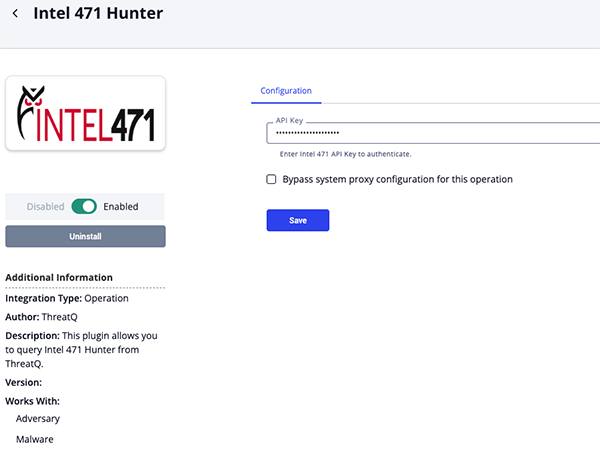
- Review any additional settings, make any changes if needed, and click on Save.
- Click on the toggle switch, located above the Additional Information section, to enable it.
Actions
The operation provides the following action:
| Action | Description | Object Type | Object Subtype |
|---|---|---|---|
| Intel 471 Hunter: Search | Enriches objects with context from Intel 471. | Adversary, Malware | N/A |
Intel 471 Hunter: Search
The Intel 471 Hunter Search operation action enriches submitted objects with context from Intel 471.
The operation action will only return the most recent 10 entries for a submitted object.
GET https://api.intel471.cloud/integrations/hunter/v1/es/query
Sample Parameters:
{
  "term": "APT15",
  "days": "7",
  "size": 10,
  "indexes": "cyborg_usecases",
  "indexes": "cyborg_collections",
  "indexes": "cyborg_threat_profiles"
}
Sample Response (truncated):
{
  "total": 3,
  "results": [
    {
      "index": "cyborg_usecases",
      "id": "e1650196-ebc1-4dee-a65e-2fcaacf5255e",
      "score": 2,
      "title": "Suspicious SOCKS Proxy Process Creation",
      "UUID": "e1650196-ebc1-4dee-a65e-2fcaacf5255e",
      "status": "Complete",
      "severity": "Medium",
      "community": false,
      "description": "This hunt package identifies processes creating a SOCKS proxy (ssh -D, plink, chisel, microsocks, python-based sockserver), or processes with socks-related arguments. SOCKS often avoids typical web filtering or inspection (it simply forwards traffic), making it a valuable tool for attackers to exfiltrate data or bypass network controls.",
      "content": {
        "tools": [
          "CrowdStrike"
        ]
      },
      "context": {
        "tooling": [],
        "threat_names": [
          "GlassWorm"
        ],
        "threat_description": "A SOCKS proxy is a network protocol that routes traffic between a client and server through an intermediary process, often used for legitimate purposes such as bypassing geographic restrictions or enhancing privacy. However, when processes like `ssh -D`, `plink`, `chisel`, `microsocks`, or custom Python-based SOCKS servers are created outside of expected administrative activity, they can indicate malicious intent. Threat actors abuse SOCKS proxies to covertly exfiltrate data, bypass network controls, and anonymize their operations, making it difficult for defenders to trace or block unauthorized communications. Recent malware campaigns, such as GlassWorm and GhostSocks, have demonstrated how attackers deploy SOCKS proxies on compromised systems to turn victim machines into relay nodes for criminal infrastructure, enabling lateral movement, persistent access, and further exploitation while evading traditional security monitoring.br>",
        "threat_categories": [
          "Technique"
        ]
      },
      "tags": {
        "tools": [],
        "campaigns": [
          "CrowdStrike | Content Update Crash | 2024"
        ],
        "platform_types": [],
        "data_sources": [],
        "goals": [],
        "dependencies": [],
        "threat_names": [
          "GlassWorm",
          "8base Ransomware",
          "Agent Tesla"
        ],
        "threat_categories": [
          "Technique"
        ],
        "threat_types": [
          "Worm"
        ],
        "attack_surfaces": [
          "client"
        ],
        "target_oses": [
          "Linux",
          "Windows"
        ],
        "actors": [
          "Scattered Spider"
        ],
        "tooling": [],
        "diamond_models": [
          "Capability"
        ],
        "kill_chains": [
          "Actions on Objectives"
        ],
        "mitre_tactic_names": [
          "Command and Control"
        ],
        "mitre_technique_names": [
          "Multi-hop Proxy",
          "Protocol Tunneling"
        ],
        "mitre_technique_ids": [
          "T1090.003",
          "T1572"
        ],
        "source_countries": [
          "China"
        ],
        "source_regions": [],
        "target_countries": [],
        "target_regions": [
          "Global"
        ],
        "target_industries": [
          "Cryptocurrency",
          "Development"
        ],
        "exploit_or_vulns": [
          "CVE-2022-41082",
          "CVE-2025-59287"
        ],
        "motivations": [],
        "severities": [],
        "operations": [
          "DeadRinger"
        ],
        "target_os_versions": []
      }
    }
  ]
}
ThreatQuotient provides the following default mapping for this action based on fields within each of the .results[].
| Feed Data Path | ThreatQ Entity | ThreatQ Object Type or Attribute Key | Published Date | Examples | Notes |
|---|---|---|---|---|---|
.content.categories[] |
Attribute |
Category |
N/A |
N/A |
N/A |
.content.tools[] |
Related Tool |
Tool |
N/A |
CrowdStrike |
N/A |
.severity |
Attribute |
Severity |
N/A |
N/A |
N/A |
.tags.attack_surfaces[] |
Attribute |
Attack Surface |
N/A |
client |
N/A |
.tags.diamond_models[] |
Attribute |
Diamond Model |
N/A |
Capability |
N/A |
.tags.kill_chains[] |
Attribute |
Kill Chain |
N/A |
Actions on Objectives |
N/A |
.tags.mitre_tactic_names[] |
Attribute |
Tactic |
N/A |
Command and Control |
N/A |
.tags.operations[] |
Attribute |
Operation |
N/A |
DeadRinger |
N/A |
.tags.source_countries[] |
Attribute |
Source Country |
N/A |
China |
N/A |
.tags.source_regions[] |
Attribute |
Source Region |
N/A |
N/A |
N/A |
.tags.target_countries[] |
Attribute |
Target Country |
N/A |
N/A |
N/A |
.tags.target_industries[] |
Attribute |
Target Industry |
N/A |
Cryptocurrency |
N/A |
.tags.target_oses[] |
Attribute |
Target OS |
N/A |
Linux |
N/A |
.tags.target_regions[] |
Attribute |
Target Region |
N/A |
Global |
N/A |
.tags.threat_categories[] |
Attribute |
Threat Category |
N/A |
Technique |
N/A |
.tags.threat_types[] |
Attribute |
Threat Type |
N/A |
Worm |
N/A |
.tags.exploit_or_vulns[] |
Related Indicator |
CVE |
N/A |
CVE-2022-41082 |
N/A |
.tags.threat_names[] |
Related Malware |
Malware |
N/A |
8base Ransomware |
The input object is not displayed. |
.tags.actors[] |
Related Adversary |
Adversary |
N/A |
Scattered Spider |
The input object is not displayed. |
.tags.campaigns[] |
Related Campaign |
Campaign |
N/A |
CrowdStrike \| Content Update Crash \| 2024 |
N/A |
.tags.mitre_technique_ids[] |
Related Attack Patterns |
Attack Pattern |
N/A |
T1572 |
If attack pattern already ingested. |
The following fields are returned as general information:
.overviewif.indexiscyborg_threat_profiles.titleif.indexiscyborg_collections.titleand.descriptionif.indexiscyborg_usecases
Run Configuration Options
These configuration options are set after selecting the action to run against an object and are not set from the operation's configuration screen.
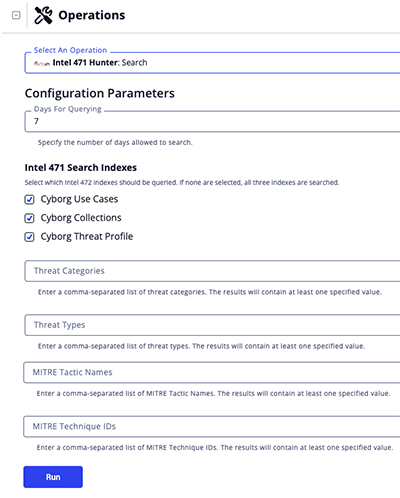
The following run options are available after selecting the operation's Search action for an object:
| Option | Description |
|---|---|
| Days For Querying: | Specify the number of days allowed to search. The default value is 7. |
| Intel 471 Search Indexes: | Select which Intel 472 indexes should be queried. Options include:
If no options are selected, all three indexes will be queried by default. |
| Threat Categories: | Enter a comma-separated list of threat categories. The results will contain at least one matching specified value. |
| Threat Types: | Enter a comma-separated list of threat types. The results will contain at least one matching specified value. |
| MITRE Tactic Names: | Enter a comma-separated list of MITRE Tactic Names. The results will contain at least one matching specified value. |
| MITRE Technique IDs: | Enter a comma-separated list of MITRE Technique IDs. The results will contain at least one matching specified value. |
Change Log
- Version 2.0.0
- Updated the integration to use the new Intel 471 Hunter API.
- Version 1.0.0
- Initial release
PDF Guides
| Document | ThreatQ Version |
|---|---|
| Intel 471 Hunter Operation Guide v2.0.0 | 5.15.0 or Greater |
| Intel 471 Hunter Operation Guide v1.0.0 | 5.15.0 or Greater |