Infoblox Dossier Operation
The web format of this guide reflects the most current release. Guides for older iterations are available in PDF format.
Integration Details
ThreatQuotient provides the following details for this integration:
| Current Integration Version | 1.1.1 |
| Compatible with ThreatQ Versions | >= 5.15.0 |
| Support Tier | ThreatQ Supported |
Introduction
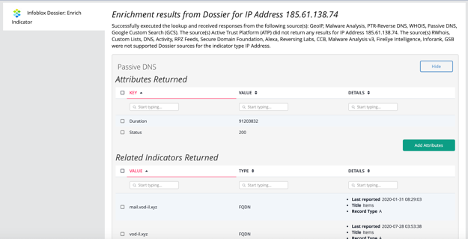
The Infoblox Dossier Operation enables a ThreatQ user to query Infoblox Dossier for enrichment metadata.
The operation provides the following action:
- Enrich Indicator - fetches enrichment information from user-selected Infoblox Dossier sources.
The operation is compatible with the following indicator types:
- Email Address
- FQDN
- IP Address
- MD5
- SHA-1
- SHA-256
- URL
Installation
Perform the following steps to install the integration:
The same steps can be used to upgrade the integration to a new version.
- Log into https://marketplace.threatq.com/.
- Locate and download the integration file.
- Navigate to the integrations management page on your ThreatQ instance.
- Click on the Add New Integration button.
- Upload the integration file using one of the following methods:
- Drag and drop the file into the dialog box
- Select Click to Browse to locate the integration file on your local machine
ThreatQ will inform you if the operation already exists on the platform and will require user confirmation before proceeding. ThreatQ will also inform you if the new version of the operation contains changes to the user configuration. The new user configurations will overwrite the existing ones for the operation and will require user confirmation before proceeding.
The operation is now installed and will be displayed in the ThreatQ UI. You will still need to configure and then enable the operation.
Configuration
ThreatQuotient does not issue API keys for third-party vendors. Contact the specific vendor to obtain API keys and other integration-related credentials.
To configure the integration:
- Navigate to your integrations management page in ThreatQ.
- Select the Operation option from the Type dropdown (optional).
- Click on the integration entry to open its details page.
- Enter the following parameters under the Configuration tab:
Parameter Description Hostname The Hostname or IP address of Infoblox Dossier. Port The communication port (default is 443). API Key Your API key for connecting to Infoblox Dossier. Verify SSL Check this box to verify SSL when connecting to the Infoblox Dossier instance. - Review any additional settings, make any changes if needed, and click on Save.
- Click on the toggle switch, located above the Additional Information section, to enable it.
Actions
The operation provides the following actions:
| Action | Description | Object Type | Object Subtype |
|---|---|---|---|
| Enrich Indicator | Enriches indicators with research from Infoblox Dossier. | Indicator | IP Addresses, Emails, FQDNs, URLs, and MD5, SHA-1, SHA-256 |
Enrich Indicator
The Enrich Indicator action enriches indicators (IP Addresses, Emails, FQDNs, URLs, and MD5, SHA-1, and SHA-256 hashes) with research from Infoblox Dossier.
Run Configuration Options
The following configuration option is set after selecting the action to run against an object and are not set from the operation's configuration screen.
The following configuration option is available for this action:
| Run Option | Description | ||
|---|---|---|---|
| Select source(s) for the enrichment to overwrite the default selection | Select one or more sources to override the default enrichment source selection. By default, the enrichment operation retrieves data from all Dossier sources applicable to the indicator; however, this option allows you to restrict enrichment to specific selected sources only. Options include:
|
Change Log
- Version 1.1.1
- Resolved an authentication issue affecting the operation when running ThreatQ v6.18.0+.
- Version 1.1.0
- Added support for new enrichment sources and removed deprecated sources.
- Resolved an issue that caused errors when the WHOIS source was selected.
- Fixed an issue causing user fields to be improperly masked.
- Updated the Enrich Indicator action to visually indicate when an enrichment source returns no results.
- Updated the Port configuration parameter to default to
443. - Updated minimum ThreatQ version to 5.15.0.
- Version 1.0.1
- Updated Dossier URI - https://csp.infoblox.com/tide/
- Accounted for empty responses from Activity, CCB, Custom Lists, zvelo
- Parsed data from RPZ Feeds, Custom Lists, DNS
- Added functionality for sources zvelo and whitelist
- Version 1.0.0
- Initial Release
PDF Guides
| Document | ThreatQ Version |
|---|---|
| Infoblox Dossier Operation Guide v1.1.1 | 5.15.0 or Greater |
| Infoblox Dossier Operation Guide v1.1.0 | 5.15.0 or Greater |
| Infoblox Dossier Operation Guide v1.0.1 | 4.30.0 or Greater |
| Infoblox Dossier Operation Guide v1.0.0 | 4.30.0 or Greater |