Dataminr Pulse Operation
The web format of this guide reflects the most current release. Guides for older iterations are available in PDF format.
Integration Details
ThreatQuotient provides the following details for this integration:
| Current Integration Version | 1.0.0 |
| Compatible with ThreatQ Versions | >= 5.12.0 |
| Support Tier | ThreatQ Supported |
Introduction
The Dataminr Pulse Operation processes GenAI-enabled alerts ingested through the Dataminr Pulse CDF’s Real-time Pulse Alerts feed, enriching them with Dataminr’s AI-generated context. This context includes Live Briefs and Intel Agent entities such as Vulnerabilities, Malware, Adversaries, and related Attack Patterns.
The operation provides the following action:
- Get Dataminr GenAI - enriches Alerts with Dataminr AI-generated context.
The operation is compatible with Event (Alert) objects.
Prerequisites
The integration requires the following:
- A Dataminr Client ID.
- A DataMinr Client Secret.
- Alerts ingested as events from the Dataminr Pulse CDF.
Installation
Perform the following steps to install the integration:
The same steps can be used to upgrade the integration to a new version.
- Log into https://marketplace.threatq.com/.
- Locate and download the integration file.
- Navigate to the integrations management page on your ThreatQ instance.
- Click on the Add New Integration button.
- Upload the integration file using one of the following methods:
- Drag and drop the file into the dialog box
- Select Click to Browse to locate the integration file on your local machine
ThreatQ will inform you if the operation already exists on the platform and will require user confirmation before proceeding. ThreatQ will also inform you if the new version of the operation contains changes to the user configuration. The new user configurations will overwrite the existing ones for the operation and will require user confirmation before proceeding.
The operation is now installed and will be displayed in the ThreatQ UI. You will still need to configure and then enable the operation.
Configuration
ThreatQuotient does not issue API keys for third-party vendors. Contact the specific vendor to obtain API keys and other integration-related credentials.
To configure the integration:
- Navigate to your integrations management page in ThreatQ.
- Select the Operation option from the Type dropdown (optional).
- Click on the integration entry to open its details page.
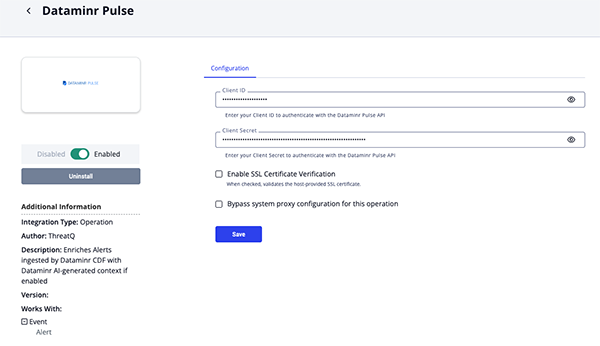
- Enter the following parameters under the Configuration tab:
Parameter Description Client ID Enter your Client ID to authenticate with the Dataminr Pulse API. Client Secret Enter your Client Secret to authenticate with the Dataminr Pulse API. Enable SSL Certificate Verification Enable this parameter if the operation should validate the host-provided SSL certificate.
- Review any additional settings, make any changes if needed, and click on Save.
- Click on the toggle switch, located above the Additional Information section, to enable it.
Actions
The operation provides the following action:
| Action | Description | Object Type | Object Subtype |
|---|---|---|---|
| Get Dataminr GenAI | Enriches Alerts with Dataminr AI-generated context | Events | Alert |
Get Dataminr GenAI
The Get Dataminr GenAI operation action parses a GenAI-enabled alert ingested by the Dataminr CDF, incorporating Dataminr’s AI-generated contextual information.
The alert_id used in the request is the Alert ID attribute ingested by Dataminr CDF when the Alert has GenAI enabled.
GET https://api.dataminr.com/pulse/v1/alerts/{alert_id}
Sample Response:
{
    "metadata": {
        "cyber": {
            "threatActors": [
                {
                    "name": "APT Iran"
                }
            ],
            "vulnerabilities": [
                {
                    "id": "CVE-2025-64095",
                    "products": [
                        {
                            "productVersion": "10.1.1",
                            "productVendor": "dnnsoftware",
                            "productName": "Dnn.Platform"
                        }
                    ],
                    "cvss": 10.0
                }
            ]
        }
    },
    "linkedAlerts": [
        {
            "count": 1,
            "parentAlertId": "12626486461170500867-1762460407000-1"
        }
    ],
    "headline": "Proof of concept exploit code reportedly published for critical severity unauthenticated file upload and overwrite vulnerability CVE-2025-64095 in DotNetNuke software by APT Iran hacking group: Local Source via GitHub.",
    "publicPost": {
        "timestamp": "2025-11-07T06:12:18.380Z",
        "href": "https://r.dataminr.com/3ZkQ5MvN491805464490091",
        "channels": [
            "blog"
        ]
    },
    "liveBrief": [
        {
            "timestamp": "2025-11-07T06:17:04.676399Z",
            "version": "current",
            "summary": "The APT Iran hacking group has reportedly published proof of concept exploit code for the critical severity unauthenticated file upload and overwrite vulnerability CVE-2025-64095 in DotNetNuke software."
        }
    ],
    "intelAgents": [
        {
            "timestamp": "2025-11-07T06:17:38.026Z",
            "version": "current",
            "summary": [
                {
                    "type": [
                        "CYBER"
                    ],
                    "title": "Vulnerability Background",
                    "content": [
                        "A critical vulnerability in the DNN (formerly DotNetNuke) web content management platform, specifically versions prior to 10.1.1, has been identified as remotely exploitable with a CVSS score of 10.0. This vulnerability can lead to site defacement and XSS attacks."
                    ]
                }
            ],
            "discoveredEntities": [
                {
                    "name": "CVE-2025-64095",
                    "type": "vulnerability",
                    "summary": "DNN (formerly DotNetNuke) is an open-source web content management platform (CMS) in the Microsoft ecosystem. Prior to 10.1.1, the default HTML editor provider allows unauthenticated file uploads and images can overwrite existing files. An unauthenticated user can upload and replace existing files allowing defacing a website and combined with other issue, injection XSS payloads. This vulnerability is fixed in 10.1.1.",
                    "publishedDate": "2025-10-28T22:15:38Z",
                    "products": [
                        {
                            "productVendor": "dnnsoftware",
                            "productName": "dotnetnuke"
                        }
                    ],
                    "epssScore": 12.5,
                    "cvss": 10.0
                },
                {
                    "name": "APT Iran",
                    "type": "threatActor",
                    "summary": "APT Iran is a pro-Iranian hacktivist group that has claimed attacks against targets in the US and Israel. The group’s campaigns have included purported attempts to disrupt fuel distribution systems. According to the APT Iran Telegram account, the group has exploited RDP access to deploy LockBit Black ransomware in attacks. They also allegedly compromised Israel’s Ministry of Health by exploiting an F5 BIG-IP vulnerability.",
                    "countryOfOrigin": "IR"
                }
            ]
        }
    ],
    "dataminrAlertUrl": "https://app.dataminr.com/#alertDetail/5/79541428296260907581762495938380-1762495938380-1",
    "alertTimestamp": "2025-11-07T06:17:01.833Z",
    "alertReferenceTerms": [
        {
            "text": "cyber exploits"
        }
    ],
    "alertId": "79541428296260907581762495938380-1762495938380-1"
}
ThreatQuotient provides the following default mapping for this action:
| Feed Data Path | ThreatQ Entity | ThreatQ Object Type or Attribute Key | Published Date | Examples | Notes |
|---|---|---|---|---|---|
.liveBrief.summary |
Alert Description | N/A | N/A | The APT Iran hacking group... |
User-Configurable. |
.intelAgents.summary.title+.intelAgents.summary.content |
Alert Description | N/A | N/A | Vulnerability Background \n A critical vulnerability in the DNN ... |
User-Configurable. |
.intelAgents.discoveredEntities.name |
Related Vulnerability/ Indicator | Vulnerability/CVE | N/A | CVE-2025-64095 |
User-Configurable.If .intelAgents.discoveredEntities.type is vulnerability |
.intelAgents.discoveredEntities.name |
Related Adversary | Adversary | N/A | APT Iran |
User-Configurable.If .intelAgents.discoveredEntities.type is threatActor |
.intelAgents.discoveredEntities.name |
Related Malware | Malware | N/A | N/A | User-Configurable.If .intelAgents.discoveredEntities.type is malware |
.intelAgents.discoveredEntities.summary |
Related Vulnerability/ Indicator Description | N/A | N/A | DNN (formerly DotNetNuke) is an... |
User-Configurable.If .intelAgents.discoveredEntities.type is vulnerability |
.intelAgents.discoveredEntities.products.productVendor[] |
Related Vulnerability/ Indicator Attribute | Vendor Name | N/A | dnnsoftware |
User-Configurable.If .intelAgents.discoveredEntities.type is vulnerability |
.intelAgents.discoveredEntities.products.productName[] |
Related Vulnerability/ Indicator Attribute | Product Name | N/A | dotnetnuke |
User-Configurable.If .intelAgents.discoveredEntities.type is vulnerability |
.intelAgents.discoveredEntities.epssScore |
Related Vulnerability/ Indicator Attribute | EPSS Score | N/A | 12.5 |
User-Configurable.If .intelAgents.discoveredEntities.type is vulnerability |
.intelAgents.discoveredEntities.cvss |
Related Vulnerability/ Indicator Attribute | CVSS Score | N/A | 10.0 |
User-Configurable.If .intelAgents.discoveredEntities.type is vulnerability |
.intelAgents.discoveredEntities.aliases[] |
Related Adversary Attribute | Alias | N/A | N/A | User-Configurable.If .intelAgents.discoveredEntities.type is threatActor |
.intelAgents.discoveredEntities.affectedOperatingSystems[] |
Related Malware Attribute | Affected Operating System | N/A | N/A | User-Configurable.If .intelAgents.discoveredEntities.type is malware |
.intelAgents.discoveredEntities.ttps[] |
Related Attack Patterns | Attack Pattern | N/A | N/A | User-Configurable. Related to the Alert related object(Vulnerability/Indicator, Adversary, Malware), based on .intelAgents.discoveredEntities.type. |
Run Parameters
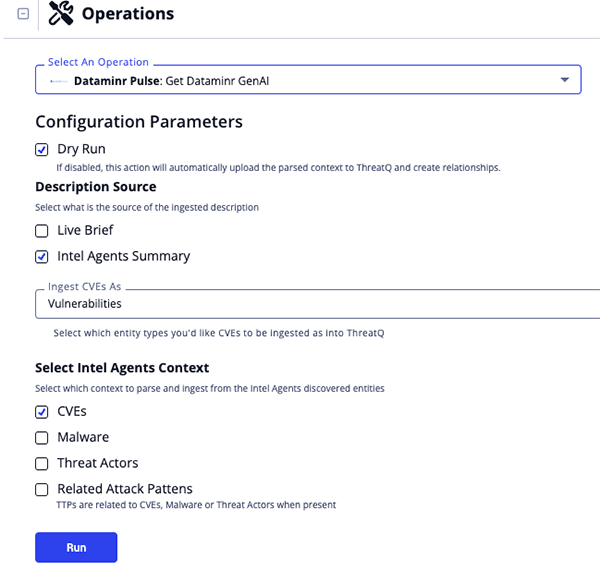
The following run parameters are available after selecting the operation's Get Dataminr GenAI action for an object:
| Parameter | Details |
|---|---|
| Dry Run | Disabling this run parameter for the action will result in it automatically uploading the parsed context to ThreatQ and creating relationships. This run parameter is enable by default. |
| Description source | Select what is the source of the ingested description. Options include:
|
| Ingest CVEs as | Select how to ingest CVEs into ThreatQ. Options include:
|
| Select Intel Agents Context | Select which context to parse and ingest from the Intel Agents discovered entities. Options include:
|
Known Issues / Limitations
- The operation uses
GenAIandAlert IDattributes which are ingested by the Dataminr Pulse CDF's Dataminr Real-time Pulse Alerts feed. If the alert does not include a GenAI attribute set toTrue, it indicates that GenAI is not enabled for that alert. - The operation must be run with the Dry Run run parameter disabled in order to ingest parsed context. This is due to a ThreatQ platform limitation.
Disabling the Dry Run run parameter will result in the automatic ingestion of all data that was parsed.
Change Log
- Version 1.0.0
- Initial release
PDF Guides
| Document | ThreatQ Version |
|---|---|
| Dataminr Pulse Operation Guide v1.0.0 | 5.12.0 or Greater |