iZoologic Sync Cases CDF
The web format of this guide reflects the most current release. Guides for older iterations are available in PDF format.
Integration Details
ThreatQuotient provides the following details for this integration:
| Current Integration Version | 1.1.0 |
| Compatible with ThreatQ Versions | >= 5.29.0 |
| Support Tier | ThreatQ Supported |
Introduction
The iZoologic Sync Cases CDF enables the ingestion and ongoing synchronization of Incident and DLR case data from iZoologic, ensuring both new and updated cases are accurately reflected. The integration collects core case information along with related details, communications, and supporting files to provide comprehensive visibility into case activity and associated entities.
The integration provides the following feeds:
- iZoologic Incident Case Sync - parses of Incident cases from iZoologic and ingests them as either events or incidents.
- Get Incident Case Details - request to get information for individual cases and return the data to the Incident Case Sync primary feed.
- Get Case Communications - request to get the communications for individual cases and returns the data to the Incident Case Sync primary feed.
- Get Case Files - request to get files from individual cases and fulfill placeholder attachments for objects created by the Incident Case Sync primary feed.
- File Request - requests the actual file data and returns it to the Get Case Files fulfillment feed.
- iZoologic DLR Case Sync - This feed parses DLR cases from iZoologic and ingests them as either compromised accounts or Identities.
- Get DLR Incident Case Details - request to get information for individual DLR cases and return the data to the DLR Case Sync primary feed.
The integration ingests the following object types:
- Compromised Accounts (custom object)
- Events
- Event Attributes
- Identities
- Identity Attributes
- Incidents
- Incident Attributes
- Notes
- Note Attributes
Prerequisites
The integration requires the following:
- A iZoologic API Key and Secret Key - these values can be obtained by clicking the account icon in iZoologic and selecting Profile > API Key.
- The compromised account custom object installed on the ThreatQ instance. This object must be installed prior to installing the integration.
Compromised Account Custom Object
The integration requires the compromised account custom object.
Use the steps provided to install the custom object.
When installing the custom objects, be aware that any in-progress feed runs will be cancelled, and the API will be in maintenance mode.
- Download the integration bundle from the ThreatQ Marketplace.
- Unzip the bundle and locate the custom object files.
The custom object files will typically consist of a JSON definition file, install.sh script, and a images folder containing the svg icons.
- SSH into your ThreatQ instance.
- Set your install pathway environment variable. This command will retrieve the install pathway from your configuration file and set it as variable for use during this installation process.
INSTALL_CONF="/etc/threatq/platform/install.conf"
if [ -f "$INSTALL_CONF" ]; then source "$INSTALL_CONF"
fi
MISC_DIR="${INSTALL_BASE_PATH:-/var/lib/threatq}/misc" - Navigate to the tmp folder using the environment variable:
cd $MISC_DIR
- Upload the custom object files, including the images folder.
The directory structure should resemble the following:
- install.sh
- <custom_object_name>.json
- images (directory)
- <custom_object_name>.svg
- Run the following command:
kubectl exec -it deployment/api-schedule-run -n threatq -- sh /var/lib/threatq/misc/install.sh /var/lib/threatq/misc
The installation script will automatically put the application into maintenance mode, move the files to their required directories, install the custom object, update permissions, bring the application out of maintenance mode, and restart dynamo.
- Delete the install.sh, definition json file, and images directory from step 6 after the object has been installed as these files are no longer needed.
- Download the integration zip file from the ThreatQ Marketplace and unzip its contents.
- SSH into your ThreatQ instance.
- Navigate to tmp directory:
cd /tmp/
- Create a new directory:
mkdir izoologic
- Upload the account.json and install.sh script into this new directory.
- Create a new directory called images within the izoologic_cdf directory.
mkdir images
- Upload the account.svg.
- Navigate to the /tmp/izoologic_cdf.
The directory should resemble the following:
- tmp
- izoologic_cdf
- account.json
- install.sh
- images
- account.svg
- izoologic_cdf
- tmp
- Run the following command to ensure that you have the proper permissions to install the custom object:
chmod +x install.sh
- Run the following command:
sudo ./install.sh
You must be in the directory level that houses the install.sh and json files when running this command.
The installation script will automatically put the application into maintenance mode, move the files to their required directories, install the custom object, update permissions, bring the application out of maintenance mode, and restart dynamo.
- Remove the temporary directory, after the custom object has been installed, as the files are no longer needed:
rm -rf izoolgic_cdf
Installation
The integration requires that the Compromised Account custom object be installed on your ThreatQ instance prior to installing the CDF. Failure to install the custom object will result in the CDF installation process failing.
Perform the following steps to install the integration:
The same steps can be used to upgrade the integration to a new version.
- Log into https://marketplace.threatq.com/.
- Locate and download the integration zip file.
- Extract and install the required custom objects if you have not done so already.
- Navigate to the integrations management page on your ThreatQ instance.
- Click on the Add New Integration button.
- Upload the integration yaml file using one of the following methods:
- Drag and drop the file into the dialog box
- Select Click to Browse to locate the file on your local machine
- Select the individual feeds to install, when prompted and click Install.
ThreatQ will inform you if the feed already exists on the platform and will require user confirmation before proceeding. ThreatQ will also inform you if the new version of the feed contains changes to the user configuration. The new user configurations will overwrite the existing ones for the feed and will require user confirmation before proceeding.
The feed(s) will be added to the integrations page. You will still need to configure and then enable the feed.
Configuration
ThreatQuotient does not issue API keys for third-party vendors. Contact the specific vendor to obtain API keys and other integration-related credentials.
To configure the integration:
- Navigate to your integrations management page in ThreatQ.
- Select the Commercial option from the Category dropdown (optional).
If you are installing the integration for the first time, it will be located under the Disabled tab.
- Click on the integration entry to open its details page.
- Enter the following parameters under the Configuration tab:
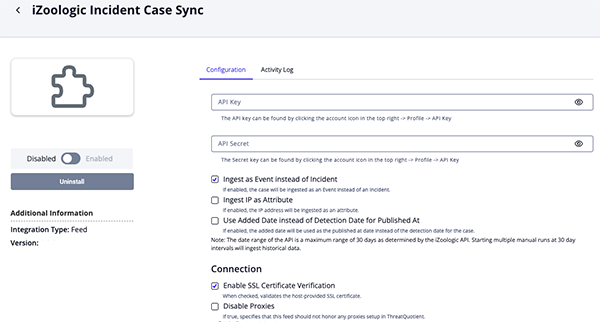
Incident Case Sync Parameters
Parameter Description API Key Enter your iZoologic API Key. Secret Key Enter your iZoologic Secret Key. Ingest as Event Instead of Incident Enable this parameter to ingests cases as events. Otherwise, cases will be ingested as incident objects. Ingest IP as Attribute Enable this parameter to ingest ip addresses as attributes. Added Date vs Detection Date Enable this parameter to have the added dateused as thepublished atdate. Otherwise, thedetection datewill be used.Enable SSL Certificate Verification Enable this parameter if the feed should validate the host-provided SSL certificate. Disable Proxies Enable this parameter if the feed should not honor proxies set in the ThreatQ UI.
DLR Case Sync Parameters
Parameter Description API Key Enter your iZoologic API Key. Secret Key Enter your iZoologic Secret Key. Ingest as Identity Instead of Compromised Account Enable this parameter to ingests cases as identities. Otherwise, cases will be ingested as compromised account objects. Ingest Description as Attribute Enable this parameter to ingest descriptions as attributes. Use iZoologic Posted Date Enable this parameter to use the iZoologic posted datefor thepublished datefor a case.Enable SSL Certificate Verification Enable this parameter if the feed should validate the host-provided SSL certificate. Disable Proxies Enable this parameter if the feed should not honor proxies set in the ThreatQ UI. 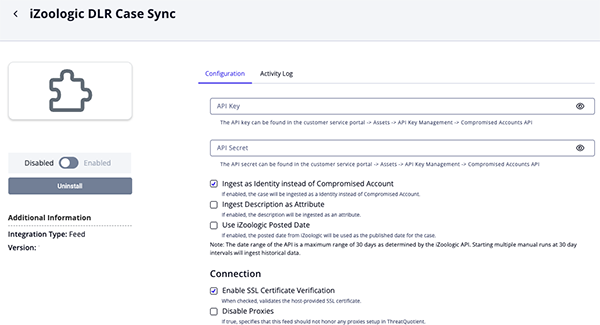
- Review any additional settings, make any changes if needed, and click on Save.
- Click on the toggle switch, located above the Additional Information section, to enable it.
ThreatQ Mapping
iZoologic Incident Case Sync
The iZoologic Incident Case Sync feed requests a list of cases that have been updated since the last time the feed was run or from the date/time chosen in a manual run. The range is 30 days max. It then iterates over the list and requests case details, communications, and files. Uses the field lastsynctime in epoch format in the body of the request
POST {host_address}/api/ThreatManagement/CaseSync
Sample Response:
{
  "result": [
    {
      "caseId": "CASE123456",
      "updatedDate": "1672617600"
    },
    {
      "caseId": "CASE123457",
      "updatedDate": "1672704000"
    },
    {
      "caseId": "CASE123458",
      "updatedDate": "1672790400"
    }
  ],
  "success": true,
  "message": null,
  "errorCode": null
}
Get Incident Case Details (Supplemental)
The Get Incidents Case Detail supplemental feed utilizes the caseId from the Case Sync primary feed to get details of the individual cases.
GET {host_address}/api/ThreatManagement/CaseDetail
Sample Response:
{
  "result": {
    "url": "https://suspicious-site.com",
    "caseType": 6,
    "caseDescription": "Incident",
    "statusCode": 1,
    "statusDescription": "Open",
    "brand": "Example Brand",
    "incidentType": "Phishing",
    "threatType": "Brand Abuse",
    "description": "Phishing site impersonating brand",
    "impact": "High risk to brand reputation",
    "recommendation": "Immediate takedown required",
    "addedDate": "1672531200",
    "detectionDate": "1672531200",
    "clientRef": "REF123",
    "ipAddress": "192.168.1.100",
    "webhost": "HostingProvider Inc",
    "webhostCountry": "United States",
    "registrarName": "GoDaddy",
    "nameServer": "ns1.example.com",
    "mxRecord": "mail.example.com",
    "detectedBy": 1,
    "upTime": "2 days, 3 hours, 45 minutes",
    "progressStage": "Investigation",
    "executiveName": null,
    "mobileAppName": null,
    "mobileAppVersion": null,
    "mobileAppStatus": null,
    "mobileAppSignature": null,
    "incidentStatusLogs": [
      {
        "incidentStatus": 1,
        "incidentStatusDescription": "Open",
        "remark": "Case opened for investigation",
        "updatedOn": "1672531200",
        "updatedBy": "iZoologic"
      }
    ],
    "caseFiles": [
      {
        "dateUploaded": "1672531200",
        "originalFilename": "evidence.pdf",
        "fileToken": "U2FsdGVkX19nK8s2mE+7a6bW...encrypted_token",
        "isCaseScreenshot": false
      }
    ]
  },
  "success": true,
  "message": null,
  "errorCode": null
}
ThreatQuotient provides the following default mapping for the main and supplemental feed:
| Feed Data Path | ThreatQ Entity | ThreatQ Object Type or Attribute Key | Published Date | Examples | Notes |
|---|---|---|---|---|---|
data.caseId |
Event.Title |
Event |
data.feed_results.addedDate |
CASE123456 |
If chosen to ingest as an Event in the feed config |
data.caseId |
Incident.Value |
Incident |
data.feed_results.addedDate |
CASE123456 |
If chosen to ingest as an Incident in the feed config |
data.feed_results.url |
Event/Incident.Attribute |
URL |
N/A |
https[:]//suspicious-site[.]com |
Updatable |
data.feed_results.description |
Event/Incident.Description |
N/A |
N/A |
Phishing site impersonating brand |
User-configurable. If chosen to ingest as object description instead of attribute in the feed config |
data.feed_results.description |
Event/Incident.Attribute |
Description |
N/A |
Phishing site impersonating brand |
User-configurable. If chosen to ingest as attribute in the feed config |
data.caseId |
Event/Incident.Attribute |
Case ID |
N/A |
CASE123456 |
N/A |
data.feed_results.brand |
Event/Incident.Attribute |
Brand |
N/A |
Example Brand |
N/A |
data.feed_results.clientRef |
Event/Incident.Attribute |
Client Ref |
N/A |
REF123 |
N/A |
data.feed_results.caseDescription |
Event/Incident.Attribute |
Case Type |
N/A |
Incident |
N/A |
data.feed_results.statusDescription |
Event/Incident.Attribute |
Status |
N/A |
Open |
Updatable |
data.feed_results.incidentType |
Event/Incident.Attribute |
Incident Type |
N/A |
Phishing |
N/A |
data.feed_results.subIncidentType |
Event/Incident.Attribute |
SubIncident Type |
N/A |
N/A |
N/A |
data.feed_results.threatType |
Event/Incident.Attribute |
Threat Type |
N/A |
Brand Abuse |
N/A |
data.feed_results.impact |
Event/Incident.Attribute |
Impact |
N/A |
High risk to brand reputation |
N/A |
data.feed_results.recommendation |
Event/Incident.Attribute |
Recommendation |
N/A |
Immediate takedown required |
N/A |
data.feed_results.mxRecord |
Event/Incident.Attribute |
MX Record |
N/A |
mail.example.com |
N/A |
data.feed_results.detectedBy |
Event/Incident.Attribute |
Detected By |
N/A |
Client |
Detection source (1=iZoo, 2=Client) |
data.feed_results.upTime |
Event/Incident.Attribute |
Up Time |
N/A |
2 days, 3 hours, 45 minutes |
N/A |
data.feed_results.progressStage |
Event/Incident.Attribute |
Progress Stage |
N/A |
Investigation |
N/A |
data.feed_results.executiveName |
Event/Incident.Attribute |
Executive Name |
N/A |
N/A |
N/A |
data.feed_results.mobileAppName |
Event/Incident.Attribute |
Mobile App Name |
N/A |
N/A |
N/A |
data.feed_results.mobileAppVersion |
Event/Incident.Attribute |
Mobile App Version |
N/A |
N/A |
N/A |
data.feed_results.mobileAppStatus |
Event/Incident.Attribute |
Mobile App Status |
N/A |
N/A |
N/A |
data.feed_results.mobileAppSignature |
Event/Incident.Attribute |
Mobile App Signature |
N/A |
N/A |
N/A |
data.feed_results.ipAddress |
Indicator.Value |
IP Address |
data.feed_results.addedDate |
192.168.1.100 |
User-configurable. If chosen to ingest IP as an Indicator Object in the feed config |
data.feed_results.ipAddress |
Event/Incident.Attribute |
IP Address |
N/A |
192.168.1.100 |
User-configurable. If chosen to ingest IP as an Attribute in the feed config |
data.feed_results.webhost |
Event/Incident.Attribute |
Web Host |
N/A |
HostingProvider Inc |
Is attributed to the IP Address Indicator if chosen in the feed config, otherwise attributed to the Event/Incident |
data.feed_results.webhostCountry |
Event/Incident.Attribute |
Web Host Country |
N/A |
United States |
Is attributed to the IP Address Indicator if chosen in the feed config, otherwise attributed to the Event/Incident |
data.feed_results.registrarName |
Event/Incident.Attribute |
Registrar Name |
N/A |
GoDaddy |
Is attributed to the IP Address Indicator if chosen in the feed config, otherwise attributed to the Event/Incident |
data.feed_results.nameServer |
Event/Incident.Attribute |
Name Server |
N/A |
ns1.example.com |
Is attributed to the IP Address Indicator if chosen in the feed config, otherwise attributed to the Event/Incident |
Get Case Communications (Supplemental)
The Get Case Communications supplemental feed utilizes the trackingId from the Case Sync primary feed to get details of the individual cases.
GET {host_address}/ThreatManagement/FetchCaseCommunications?fromdate=1753799715&todate=1755095715&caseid=gz3kEgBWO
Sample Response:
{
  "result": [
    {
      "caseID": "gz3kEgBWO",
      "brand": "ThreatQ",
      "createdOn": "1754599674",
      "subject": "New file uploaded for the CASE ID - gz3kEgBWO",
      "message": "Dear iZOOlabs, File name - test_file.txt Please find more details here on iZOOlabs > Incident/Monitoring > Uploads\r\n",
      "postedBy": "user@email.com"
    },
    {
      "caseID": "gz3kEgBWO",
      "brand": "ThreatQ",
      "createdOn": "1754490523",
      "subject": "Incident Acknowledgement - ",
      "message": "Incident Acknowledgement DearDemo, This is acknowledged that the following information has been received. Client Reference: Brand Targeted: ThreatQ Incident Type: Phishing URL: http://test.com Comment:This is a comment. iZOOlabs are currently reviewing this information and an incident will be logged shortly. You will be able to track this incident in iZOOlabs Incident Management portal in a few minutes. Feel free to contact us if you require any assistance. Thank you.",
      "postedBy": "user@email.com"
    }
  ],
  "success": true,
  "message": "",
  "errorCode": ""
}
ThreatQuotient provides the following default mapping for this supplemental feed:
| Feed Data Path | ThreatQ Entity | ThreatQ Object Type or Attribute Key | Published Date | Examples | Notes |
|---|---|---|---|---|---|
value.createdOn |
Title or Value |
Event or Note |
value.createdOn |
2025-08-06 00:00:00 - Incident Acknowledgement - |
Used with "subject" as the title/value. Incident Case Sync ingests these as Notes, DLR Case Sync ingests these as Events |
value.subject |
Title or Value |
Event or Note |
value.createdOn |
2025-08-06 00:00:00 - Incident Acknowledgement - |
Used with "createdOn" as the title/value. Incident Case Sync ingests these as Notes, DLR Case Sync ingests these as Events |
value.message |
Description |
_See example response_ |
N/A | ||
value.brand |
Attribute |
Brand |
ThreatQ |
N/A | |
value.postedBy |
Attribute |
Posted By |
user@email.com |
N/A |
Get Case Files (Fulfillment)
The Get Case Files fulfillment feed is used to fetch files for each Incident Case in iZoologic and upload them to ThreatQ using the File Request supplemental feed.
File Request (Supplemental)
The File Request supplemental feed retrieves file data from iZoologic to upload into ThreatQ using a file token that was returned with the case details.
POST {host_address}/ThreatManagement/DownloadCaseFile
Sample Response for Test File:
test fileiZoologic DLR Case Sync
The iZoologic DLR Case Sync feed retrieves cases that have been updated since the previous execution or from a user-specified date and time during a manual run, with a maximum lookback period of 30 days. It processes each case to collect detailed case information, related communications, and associated files, using the lastsynctime field in epoch format within the request body to determine the update window.
POST {host_address}/api/ThreatManagement/DLRSyncedCases
Sample Response:
{
  "result": [
    {
      "caseId": "DLR#n9Ra7KbR3",
      "modifiedDate": "1755168791"
    }
  ],
  "success": true,
  "message": "",
  "errorCode": ""
}
Get DLR Incident Case Details (Supplemental)
The Get DLR Incident Case Details supplemental feed utilizes the trackingId from the Case Sync primary feed to get details of the individual cases.
GET {host_address}/api/ThreatManagement/DLRDetail
Sample Response 1:
{
  "result": {
    "caseId": "DLR#n9Ra7KbR3",
    "trackingID": "n9Ra7KbR3",
    "brand": "ThreatQ",
    "brandCode": "jnWkxsedbn",
    "fileOrBreachName": "Test",
    "incidentType": "Login Credentials / Bank Account",
    "severity": "Substantial Threat",
    "threatActorName": null,
    "threatActorType": null,
    "threatActorActivities": null,
    "threatActorDetail": null,
    "dataType": "Combo",
    "subType": "Chat Platforms",
    "seller": null,
    "status": "Recovered",
    "originalUrl": "",
    "addedDate": "1755168791",
    "estimatedCost": null,
    "estimatedCrytocurrencyTransactionRate": null,
    "affectedProperty": "Test",
    "affectedPropertyBase": null,
    "affectedPropertyBaseDate": null,
    "affectedPropertyBINNumber": null,
    "description": "This is only a sample DLR case.",
    "impact": "Compromised Accounts details are available in the cybercrime ecosystem and are available for sale.",
    "recommendation": "Compromised Account details have been recovered from the Dark Web are a compromised. The business should immediately mitigate this account by blocking / suspending this account depending on corporate policy.",
    "detectedOn": "Telegram",
    "totalRecords": 1,
    "totalCorporateAccounts": 0,
    "totalPublicAccounts": 1,
    "totalExecutiveAccounts": 0,
    "dataLossRecoveryDetail": [
      {
        "cardType": null,
        "cardLevel": null,
        "cardNumber": null,
        "cardExpiry": null,
        "cvv": null,
        "cardDetail": null,
        "cardClassification": null,
        "track1": null,
        "track2": null,
        "dob": null,
        "ssn": null,
        "country": null,
        "state": null,
        "city": null,
        "zip": null,
        "firstName": null,
        "application": "Application_Test",
        "websiteOrServer": "_Test",
        "userName": "Username_Test",
        "email": "Email_Test",
        "corporateOrPublicAccount": "Public",
        "isExecutiveAccount": false,
        "password": "Password_Test",
        "phone": null,
        "address": null,
        "ipAddress": null,
        "userAgent": null,
        "recoveredProperty": "Test",
        "postedDate": "1754956800",
        "recoveryRemark": null
      }
    ]
  },
  "success": true,
  "message": "",
  "errorCode": ""
}
Sample Response 2:
{
  "result": {
    "caseId": "DLR123456",
    "trackingID": "TRK789012",
    "brand": "Example Brand",
    "brandCode": "BRAND001",
    "fileOrBreachName": "Dark Web Forum",
    "incidentType": "Data Breach",
    "severity": "Financial Data Exposure",
    "threatActorName": "CyberCriminal Group",
    "threatActorType": "Hacktivist",
    "threatActorActivities": "Defacement, Hacking",
    "threatActorDetail": "A decentralized international hacktivist group, known for various cyber-attacks, targeting government entities perceived as unjust or corrupt.",
    "dataType": "Combo",
    "SubType": "Sub Incident Type",
    "Seller": "Beller",
    "status": "Active",
    "addedDate": "2024-01-15T10:30:00Z",
    "estimatedCost": "$50,000",
    "estimatedCrytocurrencyTransactionRate": "0.5 BTC",
    "affectedProperty": "Customer credit card database",
    "affectedPropertyBase": "Primary database server",
    "affectedPropertyBaseDate": "1706656548",
    "AffectedPropertyBINNumber": "4101",
    "description": "Credit card data found on dark web marketplace",
    "impact": "Potential financial fraud for affected customers",
    "recommendation": "Immediate card replacement and customer notification",
    "detectedOn": "Github",
    "totalRecords": 1500,
    "totalCorporateAccounts": 150,
    "totalPublicAccounts": 1350,
    "totalExecutiveAccounts": 220,
    "dataLossRecoveryPrimaryDetail": [
      {
        "cardType": "Visa",
        "cardLevel": "Premium",
        "cardNumber": "****-****-****-5678",
        "cardExpiry": "12/27",
        "firstName": "John D.",
        "email": "Billy.****@example.com",
        "phone": "555-***-5678"
      }
    ],
    "dataLossRecoveryDetail": [
      {
        "cardType": "Visa",
        "cardLevel": "Premium",
        "cardNumber": "****-****-****-1234",
        "cardExpiry": "12/25",
        "firstName": "John D.",
        "email": "john.****@example.com",
        "phone": "555-***-1234"
      }
    ]
  },
  "success": true,
  "message": null,
  "errorCode": null
}
ThreatQuotient provides the following default mapping for the main and supplemental feed:
| Feed Data Path | ThreatQ Entity | ThreatQ Object Type or Attribute Key | Published Date | Examples | Notes |
|---|---|---|---|---|---|
data.dataLossRecoveryDetail.email |
Compromised Account/Identity.Value |
Compromised Account or Identity |
data.dataLossRecoveryDetail.<addedDate/postedDate> |
Billy.****@example.com |
User-configurable. Object type and date used chosen in feed config |
data.dataLossRecoveryDetail.userName |
Compromised Account/Identity.Value |
Compromised Account or Identity |
data.dataLossRecoveryDetail.<addedDate/postedDate> |
Username_Test |
User-configurable. If email is unavailable. Object type and date used chosen in feed config |
data.description |
Compromised Account/Identity.Description |
N/A |
N/A |
This is only a sample DLR case. |
User-configurable. If chosen to use description as object description. |
data.description |
Compromised Account/Identity.Attribute |
Description |
N/A |
This is only a sample DLR case. |
User-configurable. If chosen to use description as object attribute. |
data.dataLossRecoveryDetail.websiteOrServer |
Compromised Account/Identity.Attribute |
Website or Server |
N/A |
_Test |
N/A |
data.dataLossRecoveryDetail.corporateOrPublicAccount |
Compromised Account/Identity.Attribute |
Corporate or Public Account |
N/A |
Public |
N/A |
data.dataLossRecoveryDetail.isExecutiveAccount |
Compromised Account/Identity.Attribute |
Is Executive Account |
N/A |
false |
N/A |
data.dataLossRecoveryDetail.password |
Compromised Account/Identity.Attribute |
Password |
N/A |
Password_Test |
N/A |
data.dataLossRecoveryDetail.phone |
Compromised Account/Identity.Attribute |
Phone |
N/A |
555-***-5678 |
N/A |
data.dataLossRecoveryDetail.address |
Compromised Account/Identity.Attribute |
Address |
N/A |
N/A |
|
data.dataLossRecoveryDetail.userAgent |
Compromised Account/Identity.Attribute |
User Agent |
N/A |
N/A |
|
data.dataLossRecoveryDetail.recoveredProperty |
Compromised Account/Identity.Attribute |
Recovered Property |
N/A |
Test |
N/A |
data.dataLossRecoveryDetail.postedDate |
Compromised Account/Identity.Attribute |
Posted Date |
N/A |
2025-08-06 14:28:43+00:00 |
Converted from epoch time |
data.dataLossRecoveryDetail.ipAddress |
Compromised Account/Identity.Attribute |
IP Address |
N/A |
Brought in as an attribute since this data is grouped with victim data, not actor data |
|
data.caseId |
Compromised Account/Identity.Attribute |
Case ID |
N/A |
DLR#n9Ra7KbR3 |
N/A |
data.brand |
Compromised Account/Identity.Attribute |
Brand |
N/A |
ThreatQ |
N/A |
data.fileOrBreachName |
Compromised Account/Identity.Attribute |
File or Breach Name |
N/A |
Dark Web Forum |
N/A |
data.severity |
Compromised Account/Identity.Attribute |
Severity |
N/A |
Substantial Threat |
N/A |
data.threatActorName |
Compromised Account/Identity.Attribute |
Threat Actor Name |
N/A |
CyberCriminal Group |
N/A |
data.threatActorType |
Compromised Account/Identity.Attribute |
Threat Actor Type |
N/A |
Hacktivist |
N/A |
data.threatActorActivities |
Compromised Account/Identity.Attribute |
Threat Actor Activities |
N/A |
Defacement, Hacking |
N/A |
data.threatActorDetail |
Compromised Account/Identity.Attribute |
Threat Actor Detail |
N/A |
A decentralized international hacktivist group... |
N/A |
data.dataType |
Compromised Account/Identity.Attribute |
Data Type |
N/A |
Combo |
N/A |
data.subType |
Compromised Account/Identity.Attribute |
Subtype |
N/A |
Sub Incident Type |
N/A |
data.addedDate |
Compromised Account/Identity.Attribute |
Added Date |
N/A |
2024-01-15T10:30:00Z |
Formatted-timestamp |
data.affectedProperty |
Compromised Account/Identity.Attribute |
Affected Property |
N/A |
Customer credit card database |
N/A |
data.detectedOn |
Compromised Account/Identity.Attribute |
Detected On |
N/A |
Telegram |
N/A |
Average Feed Run
Object counts and Feed runtime are supplied as generalities only - objects returned by a provider can differ based on credential configurations and Feed runtime may vary based on system resources and load.
iZoologic Incident Case Sync
| Metric | Result |
|---|---|
| Run Time | <1 minute |
| Events | 3 |
| Event Attributes | 15 |
| Notes | 5 |
| Note Attributes | 10 |
iZoologic DLR Case Sync
| Metric | Result |
|---|---|
| Run Time | <1 minute |
| Identity | 1 |
| Identity Attributes | 14 |
Known Issues / Limitations
- The iZoologic API currently does not support providing DLR case communications.
- ThreatQ system egress IP Address may need to be whitelisted with iZoologic. Please contact iZoologic support for assistance.
- The API can usually only accept requests with a maximum time range of 30 days. To cover more days, multiple historical runs will be needed.
- The API can only go back 60 or 180 days for certain API endpoints.
Change Log
- Version 1.1.0
- Resolved an issue where updates to a URL on an existing iZoologic Incident case resulted in the creation of a new object instead of updating the existing record. The Case ID is now used as the object value to ensure proper correlation.
- Version 1.0.1
- Resolved an issue where case statuses from iZOOlogic were not correctly mapped or updated when status fields returned null, and duplicate statuses could be applied despite ingest rule configuration.
-
Resolved an issue in the Incident Case Sync feed where the Added Date vs. Detection Date parameter was not honored, causing the feed to default to using the
detection date.
- Version 1.0.0 rev-a
- Guide Update - updated custom object installation steps for ThreatQ v6 instances.
- Version 1.0.0
- Initial release
PDF Guides
| Document | ThreatQ Version |
|---|---|
| iZoologic Sync Cases CDF Guide v1.1.0 | 5.29.0 or Greater |
| iZoologic Sync Cases CDF Guide v1.0.1 | 5.29.0 or Greater |
| iZoologic Sync Cases CDF Guide v1.0.0 | 5.29.0 or Greater |