TweetFeed GitHub CDF
The web format of this guide reflects the most current release. Guides for older iterations are available in PDF format.
Integration Details
ThreatQuotient provides the following details for this integration:
| Current Integration Version | 1.0.0 |
| Compatible with ThreatQ Versions | >= 5.29.0 |
| Support Tier | ThreatQ Supported |
Introduction
The TweetFeed GitHub CDF integration for ThreatQ enables analysts to automatically ingest indicators of compromise and related malware derived from curated Twitter content published via 0xDanielLopez’s GitHub repository.
The integration provides the following feed:
- TweetFeed GitHub - retrieves a user-selected CSV file from the GitHub repository, parses indicators of compromise, and associates related malware based on applied tags.
The integration ingests indicators and indicator attributes into ThreatQ.
Installation
Perform the following steps to install the integration:
The same steps can be used to upgrade the integration to a new version.
- Log into https://marketplace.threatq.com/.
- Locate and download the integration yaml file.
- Navigate to the integrations management page on your ThreatQ instance.
- Click on the Add New Integration button.
- Upload the integration yaml file using one of the following methods:
- Drag and drop the file into the dialog box
- Select Click to Browse to locate the file on your local machine
ThreatQ will inform you if the feed already exists on the platform and will require user confirmation before proceeding. ThreatQ will also inform you if the new version of the feed contains changes to the user configuration. The new user configurations will overwrite the existing ones for the feed and will require user confirmation before proceeding.
The feed(s) will be added to the integrations page. You will still need to configure and then enable the feed.
Configuration
ThreatQuotient does not issue API keys for third-party vendors. Contact the specific vendor to obtain API keys and other integration-related credentials.
To configure the integration:
- Navigate to your integrations management page in ThreatQ.
- Select the OSINT option from the Category dropdown (optional).
If you are installing the integration for the first time, it will be located under the Disabled tab.
- Click on the integration entry to open its details page.
- Enter the following parameters under the Configuration tab:
Parameter Description Feed URL The the URL for the feed source. The default URL is: https://raw.githubusercontent.com/0xDanielLopez/TweetFeed/master/today.csv.The default URL can be modified to point to the
week,month, oryearCSV files.Tag Whitelist Enter a comma-separated list tags to "whitelist" in order to filter the data down. If left blank, all data will be ingested. Enable SSL Certificate Verification Enable this parameter if the feed should validate the host-provided SSL certificate. Disable Proxies Enable this parameter if the feed should not honor proxies set in the ThreatQ UI.
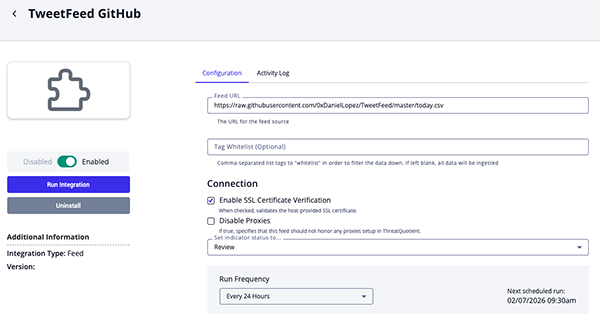
- Review any additional settings, make any changes if needed, and click on Save.
- Click on the toggle switch, located above the Additional Information section, to enable it.
ThreatQ Mapping
TweetFeed GitHub
The TweetFeed GitHub feed retrieves a user-selected CSV file from the GitHub repository, parses indicators of compromise, and associates related malware based on applied tags.
GET https://raw.githubusercontent.com/0xDanielLopez/TweetFeed/master/today.csv
Sample Response:
2021-10-21 00:00:01,pingineer_jp,url,https://cr-mufg-login.com/,#phishing #scam,https://twitter.com/pingineer_jp/status/1450975121171120131
2021-10-21 00:00:41,pingineer_jp,url,https://www.ronsxdrd.com/,#phishing #scam,https://twitter.com/pingineer_jp/status/1450975287932379139
2021-10-21 00:02:38,drb_ra,ip,185.215.113.53,#CobaltStrike,https://twitter.com/drb_ra/status/1450975781719617537
2021-10-21 00:02:45,drb_ra,ip,45.77.12.223,#CobaltStrike,https://twitter.com/drb_ra/status/1450975808131112966
2021-10-21 00:02:45,drb_ra,ip,103.210.236.18,#CobaltStrike,https://twitter.com/drb_ra/status/1450975810672865282
2021-10-21 00:02:45,drb_ra,ip,192.168.43.104,#CobaltStrike,https://twitter.com/drb_ra/status/1450975810672865282
2021-10-21 00:02:50,drb_ra,ip,106.13.200.188,#CobaltStrike,https://twitter.com/drb_ra/status/1450975828645404674
2021-10-21 00:02:56,drb_ra,ip,154.95.225.141,#CobaltStrike,https://twitter.com/drb_ra/status/1450975853832179720
2021-10-21 00:02:56,drb_ra,ip,122.10.58.22,#CobaltStrike,https://twitter.com/drb_ra/status/1450975853832179720
2021-10-21 00:03:02,drb_ra,ip,23.234.21.215,#CobaltStrike,https://twitter.com/drb_ra/status/1450975879698518016
2021-10-21 00:03:07,drb_ra,ip,134.122.24.52,#CobaltStrike,https://twitter.com/drb_ra/status/1450975902557425666
2021-10-21 00:03:13,drb_ra,ip,207.148.76.15,#CobaltStrike,https://twitter.com/drb_ra/status/1450975928046264321
2021-10-21 00:03:19,drb_ra,ip,23.234.21.220,#CobaltStrike,https://twitter.com/drb_ra/status/1450975951282638852
2021-10-21 00:03:23,drb_ra,ip,156.232.248.44,#CobaltStrike,https://twitter.com/drb_ra/status/1450975968429068288
2021-10-21 00:03:28,drb_ra,ip,34.85.106.244,#CobaltStrike,https://twitter.com/drb_ra/status/1450975989765492744
2021-10-21 00:03:34,drb_ra,ip,122.10.58.17,#CobaltStrike,https://twitter.com/drb_ra/status/1450976016202182659
2021-10-21 00:03:39,drb_ra,ip,154.95.225.144,#CobaltStrike,https://twitter.com/drb_ra/status/1450976034346651649
2021-10-21 00:03:43,drb_ra,ip,45.77.9.110,#CobaltStrike,https://twitter.com/drb_ra/status/1450976053476958213
2021-10-21 00:03:49,drb_ra,ip,172.93.44.30,#CobaltStrike,https://twitter.com/drb_ra/status/1450976078097534976
2021-10-21 00:03:55,drb_ra,ip,185.212.129.254,#CobaltStrike,https://twitter.com/drb_ra/status/1450976101921181700
ThreatQuotient provides the following default mapping for this feed:
| Feed Data Path | ThreatQ Entity | ThreatQ Object Type or Attribute Key | Published Date | Examples | Notes | |
|---|---|---|---|---|---|---|
data[1] |
Attribute | Author | N/A | data[0] |
pingineer_jp | N/A |
data[2] |
Type | Indicator | Mapped to ThreatQ Types | N/A | ip | N/A |
data[4] |
Value | Indicator | N/A | data[0] |
N/A | N/A |
data[5] |
Tag | N/A | # is stripped |
N/A | CobaltStrike | Space-separated field when multi-valued |
data[5] |
Value | Malware Family | N/A | data[0] |
Alienbot | Compared against a whitelist of malware names |
data[6] |
Attribute | Tweet Link | N/A | data[0] |
N/A | N/A |
Average Feed Run
Object counts and Feed runtime are supplied as generalities only - objects returned by a provider can differ based on credential configurations and Feed runtime may vary based on system resources and load.
| Metric | Result |
|---|---|
| Run Time | 1 minute |
| Indicators | 627 |
| Indicator Attributes | 1,581 |
| Malware | 12 |
Known Issues / Limitations
- Updating the Feed URL parameter to point to larger datasets will increase feed runtime.
Change Log
- Version 1.0.0
- Initial release
PDF Guides
| Document | ThreatQ Version |
|---|---|
| TweetFeed GitHub CDF User Guide v1.0.0 | 5.29.0 or Greater |