SpyCloud CDF
The web format of this guide reflects the most current release. Guides for older iterations are available in PDF format.
Integration Details
ThreatQuotient provides the following details for this integration:
| Current Integration Version | 1.0.0 |
| Compatible with ThreatQ Versions | >= 5.12.1 |
| Support Tier | ThreatQ Supported |
Introduction
The SpyCloud CDF for ThreatQ automatically ingests breach and compromised credential data, enabling analysts to quickly identify exposures affecting their organization’s assets. Powered by SpyCloud’s cybercrime analytics platform, which continuously monitors the dark web and other underground sources, this integration provides real-time intelligence to help prevent account takeovers, ransomware attacks, and related threats.
The integration provides the following feeds:
- SpyCloud Breaches - ingests new breach data from SpyCloud’s Breach Catalogue as Event objects.
- SpyCloud Compromised Credentials - ingests compromised account information based on specified monitored assets.
The integration ingests the following object types:
- Compromised Accounts
- Events
- Identities
- Indicators
- Malware
Prerequisites
The following is required to install and operate this integration:
- A valid SpyCloud API key that can be obtained at your SpyCloud customer portal: https://portal.spycloud.com/.
- The Compromised Account custom object installed on your instance.
Compromised Account Custom Object
This integration requires the Compromised Account custom object. ThreatQ Hosted customers should contact the ThreatQ Support team to request installation of the object, while On-Premises customers can follow the steps below to install it manually.
When installing the custom objects, be aware that any in-progress feed runs will be cancelled, and the API will be in maintenance mode.
- Download the integration bundle from the ThreatQ Marketplace.
- Unzip the bundle and locate the custom object files.
The custom object files will typically consist of a JSON definition file, install.sh script, and a images folder containing the svg icons.
- SSH into your ThreatQ instance.
- Set your install pathway environment variable. This command will retrieve the install pathway from your configuration file and set it as variable for use during this installation process.
INSTALL_CONF="/etc/threatq/platform/install.conf"
if [ -f "$INSTALL_CONF" ]; then source "$INSTALL_CONF"
fi
MISC_DIR="${INSTALL_BASE_PATH:-/var/lib/threatq}/misc" - Navigate to the tmp folder using the environment variable:
cd $MISC_DIR
- Upload the custom object files, including the images folder.
The directory structure should resemble the following:
- install.sh
- <custom_object_name>.json
- images (directory)
- <custom_object_name>.svg
- Run the following command:
kubectl exec -it deployment/api-schedule-run -n threatq -- sh /var/lib/threatq/misc/install.sh /var/lib/threatq/misc
The installation script will automatically put the application into maintenance mode, move the files to their required directories, install the custom object, update permissions, bring the application out of maintenance mode, and restart dynamo.
- Delete the install.sh, definition json file, and images directory from step 6 after the object has been installed as these files are no longer needed.
- Download the integration zip file from the ThreatQ Marketplace and unzip its contents.
- SSH into your ThreatQ instance.
- Navigate to tmp directory:
cd /tmp/
- Create a new directory:
mkdir spycloud_cdf
- Upload the account.json and install.sh script into this new directory.
- Create a new directory called images within the spycloud_cdf directory.
mkdir images
- Upload the account.svg.
- Navigate to the /tmp/spycloud_cdf.
The directory should resemble the following:
- tmp
- spycloud_cdf
- account.json
- install.sh
- images
- account.svg
- spycloud_cdf
- tmp
- Run the following command to ensure that you have the proper permissions to install the custom object:
chmod +x install.sh
- Run the following command:
sudo ./install.sh
You must be in the directory level that houses the install.sh and json files when running this command.
The installation script will automatically put the application into maintenance mode, move the files to their required directories, install the custom object, update permissions, bring the application out of maintenance mode, and restart dynamo.
- Remove the temporary directory, after the custom object has been installed, as the files are no longer needed:
rm -rf spycloud_cdf
Installation
The CDF requires the installation of the Compromised Account custom object before installing the actual CDF. See the Compromised Account section in the Prerequisites chapter for more details. The custom object must be installed prior to installing the CDF. Attempting to install the CDF without the custom object will cause the CDF install process to fail.
Perform the following steps to install the integration:
The same steps can be used to upgrade the integration to a new version.
- Log into https://marketplace.threatq.com/.
- Locate and download the integration zip file.
- Extract the contents of the zip file and install the required Compromise Account custom object.
- Navigate to the integrations management page on your ThreatQ instance.
- Click on the Add New Integration button.
- Upload the integration yaml file using one of the following methods:
- Drag and drop the file into the dialog box
- Select Click to Browse to locate the file on your local machine
- Select the individual feeds to install, when prompted and click Install.
ThreatQ will inform you if the feed already exists on the platform and will require user confirmation before proceeding. ThreatQ will also inform you if the new version of the feed contains changes to the user configuration. The new user configurations will overwrite the existing ones for the feed and will require user confirmation before proceeding.
The feed(s) will be added to the integrations page. You will still need to configure and then enable the feed.
Configuration
ThreatQuotient does not issue API keys for third-party vendors. Obtain API credentials directly from SpyCloud.
To configure the integration:
- Navigate to your ThreatQ integrations page.
- Select the Commercial category.
- Click the SpyCloud integration entry to open its configuration.
- Enter the configuration parameters for each feed as outlined below.
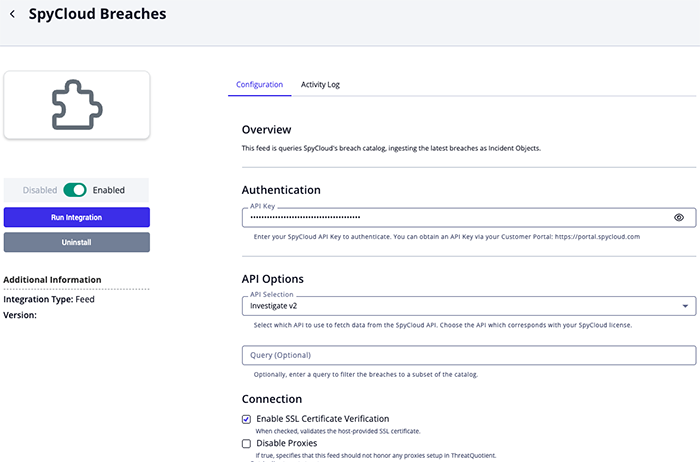
SpyCloud Breaches Configuration Parameters
| Parameter | Description |
|---|---|
| API Key | Enter your SpyCloud API key for authentication. |
| API Selection | Select the appropriate SpyCloud API version. Options include:
|
| Query | Optional - filter the breach catalog using an optional query string. |
| Enable SSL Certificate Verification | Enable this parameter if the feed should validate the host-provided SSL certificate. |
| Disable Proxies | Enable this parameter if the feed should not honor proxies set in the ThreatQ UI. |
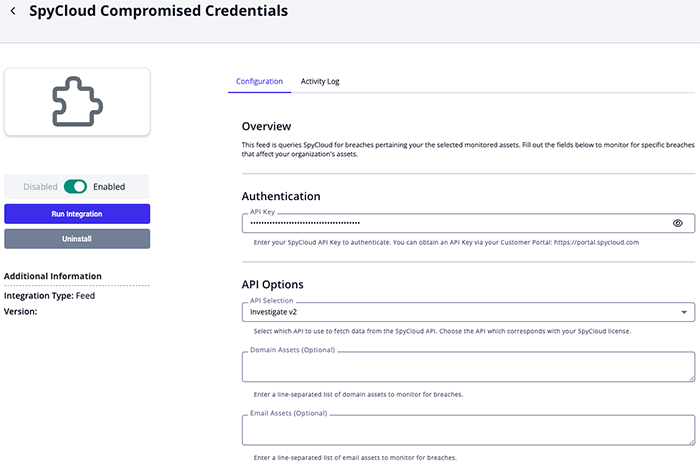
SpyCloud Compromised Credentials Configuration Parameters
| Parameter | Description | ||
|---|---|---|---|
| API Key | Enter your SpyCloud API key for authentication. | ||
| Domain Assets | Optional - enter a line-separated list of domain assets to monitor for breaches. | ||
| Email Assets | Optional - enter a line-separated list of email assets to monitor for breaches. | ||
| IP Assets | Optional - enter a line-separated list of IP assets to monitor for breaches. | ||
| Username Assets | Optional - enter a line-separated list of username assets to monitor for breaches. | ||
| Fetch Breach Details | Enable this parameter to fetch the full details of each breach. This will include the breach's description, affected asset counts, and external references. If disabled, only the compromised credential object will be created.
Enabling this parameter will increase the amount of API requests made that will count against your API limit. |
||
| Severity Filter | Select the severity levels of breaches to monitor. Options include:
Leaving these parameter options unchecked will result in the feed pulling breaches of any severity. |
||
| Attribute Filter | Select which pieces of context to be ingested with each compromised credential. Options include:
Not all fields are available for every breached credential. |
||
| PII Attribute Filter | Select which pieces of personal information to be ingested with each compromised credential. Options include:
Not all fields are available for every breached credential. |
||
| Banking Attribute Filter | Select which pieces of banking information to be ingested with each compromised credential. Options include:
Not all fields are available for every breached credential. |
||
| Enable SSL Certificate Verification | Enable this parameter if the feed should validate the host-provided SSL certificate. | ||
| Disable Proxies | Enable this parameter if the feed should not honor proxies set in the ThreatQ UI. |
ThreatQ Mapping
SpyCloud Breaches
The SpyCloud Breaches feed ingests new breaches from SpyCloud’s Breach Catalogue as event objects.
GET https://api.spycloud.io/investigations-v2/breach/catalog
Sample Response:
{
    "hits": 3,
    "results": [
        {
            "type": "PUBLIC",
            "breach_category": "exfiltrated",
            "num_records": 618,
            "title": "Huachiew Chalermprakiet University",
            "spycloud_publish_date": "2024-04-12T00:00:00Z",
            "breached_companies": [
                {
                    "company_name": "Huachiew Chalermprakiet University",
                    "industry": "Education"
                }
            ],
            "description": "On an unknown date, data reported to belong to Huachiew Chalermprakiet University, whose headquarters are located in Thailand, was exfiltrated. The stolen data includes email addresses, usernames, passwords, and may contain other compromised user details. This breach is being publicly shared on the Internet.",
            "site_description": "Huachiew Chalermprakiet University is located in Thailand.",
            "site": "hcu.ac.th",
            "id": 51234,
            "confidence": 3,
            "acquisition_date": "2023-12-05T00:00:00Z",
            "tlp": "amber",
            "uuid": "5c6772e9-2bf1-42e8-a46d-ed197df2ae82",
            "breach_main_category": "breach",
            "consumer_category": "publicexposure",
            "sensitive_source": false,
            "short_title": "Huachiew Chalermprakiet Univers…",
            "assets": {
                "username": 618,
                "password": 579,
                "email": 1
            }
        },
        {
            "type": "PRIVATE",
            "breach_category": "infostealer",
            "num_records": 661446,
            "title": "stealc Stealer",
            "spycloud_publish_date": "2024-05-18T00:00:00Z",
            "description": "stealc Stealer is a Windows-targeted stealer designed to grab form data such as IP addresses, browsing history, saved passwords, cryptocurrency, private messages and/or screenshots from affected users.",
            "site_description": "stealc Stealer is a Windows-targeted stealer designed to grab form data such as IP addresses, browsing history, saved passwords, cryptocurrency, private messages and/or screenshots from affected users.",
            "site": "n/a",
            "id": 59176,
            "premium_flag": "YES",
            "confidence": 3,
            "malware_family": "stealc",
            "acquisition_date": "2024-05-18T00:00:00Z",
            "tlp": "clear",
            "uuid": "132cfa76-2a82-428e-9d3c-8355c73eaa1b",
            "breach_main_category": "malware",
            "consumer_category": "infostealer",
            "sensitive_source": false,
            "short_title": "stealc Stealer",
            "assets": {
                "av_softwares": 1442,
                "ip_addresses": 661446,
                "user_hostname": 659248,
                "log_id": 661446,
                "country_code": 660517,
                "user_sys_registered_owner": 655819,
                "email": 327450,
                "user_os": 661446,
                "password": 661446,
                "keyboard_languages": 661446,
                "infected_time": 661446,
                "full_name": 123,
                "target_url": 661446,
                "username": 333996,
                "infected_machine_id": 661446,
                "country": 661359
            }
        }
    ]
ThreatQ provides the following default mapping for this feed based on each item within the API response's .results array. The .spycloud_publish_date represents the first key present in the response from: [.breach_date, .acquisition_date, 'public_date, .spycloud_publish_date].
| Feed Data Path | ThreatQ Entity | ThreatQ Object Type or Attribute Key | Published Date | Examples | Notes |
|---|---|---|---|---|---|
.type, .title, .breach_main_category, .breach_category, .uuid |
Event.Title | N/A | .spycloud_publish_date |
N/A | Fields concatenated to build title |
.description, .assets, .media_urls[] |
Event.Description | N/A | N/A | N/A | Fields concatenated to build HTML description |
.malware_family |
Malware.Value | N/A | .spycloud_publish_date |
StealerC |
N/A |
.breached_companies[].company_name |
Identity.Value | N/A | .spycloud_publish_date |
Acme Corp |
N/A |
breached/targeted |
Identity.Tag | N/A | N/A | breached |
breached for .breached_companies[] and targeted for .targeted_companies[] |
.targeted_companies[].company_name |
Identity.Value | N/A | .spycloud_publish_date |
Acme Corp |
N/A |
.targeted_companies[].industry |
Identity.Attribute | Industry |
.spycloud_publish_date |
Energy |
N/A |
.id |
Event.Attribute | Breach ID |
.spycloud_publish_date |
2 |
N/A |
.site |
Event.Attribute | Affected Site |
.spycloud_publish_date |
linkedin.com |
N/A |
.assets[key] |
Event.Attribute | Breached Data |
.spycloud_publish_date |
email |
N/A |
.type |
Event.Attribute | Breach Type |
.spycloud_publish_date |
PUBLIC |
N/A |
.num_records |
Event.Attribute | Number of Records |
.spycloud_publish_date |
1234567 |
N/A |
.confidence |
Event.Attribute | Confidence |
.spycloud_publish_date |
High |
Mapped to normalized values |
.combo_list_flag |
Event.Attribute | Is Combo List |
.spycloud_publish_date |
false |
true if value is YES, false otherwiswe |
.breach_main_category |
Event.Attribute | Category |
.spycloud_publish_date |
breach |
N/A |
.breach_category |
Event.Attribute | Subcategory |
.spycloud_publish_date |
exposed |
N/A |
.targeted_industries |
Event.Attribute | Target Industry |
.spycloud_publish_date |
N/A | N/A |
.sensitive_source |
Event.Attribute | Is Sensitive Source |
.spycloud_publish_date |
false |
N/A |
.consumer_category |
Event.Attribute | Consumer Category |
.spycloud_publish_date |
infostealer |
N/A |
.breach_date |
Event.Attribute | Breach Date |
.spycloud_publish_date |
2022-11-18T00:00:00Z |
N/A |
.acquisition_date |
Event.Attribute | Acquisition Date |
.spycloud_publish_date |
2022-11-28T00:00:00Z |
N/A |
.public_date |
Event.Attribute | Public Date |
.spycloud_publish_date |
2024-05-02T00:00:00Z |
N/A |
Confidence Normalization Map
The following table illustrates how SpyCloud attributes are mapped to ThreatQ.
| SpyCloud Value | ThreatQ Value |
|---|---|
| 1 | Low |
| 2 | Medium |
| 3 | High |
SpyCloud Compromised Credentials
The SpyCloud Compromised Credentials feed ingests compromised credentials via SpyCloud's breached asset lookup API. You will be able to specify one or more assets (i.e. domains, usernames, emails, etc.) to monitor for breached credentials.
The feed will bring in new compromised credentials based on the feed run's timeframe.
GET https://api.spycloud.io/investigations-v2/breach/data/{{type}}/{{asset}}
Sample Response:
{
    "cursor": "63a38950-1e6c-4462-8214-2679847aeeb8",
    "hits": 2255818,
    "results": [
        {
            "user_browser": "Google Chrome [Default]",
            "password": "********",
            "source_id": 59182,
            "ip_addresses": [
                "103.46.201.86"
            ],
            "country": "INDIA",
            "user_os": "Windows 10 Home [x64]",
            "user_hostname": "ABHI",
            "user_sys_registered_owner": "hhbbk",
            "keyboard_languages": "english (united states)",
            "infected_machine_id": "5103dbeb-97db-4187-9592-0421f8c952d0",
            "log_id": "22f2980c0e2f00278083136632e9c3be55bd15b916f92bbfbd3aa41d0dc0708c",
            "target_url": "https://accounts.acme.com/forgot-password/",
            "username": "6280183056",
            "infected_time": "2022-08-12T11:03:06Z",
            "spycloud_publish_date": "2024-05-18T00:00:00Z",
            "target_domain": "acme.com",
            "target_subdomain": "accounts.acme.com",
            "password_type": "plaintext",
            "password_plaintext": "********",
            "country_code": "IN",
            "severity": 25,
            "document_id": "295b4dc1-2cf0-4537-87e6-23c9960f1d8a"
        },
        {
            "password": "********",
            "source_id": 59194,
            "email": "vivekbicky@gmail.com",
            "ip_addresses": [
                "49.37.66.162"
            ],
            "country": "INDIA",
            "user_os": "Windows 10 Pro [x64]",
            "user_hostname": "DESKTOP-R7SMU0D",
            "user_sys_registered_owner": "hp",
            "keyboard_languages": "english (united states)",
            "infected_machine_id": "9317cc4d-3bbe-415c-be77-3c5216418b3e",
            "log_id": "02285e9062ac85c50302c6e681e53b1c205fe51706f396bdadb6eef06fa567e7",
            "target_url": "https://www.acme.com/careers/apply/form/48225",
            "infected_time": "2023-03-05T18:04:13Z",
            "spycloud_publish_date": "2024-05-18T00:00:00Z",
            "email_domain": "gmail.com",
            "email_username": "vivekbicky",
            "domain": "gmail.com",
            "target_domain": "acme.com",
            "password_type": "plaintext",
            "password_plaintext": "********",
            "country_code": "IN",
            "severity": 25,
            "document_id": "8fa7d143-55c7-410c-955a-33be77eef196"
        },
        {
            "user_browser": "Google Chrome [Default]",
            "password": "********",
            "source_id": 59194,
            "email": "mesthermerino24@gmail.com",
            "ip_addresses": [
                "90.161.236.158"
            ],
            "country": "SPAIN",
            "infected_path": "C:\\Users\\rodri\\AppData\\Local\\Temp\\Rar$EXb19436.20504\\2O23-F1LES-S0ft\\Launcher_S0FT-2O23.exe",
            "user_os": "Windows 10 Home [x64]",
            "user_hostname": "PRIMUX_15R5A",
            "user_sys_registered_owner": "rodri",
            "keyboard_languages": "español (españa, internacional)",
            "infected_machine_id": "3773857f-f1de-4382-836b-f83b4e819ccf",
            "log_id": "f26498c3a206c8e6fc4ba9278b46672f701f1a5d582efea1f1fb33045d0d8ffc",
            "target_url": "https://auth.acme.com/login/session",
            "infected_time": "2023-03-05T15:40:54Z",
            "spycloud_publish_date": "2024-05-18T00:00:00Z",
            "email_domain": "gmail.com",
            "email_username": "mesthermerino24",
            "domain": "gmail.com",
            "target_domain": "acme.com",
            "target_subdomain": "auth.acme.com",
            "password_type": "plaintext",
            "password_plaintext": "********",
            "country_code": "ES",
            "severity": 25,
            "document_id": "07111791-a813-470b-87ac-5f401872ad6a"
        }
    ]
}
ThreatQ provides the following default mapping for this feed based on each item within the API response's .results array.
Not all fields will be available with each breached credential.
| Feed Data Path | ThreatQ Entity | ThreatQ Object Type or Attribute Key | Published Date | Examples | Notes |
|---|---|---|---|---|---|
.email, .username |
Account.Value | N/A | .spycloud_publish_date |
roadrunner@acme.com |
Whichever field that's available will be used |
.infected_path |
Indicator.Value | File Path | .spycloud_publish_date |
C:\\Users\\rodri\\AppData\\Local\\Temp\\Rar$EXb19436.20504\\2O23-F1LES-S0ft\\Launcher_S0FT-2O23.exe |
N/A |
| N/A | Account.Tag | N/A | N/A | infected |
Applied when there is a .infected_machine_id |
| N/A | Account.Tag | N/A | N/A | plaintext-password |
Applied when the breached password is plaintext |
| N/A | Account.Attribute | Credential Type | .spycloud_publish_date |
Email |
Applied when an email is present |
| N/A | Account.Attribute | Credential Type | .spycloud_publish_date |
Username |
Applied when a username is present |
.severity |
Account.Attribute | Severity | .spycloud_publish_date |
Critical |
User-Configurable; Mapped to a normalized name |
.password_plaintext |
Account.Attribute | Password | .spycloud_publish_date |
N/A | User-Configurable; If .password_type is plaintext and different than ******** |
.pasword |
Account.Attribute | Password | .spycloud_publish_date |
N/A | User-Configurable; If .password_type is not plaintext and different than ******** |
.password_type |
Account.Attribute | Password Type | .spycloud_publish_date |
plaintext |
User-Configurable. If value different than ******** |
.salt |
Account.Attribute | Salt | .spycloud_publish_date |
N/A | User-Configurable. If value different than ******** |
.ip_addresses[] |
Account.Attribute | User IP Address | .spycloud_publish_date |
N/A | User-Configurable. If value different than ******** |
.target_domain |
Account.Attribute | Target Domain | .spycloud_publish_date |
linkedin.com |
User-Configurable. If value different than ******** |
.target_subdomain |
Account.Attribute | Target Subdomain | .spycloud_publish_date |
.gov.eu |
User-Configurable. If value different than ******** |
.email_domain |
Account.Attribute | Email Domain | .spycloud_publish_date |
.gmail.com |
User-Configurable. If value different than ******** |
.target_url |
Account.Attribute | Target URL | .spycloud_publish_date |
https://linkedin.com/login/ |
User-Configurable. If value different than ******** |
.account_signup_time |
Account.Attribute | Account Signup Date | .spycloud_publish_date |
N/A | User-Configurable. If value different than ******** |
.record_cracked_date |
Account.Attribute | Record Cracked Date | .spycloud_publish_date |
N/A | User-Configurable. If value different than ******** |
.infected_time |
Account.Attribute | Infected At | .spycloud_publish_date |
2023-03-05T15:40:54Z |
User-Configurable. If value different than ******** |
.full_name |
Account.Attribute | Full Name | .spycloud_publish_date |
N/A | User-Configurable. If value different than ******** |
.first_name |
Account.Attribute | First Name | .spycloud_publish_date |
N/A | User-Configurable. If value different than ******** |
.phone |
Account.Attribute | Phone | .spycloud_publish_date |
N/A | User-Configurable. If value different than ******** |
.dob |
Account.Attribute | Date of Birth | .spycloud_publish_date |
N/A | User-Configurable. If value different than ******** |
.industry |
Account.Attribute | Industry | .spycloud_publish_date |
N/A | User-Configurable. If value different than ******** |
.country |
Account.Attribute | Country | .spycloud_publish_date |
SPAIN |
User-Configurable. If value different than ******** |
.country_code |
Account.Attribute | Country Code | .spycloud_publish_date |
NL |
User-Configurable. If value different than ******** |
.user_os |
Account.Attribute | User Operating System | .spycloud_publish_date |
Windows |
User-Configurable. If value different than ******** |
.user_hostname |
Account.Attribute | User Hostname | .spycloud_publish_date |
N/A | User-Configurable. If value different than ******** |
.cc_type |
Account.Attribute | Credit Card Type | .spycloud_publish_date |
N/A | User-Configurable. If value different than ******** |
.cc_bin |
Account.Attribute | Credit Card BIN | .spycloud_publish_date |
N/A | User-Configurable. If value different than ******** |
.cc_last_four |
Account.Attribute | Credit Card Last 4 Digits | .spycloud_publish_date |
N/A | User-Configurable. If value different than ******** |
.cc_expiration |
Account.Attribute | Credit Card Expiration | .spycloud_publish_date |
N/A | User-Configurable. If value different than ******** |
.cc_code |
Account.Attribute | Credit Card CVV | .spycloud_publish_date |
N/A | User-Configurable. If value different than ******** |
.bank_name |
Account.Attribute | Bank Name | .spycloud_publish_date |
Wells Fargo |
User-Configurable. If value different than ******** |
.bank_number |
Account.Attribute | Bank Number | .spycloud_publish_date |
N/A | User-Configurable. If value different than ******** |
Severity Map
The following table illustrates how SpyCloud severity values are mapped to ThreatQ.
| SpyCloud Value | ThreatQ Value |
|---|---|
| 2 | Email Only |
| 5 | Informational |
| 20 | High |
| 25 | Critical |
Average Feed Run
SpyCloud Breaches
| Metric | Result |
|---|---|
| Run Time | 1 minute |
| Events | 1 |
| Event Attributes | 729 |
| Identities | 10 |
| Malware | 6 |
SpyCloud Compromised Credentials
| Metric | Result |
|---|---|
| Run Time | 1 minute |
| Compromised Accounts | 125 |
| Compromised Account Attributes | 1,691 |
| Events | 9 |
| Event Attributes | 284 |
| Indicators | 16 |
| Malware | 5 |
Known Issues / Limitations
- The SpyCloud Compromised Credentials feed requires at least one asset type (Domain, Email, IP, or Username) to be specified. If none are configured, the feed will execute an empty run.
Change Log
- Version 1.0.0 rev-a
- Guide Update - updated custom object installation steps for ThreatQ v6 instances.
- Version 1.0.0
- Initial release
PDF Guides
| Document | ThreatQ Version |
|---|---|
| SpyCloud CDF Guide v1.0.0 | 5.12.1 or Greater |