Security Onion CDF
The web format of this guide reflects the most current release. Guides for older iterations are available in PDF format.
Integration Details
ThreatQuotient provides the following details for this integration:
| Current Integration Version | 1.0.0 |
| Compatible with ThreatQ Versions | >= 5.29.0 |
| Support Tier | ThreatQ Supported |
Introduction
The Security Onion CDF integration ingests alerts, detections, and their associated context from Security Onion into ThreatQ. The integration enables analysts to correlate Security Onion alert data with threat intelligence stored in ThreatQ.
The integration provides the following feed:
- Security Onion Alerts –retrieves alert and detection data from Security Onion and ingests them as Events and Signatures, along with Indicators and Assets as applicable.
The integration ingests the following object types:
- Assets
- Events
- Indicators
- Signatures
Prerequisites
The following is required in order to install and run the integration:
- Security Onion API ID
- Security Onion API Secret
These credentials can be generated within Security Onion by navigating to Administration → API Clients.
Installation
Perform the following steps to install the integration:
The same steps can be used to upgrade the integration to a new version.
- Log into https://marketplace.threatq.com/.
- Locate and download the integration yaml file.
- Navigate to the integrations management page on your ThreatQ instance.
- Click on the Add New Integration button.
- Upload the integration yaml file using one of the following methods:
- Drag and drop the file into the dialog box
- Select Click to Browse to locate the file on your local machine
- Select the individual feeds to install, when prompted and click Install.
ThreatQ will inform you if the feed already exists on the platform and will require user confirmation before proceeding. ThreatQ will also inform you if the new version of the feed contains changes to the user configuration. The new user configurations will overwrite the existing ones for the feed and will require user confirmation before proceeding.
The feed(s) will be added to the integrations page. You will still need to configure and then enable the feed.
Configuration
ThreatQuotient does not issue API keys for third-party vendors. Contact the specific vendor to obtain API keys and other integration-related credentials.
To configure the integration:
- Navigate to your integrations management page in ThreatQ.
- Select the Commercial option from the Category dropdown (optional).
If you are installing the integration for the first time, it will be located under the Disabled tab.
- Click on the integration entry to open its details page.
- Enter the following parameters under the Configuration tab:
Parameter Description Host The Hostname or IP address of the Security Onion instance. API ID Your API ID from Security Onion. API Secret The API Secret associated with the API ID. Ingest Events as Sightings Instead of Alerts Enable this parameter to ingest alerts as Event Sightings (opposed to Event Alerts). This parameter is disabled by default. Ingest Private IPs as Assets Enable this parameter to ingest private IPs as Assets (opposed to Event Attributes). This parameter is enabled by default. Context Ingestion Options Select specific context fields to ingest into ThreatQ. Options include: - Event Tags (default)
- Event Severity (default)
- Event Severity Label (default)
- Event Score
- Event Dataset
- Event Category
- Signature Product
- Signature Service
- Signature Metadata
Enable SSL Certificate Verification Enable this parameter if the feed should validate the host-provided SSL certificate. Disable Proxies Enable this parameter if the feed should not honor proxies set in the ThreatQ UI.
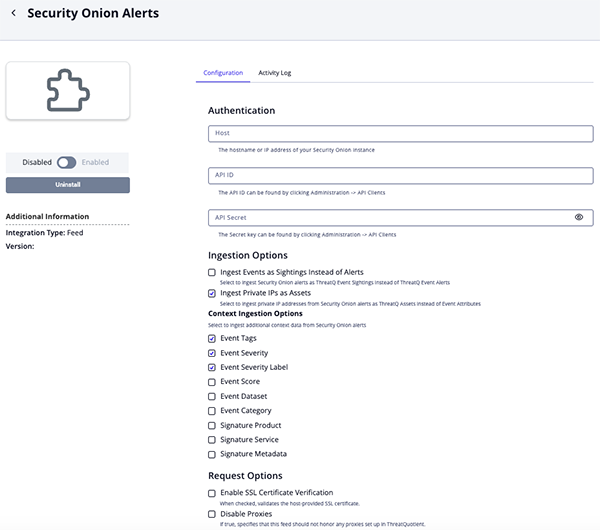
- Review any additional settings, make any changes if needed, and click on Save.
- Click on the toggle switch, located above the Additional Information section, to enable it.
ThreatQ Mapping
Security Onion Alerts
The Security Onion Alerts feed queries Security Onion for alerts along with associated detections and contextual data, retrieving results for the date range between the previous execution and the current run.
GET /connect/events?query=tags:alert | sortby @timestamp
Sample Response:
{
  "events": [
    {
      "source": "securityonion:.ds-logs-suricata.alerts-so-2025.06.12-000003",
      "Time": "2025-06-10T22:58:02.307Z",
      "timestamp": "2025-06-10T22:58:02.307Z",
      "id": "8gq1ZZcBcalMnhRghGIa",
      "type": "",
      "score": 0,
      "payload": {
        "@timestamp": "2025-06-10T22:58:02.307Z",
        "@version": "1",
        "container.id": "eve-2025-06-12-19:54.json",
        "data_stream.dataset": "import",
        "data_stream.namespace": "so",
        "data_stream.type": "logs",
        "destination.ip": "203.161.44.208",
        "destination.port": 80,
        "ecs.version": "8.0.0",
        "elastic_agent.id": "aa7c6d6d-a5fe-4935-b7de-9d332be87f6b",
        "elastic_agent.snapshot": false,
        "elastic_agent.version": "8.14.3",
        "event.acknowledged": true,
        "event.acknowledged_elapsed_seconds": 12331054,
        "event.acknowledged_timestamp": "2025-10-31T16:15:36.955Z",
        "event.category": "network",
        "event.dataset": "suricata.alert",
        "event.imported": true,
        "event.ingested": "2025-06-12T19:54:39.161Z",
        "event.module": "suricata",
        "event.severity": 1,
        "event.severity_label": "low",
        "import.file": "eve-2025-06-12-19:54.json",
        "import.id": "d2d6ddc0c650c3d3bfec174b588b9f77",
        "input.type": "log",
        "log.file.path": "/nsm/import/d2d6ddc0c650c3d3bfec174b588b9f77/suricata/eve-2025-06-12-19:54.json",
        "log.id.uid": "811105843248641",
        "log.offset": 118623,
        "message": "{\"timestamp\":\"2025-06-10T22:58:02.307685+0000\",\"flow_id\":811105843248641,\"pcap_cnt\":364797,\"event_type\":\"alert\",\"src_ip\":\"71.6.199.65\",\"src_port\":57184,\"dest_ip\":\"203.161.44.208\",\"dest_port\":80,\"proto\":\"TCP\",\"pkt_src\":\"wire/pcap\",\"community_id\":\"1:kFVQfpMI3R/22WZhYIK4c1GbxcU=\",\"tx_id\":0,\"alert\":{\"action\":\"allowed\",\"gid\":1,\"signature_id\":2029054,\"rev\":3,\"signature\":\"ET SCAN Zmap User-Agent (Inbound)\",\"category\":\"Detection of a Network Scan\",\"severity\":3,\"metadata\":{\"confidence\":[\"High\"],\"created_at\":[\"2019_11_26\"],\"signature_severity\":[\"Informational\"],\"updated_at\":[\"2024_04_13\"]},\"rule\":\"alert http $EXTERNAL_NET any -> any any (msg:\\\"ET SCAN Zmap User-Agent (Inbound)\\\"; flow:established,to_server; http.user_agent; content:\\\"Mozilla/5.0 zgrab/0.x\\\"; startswith; endswith; classtype:network-scan; sid:2029054; rev:3; metadata:created_at 2019_11_26, confidence High, signature_severity Informational, updated_at 2024_04_13;)\"},\"app_proto\":\"http\",\"direction\":\"to_server\",\"payload_printable\":\"GET / HTTP/1.1\\r\\nHost: 203.161.44.208\\r\\nUser-Agent: Mozilla/5.0 zgrab/0.x\\r\\nAccept: */*\\r\\nAccept-Encoding: gzip\\r\\n\\r\\n\",\"stream\":1,\"packet\":\"ABY8y3JCZGSbTzcACABFKAA04ZUAADYGnE1HBsdBy6Es0N9gAFDRvPgvuoucUYAQAfXp9AAAAQEICgW9oRONp08n\",\"packet_info\":{\"linktype\":1}}",
        "metadata.beat": "filebeat",
        "metadata.input.beats.host.ip": "172.17.1.1",
        "metadata.input_id": "logfile-logs-47da5c87-a0c7-4cf5-941b-4fed6ab307f0",
        "metadata.pipeline": "suricata.common",
        "metadata.raw_index": "logs-import-so",
        "metadata.stream_id": "logfile-log.logs-47da5c87-a0c7-4cf5-941b-4fed6ab307f0",
        "metadata.type": "_doc",
        "metadata.version": "8.14.3",
        "network.community_id": "1:kFVQfpMI3R/22WZhYIK4c1GbxcU=",
        "network.data.decoded": "GET / HTTP/1.1\r\nHost: 203.161.44.208\r\nUser-Agent: Mozilla/5.0 zgrab/0.x\r\nAccept: */*\r\nAccept-Encoding: gzip\r\n\r\n",
        "network.packet_source": "wire/pcap",
        "network.transport": "TCP",
        "observer.name": "securityonion",
        "rule.action": "allowed",
        "rule.category": "Detection of a Network Scan",
        "rule.gid": 1,
        "rule.metadata.confidence": ["High"],
        "rule.metadata.created_at": ["2019_11_26"],
        "rule.metadata.signature_severity": ["Informational"],
        "rule.metadata.updated_at": ["2024_04_13"],
        "rule.name": "ET SCAN Zmap User-Agent (Inbound)",
        "rule.reference": "https://community.emergingthreats.net",
        "rule.rev": 3,
        "rule.rule": "alert http $EXTERNAL_NET any -> any any (msg:\"ET SCAN Zmap User-Agent (Inbound)\"; flow:established,to_server; http.user_agent; content:\"Mozilla/5.0 zgrab/0.x\"; startswith; endswith; classtype:network-scan; sid:2029054; rev:3; metadata:created_at 2019_11_26, confidence High, signature_severity Informational, updated_at 2024_04_13;)",
        "rule.ruleset": "Emerging Threats",
        "rule.severity": 3,
        "rule.uuid": "2029054",
        "source.ip": "71.6.199.65",
        "source.port": 57184,
        "tags": ["alert", "_geoip_expired_database", "alert", "alert"]
      },
      "sort": [1749596282307]
    }
  ]
}
ThreatQuotient provides the following default mapping for this feed:
| Feed Data Path | ThreatQ Entity | ThreatQ Object Type or Attribute Key | Published Date | Examples | Notes |
|---|---|---|---|---|---|
value.id |
Event.Title | Event (Sighting or Alert) | event.payload. |
8gq1ZZcBcalMnhRghGIa |
Combined with rule category and name to make the Event title |
value.payload.rule.category |
Event.Title | Event (Sighting or Alert) | event.payload. |
Detection of a Network Scan |
Combined with ID and rule name to make the Event title |
value.payload.rule.name |
Event.Title | Event (Sighting or Alert) | event.payload. |
ET SCAN Zmap User-Agent (Inbound) |
Combined with ID and rule category to make the Event title |
value.payload.message |
Event.Description | Event (Sighting or Alert) | event.payload. |
{\"timestamp\":\"2025-06-10T22:58:02.307685+0000\",\ |
N/A |
value.payload.rule.name |
Signature.Name | Signature (Snort or Custom) | N/A |
ET SCAN Zmap User-Agent (Inbound) |
Type is determined by the |
value.payload.rule.rule |
Signature.Value | Signature (Snort or Custom) | N/A |
alert http $EXTERNAL_NET any -> any any (msg:\"ET SCAN Zmap User-Agent (Inbound)\"; ... |
If 'rule.rule' doesn't exist, then value becomes 'Sigma - {value.payload.rule.uuid}' |
value.payload.source.ip |
Indicator/Asset.Value | Indicator (IP Address) or Asset | N/A |
71.6.199.65 |
If the IP address is not private and the object type is chosen in the config |
value.payload.destination.ip |
Indicator/Asset.Value | Indicator (IP Address) or Asset | N/A |
203.161.44.208 |
If the IP address is not private and the object type is chosen in the config |
value.payload.tags |
Event.Tags | N/A | N/A |
alert, _geoip_expired_database |
User-configurable |
value.payload.source.ip |
Indicator.Attribute | Source IP | N/A |
71.6.199.65 |
If the IP Address is private |
value.payload.destination.ip |
Indicator.Attribute | Destination IP | N/A |
203.161.44.208 |
If the IP Address is private |
value.payload.source.port |
Event/Indicator/Asset.Attribute | Source Port | N/A |
57184 |
User-configurable |
value.payload.destination.port |
Event/Indicator/Asset.Attribute | Destination Port | N/A |
80 |
User-configurable |
value.payload.event.severity |
Event.Attribute | Severity | N/A |
1 |
N/A |
value.payload.event.severity_label |
Event.Attribute | Severity Label | N/A |
low |
N/A |
value.payload.event.dataset |
Event.Attribute | Dataset | N/A |
suricata.alert |
N/A |
value.payload.rule.category |
Event.Attribute | Category | N/A |
Detection of a Network Scan |
N/A |
value.score |
Event.Attribute | Score | N/A |
0 |
N/A |
value.payload.rule.name |
Signature.Attribute | Rule Name | N/A |
ET SCAN Zmap User-Agent (Inbound) |
N/A |
value.payload.rule.uuid |
Signature.Attribute | Rule UUID | N/A |
2029054 |
N/A |
value.payload.rule.severity |
Signature.Attribute | Rule Severity | N/A |
3 |
N/A |
value.payload.rule.product |
Signature.Attribute | Rule Product | N/A |
linux |
N/A |
value.payload.rule.service |
Signature.Attribute | Rule Service | N/A |
auth |
N/A |
value.payload.rule.metadata. |
Signature.Attribute | Rule Confidence | N/A |
High |
User-configurable |
value.payload.rule.metadata.created_at |
Signature.Attribute | Rule Created At | N/A |
2019_11_26 |
User-configurable |
value.payload.rule.metadata.signature_severity |
Signature.Attribute | Signature Severity | N/A |
Informational |
User-configurable |
value.payload.rule.metadata.updated_at |
Signature.Attribute | Rule Updated At | N/A |
2024_04_13 |
User-configurable |
Average Feed Run
Object counts and Feed runtime are supplied as generalities only - objects returned by a provider can differ based on credential configurations and Feed runtime may vary based on system resources and load.
| Metric | Result |
|---|---|
| Run Time | 1 minute |
| Events | 101 |
| Event Attributes | 395 |
| Indicators | 77 |
| Indicator Attributes | 94 |
| Signatures | 6 |
| Signature Attributes | 22 |
Change Log
- Version 1.0.0
- Initial release
PDF Guides
| Document | ThreatQ Version |
|---|---|
| Security Onion CDF Guide v1.0.0 | 5.29.0 or Greater |