Seclytics CDF
The web format of this guide reflects the most current release. Guides for older iterations are available in PDF format.
Integration Details
ThreatQuotient provides the following details for this integration:
| Current Integration Version | 1.1.0 |
| Compatible with ThreatQ Versions | >= 5.12.1 |
| Support Tier | ThreatQ Supported |
Introduction
The Seclytics CDF retrieves a compressed cvs file, with all seen predicted IPs since 2015, along with detection info.
The integration provides the following feed:
- Seclytics Predictions - retrieves and ingests all seen predicted IPs based on user filters.
The integration ingests IP Address type indicators.
Prerequisites
The following is required in order to install and run the integration:
- A Seclytics Access Token Key
Installation
Perform the following steps to install the integration:
The same steps can be used to upgrade the integration to a new version.
- Log into https://marketplace.threatq.com/.
- Locate and download the integration file.
- Navigate to the integrations management page on your ThreatQ instance.
- Click on the Add New Integration button.
- Upload the integration file using one of the following methods:
- Drag and drop the file into the dialog box
- Select Click to Browse to locate the integration file on your local machine
ThreatQ will inform you if the feed already exists on the platform and will require user confirmation before proceeding. ThreatQ will also inform you if the new version of the feed contains changes to the user configuration. The new user configurations will overwrite the existing ones for the feed and will require user confirmation before proceeding.
- The feed will be added to the integrations page. You will still need to configure and then enable the feed.
Configuration
ThreatQuotient does not issue API keys for third-party vendors. Contact the specific vendor to obtain API keys and other integration-related credentials.
To configure the integration:
- Navigate to your integrations management page in ThreatQ.
- Select the Commercial option from the Category dropdown (optional).
If you are installing the integration for the first time, it will be located under the Disabled tab.
- Click on the integration entry to open its details page.
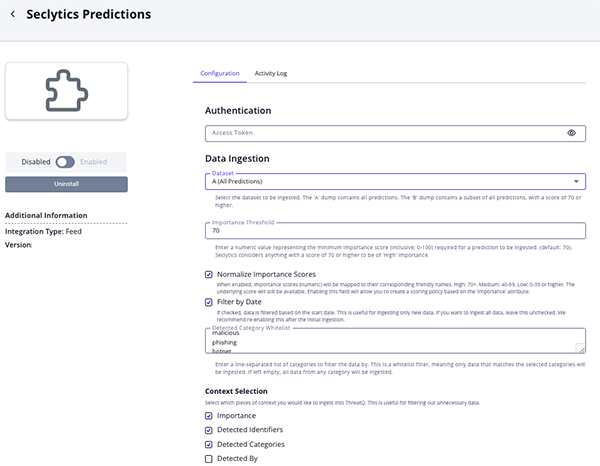
- Enter the following parameters under the Configuration tab:
Parameter Description Access Token Key Your Seclytics Access Token Key. Dataset Select the dataset to be ingested into ThreatQ. Options include: - A (default) - contains all predictions
- B - contains a subset of all predictions with a score of 70 or higher.
Importance Threshold Specify the minimum importance score required for a prediction to be ingested. This value must be a number between 0 and 100 (inclusive), with a default of 70.Seclytics classifies predictions with a score of 70 or higher as "High” importance.
Normalize Importance Scores Enable this parameter numeric importance scores mapped to their corresponding friendly names. Score range mapping is as follows: - High: scores 70+
- Medium: scores 40-69
- Low: scores 0-39
Enabling this parameter allows you to create a scoring policy based on the
Importanceattribute.Filter by Date Enable this parameter to filter data baed on the Start Date.Disable this parameter to ingest all available data. It is recommended to re-enable this parameter after the initial ingestion is complete.
Detected Categories Enter a line-separated list of categories to filter the data. This operates as a whitelist, meaning only data matching the specified categories will be ingested. If no categories are provided, all available data will be ingested. The default values are: malicious phishing botnet backscatter
Context Selection Select which pieces of context to ingest into ThreatQ. Options include: - Importance (default)
- Detected Identifiers (default)
- Detected Categories (default)
- Detected By
- Detected At
- Last Seen At (default)
- Predicted At
- Predicted netblock
- Predicted Category
- Review any additional settings, make any changes if needed, and click on Save.
- Click on the toggle switch, located above the Additional Information section, to enable it.
ThreatQ Mapping
Seclytics Predictions
The Seclytics Predictions feed retrieves and ingests all seen predicted IPs based on user filters.
GET https://api.seclytics.com/bulk/seen-predictions-dump-a.json.gz?access_token=<access_token>
Sample CSV Response:
ip,predicted_at,predicted_netblock,predicted_category,cluster,detected_by,detected_ident
ifiers,detected_categories,detected_at,last_seen_at,importance
102.140.192.0,2018-06-21T02:03:48,102.140.192.0/24,
spam,3caa3b5744f91251e7ec2b45ef2d6d892786935b,uceprotect_level2,,spam,2021-02-09T00:00:00,
2022-11-27T00:00:00,10102.140.192.1,2018-06-21T02:03:48,102.140.192.0/24,
spam,3caa3b5744f91251e7ec2b45ef2d6d892786935b,uceprotect_level2,,spam,2021-02-09T00:00:00,
2022-11-27T00:00:00,10
ThreatQuotient provides the following default mapping for this feed:
| Feed Data Path | ThreatQ Entity | ThreatQ Object Type or Attribute Key | Published Date | Examples | Notes |
|---|---|---|---|---|---|
| 0 (first token) | Indicator.Value | IP Address | N/A | 102.140.192.0 | N/A |
| 1 (second token) | Indicator.Attribute | Predicted At | N/A | 2018-06-21T02:03:48 | N/A |
| 2 (third token) | Indicator.Attribute | Predicted Netblock | N/A | 102.140.192.0/24 | N/A |
| 3 (fourth token) | Indicator.Attribute | Predicted Category | N/A | spam | N/A |
| 4 (fifth token) | Indicator.Attribute | Cluster | N/A | 3caa3b5744f91251e7ec2b45ef2d6d892786935b | N/A |
| 5 (sixth token) | Indicator.Attribute | Detected By | N/A | uceprotect_level2 | N/A |
| 6 (seventh token) | Indicator.Attribute | Detected Identifiers | N/A | N/A | N/A |
| 7 (eighth token) | Indicator.Attribute | Detected Categories | N/A | spam | N/A |
| 8 (ninth token) | Indicator.Attribute | Detected At | N/A | 2021-02-09T00:00:00 | N/A |
| 9 (tenth token) | Indicator.Attribute | Last Seen At | N/A | 2022-11-27T00:00:00 | N/A |
| 10 (eleventh token) | Indicator.Attribute | Importance | N/A | 10 | N/A |
| 10 (eleventh token) | Indicator.Attribute | Normalized Importance | N/A | High | N/A |
Average Feed Run
Object counts and Feed runtime are supplied as generalities only - objects returned by a provider can differ based on credential configurations and Feed runtime may vary based on system resources and load.
| Metric | Result |
|---|---|
| Run Time | 3 hours |
| Indicators | 6,543 |
| Indicator Attributes | 129,600 |
Change Log
- Version 1.1.0
- Added the following new configuration parameters:
- Dataset - users can now select the dataset to be ingested into ThreatQ.
- Importance Threshold - users can now specify a minimum numeric value that defines the importance score threshold required for a prediction to be ingested.
- Normalize Importance Score - enable mapping numeric scores to friendly names.
- Context Selection - users can now define which contextual data is ingested by the feed.
- Updated the Detected Category Whitelist parameter to allow the user to enter a line-separated list of categories.
- Added support for updating existing attributes (e.g., dates) within the feed instead of creating new instances.
- Updated the minimum ThreatQ version to 5.12.1.
- Added the following new configuration parameters:
- Version 1.0.0
- Initial release
PDF Guides
| Document | ThreatQ Version |
|---|---|
| Seclytics CDF Guide v1.1.0 | 5.12.1 or Greater |
| Seclytics CDF Guide v1.0.0 | 4.34 or Greater |