Resecurity CDF
The web format of this guide reflects the most current release. Guides for older iterations are available in PDF format.
Integration Details
ThreatQuotient provides the following details for this integration:
| Current Integration Version | 1.1.1 |
| Compatible with ThreatQ Versions | >= 5.29.0 |
| Support Tier | ThreatQ Supported |
Introduction
The Resecurity CDF integration allows analysts to automatically ingest threat intelligence data from Resecurity, ensuring timely and consistent access to the latest security insights for enhanced analysis and decision-making.
The integration provides the following feeds:
- Resecurity Threat Intelligence Botnets - ingests botnet data.
- Resecurity Threat Intelligence IOCs - ingests IOCs.
- Resecurity Threat Intelligence IPs - ingests IP Addresses.
- Resecurity Threat Intelligence Domains - ingests Domains.
- Resecurity Threat Intelligence Incidents - ingests Resecurity Incidents as ThreatQ Events.
- Resecurity Threat Intelligence DarkWeb - ingests DarkWeb Posts as ThreatQ Events.
- Resecurity Threat Intelligence Alerts - ingests alerts as ThreatQ Incidents.
- Resecurity Threat Intelligence Data Breaches - ingests data breaches as ThreatQ Reports
- Resecurity Threat Intelligence Cards - ingests threat intelligence about cards
The integrations ingests the following object types:
- Adversaries
- Compromised Cards (custom object)
- Events
- Incidents
- Indicators
- Malware
- Reports
Prerequisites
The following is required to run the integration and its feeds:
- A Resecurity API Key.
- The Compromised Card custom object installed on your ThreatQ instance.
Compromised Card Custom Object
The integration requires the Compromised Card custom object.
Use the steps provided to install the custom object.
When installing the custom objects, be aware that any in-progress feed runs will be cancelled, and the API will be in maintenance mode.
- Download the integration bundle from the ThreatQ Marketplace.
- Unzip the bundle and locate the custom object files.
The custom object files will typically consist of a JSON definition file, install.sh script, and a images folder containing the svg icons.
- SSH into your ThreatQ instance.
- Set your install pathway environment variable. This command will retrieve the install pathway from your configuration file and set it as variable for use during this installation process.
INSTALL_CONF="/etc/threatq/platform/install.conf"
if [ -f "$INSTALL_CONF" ]; then source "$INSTALL_CONF"
fi
MISC_DIR="${INSTALL_BASE_PATH:-/var/lib/threatq}/misc" - Navigate to the tmp folder using the environment variable:
cd $MISC_DIR
- Upload the custom object files, including the images folder.
The directory structure should resemble the following:
- install.sh
- <custom_object_name>.json
- images (directory)
- <custom_object_name>.svg
- Run the following command:
kubectl exec -it deployment/api-schedule-run -n threatq -- sh /var/lib/threatq/misc/install.sh /var/lib/threatq/misc
The installation script will automatically put the application into maintenance mode, move the files to their required directories, install the custom object, update permissions, bring the application out of maintenance mode, and restart dynamo.
- Delete the install.sh, definition json file, and images directory from step 6 after the object has been installed as these files are no longer needed.
Use the following steps to install the custom objects in ThreatQ v5:
- Download the integration zip file from the ThreatQ Marketplace and unzip its contents.
- SSH into your ThreatQ instance.
- Navigate to tmp directory:
cd /tmp/
- Create a new directory:
mkdir resecurity_cdf
- Upload the compromised_card.json and install.sh script into this new directory.
- Create a new directory called images within the resecurity_cdf directory.
mkdir images
- Upload the compromised_card.svg.
- Navigate to the /tmp/ignite_cdf.
The directory should resemble the following:
- tmp
- resecrurity_cdf
- compromised_card.json
- install.sh
- images
- compromised_card.svg
- resecrurity_cdf
- tmp
- Run the following command to ensure that you have the proper permissions to install the custom object:
chmod +x install.sh
- Run the following command:
sudo ./install.sh
You must be in the directory level that houses the install.sh and json files when running this command.
The installation script will automatically put the application into maintenance mode, move the files to their required directories, install the custom object, update permissions, bring the application out of maintenance mode, and restart dynamo.
- Remove the temporary directory, after the custom object has been installed, as the files are no longer needed:
rm -rf resecurity_cdf
Installation
The CDF requires the installation of the Compromised Card custom object before installing the actual CDF. See the Prerequisites chapter for more details. The custom object must be installed prior to installing the CDF. Attempting to install the CDF without the custom object will cause the CDF install process to fail.
Perform the following steps to install the integration:
The same steps can be used to upgrade the integration to a new version.
- Log into https://marketplace.threatq.com/.
- Locate and download the integration zip file.
- Extract the contents of the zip and install the required Compromised Card custom object.
- Navigate to the integrations management page on your ThreatQ instance.
- Click on the Add New Integration button.
- Upload the integration yaml file using one of the following methods:
- Drag and drop the file into the dialog box
- Select Click to Browse to locate the file on your local machine
- Select the individual feeds to install, when prompted, and click Install.
ThreatQ will inform you if the feed already exists on the platform and will require user confirmation before proceeding. ThreatQ will also inform you if the new version of the feed contains changes to the user configuration. The new user configurations will overwrite the existing ones for the feed and will require user confirmation before proceeding.
The feed(s) will be added to the integrations page. You will still need to configure and then enable the feed(s).
Configuration
ThreatQuotient does not issue API keys for third-party vendors. Contact the specific vendor to obtain API keys and other integration-related credentials.
To configure the integration:
- Navigate to your integrations management page in ThreatQ.
- Select the Commercial option from the Category dropdown (optional).
If you are installing the integration for the first time, it will be located under the Disabled tab.
- Click on the integration entry to open its details page.
- Enter the following parameters under the Configuration tab:
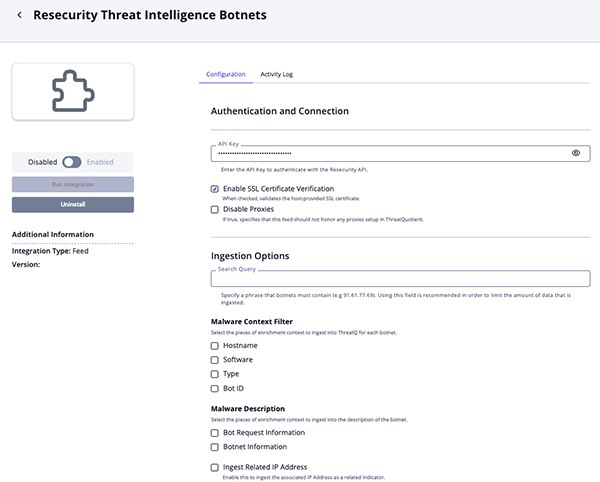
Intelligence Botnets Parameters
Parameter Description API Key Enter the API Key to authenticate with the Resecurity API. Enable SSL Certificate Verification Enable this parameter if the feed should validate the host-provided SSL certificate. Disable Proxies Enable this parameter if the feed should not honor proxies set in the ThreatQ UI. Search Query Specify a phrase that botnets must contain. The default value is: 91.61.77.69.It is recommended to use this parameter in order to limit the amount of data that is ingested.
Malware Context Filter Select the pieces of enrichment context to ingest into ThreatQ for each botnet. Options include: - Hostname (default)
- Software (default)
- Type (default)
- Bot ID
Malware Description Select the pieces of enrichment context to ingest into the description of the botnet. Options include: - Bot Request Information (default)
- Botnet Information
Ingest Related IP Address Enable this parameter to ingest the associated IP Address as a related Indicator. This parameter is enabled by default.
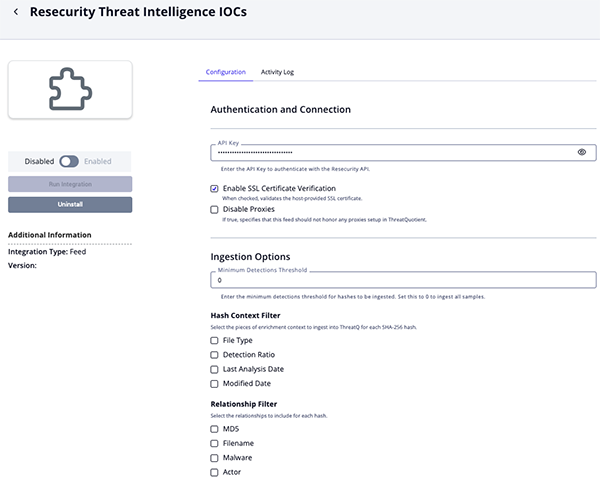
Threat Intelligence IOCs Parameters
Parameter Description API Key Enter the API Key to authenticate with the Resecurity API. Enable SSL Certificate Verification Enable this parameter if the feed should validate the host-provided SSL certificate. Disable Proxies Enable this parameter if the feed should not honor proxies set in the ThreatQ UI. Minimum Detections Threshold Enter the minimum detections threshold for hashes to be ingested. Set this parameter to 0, the default value, to ingest all samples.Hash Context Filter Select the pieces of enrichment context to ingest into ThreatQ for each SHA-256 hash. Options include: - File Type (default)
- Detection Ratio (default)
- Last Analysis Date
- Modified Date
Relationship Filter Select the relationships to include for each hash. Options include: - MD5 (default)
- Filename
- Malware
- Actor
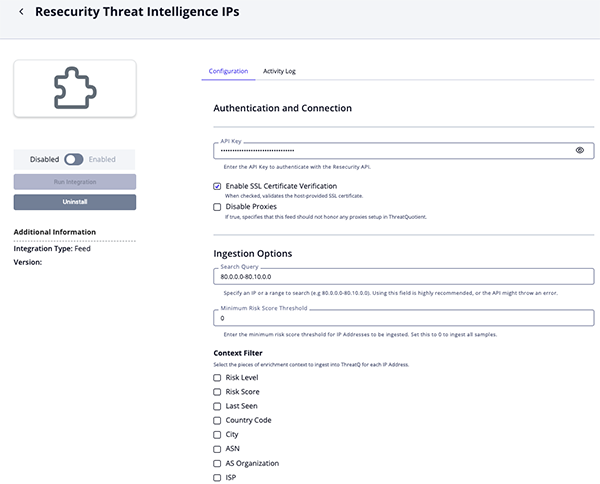
Threat Intelligence IPs Parameters
Parameter Description API Key Enter the API Key to authenticate with the Resecurity API. Enable SSL Certificate Verification Enable this parameter if the feed should validate the host-provided SSL certificate. Disable Proxies Enable this parameter if the feed should not honor proxies set in the ThreatQ UI. Search Query Specify an IP or a range to search. The default value is: 80.0.0.0-80.10.0.0.Utilizing this parameter is highly recommended to prevent the API from throwing an error.
Minimum Risk Score Threshold Enter the minimum risk score threshold for IP Addresses to be ingested. Set this parameter to 0, the default value, to ingest all samples.Context Filter Select the pieces of enrichment context to ingest into ThreatQ for each IP Address. Options include: - Risk Level (default)
- Risk Score (default)
- Last Seen (default)
- Country Code
- City
- ASN
- AS Organization
- ISP
Relationship Filter Select the relationships to include for each IP Address. Options include: - VPN Related Domains
- VPN Related IPs
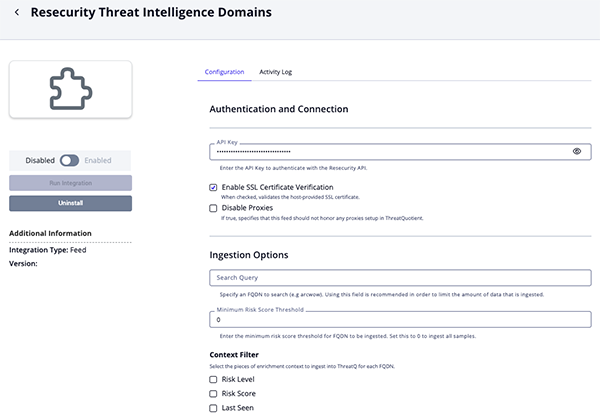
Threat Intelligence Domains Parameters
Parameter Description API Key Enter the API Key to authenticate with the Resecurity API. Enable SSL Certificate Verification Enable this parameter if the feed should validate the host-provided SSL certificate. Disable Proxies Enable this parameter if the feed should not honor proxies set in the ThreatQ UI. Search Query Specify an FQDN to search in order to limit the amount of data that is ingested. The default value is arcwow.Minimum Risk Score Threshold Enter the minimum risk score threshold for FQDN to be ingested. Set this parameter to 0, the default value, to ingest all samples.Context Filter Select the pieces of enrichment context to ingest into ThreatQ for each FQDN. Options include: - Risk Level (default)
- Risk Score (default)
- Last Seen (default)
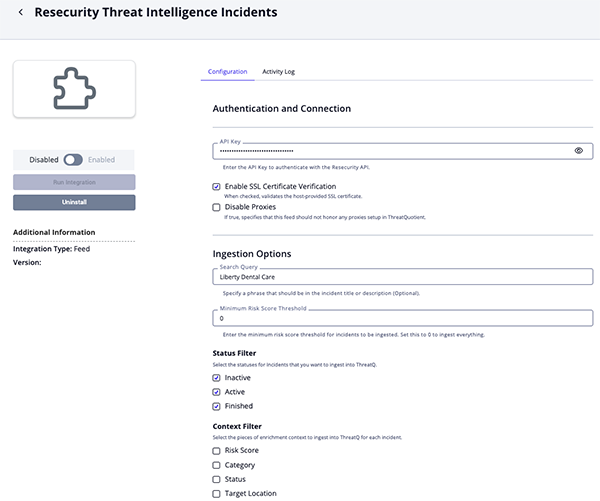
Threat Intelligence Incidents Parameters
Parameter Description API Key Enter the API Key to authenticate with the Resecurity API. Enable SSL Certificate Verification Enable this parameter if the feed should validate the host-provided SSL certificate. Disable Proxies Enable this parameter if the feed should not honor proxies set in the ThreatQ UI. Search Query Optional - Specify a phrase that should be in the incident title or description. Minimum Risk Score Threshold Enter the minimum risk score threshold for incidents to be ingested. Set this parameter to 0, the default value, to ingest everything.Status Filter Select the statuses for Incidents that you want to ingest into ThreatQ. Options include: - Inactive
- Active (default)
- Finished (default)
Context Filter Select the pieces of enrichment context to ingest into ThreatQ for each incident. Options include: - Risk Score (default)
- Category (default)
- Status (default)
- Target Location
- Target Industry
- Modified Date
Relationships Filter Select the relationships to include for each incident. Options include: - IOC Hashes
- Malicious Activity IPs
- Malicious Activity Domains
- Malicious Activity Emails
- Victim Information IPs
- Victim Information Domains
- Victim Information Emails
Threat Intelligence DarkWeb Parameters
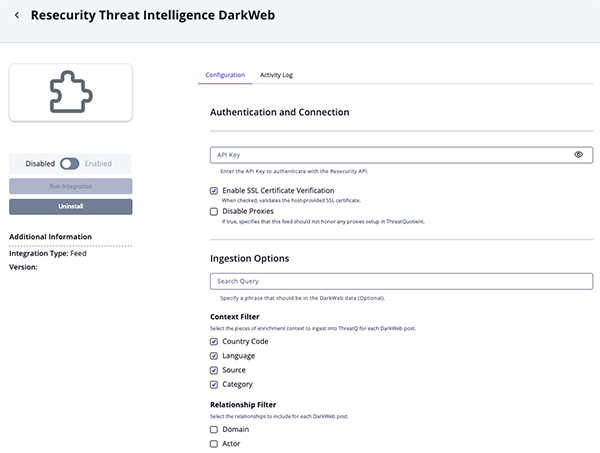
Parameter Description API Key Enter the API Key to authenticate with the Resecurity API. Enable SSL Certificate Verification Enable this parameter if the feed should validate the host-provided SSL certificate. Disable Proxies Enable this parameter if the feed should not honor proxies set in the ThreatQ UI. Search Query Optional - Specify a phrase that should be in the DarkWeb data. Context Filter Select the pieces of enrichment context to ingest into ThreatQ for each incident. Options include: - Country Code (default)
- Language (default)
- Source (default)
- Category (default)
Relationship Filter Select the relationships to include for each DarkWeb post. Options include: - Domain
- Actor
Threat Intelligence Alerts Parameters
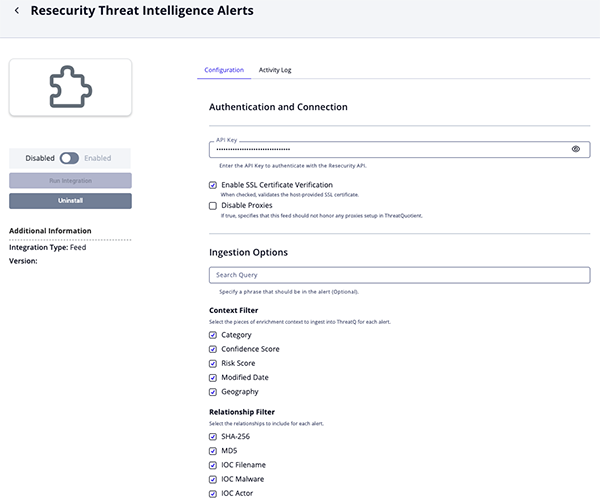
Parameter Description API Key Enter the API Key to authenticate with the Resecurity API. Enable SSL Certificate Verification Enable this parameter if the feed should validate the host-provided SSL certificate. Disable Proxies Enable this parameter if the feed should not honor proxies set in the ThreatQ UI. Security Query Optional - Specify a phrase that should be in the alert. Context Filter Select the pieces of enrichment context to ingest into ThreatQ for each alert. Options include: - Category (default)
- Confidence Score (default)
- Risk Score (default)
- Modified Date
- Geography
Relationship Filter Select the relationships to include for each alert. Options include: - SHA-256 (default)
- MD5
- IOC Filename
- IOC Malware
- IOC Actor
- TTP Filename
Hash Context Filter Select the pieces of enrichment context to ingest into ThreatQ for each SHA-256 hash. Options include: - File Type (default)
- Detection Ratio (default)
- Last Analysis Date
- Modified Date
Threat Intelligence Data Breaches Parameters
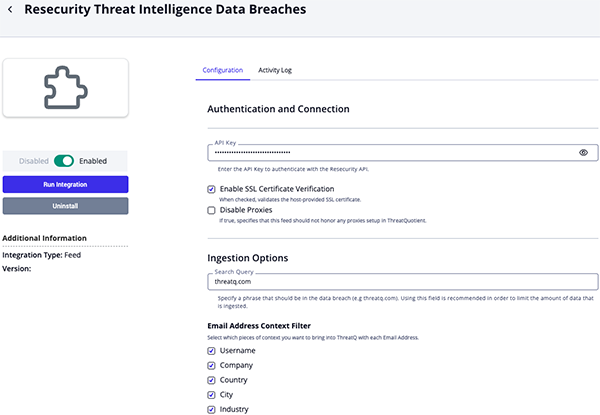
Parameter Description API Key Enter the API Key to authenticate with the Resecurity API. Enable SSL Certificate Verification Enable this parameter if the feed should validate the host-provided SSL certificate. Disable Proxies Enable this parameter if the feed should not honor proxies set in the ThreatQ UI. Search Query Specify a phrase that must appear in the data breach content (for example, threatq.com) to limit the amount of data ingested. ThreatQuotient highly recommends utilizing this parameter as the feed can ingest ingest large amounts of data. Email Address Context Filter Select which pieces of context to bring into ThreatQ with each Email Address. Options include: - Username (default)
- Company (default)
- Country (default)
- City
- Industry
- Job Title
Breach Report Context Filter Select which pieces of context to bring into ThreatQ with each Breach Report. Options include: - Compromised Data (default)
- Geography (default)
- Accounts (default)
- Score (default)
Threat Intelligence Cards Parameters
Parameter Description API Key Enter the API Key to authenticate with the Resecurity API. Enable SSL Certificate Verification Enable this parameter if the feed should validate the host-provided SSL certificate. Disable Proxies Enable this parameter if the feed should not honor proxies set in the ThreatQ UI. Search Query Specify a phrase that must appear in the record, such as a card number, BIN, or free text. ThreatQuotient highly recommends utilizing this parameter as the feed can ingest ingest large amounts of data. Bank Identification Number Enter a 6-digit bank identifier to filter incoming card data. Card Context Filter Select the pieces of enrichment context to ingest into ThreatQ for each card. Options include: - Expiration (default)
- CVV (default)
- Type (default)
- Bank Name (default)
- BIN (default)
- Owner Full Name (default)
- Owner Country (default)
- Owner Address
- Category
- Source
Relationship Filter Select the relationships to include for each card. Options include: - Bot IP Address (default)
- Bot Email Address
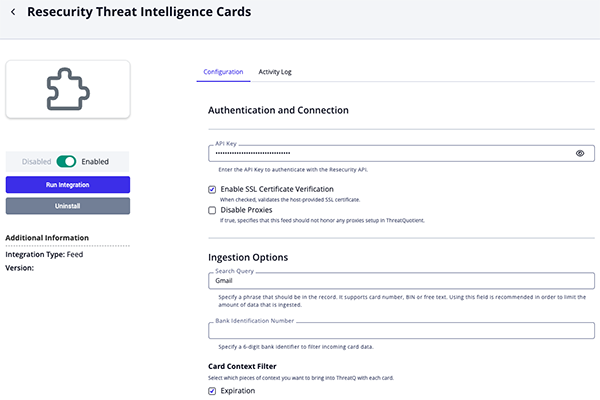
- Review any additional settings, make any changes if needed, and click on Save.
- Click on the toggle switch, located above the Additional Information section, to enable it.
ThreatQ Mapping
Resecurity Threat Intelligence Botnets
The Resecurity Threat Intelligence Botnets feed periodically pulls botnets from Resecurity. The API does not allow to filter by date, but the entries are sorted chronologically. New pages are requested as long as .time of the last returned entry is greater than feed run start date.
The value of the user configuration Search Query is search in the fields .ip, .bot_info, .info.
GET https://app.resecurity.com/api/botnets/index
Request Parameters:
{
  "query": "91.61.77.69",
  "per-page": 50,
  "page": 1
}
Sample Response:
[
  {
    "id": 59967949,
    "ip": "91.61.77.69",
    "type": 1001,
    "bot": "4659ca3b-14cbd1a1-c904d3f3-27ad901f-16de201d",
    "bot_info": "E\r\nMachineID :   4659CA3B-14CBD1A1-C904D3F3-27AD901F-16DE201D\r\nEXE_PATH  :   C:\\Users\\KRASSE~1\\AppData\\Local\\Temp\\J4HakZ4P0isdStK9\\1b009389e9705c143c4f88885cccc0d9.exe\r\n\r\nWindows",
    "botnet": "logs13092019/azorult",
    "hostname": "KRASSER(krasser88)",
    "time": 1567724685,
    "info": "host: https://webmail.o2mail.de\r\nuser: danieltismer@o2.de\r\npass: ascheberg88",
    "software": "MozillaFirefox"
  }
]
ThreatQuotient provides the following default mapping for this feed:
| Feed Data Path | ThreatQ Entity | ThreatQ Object Type or Attribute Key | Published Date | Examples | Notes |
|---|---|---|---|---|---|
.botnet |
Malware.Value | Malware | .time |
logs13092019/azorult |
N/A |
.info |
Malware.Description | N/A | N/A | host: https://webmail.o2mail.de... |
If Bot Request Information enabled in Malware Description. |
.bot_info |
Malware.Description | N/A | N/A | E\r\nMachineID : 4659CA3B-14CBD1A1... |
If Bot Information enabled in Malware Description. |
.bot |
Malware.Attribute | Bot ID | .time |
4659ca3b-14cbd1a1-c904d3f3-27ad901f-16de201d |
User-configurable. |
.hostname |
Malware.Attribute | Hostname | .time |
KRASSER(krasser88) |
User-configurable. |
.software |
Malware.Attribute | Software | .time |
MozillaFirefox |
User-configurable. |
.type |
Malware.Attribute | Type | .time |
Password |
User-configurable. Updatable. Mapped according to Resecurity Botnet Type Mapping. |
.ip |
Related Indicator | IP Address | .time |
91.61.77.69 |
If Ingest Related IP Address enabled. |
Resecurity Botnet Type Mapping
Resecurity Botnet type to ThreatQ attribute mapping is as follows:
| Resecurity Botnet Type | ThreatQ Attribute |
|---|---|
| 0 | Unknown |
| 1 | Cookies |
| 2 | File |
| 3 | Web Inject |
| 11 | HTTP request |
| 12 | HTTPS request |
| 13 | Luhn 10 request |
| 100 | Login FTP |
| 101 | Login POP3 |
| 102 | File search |
| 103 | Keylogger |
| 104 | Device |
| 200 | Grabbed UI |
| 201 | Grabbed HTTP |
| 202 | Grabbed wsocket |
| 203 | Grabbed FTP software |
| 204 | Grabbed emailsoftware |
| 205 | Grabbed web form |
| 299 | Grabbed other |
| 300 | Commandline result |
| 400 | Analytics software |
| 401 | Analytics firewall |
| 402 | Analytics antivirus |
| 500 | Ports |
| 1000 | Megapackage |
| 1001 | Password |
| 1002 | Browser autocomplete |
| 1003 | Credit card |
| 1004 | Browser downloads |
| 1005 | Browser history |
Resecurity Threat Intelligence IOCs
The Resecurity Threat Intelligence IOCs feed periodically pulls IOCs from Resecurity. The API does not allow to filter by date, but the entries are sorted chronologically. New pages are requested as long as .update_date of the last returned entry is greater than feed run start date.
The number of detections is parsed from .detection_ratio (the value before /). The parsed value is compared to the Minimum Detections Threshold user configuration. If the value is lower than the entry is discarded.
GET https://app.resecurity.com/api/ioc/index
Sample Response:
[
  {
    "id": 33379825,
    "sha256": "dba860617762bc713771de351026eb683546b37489fa0359064948f263438030",
    "md5": "e5eb524308a58190d9feb2244d187eb8",
    "malware_name": "HEUR:Exploit.MSOffice.Agent.n",
    "file_name": "1021E2EC.htm",
    "file_type": "HTML",
    "detection_ratio": "32 / 62",
    "analysis_date": 1758738336,
    "add_date": 1758744973,
    "update_date": 1758745218,
    "actor_name": "Actor1",
    "item_url": "https://app.resecurity.com/ioc?IocSearch[id]=33379825"
  }
]
ThreatQuotient provides the following default mapping for this feed:
| Feed Data Path | ThreatQ Entity | ThreatQ Object Type or Attribute Key | Published Date | Examples | Notes |
|---|---|---|---|---|---|
.sha256 |
Indicator.Value | SHA-256 | .add_date |
dba860617762bc713771de351026e... |
N/A |
.item_url |
Indicator.Description | N/A | N/A | Resecurity Link | Formated using HTML <a> tag. |
.file_type |
Indicator.Attribute | File Type | .add_date |
HTML |
User-configurable. |
.detection_ratio |
Indicator.Attribute | Detection Ratio | .add_date |
32 / 62 |
User-configurable. Updatable. |
.analysis_date |
Indicator.Attribute | Last Analysis Date | .add_date |
2025-09-24 18:25:36+00:00 |
User-configurable. Updatable. Formated to human-readable date. |
.update_date |
Indicator.Attribute | Modified Date | .add_date |
2025-09-24 20:20:18+00:00 |
User-configurable. Updatable. Formated to human-readable date. |
.malware_name |
Related Malware.Value | Malware | .add_date |
HEUR:Exploit.MSOffice.Agent.n |
User-configurable. |
.file_name |
Related Indicator.Value | Filename | .add_date |
1021E2EC.htm |
User-configurable. |
.md5 |
Related Indicator.Value | MD5 | .add_date |
e5eb524308a58190d9feb2244d187eb8 |
User-configurable. |
.actor_name |
Related Adversary.Name | Adversary | .add_date |
Actor1 |
User-configurable. |
Resecurity Threat Intelligence IPs
The Resecurity Threat Intelligence IPs feed periodically pulls IP Addresses from Resecurity. The API does not allow to filter by date, but the entries are sorted chronologically. New pages are requested as long as .last_seen_date of the last returned entry is greater than feed run start date.
GET https://app.resecurity.com/api/ip/index
Request Parameters:
{
  "query": "46.166.165.98/28",
  "per-page": 20,
  "page": 1
}
Sample Response:
[
  {
    "id": 121332481,
    "ip": "46.166.165.101",
    "first_seen_date": 1509731402,
    "last_seen_date": 1759234202,
    "risk_score": 25,
    "flags": [
      2,
      8
    ],
    "highRiskLevelReason": "IP is not high-risk",
    "risk_level": 0,
    "location": {
      "country": "lt",
      "as_number": 16125,
      "as_org": "UAB Cherry Servers",
      "city": "Jonava",
      "isp": "UAB Cherry Servers"
    },
    "malicious_activity": [
      {
        "feed": {
          "id": 27,
          "source": "IP2Location (Proxy)",
          "last_sync": 1510580872
        },
        "malware": {
          "id": 1877,
          "name": "Data Center or Hosting",
          "description": null,
          "alias": [
            "data center or hosting"
          ]
        },
        "last_seen_date": 1510223401
      }
    ],
    "vpn_related_domains": [
      "vpn.blackvpn.lt"
    ],
    "vpn_related_ips": [
      "162.219.178.234",
      "5.254.125.106"
    ],
    "references": {
      "total_count": 1,
      "modules": [
        {
          "module_title": "Detections",
          "module_id": 1,
          "total_count": 1,
          "module_search_url": "https://app.resecurity.com/search/index?PostSearch[query]=46.166.165.101",
          "results": [
            {
              "id": 696371067,
              "date": "9 years ago",
              "snippet": " ... :23 INFO [net] From: 2b8c4dba | 46.166.165.101/46.166.165.101:30303 Recv: [DISCONNECT reason=TOO_MANY_PEERS ... "
            }
          ]
        }
      ]
    }
  }
]
ThreatQuotient provides the following default mapping for this feed:
| Feed Data Path | ThreatQ Entity | ThreatQ Object Type or Attribute Key | Published Date | Examples | Notes |
|---|---|---|---|---|---|
.ip |
Indicator.Value | IP Address | .first_seen_date |
46.166.165.101 |
N/A |
.risk_score |
Indicator.Attribute | Risk Score | .first_seen_date |
25 |
User-configurable. Updatable. |
.risk_level |
Indicator.Attribute | Risk Level | .first_seen_date |
0 |
User-configurable. Updatable. |
.last_seen_date |
Indicator.Attribute | Last Seen | .first_seen_date |
2025-09-24 18:25:36+00:00 |
User-configurable. Updatable. Formated to human-readable date. |
.location.country |
Indicator.Attribute | Country Code | .first_seen_date |
LT |
User-configurable. Uppercase. |
.location.city |
Indicator.Attribute | City | .first_seen_date |
Jonava |
User-configurable. |
.location.as_number |
Indicator.Attribute | ASN | .first_seen_date |
16125 |
User-configurable. |
.location.as_org |
Indicator.Attribute | AS Organization | .first_seen_date |
UAB Cherry Servers |
User-configurable. |
.location.ips |
Indicator.Attribute | ISP | .first_seen_date |
UAB Cherry Servers |
User-configurable. |
.vpn_related_domains |
Related Indicator | FQDN | .first_seen_date |
vpn.blackvpn.lt |
User-configurable. |
.vpn_related_ips |
Related Indicator | IP Address | .first_seen_date |
162.219.178.234 |
User-configurable. |
The following paths are added to the indicator's description:
.highRiskLevelReasonmalicious_activity[].feed.sourcemalicious_activity[].malware.alias[]malicious_activity[].last_seen_datereferences.total_countreferences.modules[].module_titlereferences.modules[].total_countreferences.modules[].module_search_url
Resecurity Threat Intelligence Domains
The Resecurity Threat Intelligence Domains feed periodically pulls FQDNs from Resecurity. The API does not allow to filter by date, but the entries are sorted chronologically. New pages are requested as long as .last_seen_date of the last returned entry is greater than feed run start date.
GET https://app.resecurity.com/api/domain/index
Request Parameters:
{
  "query": "we*",
  "per-page": 20,
  "page": 1
}
Sample Response:
[
  {
    "id": 35196838,
    "domain": "we11point.com",
    "first_seen_date": 1447880834,
    "last_seen_date": 1757878382,
    "risk_score": 25,
    "flags": [
      1
    ],
    "whois_status": 1,
    "dns_status": 1,
    "highRiskLevelReason": "Domain is not high-risk",
    "risk_level": 0,
    "references": {
      "total_count": 9,
      "modules": [
        {
          "module_title": "Detections",
          "module_id": 1,
          "total_count": 9,
          "module_search_url": "https://app.resecurity.com/search/index?PostSearch[query]=we11point.com",
          "results": [
            {
              "id": 726708347,
              "date": "8 years ago",
              "snippet": " hhh u4wz2KL4 Airelle-hrsk.txt ! Title: Airelle-hrsk.txt ! Liste anti-risk bloquant l'accès à 51886 sites à possible contenu dangereux ! © Airelle — http://rlwpx.free.fr/WPFF/hosts.htm — 05.03.2017 ! Diffusion et utilisation libres sous réserve de  ... "
            },
            {
              "id": 703196895,
              "date": "9 years ago",
              "snippet": " ...  https://www.passivetotal.org/passive/we11point.com https://www.passivetotal.org/passive ... "
            },
            {
              "id": 148761890,
              "date": "10 years ago",
              "snippet": " ...  мошенники использовали поддельное доменное имя we11point.com (ранее бренд WellPoint использовался компанией ...  used the counterfeit domain name we11point.com (earlier the brand of WellPoint ... "
            },
            {
              "id": 43214536,
              "date": "10 years ago",
              "snippet": " ...  мошенники использовали поддельное доменное имя we11point.com (ранее бренд WellPoint использовался компанией ... "
            },
            {
              "id": 54501490,
              "date": "10 years ago",
              "snippet": " ...  мошенники использовали поддельное доменное имя we11point.com (ранее бренд WellPoint использовался компанией ...  used the counterfeit domain name we11point.com (earlier the brand of WellPoint ... "
            }
          ]
        }
      ]
    }
  }
]
ThreatQuotient provides the following default mapping for this feed:
| Feed Data Path | ThreatQ Entity | ThreatQ Object Type or Attribute Key | Published Date | Examples | Notes |
|---|---|---|---|---|---|
.domain |
Indicator.Value | FQDN | .first_seen_date |
we11point.com |
N/A |
.risk_score |
Indicator.Attribute | Risk Score | .first_seen_date |
25 |
User-configurable. Updatable. |
.risk_level |
Indicator.Attribute | Risk Level | .first_seen_date |
0 |
User-configurable. Updatable. |
.last_seen_date |
Indicator.Attribute | Last Seen | .first_seen_date |
2025-09-24 18:25:36+00:00 |
User-configurable. Updatable. Formated to human-readable date. |
The following paths are added to the indicator's description:
.highRiskLevelReasonreferences.total_countreferences.modules[].module_titlereferences.modules[].total_countreferences.modules[].module_search_url
Resecurity Threat Intelligence Incidents
The Resecurity Threat Intelligence Incidents feed periodically pulls Incidents from Resecurity and ingests them as ThreatQ Events. Incident filtering is available by date, but it's day-specific—the API disregards the hours, minutes, and seconds.
GET https://app.resecurity.com/api/incident/index
Request Parameters:
{
  "query": "SQL",
  "per-page": 20,
  "page": 1,
  "date_from": "2025-07-20",
  "date_to": "2025-07-21"
}
Sample Response:
[
  {
    "id": 263488,
    "date": "2025-08-20",
    "name": "Advanced Blending Solutions",
    "description": "Advanced Blending Solutions is a leading designer, manufacturer, and supplier of blending and ...",
    "confidence_score": null,
    "tlp": 0,
    "risk_score": 50,
    "target_geo": [
      "British Indian Ocean Territory",
      "India"
    ],
    "target_industries": [
      "Finance"
    ],
    "references": [
      "https://www.cyfirma.com/research/finstealer/"
    ],
    "tags": [
      "phishing",
      "c2 servers"
    ],
    "status": 1,
    "created_at": 1755706673,
    "updated_at": 1755706673,
    "categories": [
      {
        "id": 5,
        "name": "Ransomware"
      }
    ],
    "ioc_hashes": [
      {
        "id": 10254851,
        "hash": "9d0460f69ed87ee3580c51c4b7c7ed1d",
        "type": 0,
        "created_at": 1739794841
      }
    ],
    "malicious_activity_ips": [
      {
        "id": 1106476,
        "ip": "92.113.19.132",
        "created_at": 1739794841,
        "type": 2
      }
    ],
    "malicious_activity_domains": [
      {
        "id": 523163,
        "name": "mysql-auth.pl",
        "type": 6,
        "created_at": 1580221624
      }
    ],
    "malicious_activity_emails": [
      {
        "id": 19798,
        "email": "mobile.mailer1@proton.me",
        "created_at": 1759227353
      }
    ],
    "victim_information_ips": [
      {
        "id": 234639,
        "ip": "193.151.29.21",
        "created_at": 1528529256,
        "type": 2
      }
    ],
    "victim_information_domains": [
      {
        "id": 467043,
        "name": "www.suffolk.gov.uk",
        "type": 7,
        "created_at": 1553277977
      }
    ],
    "victim_information_emails": [
      {
        "id": 19798,
        "email": "john.doe@proton.me",
        "created_at": 1759227353
      }
    ]
  }
]
ThreatQuotient provides the following default mapping for this feed:
| Feed Data Path | ThreatQ Entity | ThreatQ Object Type or Attribute Key | Published Date | Examples | Notes |
|---|---|---|---|---|---|
.name |
Event.Title | Incident | .created_at |
Advanced Blending Solutions |
N/A |
.tags |
Event.Tags | N/A | N/A | phishing |
N/A |
.tlp |
Event.TLP | N/A | N/A | WHITE |
See Incident TLP Mapping |
.risk_score |
Event.Attribute | Risk Score | .created_at |
25 |
User-configurable. Updatable. |
.updated_at |
Event.Attribute | Modified Date | .created_at |
2025-09-24 18:25:36+00:00 |
User-configurable. Updatable. Formated to human-readable date. |
.target_geo |
Event.Attribute | Target Location | .created_at |
India |
User-configurable. |
.target_industries |
Event.Attribute | Target Industry | .created_at |
Finance |
User-configurable. |
.categories[].name |
Event.Attribute | Category | .created_at |
Ransomware |
User-configurable. |
.status |
Event.Attribute | Status | .created_at |
Active |
User-configurable. Updatable. See Incident Status Mapping |
.ioc_hashes[].hash |
Related Indicator.Value | MD5/SHA-1/SHA-256/sha-384/SHA-512 | .ioc_hashes[].created_at |
9d0460f69ed87ee3580c51c4b7c7ed1d |
User-configurable. Type computed based on length. |
.malicious_activity_ips[].ip |
Related Indicator.Value | IP Address/IPv6 Address | .malicious_activity_ips[].created_at |
92.113.19.132 |
User-configurable. Type computed based on format. |
.victim_information_ips[].ip |
Related Indicator.Value | IP Address/IPv6 Address | .victim_information_ips[].created_at |
193.151.29.21 |
User-configurable. Type computed based on format. |
.malicious_activity_domains[].name |
Related Indicator.Value | FQDN | .malicious_activity_domains[].created_at |
mysql-auth.pl |
User-configurable. |
.victim_information_domains[].name |
Related Indicator.Value | FQDN | .malicious_activity_domains[].created_at |
www.suffolk.gov.uk |
User-configurable. |
.malicious_activity_emails[].email |
Related Indicator.Value | Email Address | .malicious_activity_emails[].created_at |
mobile.mailer1@proton.me |
User-configurable. |
.victim_information_emails[].email |
Related Indicator.Value | Email Address | .victim_information_emails[].created_at |
john.doe@proton.me |
User-configurable. |
The following paths are added to the event's description:
.descriptionreferences
Incident TLP Mapping
| Resecurity TLP | ThreatQ TLP |
|---|---|
| 0 | WHITE |
| 1 | GREEN |
| 2 | AMBER |
| 3 | RED |
Incident Status Mapping
| Resecurity Status | ThreatQ Status Attribute |
|---|---|
| 0 | Inactive |
| 1 | Active |
| 2 | Finished |
Resecurity Threat Intelligence DarkWeb
The Resecurity Threat Intelligence DarkWeb feed periodically pulls DarkWeb posts from Resecurity and ingests them as ThreatQ events. The API does not allow to filter by date, but the entries are sorted chronologically. New pages are requested as long as .timestamp of the last returned entry is greater than feed run start date.
The value of the user configuration Search Query is search in the fields .post and .resource_name.
GET https://app.resecurity.com/api/dark-web/index
Request Parameters:
{
  "query": "voodoo",
  "per-page": 20,
  "page": 1
}
Sample Response:
[
  {
    "id": 2187714561,
    "snippet": "...  {Burnin' Sky} 1977 57. b>Voodoo/b> ( Queen) {The Cosmos Rocks} ...  | 10,25 MB | 57. b>Voodoo/b> ... ",
    "resource_name": "bestblackhatforum.com",
    "url": "https://bestblackhatforum.com/Thread-Get-EaseUS-Video-Editor-Lifetime-License-79-95?page=48",
    "country": "us",
    "language": "en",
    "actor": "Burnly",
    "title": "[Get] EaseUS Video Editor - Lifetime License $79.95",
    "post": "Thanks for sharing",
    "timestamp": 1759400160,
    "source": "Dark Web",
    "category": "Cybercrime"
  }
]
ThreatQuotient provides the following default mapping for this feed:
| Feed Data Path | ThreatQ Entity | ThreatQ Object Type or Attribute Key | Published Date | Examples | Notes |
|---|---|---|---|---|---|
.title |
Event.Title | Sighting | .timestamp |
DarkWeb Post: [Get] EaseUS Video Editor - Lifetime License $79.95 |
Prepended with DarkWeb Post: |
.country |
Event.Attribute | Country Code | .timestamp |
US |
User-configurable. Uppercase. |
.language |
Event.Attribute | Language | .timestamp |
en |
User-configurable. |
.source |
Event.Attribute | Source | .timestamp |
Dark Web |
User-configurable. |
.category |
Event.Attribute | Category | .timestamp |
Cybercrime |
User-configurable. |
.resource_name |
Related Indicator.Value | FQDN | .timestamp |
bestblackhatforum.com |
User-configurable. |
.actor |
Related Adversary.Name | Adversary | .timestamp |
Burnly |
User-configurable. |
The following paths are added to the indicator's description:
.snippet.resource_name.url.country.language.actor.post.timestamp
Resecurity Threat Intelligence Alerts
The Resecurity Threat Intelligence Alerts feed periodically pulls alerts from Resecurity and ingests them as ThreatQ Incidents. A query can be used to limit the amount of data that is ingested. This endpoint does not offer support for filtering by date.
GET https://app.resecurity.com/api/alert/index
Request Parameters:
{
  "query": "yandex.ru",
  "per-page": 20,
  "page": 1
}
Sample Response:
[
  {
    "category": {
      "id": 15,
      "name": "Threat Actor"
    },
    "confidence_score": 1,
    "content": "p>There was identified underground shop in TOR network, selling compromised credit cards. /p>",
    "for_splunk": {
      "email": "john@yahoo.com",
      "ip": "1.1.1.1"
    },
    "geography": [
      "al",
      "dz"
    ],
    "id": 123,
    "ioc": {
      "actor_name": "Actor11",
      "add_date": 1495442554,
      "analysis_date": 1495443267,
      "detection_ratio": "52 / 58",
      "file_name": "WannaCry.infected",
      "file_type": "Win32 EXE",
      "id": 6811735,
      "item_url": "https://app.resecurity.com/ioc?IocSearch[id]=6811735",
      "malware_name": "Trojan-Ransom.Win32.Wanna.b",
      "md5": "84c82835a5d21bbcf75a61706d8ab549",
      "sha256": "ed01ebfbc9eb5bbea545af4d01bf5f1071661840480439c6e5babe8e080e41aa",
      "update_date": 1495444010
    },
    "risk_score": 25,
    "subject": "Jocker/Stash Underground Shop (~300 CNB Credit Cards)",
    "tags": "tag1,tag2,tag3",
    "threat_actors": "Actor1,Actor2,Actor3",
    "tlp_status": "Red",
    "updated_at": "1506790365",
    "ttp": [
      {
        "name": "Apache - Arbitrary Long HTTP Headers Denial of Service ©",
        "id": 345,
        "exploit_type": "dos",
        "exploit_source_code": "code",
        "exploit_port": 80,
        "exploit_platform": "windows",
        "exploit_file": "platforms/linux/dos/371.c",
        "exploit_date": "2004-08-02T00:00:00.000+0000",
        "exploit_actor": "anonymous",
        "description": "Apache - Arbitrary Long HTTP Headers Denial of Service ©span class=\"table__detail\">linux, dos, 0/span>",
        "category": "Exploit"
      }
    ]
  }
]
ThreatQuotient provides the following default mapping for this feed:
| Feed Data Path | ThreatQ Entity | ThreatQ Object Type or Attribute Key | Published Date | Examples | Notes |
|---|---|---|---|---|---|
.subject |
Incident.Value | Incident | N/A | Alert: Jocker/Stash Underground Shop ... |
Prepended with Alert: |
.tags |
Incident.Tags | N/A | N/A | tags1 |
N/A |
.tlp_status |
Incident.TLP | N/A | N/A | RED |
N/A |
.category.name |
Incident.Attribute | Category | N/A | Threat Actor |
User-configurable. |
.confidence_score |
Incident.Attribute | Confidence Score | N/A | 1 |
User-configurable. Updatable. |
.risk_score |
Incident.Attribute | Risk Score | N/A | 25 |
User-configurable. Updatable. |
.updated_at |
Incident.Attribute | Modified Date | N/A | 2025-09-24 20:20:18+00:00 |
User-configurable. Updatable. Formated to human-readable date. |
.geography |
Incident.Attribute | Geography | N/A | al |
User-configurable. |
.ttp[].exploit_file |
Related Indicator.Value | File Path | .ttp[].exploit_date |
platforms/linux/dos/371.c |
User-configurable. |
.ttp[].description |
Related Indicator.Description | N/A | N/A | Apache - Arbitrary Long HTTP ... |
Description for File Path. |
.ttp[].exploit_platform |
Related Indicator.Attribute | Platform | .ttp[].exploit_date |
windows |
Attribute for File Path. |
.ttp[].exploit_type |
Related Indicator.Attribute | Type | .ttp[].exploit_date |
dos |
Attribute for File Path. |
.ioc.actor_name |
Related Adversary.Name | Adversary | N/A | Actor11 |
User-configurable. |
.ioc.malware_name |
Related Malware.Value | Malware | N/A | Trojan-Ransom.Win32.Wanna.b |
User-configurable. |
.ioc.sha256 |
Related Indicator.Value | SHA-256 | .ioc.add_date |
ed01ebfbc9eb5bbea545af4d01bf5f10... |
User-configurable. |
.ioc.item_url |
Related Indicator.Description | N/A | N/A | Resecurity Link |
Formated using HTML <a> tag. Description of SHA-256. |
.ioc.file_type |
Related Indicator.Attribute | File Type | .ioc.add_date |
Win32 EXE |
User-configurable. Attribute for SHA-256. |
.ioc.detection_ratio |
Related Indicator.Attribute | Detection Ratio | .ioc.add_date |
52 / 58 |
User-configurable. Updatable. Attribute for SHA-256. |
.ioc.analysis_date |
Related Indicator.Attribute | Last Analysis Date | .ioc.add_date |
2025-09-24 18:25:36+00:00 |
User-configurable. Updatable. Formated to human-readable date. Attribute for SHA-256. |
.ioc.update_date |
Related Indicator.Attribute | Modified Date | .ioc.add_date |
2025-09-24 20:20:18+00:00 |
User-configurable. Updatable. Formated to human-readable date. Attribute for SHA-256. |
.ioc.file_name |
Related Indicator.Value | Filename | .ioc.add_date |
WannaCry.infected |
User-configurable. |
.ioc.md5 |
Related Indicator.Value | MD5 | .ioc.add_date |
W84c82835a5d21bbcf75a61706d8ab549 |
User-configurable. |
The following paths are added to the report's description:
.category.name.confidence_score.geography.updated_at.content
Resecurity Threat Intelligence Data Breaches
The Resecurity Threat Intelligence Data Breaches feed retrieves data breach information from Resecurity and ingests it into ThreatQ as Report objects, along with associated email addresses. To control data volume, it is strongly recommended to apply a query to limit the scope of ingestion.
This endpoint does not support date-based filtering.
GET https://app.resecurity.com/api/breaches/index
Sample Request Parameters:
{
  "query": "threatq.com",
  "per-page": 20,
  "page": 1
}
Sample Response:
[
  {
    "email": "michel.huffaker@threatq.com",
    "id": 19643651173,
    "info": {
      "address1": "11400 COMMERCE PARK DR SUITE 200",
      "address2": "",
      "city": "RESTON",
      "company_name": "THREATQUOTIENT",
      "company_revenue": "$10-49 Million",
      "company_size": "100-249",
      "company_size_integer": "",
      "company_url": "THREATQ.COM",
      "country": "US",
      "data_file": "PAMPANGA.TALDISCOVERY.US.10.11.19",
      "data_source": "Pampanga",
      "dex_title": "",
      "direct_dial": "",
      "direct_dial_ext": "",
      "ext": "",
      "first_name": "MICHEL",
      "hg_customer_id": "0",
      "hq_address": "",
      "hq_city": "",
      "hq_company_name": "",
      "hq_country": "",
      "hq_phone": "",
      "hq_state": "",
      "hq_zip": "",
      "id": "69767803",
      "industry": "Software, Internet and Technology",
      "job_area": "General Management",
      "job_function": "General Management",
      "job_level": "Director Level",
      "job_title": "DIRECTOR THREAT INTELLIGENCE",
      "last_name": "HUFFAKER",
      "member_id": "",
      "ml_title": "Senior Management (SVP/GM/Director)",
      "phone": "7035749885",
      "sic_primary": "7371",
      "sic_secondary": "",
      "silo": "Business",
      "state": "VA",
      "zip": "20191"
    },
    "ip": "",
    "password": null,
    "password_hash": null,
    "salt": null,
    "source": {
      "accounts": 121877048,
      "actor_name": null,
      "add_date": 1731363713,
      "attack_vector": null,
      "category": 1,
      "collect_date": 1712872800,
      "compromised_data": [
        "Email addresses"
      ],
      "description": null,
      "geography": [
        "Canada"
      ],
      "id": 17775,
      "meta": [
        "Large-scale breach (1M+ victims)"
      ],
      "name": "pureincubation.com contacts",
      "score": 100,
      "ttp": [],
      "url": null
    },
    "source_id": 17775,
    "username": "MICHEL HUFFAKER"
  }
]
ThreatQuotient provides the following default mapping for this feed:
| Feed Data Path | ThreatQ Entity | ThreatQ Object Type or Attribute Key | Published Date | Examples | Notes |
|---|---|---|---|---|---|
.source.name |
Report.Value | Report | .source.collect_date |
Data Breach: pureincubation.com contacts |
Prepended with Data Breach: |
.source.description |
Report.Description | N/A | N/A | N/A | N/A |
.source.compromised_data |
Report.Attribute | Compromised Data | .source.collect_date |
Email addresses |
User-configurable. |
.source.geography |
Report.Attribute | Geography | .source.collect_date |
Canada |
User-configurable. |
.source.accounts |
Report.Attribute | Accounts | .source.collect_date |
121877048 |
User-configurable. Updatable. |
.source.score |
Report.Attribute | Score | .source.collect_date |
100 |
User-configurable. Updatable. |
.email |
Related Indicator.Value | Email Address | N/A | michel.huffaker@threatq.com |
N/A |
| N/A | Related Indicator.Description | N/A | N/A | N/A | See note above. |
.username |
Related Indicator.Attribute | Username | N/A | MICHEL HUFFAKER |
User-configurable. |
.info.company_name |
Related Indicator.Attribute | Company | N/A | THREATQUOTIENT |
User-configurable. |
.info.country |
Related Indicator.Attribute | Country | N/A | US |
User-configurable. |
.info.city |
Related Indicator.Attribute | City | N/A | RESTON |
User-configurable. |
.info.industry |
Related Indicator.Attribute | Industry | N/A | Software, Internet and Technology |
User-configurable. |
.info.job_title |
Related Indicator.Attribute | Job Title | N/A | DIRECTOR THREAT INTELLIGENCE |
User-configurable. |
The following paths are added to the description of an Email address:
.info.address1.info.city.info.country.info.company_name.info.company_revenue.info.company_url.info.country.info.data_file.info.data_source.info.first_name.info.industry.info.job_area- .
info.job_level .info.last_name.
Resecurity Threat Intelligence Cards
The Resecurity Threat Intelligence Cards feed retrieves card-related threat intelligence data from Resecurity. Although the API does not support date-based filtering, results are returned in chronological order. During execution, additional pages are requested while the created_at value of the last returned entry remains later than the feed run start date.
GET https://app.resecurity.com/api/cards/index
Sample Request Parameters:
{
  "bin": "453937",
  "query": "gmail",
  "per-page": 20,
  "page": 1
}
Sample Response:
[
  {
    "id": 3101517,
    "number": "4539372191940200",
    "created_at": 1703240170,
    "expiration_date": "12/2023",
    "cvv": "123",
    "type": "CREDIT",
    "category": "GOLD",
    "bank_name": "NATIONAL WESTMINSTER BANK PLC",
    "bin": 453937,
    "card_owner": "John Doe",
    "country": "United Kingdom",
    "address": "Arlington, NO",
    "source": "BidenCash 2023",
    "info": {
      "Bot IP": "60.49.69.42",
      "Bot Date": "2022-10-28",
      "Bot Emails": [
        "tavont71@gmail.com",
        "faithxhunter@outlook.com",
        "tavont600@gmail.com"
      ]
    }
  }
]
ThreatQuotient provides the following default mapping for this feed:
| Feed Data Path | ThreatQ Entity | ThreatQ Object Type or Attribute Key | Published Date | Examples | Notes |
|---|---|---|---|---|---|
.number |
Card.Value | Card | .created_at |
4539372191940200 |
N/A |
.expiration_date |
Card.Attribute | Expiration | .created_at |
12/2023 |
User-configurable. Updatable |
.cvv |
Card.Attribute | CVV | .created_at |
123 |
User-configurable |
.type |
Card.Attribute | Type | .created_at |
CREDIT |
User-configurable |
.category |
Card.Attribute | Category | .created_at |
GOLD |
User-configurable |
.bank_name |
Card.Attribute | Bank Name | .created_at |
NATIONAL WESTMINSTER BANK PLC |
User-configurable |
.bin |
Card.Attribute | BIN | .created_at |
453937 |
User-configurable |
.card_owner |
Card.Attribute | Owner Full Name | .created_at |
John Doe |
User-configurable |
.address |
Card.Attribute | Owner Address | .created_at |
Arlington, NO |
User-configurable |
.source |
Card.Attribute | Source | .created_at |
BidenCash 2023 |
User-configurable |
.country |
Card.Attribute | Owner Country | .created_at |
United Kingdom |
User-configurable |
.info.Bot IP |
Related Indicator.Value | IP Address | N/A | 60.49.69.42 |
User-configurable |
.info.Bot Emails[] |
Related Indicator.Value | Email Address | N/A | tavont71@gmail.com |
User-configurable |
Average Feed Run
Object counts and Feed runtime are supplied as generalities only - objects returned by a provider can differ based on credential configurations and Feed runtime may vary based on system resources and load.
Resecurity Threat Intelligence Botnets
| Metric | Result |
|---|---|
| Run Time | 1 minute |
| Indicators | 10 |
| Malware | 9 |
| Malware Attributes | 53 |
Resecurity Threat Intelligence IOCs
| Metric | Result |
|---|---|
| Run Time | 2 minute |
| Indicators | 100 |
| Indicator Attributes | 400 |
| Malware | 100 |
Resecurity Threat Intelligence IPs
| Metric | Result |
|---|---|
| Run Time | 10 minutes |
| Indicators | 100 |
| Indicator Attributes | 800 |
Resecurity Threat Intelligence Domains
| Metric | Result |
|---|---|
| Run Time | 10 minutes |
| Indicators | 100 |
| Indicator Attributes | 800 |
Resecurity Threat Intelligence Incidents
| Metric | Result |
|---|---|
| Run Time | 2 minutes |
| Indicators | 49 |
| Indicator Attributes | 250 |
Resecurity Threat Intelligence DarkWeb
| Metric | Result |
|---|---|
| Run Time | 10 minutes |
| Event | 100 |
| Event Attributes | 400 |
Resecurity Threat Intelligence Alerts
| Metric | Result |
|---|---|
| Run Time | 1 minute |
| Indicators | 1 |
| Indicator Attributes | 4 |
| Incidents | 1 |
| Incident Attributes | 5 |
| Malware | 1 |
| Adversary | 1 |
Resecurity Threat Intelligence Data Breaches
| Metric | Result |
|---|---|
| Run Time | 3 minutes |
| Indicators | 300 |
| Indicator Attributes | 2400 |
| Report | 100 |
| Report Attributes | 400 |
Resecurity Threat Intelligence Cards
| Metric | Result |
|---|---|
| Run Time | 3 minutes |
| Card | 50 |
| Card Attributes | 450 |
| Indicators | 120 |
Known Issues / Limitations
- Resecurity Threat Intelligence Botnets feed - ThreatQ will only display the most recent entry when a botnet has multiple entries.
- All the API endpoints utilized by this integration may occasionally return a
524 Error Status Codewhen querying large data volumes. The recommended workaround is to use the Search Query user configuration parameter to limit the amount of ingested data. - Research Threat Intelligence Data Breaches - this feed can ingest a maximum of 200 pages.
Change Log
- Version 1.1.1
- Resolved Resecurity IOC ingestion issues by disabling redirects, adding explicit handling for HTTP 401 and 3xx responses, and limiting IOC pagination to prevent provider-side HTTP 500 errors.
- Version 1.1.0
- Added two new feeds:
- Resecurity Threat Intelligence Data Breaches
- Resecurity Threat Intelligence Cards
- Added a new known issue / limitation entry - the Resecurity Threat Intelligence Data Breaches feed can only ingest a maximum of 200 pages.
- The integration now requires the installation of the Compromised Card custom object.
- Added two new feeds:
- Version 1.0.0
- Initial release
PDF Guides
| Document | ThreatQ Version |
|---|---|
| Resecurity CDF Guide v1.1.1 | 5.29.0 or Greater |
| Resecurity CDF Guide v1.1.0 | 5.29.0 or Greater |
| Resecurity CDF Guide v1.0.0 | 5.29.0 or Greater |