Recorded Future Sandbox CDF
The web format of this guide reflects the most current release. Guides for older iterations are available in PDF format.
Integration Details
ThreatQuotient provides the following details for this integration:
| Current Integration Version | 1.0.0 |
| Compatible with ThreatQ Versions | >= 5.12.1 |
| Support Tier | ThreatQ Supported |
Introduction
The Recorded Future Sandbox CDF enables organizations to automatically ingest sandbox analysis data from Recorded Future Sandbox into ThreatQ. Recorded Future Sandbox provides a secure environment for detonating and analyzing suspicious files and URLs, producing detailed behavioral reports and indicators of compromise that support rapid threat identification and response.
This integration retrieves sample submission analysis reports from the Recorded Future Sandbox API and ingests the resulting intelligence into ThreatQ, including reports, indicators, malware, attack patterns, and associated attributes. By bringing sandbox analysis results into ThreatQ, analysts can correlate detonation findings with existing threat intelligence, enrich investigations, and improve visibility into emerging and evasive threats.
The integration provides the following feed:
- Recorded Future Sandbox Analyses - fetches and ingests sample submission analysis reports from the Recorded Future Sandbox API.
The integration ingests the following system objects:
- Attack Patterns
- Indicators
- Indicator Attributes
- Malware
- Reports
- Report Attributes
Prerequisites
The following is require to run the integration:
- A valid Recorded Future Sandbox License
- A valid Recorded Future Sandbox API key is required. Each Sandbox host utilizes a distinct API key; ensure you obtain the appropriate key from the profile page of the selected host:
- Recorded Future Sandbox: https://sandbox.recordedfuture.com/account
- Recorded Future Triage (Private): https://private.tria.ge/account
- Recorded Future Triage (Public): https://tria.ge/account
Installation
Perform the following steps to install the integration:
The same steps can be used to upgrade the integration to a new version.
- Log into https://marketplace.threatq.com/.
- Locate and download the integration yaml file.
- Navigate to the integrations management page on your ThreatQ instance.
- Click on the Add New Integration button.
- Upload the integration yaml file using one of the following methods:
- Drag and drop the file into the dialog box
- Select Click to Browse to locate the file on your local machine
ThreatQ will inform you if the feed already exists on the platform and will require user confirmation before proceeding. ThreatQ will also inform you if the new version of the feed contains changes to the user configuration. The new user configurations will overwrite the existing ones for the feed and will require user confirmation before proceeding.
The feed will be added to the integrations page. You will still need to configure and then enable the feed.
Configuration
ThreatQuotient does not issue API keys for third-party vendors. Contact the specific vendor to obtain API keys and other integration-related credentials.
To configure the integration:
- Navigate to your integrations management page in ThreatQ.
- Select the Commercial option from the Category dropdown (optional).
If you are installing the integration for the first time, it will be located under the Disabled tab.
- Click on the integration entry to open its details page.
- Enter the following parameters under the Configuration tab:
Parameter Description Sandbox Host Select the appropriate cloud instance to connect to. Available options include: - Recorded Future Sandbox (default)
- Recorded Future Triage (Private)
- Recorded Future Triage (Public)
API Key Enter your API Key for the selected Sandbox Host. API Options Query Optional - specify a query to filter the samples retrieved from the API. For details on supported query syntax, refer to Recorded Future Sandbox' API documentation: https://sandbox.recordedfuture.com/docs/cloud-api/search/.
Ingest Options Minimum Analysis Score Threshold Specify a minimum analysis score (0–10) to determine which samples are ingested into the platform. Only samples with a score equal to or greater than this value will have their analysis reports imported. The default value is
6. For details on scoring criteria, refer to Recorded Future's documentation: https://sandbox.recordedfuture.com/docs/scoring/.Minimum Indicator Score Threshold Specify a minimum analysis score (0–10) to control which indicators of compromise (IOCs) are ingested into the platform. Only IOCs associated with samples meeting or exceeding this score will be imported. The default value is
8.For details on scoring criteria, refer to Recorded Future's documentation: https://sandbox.recordedfuture.com/docs/scoring/.Ingest Indicators from Targets Enable this parameter to have targets ingested as indicators of compromise (IOCs) provided their score meets or exceeds the configured minimum threshold. To reduce false positives, IP addresses, domains, and URLs are excluded from IOC ingestion and will instead be included within the report description. Only file hashes and filenames will be ingested as IOCs. This parameter is enabled by default.
Ingested File Indicators Select which hashes to ingest from the sample and related targets. Available options include: - Filename (default)
- MD5 (default)
- SHA-1
- SHA-256 (default)
- SHA-512
Enable SSL Certificate Verification Enable this parameter if the feed should validate the host-provided SSL certificate. Disable Proxies Enable this parameter if the feed should not honor proxies set in the ThreatQ UI.
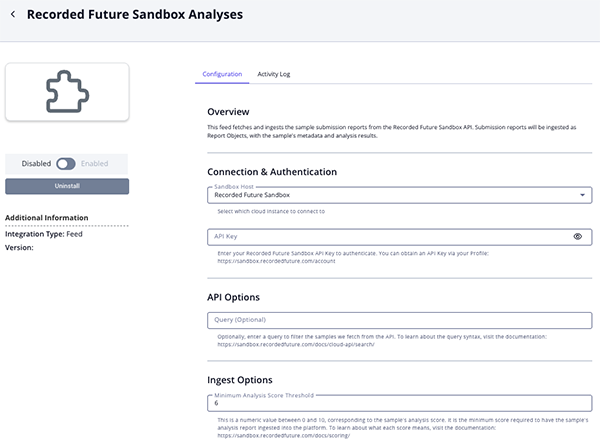
- Review any additional settings, make any changes if needed, and click on Save.
- Click on the toggle switch, located above the Additional Information section, to enable it.
ThreatQ Mapping
Recorded Future Sandbox Analyses
The Recorded Future Sandbox Analyses feed ingests analysis reports for samples detonated within the Recorded Future Sandbox. These reports are created as Report objects and include associated indicators, malware, and attack patterns identified during analysis. Additionally, the feed provides the capability to dynamically mark indicators as Active based on the sample’s threat score.
GET https://{{ host }}/api/v0/search
The host will change based on your license and deployment. The default is sandbox.recordedfuture.com.
GET https://{{ host }}/api/v0/samples/{{ sample_id }}/overview.json
Sample:
{
    "data": [
        {
            "id": "240710-sc5hbakm21",
            "status": "reported",
            "kind": "file",
            "filename": "Update_9392108.msix",
            "submitted": "2024-07-10T14:59:46Z",
            "completed": "2024-07-10T15:02:55Z",
            "sha256": "4c2f8feced7768f756ac7d4fa633b08fd61f0ba198c860fa4f1093dedbf060d2"
        }
    ],
    "next": "2024-07-10T14:36:54Z|240710-rw1g2axcag"
}
For each sample submission, the complete analysis report is retrieved using the Recorded Future Sandbox – Get Sample Overview supplemental feed.
{
    "analysis": {
        "family": [
            "lumma"
        ],
        "score": 10,
        "tags": [
            "family:lumma",
            "stealer"
        ]
    },
    "extracted": [
        {
            "config": {
                "c2": [
                    "https://benchillppwo.shop/api"
                ],
                "family": "lumma",
                "rule": "Lumma2024",
                "botnet": "ono76",
                "tags": [
                    "stealer"
                ]
            },
            "tasks": [
                "behavioral1"
            ]
        },
        {
            "config": {
                "c2": [
                    "51.89.163.40:443",
                ],
                "family": "lumma",
                "rule": "Lumma2024",
                "botnet": "ono76"
            },
            "tasks": [
                "behavioral2"
            ]
        }
    ],
    "sample": {
        "completed": "2024-07-10T20:55:08Z",
        "created": "2024-07-10T20:52:12Z",
        "id": "240710-znsq8apm6y",
        "score": 10,
        "target": "https://benchillppwo.shop/api"
    },
    "signatures": [
        {
            "desc": "An infostealer written in C++ first seen in August 2022.",
            "label": "lumma",
            "name": "Lumma Stealer",
            "score": 10,
            "tags": [
                "stealer",
                "family:lumma"
            ]
        },
        {
            "label": "reg_hw_system",
            "name": "Enumerates system info in registry",
            "ttp": [
                "T1012",
                "T1082"
            ]
        },
        {
            "name": "Suspicious behavior: EnumeratesProcesses"
        },
        {
            "name": "Suspicious behavior: NtCreateUserProcessBlockNonMicrosoftBinary"
        },
        {
            "name": "Suspicious use of FindShellTrayWindow"
        },
        {
            "name": "Suspicious use of SendNotifyMessage"
        },
        {
            "name": "Suspicious use of WriteProcessMemory"
        }
    ],
    "targets": [
        {
            "family": [
                "lumma"
            ],
            "iocs": {
                "domains": [
                    "2.136.104.51.in-addr.arpa"
                ],
                "ips": [
                    "8.8.8.8"
                ],
                "urls": [
                    "https://benchillppwo.shop/api",
                    "https://benchillppwo.shop/cdn-cgi/challenge-platform/h/b/orchestrate/chl_page/v1?ray=8a1370b7e9f1417e"
                ]
            },
            "score": 10,
            "signatures": [
                {
                    "desc": "An infostealer written in C++ first seen in August 2022.",
                    "label": "lumma",
                    "name": "Lumma Stealer",
                    "score": 10,
                    "tags": [
                        "stealer",
                        "family:lumma"
                    ]
                },
                {
                    "label": "reg_hw_system",
                    "name": "Enumerates system info in registry",
                    "ttp": [
                        "T1012",
                        "T1082"
                    ]
                },
                {
                    "name": "Suspicious behavior: EnumeratesProcesses"
                }
            ],
            "tags": [
                "family:lumma",
                "stealer"
            ],
            "target": "https://benchillppwo.shop/api",
            "tasks": [
                "behavioral1"
            ]
        }
    ],
    "tasks": {
        "240710-znsq8apm6y-behavioral1": {
            "backend": "sbx4m8",
            "kind": "behavioral",
            "name": "behavioral1",
            "os": "windows10-2004-x64",
            "resource": "win10v2004-20240617-en",
            "score": 10,
            "sigs": 7,
            "status": "reported",
            "tags": [
                "family:lumma",
                "stealer"
            ],
            "target": "https://benchillppwo.shop/api",
            "timeout": 150
        },
        "240710-znsq8apm6y-static1": {
            "kind": "static",
            "name": "static1",
            "score": 1,
            "status": "reported"
        },
        "240710-znsq8apm6y-urlscan1": {
            "kind": "urlscan",
            "name": "urlscan1",
            "score": 1,
            "status": "reported"
        }
    },
    "version": "0.3.0"
}
ThreatQuotient provides the following default mapping for this feed:
| Feed Data Path | ThreatQ Entity | ThreatQ Object Type or Attribute Key | Published Date | Examples | Notes |
|---|---|---|---|---|---|
.sample.target, .sample.score, .sample.id |
Report.Value |
N/A |
.sample.completed |
N/A |
Fields concatenated to build report value; Score normalized to a friendly disposition. |
.analysis.tags[] |
Report.Tag |
N/A |
N/A |
lumma |
N/A |
.analysis.user_tags[] |
Report.Tag |
N/A |
N/A |
phishing |
N/A |
N/A |
Indicator.Tag |
N/A |
N/A |
C2 |
Applied to Indicators extracted from the malware config's c2 section |
N/A |
Indicator.Tag |
N/A |
N/A |
DGA |
Applied to Indicators extracted from the malware config's DGA section |
.analysis.score, .sample.score, .targets[].score |
Report.Attribute |
Score |
.sample.completed |
10 |
Known Bad (10+), Likely Malicious (8+), Suspicious (6+), Likely Benign (2+), Potentially Non-Malicious (1+) |
.analysis.score, .targets[].score |
Report.Attribute |
Disposition |
.sample.completed |
Malicious |
N/A |
.tasks |
Report.Attribute |
Task Count |
.sample.completed |
1 |
N/A |
.sample.target |
Report.Attribute |
Target |
N/A |
.sample.completed |
N/A |
.extracted |
Report.Attribute |
Has Malware Configs |
.sample.completed |
N/A |
Boolean |
.sample.id |
Report.Attribute |
Submission ID |
.sample.completed |
N/A |
N/A |
N/A |
Indicator.Attribute |
Threat Type |
.sample.completed |
C2 |
Applied to Indicators extracted from the malware config's c2 section |
.analysis.family |
Malware.Value |
N/A |
.sample.completed |
lumma |
N/A |
.signatures[].ttp[] |
AttackPattern.Value |
N/A |
.sample.completed |
T1234 - Value |
Uses the mapped ThreatQ MITRE ATT&CK value when available; otherwise falls back to the raw TID. |
.sample.md5, .targets[].md5 |
Indicator.Value |
MD5 |
.sample.completed |
N/A |
N/A |
.sample.sha1, .targets[].sha1 |
Indicator.Value |
SHA-1 |
.sample.completed |
N/A |
N/A |
.sample.sha256, .targets[].sha256 |
Indicator.Value |
SHA-256 |
.sample.completed |
N/A |
N/A |
.sample.sha512, .targets[].sha512 |
Indicator.Value |
SHA-512 |
.sample.completed |
N/A |
N/A |
.sample.target, .targets[].target |
Indicator.Value |
Filename |
.sample.completed |
N/A |
N/A |
.extracted[].config.c2 |
Indicator.Value |
IP Address |
.sample.completed |
N/A |
N/A |
.extracted[].config.attr.dga |
Indicator.Value |
FQDN |
.sample.completed |
N/A |
N/A |
Average Feed Run
Object counts and Feed runtime are supplied as generalities only - objects returned by a provider can differ based on credential configurations and Feed runtime may vary based on system resources and load.
| Metric | Result |
|---|---|
| Run Time | 1 minute |
| Attack Patterns | 3 |
| Indicators | 118 |
| Indicator Attributes | 244 |
| Malware | 3 |
| Reports | 27 |
| Report Attributes | 162 |
Change Log
- Version 1.0.0
- Initial release
PDF Guides
| Document | ThreatQ Version |
|---|---|
| Recorded Future Sandbox CDF Guide v1.0.0 | 5.12.1 or Greater |