Recorded Future Compromised Credentials CDF
The web format of this guide reflects the most current release. Guides for older iterations are available in PDF format.
Integration Details
ThreatQuotient provides the following details for this integration:
| Current Integration Version | 1.0.0 |
| Compatible with ThreatQ Versions | >= 5.12.1 |
| Support Tier | ThreatQ Supported |
Introduction
The Recorded Future Compromised Credentials CDF integration enables ThreatQ to ingest identity exposure and compromised credential detections from Recorded Future’s Identity API into the ThreatQ platform. The integration is designed to help organizations identify, track, and operationalize compromised account intelligence by ingesting exposed credential data as structured threat intelligence objects within ThreatQ.
The integration provides the following feed:
- Recorded Future Compromised Credentials - ingests Compromised Account objects as the primary entity and, when enabled and available in the source data, ingests related Indicator objects associated with the compromised account.
The integration ingests the following system objects:
- Compromised Accounts (custom object)
- Indicators
Prerequisites
The following is required to install and run the integration:
- A Recored Future API Key.
- The Compromised Account custom object installed on your ThreatQ instance. This object must be installed prior to attempting to install the integration.
Compromised Account Custom Object
The integration requires the compromised account custom object.
Use the steps provided to install the custom object.
When installing the custom objects, be aware that any in-progress feed runs will be cancelled, and the API will be in maintenance mode.
- Download the integration bundle from the ThreatQ Marketplace.
- Unzip the bundle and locate the custom object files.
The custom object files will typically consist of a JSON definition file, install.sh script, and a images folder containing the svg icons.
- SSH into your ThreatQ instance.
- Set your install pathway environment variable. This command will retrieve the install pathway from your configuration file and set it as variable for use during this installation process.
INSTALL_CONF="/etc/threatq/platform/install.conf"
if [ -f "$INSTALL_CONF" ]; then source "$INSTALL_CONF"
fi
MISC_DIR="${INSTALL_BASE_PATH:-/var/lib/threatq}/misc" - Navigate to the tmp folder using the environment variable:
cd $MISC_DIR
- Upload the custom object files, including the images folder.
The directory structure should resemble the following:
- install.sh
- <custom_object_name>.json
- images (directory)
- <custom_object_name>.svg
- Run the following command:
kubectl exec -it deployment/api-schedule-run -n threatq -- sh /var/lib/threatq/misc/install.sh /var/lib/threatq/misc
The installation script will automatically put the application into maintenance mode, move the files to their required directories, install the custom object, update permissions, bring the application out of maintenance mode, and restart dynamo.
- Delete the install.sh, definition json file, and images directory from step 6 after the object has been installed as these files are no longer needed.
- Download the integration bundle from the ThreatQ Marketplace.
- Unzip the bundle and locate the custom object files.
The custom object files will typically consist of a JSON definition file, install.sh script, and a images folder containing the svg icons.
- SSH into your ThreatQ instance.
- Navigate to the tmp folder:
cd /tmp/
- Create a new directory for the custom object files:
mkdir <integration_name>
- Upload the custom object files, including the images folder, to the new directory.
- Navigate to the integration name directory if you have not done so already.
The directory structure should be as the following:
- tmp
- <integration_name>
- install.sh
- account.json
- images (directory)
- account.svg
- <integration_name>
- tmp
- Run the following command to ensure you have the proper permissions to install the custom object:
chmod +x install.sh
- Run the install script:
sudo ./install.sh
You must be in the directory that houses the install.sh and json file when running this command.
The installation script will automatically put the application into maintenance mode, move the files to their required directories, install the custom object, update permissions, bring the application out of maintenance mode, and restart dynamo.
- Remove the temporary directory, after the custom object has been installed, as the files are no longer needed:
rm -rf <integration_name>
Installation
The CDF requires the installation of the Compromised Account custom object before installing the actual CDF. See the Prerequisites chapter for more details. The custom object must be installed prior to installing the CDF. Attempting to install the CDF without the custom object will cause the CDF install process to fail.
Perform the following steps to install the integration:
The same steps can be used to upgrade the integration to a new version.
- Log into https://marketplace.threatq.com/.
- Locate and download the integration zip file.
- Extract the contents of the zip and install the required Compromised Card custom object.
- Navigate to the integrations management page on your ThreatQ instance.
- Click on the Add New Integration button.
- Upload the integration yaml file using one of the following methods:
- Drag and drop the file into the dialog box
- Select Click to Browse to locate the file on your local machine
ThreatQ will inform you if the feed already exists on the platform and will require user confirmation before proceeding. ThreatQ will also inform you if the new version of the feed contains changes to the user configuration. The new user configurations will overwrite the existing ones for the feed and will require user confirmation before proceeding.
The feed will be added to the integrations page. You will still need to configure and then enable the feed.
Configuration
ThreatQuotient does not issue API keys for third-party vendors. Contact the specific vendor to obtain API keys and other integration-related credentials.
To configure the integration:
- Navigate to your integrations management page in ThreatQ.
- Select the Commercial option from the Category dropdown (optional).
If you are installing the integration for the first time, it will be located under the Disabled tab.
- Click on the integration entry to open its details page.
- Enter the following parameters under the Configuration tab:
Parameter Description API Key Enter your Recorded Future API Key. Organization IDs Enter a line-separated list of Recorded Future organization IDs. Enable SSL Certificate Verification Enable this parameter if the feed should validate the host-provided SSL certificate. Disable Proxies Enable this parameter if the feed should not honor proxies set in the ThreatQ UI. Include Enterprise Level Enable this parameter to include enterprise-level detections across all organizations. This parameter is enabled by default. Novel Detections Only Enable this parameter to have the feed only return novel detections. This parameter is disabled by default. Malware Detections Only Enable this parameter to have the feed only return malware-linked detections. This parameter is disabled by default. Domains Optional - enter a line-separated list of domains to use with filter.domains.Detection Types Optional - enter a line-separated list to use with filter.detection.types.Source Types Optional - enter a line-separated list to use with filter.source.type.Detection Type Optional - select the request body filter.detection_type value. Options include:- All (default)
- Workforce
- External
- VIP
Cookie Filter Optional - select a value for filter.cookies. Options include:- None (default)
- Cookies
- Unexpired Cookies
Authorization Technology IDs Optional - enter a line-separated list of Recorded Future authorization technology IDs. Authorization Technology Any Enable this parameter to use any-match behavior for the authorization technology filter. This parameter is disabled by default. This option is available only when Authorization Technology IDs parameter is being used.
Result Limit Per Request Enter the maximum detections per request. Recorded Future allows up to 1000. The default value is100.Account Context Select which pieces of context are ingested with the compromised account. Options include: - Detection ID (default)
- Detection Type (default)
- Source Type (default)
- Novel Flag (default)
- Password Type (default)
- Cleartext Hint (default)
- Password Properties (default)
- Authorization URL (default)
- Affected Domain (default)
- Authorization Protocols (default)
- Authorization Technologies (default)
- Dump Name (default)
- Dump Source (default)
- Dump Description (default)
- Dump Downloaded At (default)
- Dump Type (default)
- Dump City (default)
- Dump State (default)
- Dump Country (default)
- Dump Country Code (default)
- Breached Name (default)
- Breached Domain (default)
- Breached Type (default)
- Breached Date (default)
- Breached Start (default)
- Breached Stop (default)
- Breached Precision (default)
- Breached Description (default)
- Breached Site Description (default)
Relate Password Hashes as Indicators Enable this parameter to ingest password hashes as indicators related to the compromised account. This parameter is enabled by default.
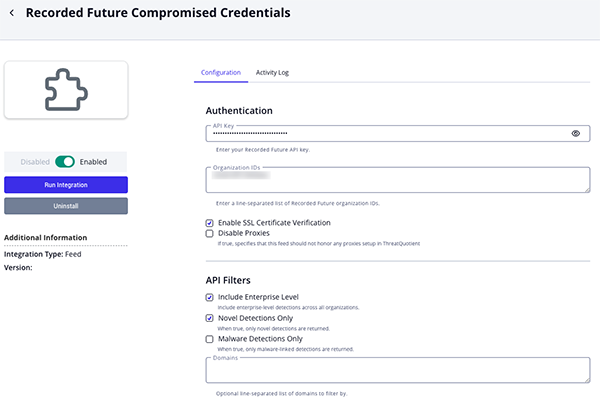
- Review any additional settings, make any changes if needed, and click on Save.
- Click on the toggle switch, located above the Additional Information section, to enable it.
ThreatQ Mapping
Recoded Future Compromised Credentials
The Recorded Future Compromised Credentials feed imports compromised credential detections from Recorded Future’s Identity API and represents each detection as a Compromised Account object within ThreatQ. Related dump, breach, password, and authorization service context is mapped as attributes on the compromised account. Password hashes can also be optionally ingested as related indicator objects.
POST https://api.recordedfuture.com/identity/detections
Sample Body:
{
  "organization_id": [
    "uhash:ER135KQ6oL"
  ],
  "include_enterprise_level": true,
  "filter": {
    "novel_only": false,
    "malware_only": false,
    "domains": [],
    "detection_types": [],
    "source_type": [],
    "created": {
      "gte": "2020-01-07T04:16:18.116Z",
      "lt": "2026-05-14T04:16:18.116Z"
    },
    "detection_type": ""
  },
  "limit": 100
}
Sample Response (truncated):
{
    "total": 1,
    "detections": [
        {
            "id": "aaad1a4d93d8cee51b3fc877125d3971",
            "novel": true,
            "type": "Workforce",
            "source_type": "MalwareCombolists",
            "subject": "jerry.wu@threatq.com",
            "password": {
                "type": "clear",
                "cleartext_hint": "Un",
                "properties": [
                    "Letter",
                    "Number"
                ],
                "hashes": [
                    {
                        "algorithm": "SHA1",
                        "hash": "5d74bb0119d26a9f83789213055e8acfe05b786c"
                    },
                    {
                        "algorithm": "SHA256",
                        "hash":
                            "aeec637ef53bc1d3a601c1271b95e26a69088ed7db7a4879aaab235f6719f927"
                    }
                ]
            },
            "authorization_service": {
                "url": "https://threatq.okta.com",
                "domain": "okta.com",
                "fqdn": "threatq.okta.com",
                "protocols": [
                    "https"
                ],
                "technology": [
                    {
                        "name": "Authentication"
                    },
                    {
                        "name": "Okta"
                    }
                ]
            },
            "dump": {
                "name": "Pure Incubation Ventures Dump 2024",
                "source": "dump:pureincubation/",
                "description":
                    "The database includes customer and company identification (ID) numbers,"
                    " full names, email and physical addresses, phone numbers, hashed "
                    "passwords, company email domains, company names, company sizes, "
                    "company revenues, industries, job titles, and more",
                "downloaded": "2024-09-27T13:09:06.299Z",
                "type": "TextDataDump",
                "breaches": [
                    {
                        "name": "Pure Incubation Ventures Breached 2024",
                        "domain": "pureincubationventures.com",
                        "type": "Breach",
                        "breached": "2024-01-31T22:00:00.000Z",
                        "start": "2024-01-31T22:00:00.000Z",
                        "stop": "2024-02-29T21:59:59.000Z",
                        "precision": "month",
                        "description":
                            "On 15 August, 2024, KryptonZombie, a member of BreachForums 2, "
                            "shared a data set containing credentials from Pure Incubation "
                            "Ventures (pureincubationventures.com), a specialized investment "
                            "firm focused on providing financial and operational expertise to "
                            "technology companies.",
                        "site_description":
                            "a specialized investment firm focused on providing financial "
                            "and operational expertise to technology companies"
                    }
                ],
                "location": {
                    "country": {
                        "name": "United States of America (the)",
                        "displayName": "United States of America",
                        "countryCode": "840",
                        "alpha2Code": "US",
                        "alpha3Code": "USA"
                    },
                    "city": "Reston",
                    "address1": "11400 Commerce Park Dr Ste 200",
                    "state": "VA",
                    "zip": "20191"
                }
            },
            "created": "2026-04-01T00:00:00.000Z"
        }
    ]
}
ThreatQuotient provides the following default mapping for this feed:
| Feed Data Path | ThreatQ Entity | ThreatQ Object Type or Attribute Key | Published Date | Examples | Notes |
|---|---|---|---|---|---|
.subject |
Compromised Account |
Value |
.created |
jerry.wu@threatq.com |
Primary compromised account value |
.id |
CompromisedAccount.Attribute |
Identity Detection ID |
.created |
aaad1a4d93d8cee51b3fc877125d3971 |
Useful for provider-side correlation |
.type |
CompromisedAccount.Attribute |
Detection Type |
.created |
Workforce |
User-configurable |
.source_type |
CompromisedAccount.Attribute |
Source Type |
.created |
MalwareCombolists, DatabaseCombolists, DatabaseDumps |
User-configurable |
.novel |
CompromisedAccount.Attribute |
Is Novel |
.created |
true |
Boolean value stored as an attribute |
.password.type |
CompromisedAccount.Attribute |
Password Type |
.created |
clear |
User-configurable |
.password.cleartext_hint |
CompromisedAccount.Attribute |
Cleartext Hint |
.created |
Un, Ah, lo |
User-configurable |
.password.properties[] |
CompromisedAccount.Attribute |
Password Property |
.created |
Letter, Number, AtLeast16Characters |
Multi-valued; user-configurable |
.authorization_service.url |
CompromisedAccount.Attribute |
Authorization URL |
.created |
https://threatq.okta.com, zoom.us/signin |
User-configurable |
.authorization_service.fqdn |
CompromisedAccount.Attribute |
Affected Domain |
.created |
threatq.okta.com, zoom.us |
Preferred source for Affected Domain |
.authorization_service.domain |
CompromisedAccount.Attribute |
Affected Domain |
.created |
okta.com, zoom.us |
Used only when .authorization_service.fqdn is not present |
.authorization_service.protocols[] |
CompromisedAccount.Attribute |
Authorization Protocol |
.created |
https |
Multi-valued; user-configurable |
.authorization_service.technology[].name |
CompromisedAccount.Attribute |
Authorization Technology |
.created |
Authentication, Okta |
Multi-valued; deduplicated during ingestion |
.dump.name |
CompromisedAccount.Attribute |
Dump Name |
.created |
April 2026 Malware Combo Lists |
User-configurable |
.dump.source |
CompromisedAccount.Attribute |
Dump Source |
.created |
dump:april_2026_malware_combo/ |
User-configurable |
.dump.description |
CompromisedAccount.Attribute |
Dump Description |
.created |
April 2026 Malware Combo Lists is a collection... |
User-configurable |
.dump.downloaded |
CompromisedAccount.Attribute |
Dump Downloaded At |
.created |
2026-04-01T00:00:00.000Z |
User-configurable |
.dump.type |
CompromisedAccount.Attribute |
Dump Type |
.created |
Combo List, SQL Dump |
User-configurable |
.dump.location.city |
CompromisedAccount.Attribute |
Dump City |
.created |
Reston |
User-configurable |
.dump.location.state |
CompromisedAccount.Attribute |
Dump State |
.created |
VA |
User-configurable |
.dump.location.country.displayName |
CompromisedAccount.Attribute |
Dump Country |
.created |
United States |
Falls back to .dump.location.country.name when needed |
.dump.location.country.alpha2Code |
CompromisedAccount.Attribute |
Dump Country Code |
.created |
US |
Falls back to .dump.location.country.countryCode when needed |
.dump.breaches[].name |
CompromisedAccount.Attribute |
Breached Name |
.created |
Animoto Breached 2018 |
Multi-valued; user-configurable |
.dump.breaches[].domain |
CompromisedAccount.Attribute |
Breached Domain |
.created |
animoto.com |
Multi-valued; user-configurable |
.dump.breaches[].type |
CompromisedAccount.Attribute |
Breached Type |
.created |
Breach |
Multi-valued; user-configurable |
.dump.breaches[].breached |
CompromisedAccount.Attribute |
Breached Date |
.created |
2018-07-10T00:00:00.000Z |
Multi-valued; user-configurable |
.dump.breaches[].start |
CompromisedAccount.Attribute |
Breached Start |
.created |
2018-07-10T00:00:00.000Z |
Multi-valued; user-configurable |
.dump.breaches[].stop |
CompromisedAccount.Attribute |
Breached Stop |
.created |
2018-07-10T23:59:59.000Z |
Multi-valued; user-configurable |
.dump.breaches[].precision |
CompromisedAccount.Attribute |
Breached Precision |
.created |
day, month, year |
Multi-valued; user-configurable |
.dump.breaches[].description |
CompromisedAccount.Attribute |
Breached Description |
.created |
In July 2018, Animoto suffered a breach... |
Multi-valued; user-configurable |
.dump.breaches[].site_description |
CompromisedAccount.Attribute |
Breached Site Description |
.created |
Animoto is a cloud-based video maker service... |
Multi-valued; user-configurable |
.password.hashes[?algorithm=="SHA1"].hash |
Related Indicator.Value |
SHA-1 |
.created |
5d74bb0119d26a9f83789213055e8acfe05b786c |
Optional; related to the compromised account when hash ingestion is enabled |
.password.hashes[?algorithm=="SHA256"].hash |
Related Indicator.Value |
SHA-256 |
.created |
aeec637ef53bc1d3a601c1271b95e26a69088ed7db7a4879aaab235f6719f927 |
Optional; related to the compromised account when hash ingestion is enabled |
.password.hashes[?algorithm=="NTLM"].hash |
Related Indicator.Value |
MD5 |
.created |
30fa543d66ee55b789f6a68feb560072 |
NTLM is mapped to MD5 in ThreatQ for compatibility |
.password.hashes[?algorithm=="MD5"].hash |
Related Indicator.Value |
MD5 |
.created |
a446ae245c82a83984c9c7b9d210803b |
Optional; related to the compromised account when hash ingestion is enabled |
.id |
Related Indicator.Attribute |
Identity Detection ID |
.created |
aaad1a4d93d8cee51b3fc877125d3971 |
Added to related hash indicators for provider-side correlation |
Average Feed Run
Object counts and Feed runtime are supplied as generalities only - objects returned by a provider can differ based on credential configurations and Feed runtime may vary based on system resources and load.
| Metric | Result |
|---|---|
| Run Time | 1 minute |
| Compromised Accounts | 13 |
| Compromised Account Attributes | 302 |
| Indicators | 30 |
| Indicator Attributes | 84 |
Change Log
- Version 1.0.0
- Initial release
PDF Guides
| Document | ThreatQ Version |
|---|---|
| Recorded Future Compromised Credentials CDF Guide v1.0.0 | 5.12.1 or Greater |