Intel 471 Compromised Credentials CDF
The web format of this guide reflects the most current release. Guides for older iterations are available in PDF format.
Integration Details
ThreatQuotient provides the following details for this integration:
| Current Integration Version | 2.0.0 |
| Compatible with ThreatQ Versions | >= 5.6.0 |
| Support Tier | ThreatQ Supported |
Introduction
The Intel 471 Compromised Credentials CDF integration for ThreatQ allows you to track your organization's compromised credentials in order to efficiently mitigate any threats targeting your organization's employees.
The integration provides the following feed:
- Intel 471 Compromised Credentials - imports compromised credentials from Intel 471's API in order to track internal credentials that have been compromised.
The integration ingests the following system objects:
- Compromised Accounts
- Compromised Account Attributes
- Indicators
- Indicator Attributes
- Malware
Prerequisites
The integration requires the following:
- Your Intel 471 Client ID and Secret.
- Compromised Account custom object installed on the ThreatQ instance.
Compromised Account Custom Object
The integration requires the Compromised Account custom object.
Use the steps provided to install the Compromised Account custom object.
When installing the custom objects, be aware that any in-progress feed runs will be cancelled, and the API will be in maintenance mode.
- Download the integration bundle from the ThreatQ Marketplace.
- Unzip the bundle and locate the custom object files.
The custom object files will typically consist of a JSON definition file, install.sh script, and a images folder containing the svg icons.
- SSH into your ThreatQ instance.
- Set your install pathway environment variable. This command will retrieve the install pathway from your configuration file and set it as variable for use during this installation process.
INSTALL_CONF="/etc/threatq/platform/install.conf"
if [ -f "$INSTALL_CONF" ]; then source "$INSTALL_CONF"
fi
MISC_DIR="${INSTALL_BASE_PATH:-/var/lib/threatq}/misc" - Navigate to the tmp folder using the environment variable:
cd $MISC_DIR
- Upload the custom object files, including the images folder.
The directory structure should resemble the following:
- install.sh
- <custom_object_name>.json
- images (directory)
- <custom_object_name>.svg
- Run the following command:
kubectl exec -it deployment/api-schedule-run -n threatq -- sh /var/lib/threatq/misc/install.sh /var/lib/threatq/misc
The installation script will automatically put the application into maintenance mode, move the files to their required directories, install the custom object, update permissions, bring the application out of maintenance mode, and restart dynamo.
- Delete the install.sh, definition json file, and images directory from step 6 after the object has been installed as these files are no longer needed.
- Download the integration zip file from the ThreatQ Marketplace and unzip its contents.
- SSH into your ThreatQ instance.
- Navigate to tmp directory:
cd /tmp/
- Create a new directory:
mkdir intel471_cdf
- Upload the account.json and install.sh script into this new directory.
- Create a new directory called images within the inte471_cdf directory.
mkdir images
- Upload the account.svg.
- Navigate to the /tmp/intel471_cdf.
The directory should resemble the following:
- tmp
- intel471_cdf
- account.json
- install.sh
- images
- account.svg
- intel471_cdf
- tmp
- Run the following command to ensure that you have the proper permissions to install the custom object:
chmod +x install.sh
- Run the following command:
sudo ./install.sh
You must be in the directory level that houses the install.sh and json files when running this command.
The installation script will automatically put the application into maintenance mode, move the files to their required directories, install the custom object, update permissions, bring the application out of maintenance mode, and restart dynamo.
- Remove the temporary directory, after the custom object has been installed, as the files are no longer needed:
rm -rf intel471_cdf
Installation
The CDF requires the installation of the Compromised Account custom object before installing the actual CDF. See the Compromised Account section of this guide for more details. The custom object must be installed prior to installing the CDF. Attempting to install the CDF without the custom object will cause the CDF install process to fail.
Perform the following steps to install the integration:
The same steps can be used to upgrade the integration to a new version.
- Log into https://marketplace.threatq.com/.
- Locate and download the integration zip file.
- Extract the integration files and install the Compromised Account custom object if you have not done so already.
- Navigate to the integrations management page on your ThreatQ instance.
- Click on the Add New Integration button.
- Upload the integration yaml file using one of the following methods:
- Drag and drop the file into the dialog box
- Select Click to Browse to locate the file on your local machine
ThreatQ will inform you if the feed already exists on the platform and will require user confirmation before proceeding. ThreatQ will also inform you if the new version of the feed contains changes to the user configuration. The new user configurations will overwrite the existing ones for the feed and will require user confirmation before proceeding.
The feed will now be installed and added to the integrations page. You will still need to configure and then enable the feed.
Configuration
ThreatQuotient does not issue API keys for third-party vendors. Contact the specific vendor to obtain API keys and other integration-related credentials.
To configure the integration:
- Navigate to your integrations management page in ThreatQ.
- Select the Commercial option from the Category dropdown (optional).
If you are installing the integration for the first time, it will be located under the Disabled tab.
- Click on the integration entry to open its details page.
- Enter the following parameters under the Configuration tab:
Parameter Description Client ID Enter your Intel 471 API Client ID. Client Secret Enter your Intel 471 API Client Secret. Fetch GIR Names Enable this parameter to fetch the GIR's name (example: 5.2.1 - initial Access Tactic). Disable this parameter to fetch the GIR's raw format (example:3.1.1). This parameter is enabled by default.Ignore Numeric Credentials Enable this parameter to skip ingestion of compromised credentials with usernames that consist solely of numeric values such as 721322. This parameter is disabled by default.Context Filter Select which pieces of context to ingest with the compromised credentials. Options include: - Accessed URLs (Default)
- Compromised Tag (Default)
- Credential Sets (Default)
- Affected Site (Detection Domain) (Default)
- File Path
- Credential Domain
- Affiliations (Default)
- Password Strength
- Last Updated
- Last Seen
- Software Name
- Credential Type
- Infection Timestamp
- OS
- GIRs (Default)
- Associated Adversary (Default)
- Associated Malware Family (Default)
- Intel471 Verity Link
Ingest Accessed URLs As Select which entity type to ingest accessed URLs as. Options include: - Indicators
- Attributes
This parameter will only be accessible if you have selected the
Accessed URLsoption for the Context Filter parameter.Accessed URL Status Select the status that should be applied to the accessed URLs. Options include: - Review (Default)
- Active
- Indirect
This parameter will only be accessible if you have selected the
Indicatorsoption for the Ingest Accessed URLs As parameter.Disable Proxies Enable this option if the feed should not honor proxies set in the ThreatQ UI. Enable SSL Verification Enable this parameter for the feed to validate the host-provided SSL certificate. This option is enabled by default.
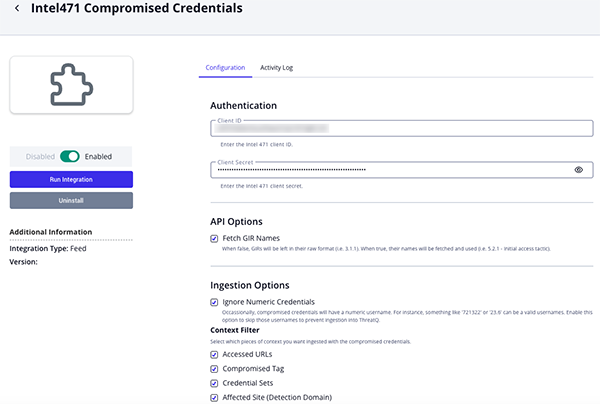
- Review any additional settings, make any changes if needed, and click on Save.
- Click on the toggle switch, located above the Additional Information section, to enable it.
ThreatQ Mapping
Intel 471 Compromised Credentials
The Intel 471 Compromised Credentials feed imports compromised credentials from Intel 471's cloud API in order to track internal credentials that have been compromised.
GET https://api.intel471.cloud/integrations/creds/v1/credentials/occurrences/stream
Sample Response:
{
  "count": 1,
  "credential_occurrences": [
    {
      "id": "cred-occurrence--dc5e2ec0-bb5f-51dd-ab51-6a083f9bd61c",
      "data": {
        "file_path": "/2026-05-16/FE98AG723573_ISM/",
        "accessed_url": "http://acmecorp471.com/login.php",
        "credential": {
          "id": "cred--10aca35f-0d17-5880-952d-65ac76c3556d",
          "credential_login": "andrewgregory@acmecorp471-customers.com",
          "credential_domain": "acmecorp471-customers.com",
          "detection_domain": "acmecorp471-customers.com",
          "affiliations": [
            "my_customers"
          ],
          "password": {
            "strength": "weak",
            "id": "163d1a38"
          }
        },
        "credential_set": {
          "id": "cred-set--94c49f73-563d-54b8-9676-7620f6621acd",
          "name": "Information-stealer logs (DEMO ONGOING)"
        },
        "info_stealer": {
          "malware_family": "Arcane"
        }
      },
      "classification": {
        "girs": [
          {
            "path": "1.1.5",
            "name": "Information-stealer malware"
          },
          {
            "path": "4.2.2",
            "name": "Compromised credentials"
          }
        ]
      },
      "last_updated_ts": "2026-05-16T06:30:03.973Z",
      "activity": {
        "first_seen_ts": "2026-05-16T06:30:03.973Z",
        "last_seen_ts": "2026-05-16T06:30:03.973Z"
      }
    }
  ]
}
ThreatQuotient provides the following default mapping for this feed:
The mapping for this feed is based on each item within the .credential_occurrences array.
| Feed Data Path | ThreatQ Entity | ThreatQ Object Type or Attribute Key | Published Date | Examples | Notes |
|---|---|---|---|---|---|
.data.credential.credential_login |
Compromised Account |
Value |
.activity.first_seen_ts |
andrewgregory@acmecorp471-customers.com |
Treated as a Compromised Account entity |
.data.info_stealer.malware_family |
Malware |
Value |
.activity.first_seen_ts |
Arcane |
Configurable via user-field |
.data.credential_set.name |
Adversary |
Name |
.activity.first_seen_ts |
N/A |
Configurable via user-field; extrapolated from credential set names when they contain actor text |
.data.credential.password.strength |
CompromisedAccount.Attribute |
Password Strength |
.activity.first_seen_ts |
weak, excellent |
Stored as attribute |
.last_updated_ts |
CompromisedAccount.Attribute |
Last Updated |
.activity.first_seen_ts |
2026-05-16T06:30:03.973Z |
Configurable via user-field |
.activity.last_seen_ts |
CompromisedAccount.Attribute |
Last Seen |
.activity.first_seen_ts |
2026-05-16T06:30:03.973Z |
Configurable via user-field |
.data.software_name |
CompromisedAccount.Attribute |
Software Name |
.activity.first_seen_ts |
Mozilla/5.0 ... Safari/535.46.6 |
Configurable via user-field; only present on some records |
.data.credential_type |
CompromisedAccount.Attribute |
Credential Type |
.activity.first_seen_ts |
infostealer |
Configurable via user-field |
.data.info_stealer.infection_ts |
CompromisedAccount.Attribute |
Infection Timestamp |
.activity.first_seen_ts |
2020-10-12T14:58:33Z |
Configurable via user-field; only present when info_stealer exists |
.data.info_stealer.os |
CompromisedAccount.Attribute |
OS |
.activity.first_seen_ts |
Windows 10 x64 |
Configurable via user-field; only present when info_stealer exists |
.classification.girs[] |
CompromisedAccount.Attribute |
GIR |
.activity.first_seen_ts |
1.1.5 - Information-stealer malware |
When Fetch GIR Names is disabled, only the GIR path is retained |
.data.credential.id |
CompromisedAccount.Attribute |
Intel471 Verity Link |
.activity.first_seen_ts |
https://verity.intel471.com/credentials-dashboard/details/... |
Links back to Intel 471 Verity |
.data.credential.affiliations |
CompromisedAccount.Attribute |
Affiliation |
.activity.first_seen_ts |
my_employees, my_customers |
Stored as attribute |
.data.file_path |
CompromisedAccount.Attribute |
File Path |
.activity.first_seen_ts |
/2026-05-16/FE98AG723573_ISM/ |
Stored as attribute |
.data.credential.detection_domain |
CompromisedAccount.Attribute |
Affected Site |
.activity.first_seen_ts |
acmecorp471.com |
Stored as attribute |
.data.credential_set.name |
CompromisedAccount.Attribute |
Credential Set |
.activity.first_seen_ts |
Information-stealer logs (DEMO ONGOING) |
Configurable via user-field |
.data.accessed_url |
CompromisedAccount.Attribute or Indicator.Value |
Accessed URL |
.activity.first_seen_ts |
http://acmecorp471.com/login.php |
Ingested as either an attribute or indicator based on user selection |
.data.credential.id |
Indicator.Attribute |
Intel471 Verity Link |
.activity.first_seen_ts |
https://verity.intel471.com/credentials-dashboard/details/... |
Applied when Accessed URLs are ingested as indicators |
.classification.girs[] |
Indicator.Attribute |
GIR |
.activity.first_seen_ts |
4.2.2 - Compromised credentials |
Applied when Accessed URLs are ingested as indicators |
Literal |
Indicator.Attribute |
Source Feed |
.activity.first_seen_ts |
Intel 471 Compromised Credentials |
Applied when Accessed URLs are ingested as indicators |
Average Feed Run
Object counts and Feed runtime are supplied as generalities only - objects returned by a provider can differ based on credential configurations and Feed runtime may vary based on system resources and load.
| Metric | Result |
|---|---|
| Run Time | 3 minutes |
| Compromised Accounts | 398 |
| Compromised Account Attributes | 5,915 |
| Indicators | 6 |
| Indicators Attributes | 423 |
| Malware | 2 |
Change Log
- Version 2.0.0
- Migrated the primary feed to the Intel 471 Credentials Stream API endpoint:
https://api.intel471.cloud/integrations/creds/v1/credentials/occurrences/stream. - Updated authentication to use Basic authentication with
client_idandclient_secret. -
Updated feed query parameters to use
last_updated_from,last_updated_until,size, andcursorfor data retrieval and pagination. -
Removed the supplemental GIR feed, as GIR names are now provided directly by the stream API through the
classification.girsfield. - Added support for ingesting the following additional attributes:
Last UpdatedLast SeenSoftware NameCredential TypeInfection TimestampOperating System (OS)
- Migrated the primary feed to the Intel 471 Credentials Stream API endpoint:
- Version 1.1.2
- Implemented indicator deduplication and enhanced data validation to resolve attribute ingestion failures.
- Version 1.1.1 rev-a
- Guide Update - updated custom object installation steps for ThreatQ v6 instances.
- Version 1.1.1
- Updated the integration to use the
/credentials/occurrences/steamendpoint which supports Accessed URLs and removes the 1,000 credential return limit.
- Updated the integration to use the
- Version 1.1.0
- Updated the feed to use the
/credentials/occurrencesendpoint. - Updated the feed to optimize overall performance, ThreatQuotient integration standards, and to provide more granular control over the data ingested.
- Added the following configuration parameters:
- Fetch Accessed URLs - fetches the accessed URLs for each compromised credential.
- Fetch GIR Names - ability to select whether to fetch the GIR name or raw value.
- Ignore Numeric Credentials - ability to skip ingestion of compromised credentials with usernames that consist solely of numeric values.
- Context Filter - allows you to select which pieces of context to ingest with the compromised credentials.
- Ingest Accessed URLs As - allows you to determine whether to ingest accessed URLs as indicators or attributes.
- Accessed URL Status - allows you to select the status that should be applied to the accessed URLs.
- Disable Proxies - allows you to determine whether or not the feed honors the proxy configuration set in the ThreatQ UI.
- Enable SSL Verification - allows you to determine if the feed should validate the host-provided SSL certificate.
- Removed the Ingest Compromised Passwords as Attributes configuration parameter.
- Updated the feed to use the
- Version 1.0.0
- Initial release
PDF Guides
| Document | ThreatQ Version |
|---|---|
| Intel 471 Compromised Credentials CDF Guide v2.0.0 | 5.6.0 or Greater |
| Intel 471 Compromised Credentials CDF Guide v1.1.2 | 5.6.0 or Greater |
| Intel 471 Compromised Credentials CDF Guide v1.1.1 | 5.6.0 or Greater |
| Intel 471 Compromised Credentials CDF Guide v1.1.0 | 5.6.0 or Greater |