GreyNoise CDF
The web format of this guide reflects the most current release. Guides for older iterations are available in PDF format.
Integration Details
ThreatQuotient provides the following details for this integration:
| Current Integration Version | 1.6.1 |
| Compatible with ThreatQ Versions | >= 5.6.0 |
| Support Tier | ThreatQ Supported |
Introduction
GreyNoise collects, analyzes, and labels data on IPs that saturate security tools with noise. This unique perspective helps analysts waste less time on irrelevant or harmless activity, and spend more time focused on targeted and emerging threats.
The GreyNoise CDF provides the following feeds:
- GreyNoise - ingests new, malicious IP Addresses every day. Additionally, a GNQL query can be provided to narrow down the results.
- GreyNoise Enrichment - queries GreyNoise with IP Addresses from a Threat Collection and enriches those IP Addresses with the data that it ingests.
The following system object types are ingested by the integration:
- Indicators
- Indicator Attributes
- Vulnerabilities
Installation
Perform the following steps to install the integration:
The same steps can be used to upgrade the integration to a new version.
- Log into https://marketplace.threatq.com/.
- Locate and download the integration file.
- Navigate to the integrations management page on your ThreatQ instance.
- Click on the Add New Integration button.
- Upload the integration file using one of the following methods:
- Drag and drop the file into the dialog box
- Select Click to Browse to locate the integration file on your local machine
- Select the feeds to install, when prompted, and click Install.
ThreatQ will inform you if the feed already exists on the platform and will require user confirmation before proceeding. ThreatQ will also inform you if the new version of the feed contains changes to the user configuration. The new user configurations will overwrite the existing ones for the feed and will require user confirmation before proceeding.
- The feeds will be added to the integrations page. You will still need to configure and then enable the feed.
Configuration
ThreatQuotient does not issue API keys for third-party vendors. Contact the specific vendor to obtain API keys and other integration-related credentials.
To configure the integration:
- Navigate to your integrations management page in ThreatQ.
- Select the Commercial option from the Category dropdown (optional).
- Click on the integration entry to open its details page.
- Enter the following parameters under the Configuration tab:
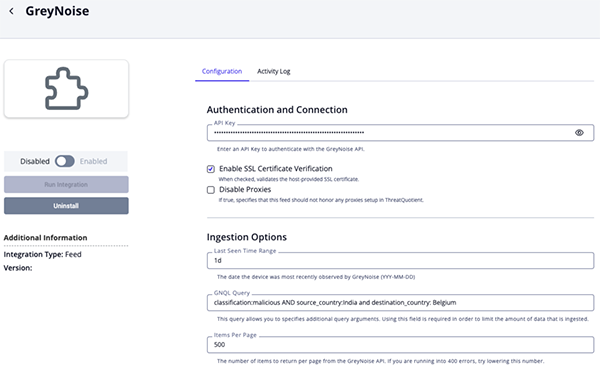
GreyNoise Configuration Parameters
Parameter Description API Token Your GreyNoise API Token. Enable SSL Certificate Verification Enable this parameter if the feed should validate the host-provided SSL certificate. Disable Proxies Enable this parameter if the feed should not honor proxies set in the ThreatQ UI. Last Seen Time Range The date the device was most recently observed by GreyNoise. You can use the keyword todayor1dto specify how many days to go back.GNQL Query
ThreatQuotient highly recommends utilizing this parameter to narrow down the ingested dataset. The field allows you to specify query arguments other than last_seenfield, which is the default. See the https://docs.greynoise.io/reference/gnqlv3query documentation for instructions on how to build a GNQL query.Items per Page The number of items to return per page from the GreyNoise API. You should lower this value if you are encountering 400 errors when running the feed.
Attribute Filter Select the pieces of context, attributes and tags, to ingest into the platform. Options include: - Tags (default)
- Classification (default)
- Malware Family (default)
- Actor (default)
- Category (default)
- CVE (default)
- Country
- Country Code (default)
- City
- Destination Countries
- Organization
- Is TOR (default)
- Is VPN (default)
- Is Spoofable
- Is Bot
- VPN Service
- Operating System
- ASN
- rDNS
- Scanned Paths
- Scanned Ports
Relationship Filter Select the related IOC types to ingest into ThreatQ. At the time of this publication, the only option is
CVE.Ingest CVEs As Select the entity type to ingest CVEs as in ThreatQ. Options include: - Indicators
- Vulnerabilities
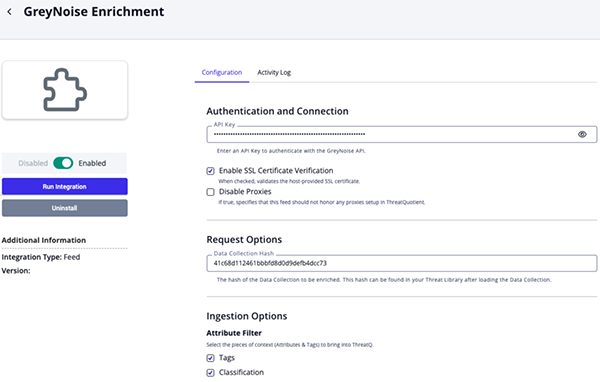
GreyNoise Enrichment Configuration Parameters
Parameter Description API Token Your GreyNoise API Token. Enable SSL Certificate Verification Enable this parameter if the feed should validate the host-provided SSL certificate. Disable Proxies Enable this parameter if the feed should not honor proxies set in the ThreatQ UI. Data Collection Hash The hash of the Data Collection to be enriched. This hash can be found in your Threat Library after loading the Data Collection. The hash will be in the browser's URL.
Example: https://<instance>/threat-library#38d08c87b6e81a37a8591444f8c5dba5Attribute Filter Select the pieces of context, attributes and tags, to ingest into the platform. Options include: - Tags (default)
- Classification (default)
- Malware Family (default)
- Actor (default)
- Category (default)
- CVE (default)
- Country
- Country Code (default)
- City
- Destination Countries
- Organization
- Is TOR (default)
- Is VPN (default)
- Is Spoofable
- Is Bot
- VPN Service
- Operating System
- ASN
- rDNS
- Scanned Paths
- Scanned Ports
Relationship Filter Select the related IOC types to ingest into ThreatQ. At the time of this publication, the only option is
CVE.Ingest CVEs As Select the entity type to ingest CVEs as in ThreatQ. Options include: - Indicators
- Vulnerabilities
- Review any additional settings, make any changes if needed, and click on Save.
- Click on the toggle switch, located above the Additional Information section, to enable it.
ThreatQ Mapping
GreyNoise
The GreyNoise feed ingests new, malicious IP Addresses every day. Additionally, a GNQL query can be provided to narrow down the results.
GET https://api.greynoise.io/v3/gnql/metadata
Sample Parameters:
{
  "query": "last_seen:1d AND classification:malicious AND destination_country:Iceland"
}
GreyNoise Enrichment
The GreyNoise Enrichment feed enriches IP Addresses from a given Threat Collection with information from GreyNoise.
POST https://api.greynoise.io/v3/ip
Sample Body:
{
  "ips": [
    "1.1.1.1"
  ]
}
Shared Response and Mapping
The following sample response and mapping table can be used for both feeds.Sample Response:
{
  "data": [
    {
      "business_service_intelligence": {
        "category": "public_dns",
        "description": "Cloudflare, Inc. is an American web infrastructure and website security company.",
        "explanation": "Public DNS services are used as alternatives to ISP name servers for DNS lookups.",
        "found": true,
        "last_updated": "2025-12-05T09:11:03Z",
        "name": "Cloudflare Public DNS",
        "reference": "https://one.one.one.one",
        "trust_level": "1"
      },
      "internet_scanner_intelligence": {
        "actor": "APT9",
        "bot": false,
        "classification": "malicious",
        "cves": [
          "CVE-2020-1234",
          "CVE-2021-2345"
        ],
        "first_seen": "2025-12-01",
        "found": false,
        "metadata": {
          "asn": "AS3462",
          "category": "isp",
          "organization": "Data Communication Business Group",
          "os": "Windows 7/8",
          "rdns": "crawl-66-249-79-17.googlebot.com",
          "source_city": "Milan",
          "source_country": "Italy",
          "source_country_code": "IT",
          "destination_countries": [
            "Germany"
          ],
          "destination_country_codes": [
            "DE"
          ]
        },
        "raw_data": {
          "http": {
            "path": [
              "/bootstrap/3.3.6/css/bootstrap.min.css"
            ]
          },
          "scan": [
            {
              "port": 80,
              "protocol": "TCP"
            }
          ]
        },
        "spoofable": true,
        "tags": [
          {
            "id": "0adee501-f8d5-4287-96cf-0c7f47e4e2b3",
            "slug": "apple-ios-lockdownd-scanner",
            "name": "Apple iOS Lockdownd Crawler",
            "description": "Observed attempting to discover legacy Apple iOS devices with lockdownd service.",
            "category": "activity",
            "intention": "suspicious",
            "references": [
              "https://www.theiphonewiki.com/wiki/Usbmux#lockdownd_protocol"
            ],
            "created": "2021-09-03",
            "updated_at": "2025-12-09T17:05:28.043568Z"
          },
          {
            "id": "0adee501-f8d5-4287-96cf-0c7f47e4e2b4",
            "slug": "emotet",
            "name": "Emotet",
            "description": "Observed attempting to send phishing attacks.",
            "category": "activity",
            "intention": "suspicious",
            "created": "2021-09-03",
            "updated_at": "2025-12-09T17:05:28.043568Z"
          }
        ],
        "tor": false,
        "vpn": false,
        "vpn_service": "Cisco"
      },
      "ip": "1.1.1.1"
    }
  ]
}
ThreatQuotient provides the following default mapping for both feeds based on fields within each of the .data[]:
| Feed Data Path | ThreatQ Entity | ThreatQ Object Type or Attribute Key | Published Date | Examples | Notes |
|---|---|---|---|---|---|
.ip |
Indicator.Value |
IP Address |
.first_seen |
1.1.1.1 |
N/A |
.business_service_intelligence.explanation |
Indicator.Description |
N/A |
N/A |
Public DNS services are used as alternatives ... |
N/A |
.business_service_intelligence.description |
Indicator.Description |
N/A |
N/A |
Cloudflare, Inc. is an American web infrastructure ... |
N/A |
.internet_scanner_intelligence.tags[].name |
Indicator.Tags |
N/A |
N/A |
Apple iOS Lockdownd Crawler |
User-configurable. |
.internet_scanner_intelligence.actor |
Indicator.Attribute |
Actor |
.first_seen |
APT9 |
User-configurable. If this is 'unknown', it will be ignored. |
.internet_scanner_intelligence.classification |
Indicator.Attribute |
Classification |
.first_seen |
malicious |
User-configurable. |
.internet_scanner_intelligence.metadata.rdns |
Indicator.Attribute |
rDNS |
.first_seen |
crawl-66-249-79-17.googlebot.com |
User-configurable |
.internet_scanner_intelligence.metadata.source_country |
Indicator.Attribute |
Source Country |
.first_seen |
Italy |
User-configurable |
.internet_scanner_intelligence.metadata.source_country_code |
Indicator.Attribute |
Country Code |
.first_seen |
IT |
User-configurable |
.internet_scanner_intelligence.metadata.source_city |
Indicator.Attribute |
Source City |
.first_seen |
Milan |
User-configurable |
.internet_scanner_intelligence.metadata.destination_countries[] |
Indicator.Attribute |
Destination Country |
.first_seen |
Germany |
User-configurable |
.internet_scanner_intelligence.metadata.destination_country_codes[] |
Indicator.Attribute |
Destination Country Code |
.first_seen |
DE |
User-configurable |
.internet_scanner_intelligence.metadata.organization |
Indicator.Attribute |
Organization |
.first_seen |
Data Communication Business Group |
User-configurable |
.internet_scanner_intelligence.metadata.asn |
Indicator.Attribute |
ASN |
.first_seen |
AS3462 |
User-configurable |
.internet_scanner_intelligence.tor |
Indicator.Attribute |
Is Tor |
.first_seen |
False |
User-configurable. This is converted to string. Updatable. |
.internet_scanner_intelligence.metadata.os |
Indicator.Attribute |
Operating System |
.first_seen |
Windows 7/8 |
User-configurable |
.internet_scanner_intelligence.metadata.category |
Indicator.Attribute |
Category |
.first_seen |
isp |
User-configurable |
.internet_scanner_intelligence.raw_data.http.path[] |
Indicator.Attribute |
Scanned Path |
.first_seen |
/bootstrap/3.3.6/css/bootstrap.min.css |
User-configurable. Only populated when the response includes raw_data. |
.internet_scanner_intelligence.raw_data.scan[].port |
Indicator.Attribute |
Scanned Port |
.first_seen |
80 |
User-configurable. Only populated when the response includes raw_data. |
.internet_scanner_intelligence.bot |
Indicator.Attribute |
Is Bot |
.first_seen |
False |
User-configurable. This is converted to string. Updatable. |
.internet_scanner_intelligence.vpn |
Indicator.Attribute |
Is VPN |
.first_seen |
False |
User-configurable. This is converted to string. Updatable. |
.internet_scanner_intelligence.spoofable |
Indicator.Attribute |
Is Spoofable |
.first_seen |
True |
User-configurable. This is converted to string. Updatable |
.internet_scanner_intelligence.vpn_service |
Indicator.Attribute |
VPN Service |
.first_seen |
Cisco |
User-configurable |
.internet_scanner_intelligence.tags[] |
Indicator.Attribute |
Malware Family |
.first_seen |
Emotet |
User-configurable. If the value is present in the table below Greynoise Malware Tags Mapping |
.business_service_intelligence.name |
Indicator.Attribute |
Name |
.first_seen |
Google Public DNS |
N/A |
.business_service_intelligence.trust_level |
Indicator.Attribute |
Trust Level |
.first_seen |
Trustworthy |
Mapped according to Greynoise Trust Mapping |
.business_service_intelligence.reference |
Indicator.Attribute |
Reference |
.first_seen |
https://one.one.one.one |
N/A |
.internet_scanner_intelligence.cves[] |
Related Indicator.Vulnerability |
CVE/Vulnerability |
.first_seen |
CVE-2020-1234 |
User-configurable. Ingested according to Ingest CVEs As. |
GreyNoise Malware Tags Mapping
The following is how GreyNoise malware tags are mapped as attribute values in ThreatQ.
| GreyNoise Malware Tag | ThreatQ Attribute Value |
|---|---|
| emotet | Emotet |
| trickbot | TrickBot |
| mirai | Mirai |
| looks like conficker | Conficker |
| d3c3mb3r botnet | D3C3MB3R Bot |
| looks like eternalblue | EternalBlue |
| zmeu worm | ZmEu |
| e6 group | E6 |
| zte router worm | ZTE Router Worm |
| ssh bruteforcer | SSH Bruteforcer |
| androxgh0st | Androxgh0st |
| zyxel router worm | Zyxel Router Worm |
GreyNoise Trust Level Mapping
The following is how GreyNoise trust levels are mapped as attribute values in ThreatQ.
| GreyNoise Trust Level | ThreatQ Attribute Value |
|---|---|
| 1 | Trustworthy |
| 2 | Somewhat Trustworthy |
Average Feed Run
Object counts and Feed runtime are supplied as generalities only - objects returned by a provider can differ based on credential configurations and Feed runtime may vary based on system resources and load.
GreyNoise
| Metric | Result |
|---|---|
| Run Time | 1 minute |
| Indicators | 8,591 |
| Indicator Attributes | 469,101 |
| Vulnerabilities | 134 |
GreyNoise Enrichment
| Metric | Result |
|---|---|
| Run Time | 1 minute |
| Indicators | 6 |
| Indicator Attributes | 1,310 |
| Vulnerabilities | 5 |
Known Issues / Limitations
- The current implementation of GreyNoise feed will not prevent the timeout errors from occurring, but it will minimize them. Also, should the error occur, the integration will still ingest the information it has received up to that point. Users should include as many limiting search parameters as they can in order to prevent any timeout errors they might encounter from the Greynoise API.
Change Log
- Version 1.6.1
- Updated the GreyNoise feed to utilize the GNQL Metadata API endpoint, reducing response payload sizes and improving memory efficiency during feed processing.
- Version 1.6.0
- Updated both feeds, GreyNoise and GreyNoise Enrichment, to utilize GreyNoise v3 api endpoints.
- Added the following new configuration parameters for both feeds:
- Enable SSL Certificate Verification - determine if the feed should validate the host-provided SSL certificate.
- Disable Proxies - determine if the feed should honor proxies set in the ThreatQ UI.
- Relationship Filter - select the related IOC types to ingest into ThreatQ.
- Ingest CVEs As - Select the entity type to ingest CVEs as in ThreatQ.
- Updated the minimum ThreatQ version to 5.6.0.
- Version 1.5.3
- Resolved an issue where users would encounter a
Error creating objects from threat dataerror with the GreyNoise feed whenfirst_seencontained an empty string.
- Resolved an issue where users would encounter a
- Version 1.5.2
- Added the ability to ingest the
Destination Countryattribute.
- Added the ability to ingest the
- Version 1.5.1
- Added the GreyNoise feed back into the integration.
- The user agent has been updated to be unique for each feed.
- Version 1.5.0
- Added configuration field, Attribute Filter, that allows you to select which context is ingested into the ThreatQ platform.
- Resolved an issue where certain attributes would only be ingested if the vpn attribute existed.
- Lowered the default limit parameter to prevent hitting pagination scroll ID timeouts. The parameter is now configurable from the configuration page: Items per Page.
- Updated the minimum ThreatQ version to 4.58.0.
- Fixed typo for the rDNS attribute (was RDSN)
- Removed GreyNoise feed due to GreNoise limitations regarding large data ingestion
- Version 1.4.0
- Improved integration performance by saving CVE, Malware, RDNS, and ASN as attributes.
- Removed the Ingest CVEs parameter from the configuration page.
- Version 1.3.0
- Fixed a filter error with the GreyNoise Enrichment feed that would occur when GreyNoise did not return any enrichment data.
- Added a manual run option for the GreyNoise Enrichment feed.
- Version 1.2.0
- Added new GreyNoise Enrichment feed.
- Add new user configuration fields for GreyNoise feed.
- Version 1.1.0
- Added new user field.
- Added published date to all attributes.
- Added tags.
- Version 1.0.1
- Limited the number of ingested
pathsattributes to 9000 to improve integration performance.
- Limited the number of ingested
- Version 1.0.0
- Initial Release
PDF Guides
| Document | ThreatQ Version |
|---|---|
| GreyNoise CDF v1.6.1 | 5.6.0 or Greater |
| GreyNoise CDF v1.6.0 | 5.6.0 or Greater |
| GreyNoise CDF v1.5.3 | 4.58 or Greater |
| GreyNoise CDF v1.5.2 | 4.58 or Greater |
| GreyNoise CDF v1.5.1 | 4.58 or Greater |
| GreyNoise CDF v1.5.0 | 4.58 or Greater |
| GreyNoise CDF v1.4.0 | 4.35 or Greater |
| GreyNoise CDF v1.3.0 | 4.35 or Greater |
| GreyNoise CDF v1.2.0 | 4.35 or Greater |
| GreyNoise CDF v1.1.0 | 4.15 or Greater |
| GreyNoise CDF v1.0.1 | 4.15 or Greater |
| GreyNoise CDF v1.0.0 | 4.15 or Greater |