DomainTools Hotlist CDF
The web format of this guide reflects the most current release. Guides for older iterations are available in PDF format.
Integration Details
ThreatQuotient provides the following details for this integration:
| Current Integration Version | 1.2.0 |
| Compatible with ThreatQ Versions | >= 5.24.1 |
| Support Tier | ThreatQ Supported |
Introduction
The DomainTools Hotlist CDF surfaces a list of active high-risk domains.
The Domain Hotlist is a family of hotlists that support blocking with DNS Response Policy Zones (RPZ). The hotlist configurations support smaller DNS servers/firewalls with fixed or limited resources, as well as large DNS fleets. Activity is measured by DomainTools' global passive DNS sensor network and domain risk is calculated from predicted malware and phishing activity, and observed proximity with malicious infrastructure. Hotlists are available from DomainTools' DNS servers using DNS Zone Transfer from an authorized IP address.
Each hotlist is updated once per day. Some hotlists are capped at a maximum number of entries.
The integration provides the following feed:
- DomainTools Hotlist - ingests FQDN indicators from DomainTools.
The integration ingests FQDN type indicators into the ThreatQ platform.
Prerequisites
The following is required to utilize the integration:
- DomainTools Username and API Key.
Installation
Perform the following steps to install the integration:
The same steps can be used to upgrade the integration to a new version.
- Log into https://marketplace.threatq.com/.
- Locate and download the integration yaml file.
- Navigate to the integrations management page on your ThreatQ instance.
- Click on the Add New Integration button.
- Upload the integration yaml file using one of the following methods:
- Drag and drop the file into the dialog box
- Select Click to Browse to locate the file on your local machine
ThreatQ will inform you if the feed already exists on the platform and will require user confirmation before proceeding. ThreatQ will also inform you if the new version of the feed contains changes to the user configuration. The new user configurations will overwrite the existing ones for the feed and will require user confirmation before proceeding.
- The feed will be added to the integrations page. You will still need to configure and then enable the feed.
Configuration
ThreatQuotient does not issue API keys for third-party vendors. Contact the specific vendor to obtain API keys and other integration-related credentials.
To configure the integration:
- Navigate to your integrations management page in ThreatQ.
- Select the Commercial option from the Category dropdown (optional).
If you are installing the integration for the first time, it will be located under the Disabled tab.
- Click on the integration entry to open its details page.
- Enter the following parameters under the Configuration tab:
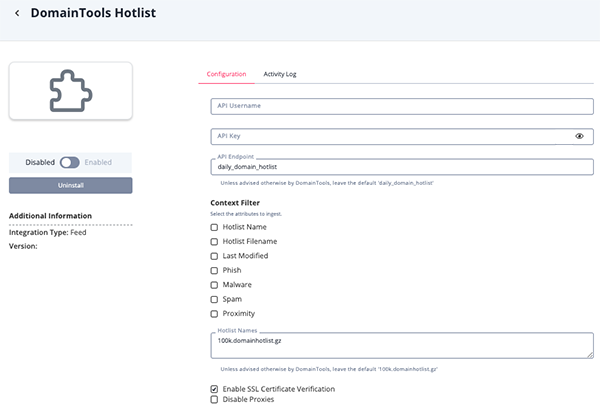
Parameter Description API Username Enter your DomainTools Hotlist username. API Key Enter your DomainTools Hotlist API Key. API Endpoint Enter the endpoint for the hotlist as defined by DomainTools. The default setting, daily_domain_hotlist, is typically used.Context Filter Select the attributes to ingest. Options include: - Hotlist Name
- Hotlist Filename
- Last Modified
- Phish
- Malware
- Spam
- Proximity
Hostlist Names Enter a list of one or more hotlist files names as supplied by DomainTools. The default value is 100k.domainhotlist.gz.Enable SSL Certificate Verification Enable this for the feed to validate the host-provided SSL certificate. Disable Proxies Enable this option if the feed should not honor proxies set in the ThreatQ UI.
- Review any additional settings, make any changes if needed, and click on Save.
- Click on the toggle switch, located above the Additional Information section, to enable it.
ThreatQ Mapping
DomainTools Hotlist
The DomainTools Hotlist feed ingests a list of active, high risk domains which has activity being measured by DomainTools' global passive DNS sensor network.
GET https://api.domaintools.com/v1/download?api_username={username}&api_key={api_key}
Sample Response:
{
    "response": {
        "download_name": "domain_hotlist",
        "files": [
            {
                "name": "daily_domain_hotlist/100k.domainhotlist.gz",
                "last_modified": "2024-11-05T01:03:04+00:00",
                "etag": "\"371978a570051763df5214a06717a34e\"",
                "size": "2016065",
                "url": "https://d2mzrdiuqyylox.cloudfront.net/daily_domain_hotlist/99s.domainhotlist.gz?Expires=1731462131Signature=bKoiKd8Rcc1pv1ghMzmE3~7tB9f5YQ98Jec9ep-~QkwiBjjD0RA5sf2-Xb6tD0S8gYU4FLORXhyUggFFFKxf4nUtkYSnJJzbYlUweUfgut0fBnlgsK1-sU4eXrG8wxOfdAWyBgNQ6ovA7yHzfX0aXpPIeelJtHY33XjpHQzJBz6s0BmP1ErSuQmuW3zrf2lRxyWyLb3f8eLVBtLstMOKa2UvBi1t9FR~hiQGR4DEnBrvy5WQ4alvwF6hc~sU9rKxqnIIRfjeHqHpTS3Qa3Ki~vxw64XkfUW5YM-Cb0~fBO0pmajmUXRkrv2q1BIDQxLKAy0fWhMEtrSp~VEGdJTbFg__&Key-Pair-Id=KJPH4999WZJ32"
            }
        ]
    }
}
ThreatQuotient provides the following default mapping for this feed:
| Feed Data Path | ThreatQ Entity | ThreatQ Object Type or Attribute Key | Published Date | Examples | Notes |
|---|---|---|---|---|---|
value[][0] |
Indicator Value | FQDN | N/A | 1wzbpb.top |
First value from download the response.files.url. |
value[][1] |
Indicator Attribute | Phish | N/A | 99 |
Second value from download the response.files.url. User-Configurable. Updatable |
value[][2] |
Indicator Attribute | Malware | N/A | 99 |
Third value from download the response.files.url. User-Configurable. Updatable |
value[][3] |
Indicator Attribute | Spam | N/A | 69 |
Fourth value from download the response.files.url. User-Configurable. Updatable |
value[][4] |
Indicator Attribute | Proximity | N/A | 99 |
Fifth value from download the response.files.url.User-Configurable. Updatable |
response.files.name |
Indicator Attribute | Hotlist | N/A | daily_domain_hotlist/100k.domainhotlist.gz |
User-Configurable. |
response.files.name |
Indicator Attribute | Hotlist Filename | N/A | 100k.domainhotlist.gz |
User-Configurable. |
response.files.last_modified |
Indicator Attribute | Last Modified | N/A | 2024-11-05T01:03:04+00:00 |
User-Configurable. Updatable. |
Average Feed Run
Object counts and Feed runtime are supplied as generalities only - objects returned by a provider can differ based on credential configurations and Feed runtime may vary based on system resources and load.
| Metric | Result |
|---|---|
| Run Time | 16 minutes |
| Indicators | 347,358 |
| Indicator Attributes | 1,500,000 |
Known Issues and Limitations
- Files such as
95s.domainhotlist.gz, have over 3 million entries which will cause the feed does not complete successfully due to a limitation of the platform. ThreatQuotient recommends using the current default:100k.domainhotlist.gz.
Change Log
- Version 1.2.0
- Resolved timeout errors caused by parsing large files.
- Updated the default hotlist name to
100k.domainhotlist.gzdue to the large size of the previous default hotlist name (95s.domainhotlist.gz). - Added a new configuration parameter:
- Context Filter - select which attributes for the feed to ingest.
- Version 1.1.0
- Updated the feed endpoint url.
- Renamed the feed from DomainTools Hotlist 95 RPZ to DomainTools Hotlist.
- Version 1.0.0
- Initial release
PDF Guides
| Document | ThreatQ Version |
|---|---|
| DomainTools Hotlist CDF Guide v1.2.0 | 5.24.1 or Greater |
| DomainTools Hotlist CDF Guide v1.1.0 | 5.24.1 or Greater |
| DomainTools Hotlist CDF Guide v1.0.0 | 5.24.1 or Greater |