DomainTools Brand Monitor CDF
The web format of this guide reflects the most current release. Guides for older iterations are available in PDF format.
Integration Details
ThreatQuotient provides the following details for this integration:
| Current Integration Version | 1.0.2 |
| Compatible with ThreatQ Versions | >= 6.3.0 |
| Support Tier | ThreatQ Supported |
Introduction
The DomainTools Brand Monitor CDF performs queries with the configured keywords against DomainTools Brand Monitor product and ingests the results. This allows security teams to search for potential typo squatting or brand-infringement domains.
The integration provides the following feed:
- DomainTools Brand Monitor - queries user supplied keywords against the Brand Monitor endpoint and ingests the results.
The integration ingests the following object types:
- Events
- Indicators
- FQDN
Prerequisites
The following is required to run the integration:
- A DomainTools API username.
- A DomainTools API Key.
Installation
Perform the following steps to install the integration:
The same steps can be used to upgrade the integration to a new version.
- Log into https://marketplace.threatq.com/.
- Locate and download the integration yaml file.
- Navigate to the integrations management page on your ThreatQ instance.
- Click on the Add New Integration button.
- Upload the integration yaml file using one of the following methods:
- Drag and drop the file into the dialog box
- Select Click to Browse to locate the file on your local machine
ThreatQ will inform you if the feed already exists on the platform and will require user confirmation before proceeding. ThreatQ will also inform you if the new version of the feed contains changes to the user configuration. The new user configurations will overwrite the existing ones for the feed and will require user confirmation before proceeding.
The feed will be added to the integrations page. You will still need to configure and then enable the feed.
Configuration
ThreatQuotient does not issue API keys for third-party vendors. Contact the specific vendor to obtain API keys and other integration-related credentials.
To configure the integration:
- Navigate to your integrations management page in ThreatQ.
- Select the Commercial option from the Category dropdown (optional).
If you are installing the integration for the first time, it will be located under the Disabled tab.
- Click on the integration entry to open its details page.
- Enter the following parameters under the Configuration tab:
Parameter Description API Username Your DomainTools API username. API Key Your DomainTools API Key. Query Values Enter a line-delimited list of keywords to query Brand Monitor. The integration will perform an individual query for each keyword entered in this field.
Domains to Ignore Optional - Enter a line-delimited list of domains that should not be ingested. These unwanted domains are referred to as variations. Domain Status Select the domain status to search for on Brand Monitor. Options include: - Both (default)
- New
- On Hold
Domain Status Mapping Provide a mapping to properly transform the DomainTools statuses to ThreatQ IOC statuses. This mapping should contain a line-separated CSV formatted string with the following columns: DomainTools Status, ThreatQ status. The default mapping for this configuration is: new, Review on-hold, ExpiredDays Back Select the number of days back, from 0 to 7, for the integration to search DomainTools. The default value is 0,which is current day.Exclude Enter domain names to exclude in the format of a pipe-delimited string. For exclusions of multiple terms, use the (\|)character as a logical AND. In such a case, a domain would have to contain all of the excluded strings in order to be excluded from matching.Domain Tag Define the tag to be ingested with the domain indicator. Enable SSL Certificate Verification Enable this parameter if the feed should validate the host-provided SSL certificate. Disable Proxies Enable this parameter if the feed should not honor proxies set in the ThreatQ UI.
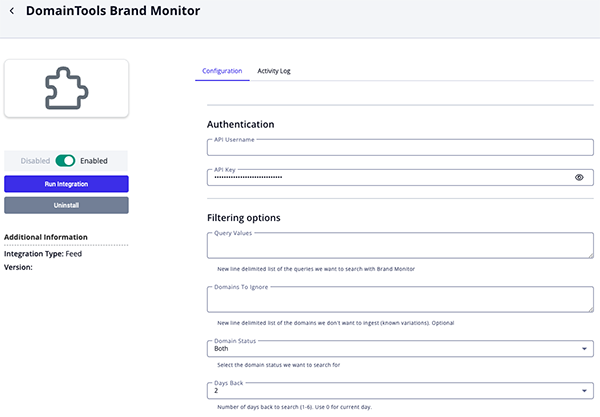
- Review any additional settings, make any changes if needed, and click on Save.
- Click on the toggle switch, located above the Additional Information section, to enable it.
ThreatQ Mapping
DomainTools Brand Monitor
The DomainTools Brand Monitor feed queries user supplied keywords against the Brand Monitor endpoint and ingest the results.
The integration will perform a query per keyword supplied. If multiple keywords are supplied, multiple queries will be performed.
GET https://api.domaintools.com/v1/mark-alert/
Sample Response:
{
    "query": "finance",
    "exclude": "auto|best",
    "new": true,
    "on-hold": true,
    "date": "2011-03-02",
    "total": 2,
    "alerts":
    [
        {
            "domain": "24hourfinance.info",
            "status": "on-hold"
        },
        {
            "domain": "actionis-finance.com",
            "status": "new"
        }
    ]
}
ThreatQuotient provides the following default mapping for this feed:
| Feed Data Path | ThreatQ Entity | ThreatQ Object Type or Attribute Key | Published Date | Examples | Notes |
|---|---|---|---|---|---|
alerts[].domain |
Indicator Value | FQDN | .date |
24hourfinance.info |
N/A |
.query |
Indicator/Event Attribute | Brand Monitor Query | .date |
finance |
Updatable. |
alerts[].status |
Indicator/Event Attribute | Domain Status | .date |
on-hold |
Updatable. This is the registrar status, and must not be confused with Indicator Status |
.new |
Indicator/Event Attribute | Domain New | .date |
No |
Updatable. Yes if value is true, No if false |
.on-hold |
Indicator/Event Attribute | Domain On-Hold | .date |
Yes |
Updatable. Yes if value is true, No if false |
alerts[].status |
Indicator Status | N/A | N/A | Expired |
User-configurable. Status mapping is defined by the user. |
| N/A | Indicator Tag | N/A | N/A | Mapped Domain status |
User-configurable. Optional. Ingested only if user has defined one. |
alerts[].domain |
Event Value | Alert | .date |
New match for "finance" for domain 24hourfinance.info |
N/A |
alerts[].domain, .query |
Event Description | N/A | .date |
24hourfinance.info detected by Brand Monitor against keyword "finance" |
Constructed as ".alerts[].domain detected by Brand Monitor against keyword .query" |
Average Feed Run
Object counts and Feed runtime are supplied as generalities only - objects returned by a provider can differ based on credential configurations and Feed runtime may vary based on system resources and load.
| Metric | Result |
|---|---|
| Run Time | 1minute |
| Events | 22 |
| Event Attributes | 88 |
| Indicators | 22 |
| Indicator Attributes | 88 |
Known Issues / Limitations
- Schedule your daily update to occur no sooner than 3am Pacific time for the best results. This ensures the data has been fully processed and is ready for your use. You will receive a 404 error response if the data has not been fully processed.
- Due to the nature that each query consumes resources, regardless of whether a match is found, your API account will be charged for each request you submit to the API. This is applicable even if are no domain names that match your query.
Change Log
- Version 1.0.2
- Added the following new configuration parameters:
- Days Back - configure the number of days back for the feed to search DomainTools.
- Exclude - enter Domain names to be excluded from the result set.
- Added the following new configuration parameters:
- Version 1.0.1
- Added the following new configuration parameters:
- Domain Status Mapping - define custom mapping for DomainTools statuses to ThreatQ statuses.
- Domain Tag - define the tag to be ingested with the domain indicator.
- Added the following new configuration parameters:
- Version 1.0.0
- Initial release
PDF Guides
| Document | ThreatQ Version |
|---|---|
| DomainTools Brand Monitor CDF Guide v1.0.2 | 6.3.0 or Greater |
| DomainTools Brand Monitor CDF Guide v1.0.1 | 6.3.0 or Greater |
| DomainTools Brand Monitor CDF Guide v1.0.0 | 6.3.0 or Greater |