CrowdStrike Recon CDF
The web format of this guide reflects the most current release. Guides for older iterations are available in PDF format.
Integration Details
ThreatQuotient provides the following details for this integration:
| Current Integration Version | 1.0.1 |
| Compatible with ThreatQ Versions | >= 5.12.1 |
| Support Tier | ThreatQ Supported |
Introduction
The CrowdStrike Recon CDF enables organizations to ingest threat intelligence from CrowdStrike Recon directly into ThreatQ, providing visibility into risks identified across the open, deep, and dark web. By monitoring forums, marketplaces, messaging platforms, and other online sources for leaked data, employee impersonations, and emerging threats, the integration maps relevant findings into ThreatQ to enhance situational awareness.
The integration provides the following feeds:
- CrowdStrike Recon - ingests notifications and alerts from CrowdStrike Recon and maps them to ThreatQ Event objects.
- CrowdStrike Get Notifications by ID (supplemental) - performs a bulk request to retrieve notification details.
The integration ingests the following object types into ThreatQ:
- Adversaries
- Compromised Accounts (custom object)
- Compromised Account Attributes
- Events
- Identities
- Identity Attributes
- Indicators
- Indicator Attributes
- Malware
- Vulnerabilities
Prerequisites
The following is required to install and run the integration:
- A CrowdStrike Recon License.
- Your CrowdStrike API Client ID.
- Your CrowdStrike API Client Secret.
- The Compromised Account custom object installed on your ThreatQ instance.
Compromised Account Custom Object
The integration requires the Compromised Account custom object.
Use the steps provided to install the custom object.
When installing the custom objects, be aware that any in-progress feed runs will be cancelled, and the API will be in maintenance mode.
- Download the integration bundle from the ThreatQ Marketplace.
- Unzip the bundle and locate the custom object files.
The custom object files will typically consist of a JSON definition file, install.sh script, and a images folder containing the svg icons.
- SSH into your ThreatQ instance.
- Set your install pathway environment variable. This command will retrieve the install pathway from your configuration file and set it as variable for use during this installation process.
INSTALL_CONF="/etc/threatq/platform/install.conf"
if [ -f "$INSTALL_CONF" ]; then source "$INSTALL_CONF"
fi
MISC_DIR="${INSTALL_BASE_PATH:-/var/lib/threatq}/misc" - Navigate to the tmp folder using the environment variable:
cd $MISC_DIR
- Upload the custom object files, including the images folder.
The directory structure should resemble the following:
- install.sh
- <custom_object_name>.json
- images (directory)
- <custom_object_name>.svg
- Run the following command:
kubectl exec -it deployment/api-schedule-run -n threatq -- sh /var/lib/threatq/misc/install.sh /var/lib/threatq/misc
The installation script will automatically put the application into maintenance mode, move the files to their required directories, install the custom object, update permissions, bring the application out of maintenance mode, and restart dynamo.
- Delete the install.sh, definition json file, and images directory from step 6 after the object has been installed as these files are no longer needed.
Use the following steps to install the custom objects in ThreatQ v5:
- Download the integration zip file from the ThreatQ Marketplace and unzip its contents.
- SSH into your ThreatQ instance.
- Navigate to tmp directory:
cd /tmp/
- Create a new directory:
mkdir flashpoint_cdf
- Upload the account.json and install.sh script into this new directory.
- Create a new directory called images within the flashpoint_cdf directory.
mkdir images
- Upload the account.svg.
- Navigate to the /tmp/flashpoint_cdf.
The directory should resemble the following:
- tmp
- flashpoint_cdf
- account.json
- install.sh
- images
- account.svg
- flashpoint_cdf
- tmp
- Run the following command to ensure that you have the proper permissions to install the custom object:
chmod +x install.sh
- Run the following command:
sudo ./install.sh
You must be in the directory level that houses the install.sh and json files when running this command.
The installation script will automatically put the application into maintenance mode, move the files to their required directories, install the custom object, update permissions, bring the application out of maintenance mode, and restart dynamo.
- Remove the temporary directory, after the custom object has been installed, as the files are no longer needed:
rm -rf flashpoint_cdf
Installation
The CDF requires the installation of Compromised Account custom object before installing the actual CDF. See the Prerequisites chapter for more details. The custom object must be installed prior to installing the CDF. Attempting to install the CDF without the custom object will cause the CDF install process to fail.
Perform the following steps to install the integration:
The same steps can be used to upgrade the integration to a new version.
- Log into https://marketplace.threatq.com/.
- Locate and download the integration zip file and extract its files.
- Install the required Compromised Account custom object if you have not do so already.
- Navigate to the integrations management page on your ThreatQ instance.
- Click on the Add New Integration button.
- Upload the integration yaml file using one of the following methods:
- Drag and drop the file into the dialog box
- Select Click to Browse to locate the file on your local machine
ThreatQ will inform you if the feed already exists on the platform and will require user confirmation before proceeding. ThreatQ will also inform you if the new version of the feed contains changes to the user configuration. The new user configurations will overwrite the existing ones for the feed and will require user confirmation before proceeding.
The feed will be added to the integrations page. You will still need to configure and then enable the feed.
Configuration
ThreatQuotient does not issue API keys for third-party vendors. Contact the specific vendor to obtain API keys and other integration-related credentials.
To configure the integration:
- Navigate to your integrations management page in ThreatQ.
- Select the Commercial option from the Category dropdown (optional).
If you are installing the integration for the first time, it will be located under the Disabled tab.
- Click on the integration entry to open its details page.
- Enter the following parameters under the Configuration tab:
Parameter Description API Hostname Select the appropriate CrowdStrike host. Options include: - US-1:
api.crowdstrike.com - US-2:
api.us-2.crowdstrike.com(Default) - EU-1:
api.eu-1.crowdstrike.com - US-GOV-1:
api.laggar.gcw.crowdstrike.com
CrowdStrike Client ID The CrowdStrike Insight EDR API Client ID to authenticate. CrowdStrike Client Secret The CrowdStrike Insight EDR API Client Secret to authenticate. Status Filter Select the statuses of notifications to filter on which alerts to ingest into ThreatQ. Options include: - New (default)
- In Progress (default)
- False Positive (Closed) (default)
- True Positive (Actioned) (default)
- True Positive (Not Actionable) (default)
- Pending Review (default)
Additional FQL Filter Enter a custom Falcon Query Language (FQL) filter to include in the API request. This filter will be appended to the default filter, which restricts results by created date according to the feed run timeframe. Ensure the query syntax is valid, as errors may result in a 400 response from the API. To apply logical operators, use +for AND and,for OR; the keywordsandorare not supported in this query language.Notification Lookback Days Select the number of days to look back from the feed run’s “until” timestamp, which is typically the feed start time. This value should exceed your organization’s average response time for CrowdStrike notifications to ensure that any updates, such as status changes, are successfully captured. Options include: - 3 Days
- 7 Days
- 14 Days (default)
- 30 Days
- 60 Days
- 90 Days
General Details Filter Select which pieces of context to ingest into ThreatQ along with the Notification Alert. Options include: - Labels (default)
- Rule name (default)
- Rule Priority (default)
- Rule Topic (default)
- Source Category (default)
- Source Domain (default)
- Notification Type (default)
- Author
- Author ID
- Telegram Channel
Ingest Author ID As The Author ID is a unique identifier associated with the actor who generated the content that triggered the notification. This identifier may differ from the displayed author name, as an actor can change their name while the Author ID remains constant. Ingesting the Author ID as a String-type indicator, with the author name captured as an attribute, enables consistent tracking and linkage of the actor to their content over time, even if the displayed name changes. Options include: - Ingest as Attribute
- Ingest as Indicator (Type: String) (default)
Ingest Author Name As The Author represents the displayed name of the actor who generated the content that triggered the notification. This name may differ from the Author ID, as an actor can change their name while the ID remains constant. Options include: - Ingest as Attribute
- Ingest as Identity (default)
- Ingest as Adversary
Ingest the Author Name as an attribute to present the information clearly in dashboards. Alternatively, ingest the Author Name as an Identity object to facilitate data sharing with external systems, such as via STIX. Depending on your use case, you may also choose to ingest the Author as an Adversary object instead of an Identity.
Include the following in the Event Title Select any additional fields to include in the title of the created ThreatQ events. Options include: - Notification Rule Name (default)
- Post Title Snippet (First 50 Characters)
- Post Content Snippet (First 90 Characters)
By default, the event title contains details about the rule that triggered the notification, along with the notification type and priority. You may choose to add further fields to enhance visibility and support efficient triage. Not all fields are applicable to every notification type and will be included only when available.
Notification rule names are not included for breach and typosquatting alerts.
Breach Details Filter Select which pieces of breach context to ingest into ThreatQ along with the Notification Alert. Options include: - Company (default)
- Credential Status (default)
- Credentials Domain (default)
- Display Name (default)
- Domain (default)
- Bank Account
- Credit Card
- Cryptocurrency Address
- Login ID (default)
- Job Position (default)
- City (default)
- Country Code (default)
- Federal Admin Region
- Federal District
- Postal Code (default)
- State (default)
- Password
- Password Hash
- Password Salt
- Phone Number
- Is Bot
- Bot ID
- Bot IP (default)
- Bot Country (default)
- Bot Username (default)
- Bot Computer Name (default)
- Bot Infection Path (default)
Typosquatting Filter Select which pieces of typosquatting context to ingest into ThreatQ along with the Notification Alert. Options include: - Domain (default)
- Base Domain
- Name Servers
- Registrant Email
- Registrant Name
- Registrant Organization
- Registrar Name
IOC Filter Select which indicator types, when available, to ingest into ThreatQ. Options include: - Domains (default)
- Emails (default)
- IPs (default)
- URLs (default)
- MD5 Hashes (default)
- SHA-1 Hashes (default)
- SHA-256 Hashes (default)
- SHA-512 Hashes (default)
- CVEs (default)
Ingest CVEs As Select the entity type to ingest CVEs as in ThreatQ. Options include: - Vulnerabilities (default)
- Indicators (Type: CVE)
Select the Indicators (Type: CVE) option to ingest CVEs as Indicators to leverage ThreatQ's Scoring Policy for CVE prioritization.
Enable SSL Certificate Verification Enable this parameter if the feed should validate the host-provided SSL certificate. Disable Proxies Enable this parameter if the feed should not honor proxies set in the ThreatQ UI.
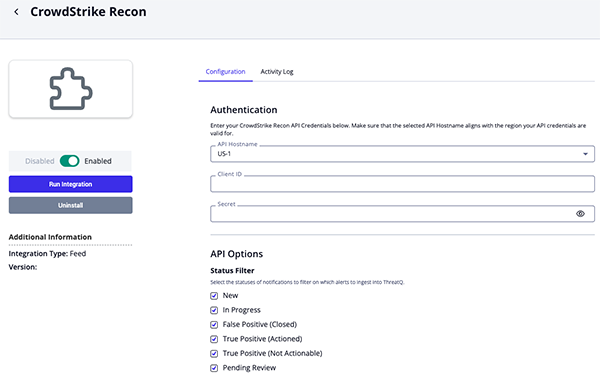
- US-1:
- Review any additional settings, make any changes if needed, and click on Save.
- Click on the toggle switch, located above the Additional Information section, to enable it.
ThreatQ Mapping
CrowdStrike Recon
The CrowdStrike Recon feed ingests notifications and alerts from CrowdStrike Recon and maps them to ThreatQ Event objects. These alerts may include details related to breached accounts, typosquatting domains, and other threats targeting your organization.
GET https://{{ host }}/recon/queries/notifications/v1
Sample Response:
{
    "meta": {
        "query_time": 3.268678658,
        "powered_by": "recon",
        "trace_id": "b6a7c4d3-d291-9ba0-9dbc-719631ac90a3"
    },
    "resources": ["92c61646140c41121092276e28b8d81b"]
}
Get Notifications by ID (supplemental)
The integration will use the Get Notifications by ID supplemental feed to perform a bulk request to retrieve notification details.
GET https://{{ host }}/recon/entities/notifications-detailed/v1?ids={{ ids }}
Sample Response:
{
"meta": {
"query_time": 3.268678658,
"powered_by": "recon",
"trace_id": "b6a7c4d3-d295-9ba0-9dbd-719631ac90a3"
},
"resources": [
{
"id": "MjAyMy0wOC0wMVQxODowNjozN1pfZDAzODgzNGQtYjE0Ny1hMTRmBTYyNTgtMmE3MDUzNDdjZWM0",
"notification": {
"cid": "92c61646140c41121092276e28b8d81b",
"id": "MjAyMy0wOC0wMVQxODowNjozN1pfZDAzODgzNGQtYjE0Ny1hMTRmBTYyNTgtMmE3MDUzNDdjZWM0",
"status": "closed-no-action-true-positive",
"assigned_to_uuid": "9860821d-8cb6-4a44-9e49-675bbf766897",
"assigned_to_uid": "stevejobs@acmecorp.com",
"assigned_to_username": "Steve Jobs",
"created_date": "2023-08-02T18:05:40.046079458Z",
"updated_date": "2023-08-03T16:27:48.80213484Z",
"rule_id": "84e768b8-a59e-4814-a4e6-259b354828f7",
"rule_name": "acme.com - all",
"rule_topic": "SA_EMAIL",
"rule_priority": "high",
"item_id": "NToyMjEwNjUzOWZiZjNmMjIzNTdkN2UxMDU4Njk4ODEzYmIzODQ5YmE2ZTEzMzYyYjVmNDJkNGRmYzhkN2E4ZDNk",
"raw_intel_id": "MzoyMDIyMTEtNzFlYjIzNmMwYzI3YWQwYjE1NzgyMGUyYjRhOTAzMzE5NGI2NDNiZDlkMDk1MzM4MWE3MGFmNjBkZTBjZGE0Mg==",
"item_type": "exposed_data",
"item_date": "2023-08-01T18:06:37.902Z",
"source_category": "forum",
"item_site": "breached.co",
"item_site_id": "NTpicmVhY2hlZC5jbw==",
"item_author": "All3in",
"item_author_id": "NTpicmVhY2hlZC5jbzo6QWxsM2lu",
"breach_summary": {
"name": "forbes.com_breached.co_20220603",
"description": "Exposed data containing the following fields: domains where credentials are used, domains, emails, filenames, hash types, hashed passwords, login IDs, and names",
"fields": [
"credentials_domains",
"domains",
"emails",
"filenames",
"hash_types",
"hashed_passwords",
"login_ids",
"names"
],
"exposure_date": "2023-08-01T18:06:37.902Z",
"url": "https://breached.vc/Thread-Forbes-Database-Leaked-Download",
"event_id": "NToyMjEwNjUzOWZiZjNmMjIzNTdkN2UxMDU4Njk4ODEzYmIzODQ5YmE2ZTEzMzYyYjVmNDJkNGRmYzhkN2E4ZDNk",
"confidence_level": "unverified",
"credentials_domains": ["forbes.com"],
"event_date": "between Feb. 20, 2014 and Feb. 21, 2014",
"obtained_by": "Syrian Electronic Army",
"files": [
{
"name": "forbes_wp_users.txt",
"size": 187547040,
"complete_data_set": true,
"download_urls": [
"https://cdn.breached.vc/files/down.php?"
]
}
],
"is_retroactively_deduped": false
},
"logs": [
{
"id": "b3bd3ba3-9c25-491c-a415-47f3660718cd",
"created_date": "2023-08-03T16:27:49.610696241Z",
"notification_id": "MjAyMy0wOC0wMVQxODowNjozN1pfZDAzODgzNGQtYjE0Ny1hMTRmBTYyNTgtMmE3MDUzNDdjZWM0",
"message": "",
"action": "STATUS_CHANGED",
"details": "Status changed from new to closed-no-action-true-positive",
"cid": "92c61646140c41121092276e28b8d81b",
"user_uuid": "9860821d-8cb6-4a44-9e49-675bbf766897",
"username": "Steve Jobs",
"user_email": "stevejobs@acmecorp.com"
},
{
"id": "d442fedc-a8fe-4783-bf25-7f481cafb436",
"created_date": "2023-08-03T16:27:46.697586345Z",
"notification_id": "MjAyMy0wOC0wMVQxODowNjozN1pfZDAzODgzNGQtYjE0Ny1hMTRmBTYyNTgtMmE3MDUzNDdjZWM0",
"message": "",
"action": "ASSIGNEE_CHANGED",
"details": "Assignee changed from unassigned to Steve Jobs",
"cid": "92c61646140c41121092276e28b8d81b",
"user_uuid": "9860821d-8cb6-4a44-9e49-675bbf766897",
"username": "Steve Jobs",
"user_email": "stevejobs@acmecorp.com"
}
]
},
"breach_details": {
"items": [
{
"email": "john.doe@acme.com",
"domain": "acme.com",
"name": "John Doe",
"phone": "",
"login_id": "johndoe",
"password": "",
"hash_type": "phpass",
"user_id": "861290",
"credentials_domain": "forbes.com",
"password_hash": "<some password hash>"
},
{
"email": "jane.doe@acme.com",
"domain": "acme.com",
"name": "Jane Doe",
"phone": "",
"login_id": "janedoe",
"password": "",
"hash_type": "phpass",
"user_id": "886108",
"credentials_domain": "forbes.com",
"password_hash": "<some password hash>"
}
]
}
},
{
"id": "MjAyMy0wOC0yNFQxNTozOToxNFpfNjcxN2QyMzItMmY4Yy00ZuQ1LWRiMMItNGExYzNjNjE4YTlj",
"notification": {
"cid": "92c61646140c41121092276e28b8d81b",
"id": "MjAyMy0wOC0yNFQxNTozOToxNFpfNjcxN2QyMzItMmY4Yy00ZuQ1LWRiMMItNGExYzNjNjE4YTlj",
"highlights": [
"</grid/p/cs-highlight>login/cs-highlight>:О§ :?",
"</dsl/cs-highlight>login/cs-highlight>.php:Ш§Щ„Щ…ШШЁ2010:Bold!",
"Removed due to sensitive details"
],
"status": "new",
"assigned_to_uuid": "unassigned",
"created_date": "2023-08-24T22:45:24.684874297Z",
"updated_date": "2023-08-24T22:45:24.684874297Z",
"rule_id": "44dc2cd6-10e8-43ba-8af0-bf4cefe33d68",
"rule_name": "Axure by Tugboat",
"rule_topic": "SA_BRAND_PRODUCT",
"rule_priority": "high",
"item_id": "MzpyMDIzMDgtMGYwNTI0OWExMTc2YWY1MzFjNjNiMzZjZTUzMmFiODQ2M2NlM2IwMTUwN2E4YTMaZTI2MlU4NzVjZTFkNmYxYw==",
"raw_intel_id": "MzpyMDIzMDgtMGYwNTI0OWExMTc2YWY1MzFjNjNiMzZjZTUzMmFiODQ2M2NlM2IwMTUwN2E4YTMaZTI2MlU4NzVjZTFkNmYxYw==",
"item_type": "file",
"item_date": "2023-08-24T15:39:14Z",
"source_category": "chat_medium",
"item_site": "telegram.org",
"item_site_id": "Mzp0ZWxlZ3JhbS5vcmc="
},
"details": {
"type": "file",
"content": "Removed because it had passwords and was several MB in size.",
"created_date": "2023-08-24T15:39:14Z",
"updated_date": "2023-08-24T15:39:14Z",
"site": "telegram.org",
"language": "en"
}
},
{
"id": "MjAyMy0wNy0zMVQxODozNDowNVpfYTVjMTIwYTgtMmIzYS1hNzdmLTQ1NnktNjQaMGR0YWMwZLU3",
"notification": {
"cid": "92c61646140c41121092276e28b8d81b",
"id": "MjAyMy0wNy0zMVQxODozNDowNVpfYTVjMTIwYTgtMmIzYS1hNzdmLTQ1NnktNjQaMGR0YWMwZLU3",
"highlights": ["ferrarif1n.com"],
"status": "new",
"assigned_to_uuid": "unassigned",
"created_date": "2023-07-31T20:22:42.483809147Z",
"updated_date": "2023-07-31T20:22:42.483809147Z",
"rule_id": "227b836f-423b-456e-aa0a-e300824575c5",
"rule_name": "integris - exactly match",
"rule_topic": "SA_TYPOSQUATTING",
"rule_priority": "high",
"item_id": "aZ50ZWayaZNtZy1jb20",
"raw_intel_id": "",
"item_type": "typosquatting_domain",
"item_date": "2023-07-31T18:34:05Z",
"source_category": "domain_data",
"typosquatting": {
"id": "aZ50ZWayaZNtZy1jb20",
"unicode_format": "ferrarif1n.com",
"punycode_format": "ferrarif1n.com",
"parent_domain": {
"id": "Y29t",
"unicode_format": "com",
"punycode_format": "com"
},
"base_domain": {
"id": "aZ50ZWayaZNtZy1jb20",
"unicode_format": "ferrarif1n.com",
"punycode_format": "ferrarif1n.com",
"is_registered": true,
"whois": {
"date_created": "2023-07-31T18:34:05Z",
"date_updated": "2023-07-31T18:34:15Z",
"date_expires": "2024-07-31T04:00:00Z",
"date_collected": "2023-07-31T19:43:52Z",
"registrar": {
"name": "NETWORK SOLUTIONS, LLC.",
"status": null
},
"registrant": {
"name": "Leclerc, Charles",
"org": "",
"email": "ferrarifan.charles0@gmail.com"
},
"name_servers": [
"DAHLIA.NS.CLOUDFLARE.COM",
"HARVEY.NS.CLOUDFLARE.COM"
]
}
}
}
}
},
{
"id": "MjAyMy0wOC0yNFQxOTozMzozM1pfMGY3MmZhNWQtNjUxYi00OGFlLTcwMTgtMNBlOWE0ZaY1YmIx",
"notification": {
"cid": "92c61646140c41121092276e28b8d81b",
"id": "MjAyMy0wOC0yNFQxOTozMzozM1pfMGY3MmZhNWQtNjUxYi00OGFlLTcwMTgtMNBlOWE0ZaY1YmIx",
"highlights": [
"[difm](https://github.com/uBlockOrigin/uAssets/assets/143128910/f5832711-19a6-43c3-8a1a-63dac2fe3385)\n\n\n\n\n\n### Configuration\n\n\n\n```yaml\nuBlock Origin: 1.51.0\nChromium: 116\nfilterset (summary):\n network: 98419\n cosmetic: 39306\n scriptlet: 18316\n html: 0\nlistset (total-discarded, cs-highlight>last/cs-highlight>-updated):\n default:\n user-filters: 4-0, never\n easylist: 69633-10, now\n easyprivacy: 33310-63, now\n plowe-0: 3726-1065, now\n ublock-badware: 7777-146, now\n ublock-filters: 34341-122, now\n ublock-privacy: 538-6,"
],
"status": "new",
"assigned_to_uuid": "unassigned",
"created_date": "2023-08-25T14:10:55.452838323Z",
"updated_date": "2023-08-25T14:10:55.452838323Z",
"rule_id": "9f3ada7d-7da8-47bb-b6e5-ac6bab820e39",
"rule_name": "cookielaw.org Domain",
"rule_topic": "SA_DOMAIN",
"rule_priority": "high",
"item_id": "MzoyMDIzMDgtYzE3MjZmNzYxNjYxMzQxNzJhYjU2OTg4MTQyODkyZTJlZDU1NDFjNzVkNmE3ZDA2GmE1ZRMyNGU5YzZkMDlkNw==",
"raw_intel_id": "MzoyMDIzMDgtYzE3MjZmNzYxNjYxMzQxNzJhYjU2OTg4MTQyODkyZTJlZDU1NDFjNzVkNmE3ZDA2GmE1ZRMyNGU5YzZkMDlkNw==",
"item_type": "post",
"item_date": "2023-08-24T19:33:33Z",
"source_category": "public_repo",
"item_site": "github.com",
"item_site_id": "MzpnaXTodWIuY29a",
"item_author": "nyfootballfan89",
"item_author_id": "MzpnaXRodWIuY29tOjc5ZDU3MTVhNWZjZWQ0ZDAzNWExZjExNmFjN2U4MjliYmQxZWYzZTFmNjEwMTQ1NWZhODZhMGUzNzdlMmQxZGQ6SmV0c1lhbmtzYGV2aWazOQ=="
},
"details": {
"type": "post",
"content": "### Prerequisites\n\n- [X] I read and understand the [policy about what is a valid filter issue](https://github.com/uBlockOrigin/uAssets/blob/master/README.md#uassets).\n- [X] I verified that this issue is not a duplicate. (Use this [button](https://user-images.githubusercontent.com/585534/146582579-c32707a0-36a1-4cc5-ad50-83172c9f67a8.png) to find out.)\n- [X] I forced an update of my filter lists. (Click the [\"Purge all caches\"](https://github.com/gorhill/uBlock/wiki/Dashboard:-Filter-lists#purge-all-caches) button while holding the 'Shift' key, then click the [\"Update now\"](https://github.com/gorhill/uBlock/wiki/Dashboard:-Filter-lists#update-now) button.)\n- [X] I did not remove any of the [default filter lists](https://user-images.githubusercontent.com/124740436/235392297-c4fc6290-73a6-4a70-96a9-3f6a7683f21d.png), or I have verified that the issue was not caused by removing any of the default lists.\n- [X] I did not enable additional filter lists, or I have verified that the issue still occurs without enabling additional filter lists.\n- [X] I do not have custom filters/rules, or I have verified that the issue still occurs without custom filters/rules.\n- [X] I am not using uBlock Origin (uBO) along with other content blocker extensions.\n- [X] I have verified that the web browser's built-in blocker or [DNS blocking](https://en.wikipedia.org/wiki/DNS_blocking) (standalone or through a VPN) is not causing the issue.\n- [ ] I did not answer truthfully to **ALL** the above checkpoints.\n\n### URL address of the web page\n\n`https://www.di.fm/`\n\n### Category\n\ndetection\n\n### Description\n\nTo recreate the issue, go to `www.di.fm` and create a free account. Then play one of \"Today's Free Channels\" on the front page. After a few minutes of playing, maybe 10 at most, it will display the page in the screenshot. Disabling the adblocker results in constant annoying ads that interrupt the music.\n\n### Other extensions used\n\nnone\n\n### Screenshot(s)\n\n\nScreenshot(s)\n\n\n\n\n\n\n\n\n### Configuration\n\n\n\n```yaml\nuBlock Origin: 1.51.0\nChromium: 116\nfilterset (summary):\n network: 98419\n cosmetic: 39306\n scriptlet: 18316\n html: 0\nlistset (total-discarded, last-updated):\n default:\n user-filters: 4-0, never\n easylist: 69633-10, now\n easyprivacy: 33310-63, now\n plowe-0: 3726-1065, now\n ublock-badware: 7777-146, now\n ublock-filters: 34341-122, now\n ublock-privacy: 538-6, now\n ublock-quick-fixes: 226-44, now\n ublock-unbreak: 2116-32, now\n urlhaus-1: 6007-0, now\nfilterset (user): [array of 4 redacted]\ntrustedset:\n added: [array of 13 redacted]\nswitchRuleset:\n added: [array of 1 redacted]\nuserSettings:\n advancedUserEnabled: true\nhiddenSettings:\n userResourcesLocation: [redacted]\nsupportStats:\n allReadyAfter: 812 ms\n maxAssetCacheWait: 302 ms\npopupPanel:\n blocked: 7\n network:\n adswizz.com: 2\n cookielaw.org: 1\n googlesyndication.com: 1\n googletagmanager.com: 1\n pub.network: 2\n extended:\n #@##panel-ad\n #@#+js(set-constant, di.VAST.XHRURLHandler, noopFunc)\n```\n",
"created_date": "2023-08-24T19:33:33Z",
"updated_date": "2023-08-25T12:53:17Z",
"site": "github.com",
"title": "di.fm: detection",
"url": "https://api.github.com/repos/uBlockOrigin/uAssets/issues/19455",
"author": "nyfootballfan89",
"language": "en"
}
},
{
"id": "MjAyMy0wOC0yNVQwNzo1NTo1N1pfZGNiNjk3YmQtN2U3ZS1kZDhiMTI5YmMtRTVjNTYxOTE3NjRk",
"notification": {
"cid": "92c61646140c41121092276e28b8d81b",
"id": "MjAyMy0wOC0yNVQwNzo1NTo1N1pfZGNiNjk3YmQtN2U3ZS1kZDhiMTI5YmMtRTVjNTYxOTE3NjRk",
"highlights": [
"Можно через Virustotal посмотреть историю IP. Но не факт что он не был индексирован сразу с Cloudom"
],
"status": "new",
"assigned_to_uuid": "unassigned",
"created_date": "2023-08-25T16:03:25.55111288Z",
"updated_date": "2023-08-25T16:03:25.55111288Z",
"rule_id": "054fe87b-c8de-4705-9489-dd3c71d8b1e3",
"rule_name": "Cloudflare, Inc. - Attack disc, creds, access fraud, VPN ",
"rule_topic": "SA_THIRD_PARTY",
"rule_priority": "high",
"item_id": "MzoyMDIzMDgtN2U2ZjgyNjE5M2YwNjJjZmY4N2Y4YTk4YWU3YTMzNDBkM2NmZWQyNGMwZjFhOTk5NWMwM2U3Y2ZhZTAyMGQ3Nw==",
"raw_intel_id": "MzoyMDIzMDgtN2U2ZjgyNjE5M2YwNjJjZmY4N2Y4YTk4YWU3YTMzNDBkM2NmZWQyNGMwZjFhOTk5NWMwM2U3Y2ZhZTAyMGQ3Nw==",
"item_type": "reply",
"item_date": "2023-08-25T07:55:57Z",
"source_category": "forum",
"item_site": "xss.is",
"item_site_id": "Mzp4c3MuaXM=",
"item_author": "sitizary332",
"item_author_id": "Mzp4c3MuaXM6ZmNmNGM1OWU1N2NjZjA4NzA0NmNmOWY4ZWFmZjI4ODNkNDdkMTg2ZmRhNTkwMjMyNGEyZjBjMWNhYzQ2MGNlNTpzaXRpemFyeTMzMg=="
},
"details": {
"type": "reply",
"content": "Можно через Virustotal посмотреть историю IP. Но не факт что он не был индексирован сразу с Cloudom",
"created_date": "2023-08-25T07:55:57Z",
"updated_date": "2023-08-25T07:55:57Z",
"site": "xss.is",
"title": "CloudFlare Bypass // Как узнать IP за CloudFlare и другими WAF и CND",
"url": "https://xss.is/threads/28805/post-669695",
"author": "sitizary332",
"language": "ru"
}
}
],
"errors": null
}ThreatQuotient provides the following default mapping for this feed based on each item within the resources array:
All fields are subject to ingestion based on availability and user-field context filters. Some indicator types will be automatically parsed out as related Indicator objects to the notification event. However, non-standard types such as AWS IDs, Bitcoin addresses, etc. will be included in the event description only.
| Feed Data Path | ThreatQ Entity | ThreatQ Object Type or Attribute Key | Published Date | Examples | Notes |
|---|---|---|---|---|---|
.notification.item_type, .notification.rule_priority, .notification.rule_topic, .notification.rule_name, |
Event.Title |
Alert, Typosquatting, or Breach |
.notification.item_date |
N/A |
Event titles will vary based on the notification type and the available information. |
.breach_details.items[].email, .breach_details.items[].display_name, .breach_details.items[].name |
CompromisedAccount.Value |
N/A |
N/A |
john.doe |
Object value will be based on available information. Only for breach alerts |
.breach_details.items[].company |
CompromisedAccount.Attribute |
Company |
N/A |
Acme Corp |
User-configurable. Only for breach alerts |
.breach_details.items[].credential_status |
CompromisedAccount.Attribute |
Credential Status |
N/A |
N/A |
User-configurable. Only for breach alerts |
.breach_details.items[].credentials_domain |
CompromisedAccount.Attribute |
Credentials Domain |
N/A |
example.com |
User-configurable. Only for breach alerts |
.breach_details.items[].login_id |
CompromisedAccount.Attribute |
Login ID |
N/A |
johndoe |
User-configurable. Only for breach alerts |
.breach_details.items[].display_name, .breach_details.items[].name |
CompromisedAccount.Attribute |
Display Name |
N/A |
John Doe |
User-configurable. Only for breach alerts |
.breach_details.items[].domain |
CompromisedAccount.Attribute |
Domain |
N/A |
acme.com |
Only for breach alerts |
.breach_details.items[].financial.bank_account |
CompromisedAccount.Attribute |
Bank Account |
N/A |
N/A |
Only for breach alerts |
.breach_details.items[].financial.credit_card |
CompromisedAccount.Attribute |
Credit Card |
N/A |
N/A |
Only for breach alerts |
.breach_details.items[].financial.cryptocurrency_address |
CompromisedAccount.Attribute |
Cryptocurrency Address |
N/A |
N/A |
Only for breach alerts |
.breach_details.items[].financial.job_position |
CompromisedAccount.Attribute |
Job Position |
N/A |
N/A |
Only for breach alerts |
.breach_details.items[].location.city |
CompromisedAccount.Attribute |
City |
N/A |
N/A |
Only for breach alerts |
.breach_details.items[].location.country_code |
CompromisedAccount.Attribute |
Country Code |
N/A |
N/A |
Only for breach alerts |
.breach_details.items[].location.federal_admin_region |
CompromisedAccount.Attribute |
Federal Admin Region |
N/A |
N/A |
Only for breach alerts |
.breach_details.items[].location.federal_district |
CompromisedAccount.Attribute |
Federal District |
N/A |
N/A |
Only for breach alerts |
.breach_details.items[].location.postal_code |
CompromisedAccount.Attribute |
Postal Code |
N/A |
N/A |
Only for breach alerts |
.breach_details.items[].location.state |
CompromisedAccount.Attribute |
State |
N/A |
N/A |
Only for breach alerts |
.breach_details.items[].password |
CompromisedAccount.Attribute |
Password |
N/A |
N/A |
Only for breach alerts |
.breach_details.items[].password_hash |
CompromisedAccount.Attribute |
Password Hash |
N/A |
N/A |
Only for breach alerts |
.breach_details.items[].password_salt |
CompromisedAccount.Attribute |
Password Salt |
N/A |
N/A |
Only for breach alerts |
.breach_details.items[].phone |
CompromisedAccount.Attribute |
Phone Number |
N/A |
N/A |
Only for breach alerts |
.breach_details.items[].bot |
CompromisedAccount.Attribute |
Is Bot |
N/A |
N/A |
Always true when this flag exists |
.breach_details.items[].bot.bot_id |
CompromisedAccount.Attribute |
Bot ID |
N/A |
N/A |
Only for breach alerts |
.breach_details.items[].bot.ip |
CompromisedAccount.Attribute |
Bot IP |
N/A |
N/A |
Only for breach alerts |
.breach_details.items[].bot.location.country |
CompromisedAccount.Attribute |
Bot Country |
N/A |
N/A |
Only for breach alerts |
.breach_details.items[].bot.operating_system.username |
CompromisedAccount.Attribute |
Bot Username |
N/A |
N/A |
Only for breach alerts |
.breach_details.items[].bot.operating_system.computer_name |
CompromisedAccount.Attribute |
Bot Computer Name |
N/A |
N/A |
Only for breach alerts |
.breach_details.items[].bot.infection_path |
CompromisedAccount.Attribute |
Bot Infection Path |
N/A |
N/A |
Only for breach alerts |
.breach_details.items[].bot.malware_family |
Malware.Value |
N/A |
N/A |
N/A |
Only for breach alerts |
.details.labels[] |
Event.Attribute |
Label |
N/A |
N/A |
N/A |
.notification.rule_name |
Event.Attribute |
Rule Name |
N/A |
N/A |
N/A |
.notification.rule_priority |
Event.Attribute |
Rule Priority |
N/A |
N/A |
N/A |
.notification.rule_topic |
Event.Attribute |
Rule Topic |
N/A |
N/A |
N/A |
.notification.source_category |
Event.Attribute |
Source Category |
N/A |
N/A |
N/A |
.notification.item_site |
Event.Attribute |
Source Domain |
N/A |
N/A |
N/A |
.notification.item_type |
Event.Attribute |
Notification Type |
N/A |
N/A |
N/A |
.details.url |
Event.Attribute |
Telegram Channel |
N/A |
N/A |
If the offending URL is a Telegram link, the channel name is parsed out. |
.notification.item_author, .details.author |
Event.Attribute, Identity.Value, Adversary.Name |
N/A |
N/A |
N/A |
Ingested type is based on user-field selection |
.notification.typosquatting.base_domain.whois.name_servers |
Event.Attribute |
Nameserver |
N/A |
N/A |
Only for typosquatting alerts |
.notification.typosquatting.base_domain.whois.registrant.email |
Event.Attribute |
Registrant Email |
N/A |
N/A |
Only for typosquatting alerts |
.notification.typosquatting.base_domain.whois.registrant.name |
Event.Attribute |
Registrant Name |
N/A |
N/A |
Only for typosquatting alerts |
.notification.typosquatting.base_domain.whois.registrant.org |
Event.Attribute |
Registrant Organization |
N/A |
N/A |
Only for typosquatting alerts |
.notification.typosquatting.base_domain.whois.registrar.name |
Event.Attribute |
Registrar Name |
N/A |
N/A |
Only for typosquatting alerts |
N/A |
Event.Attribute |
Threat Type |
N/A |
Typosquatting |
Automatically added for all Typosquatting alerts |
.details.iocs.domains[] |
Indicator.Value |
FQDN |
N/A |
N/A |
N/A |
.details.iocs.emails[] |
Indicator.Value |
Email Address |
N/A |
N/A |
N/A |
.details.iocs.ips[] |
Indicator.Value |
IP Address |
N/A |
N/A |
N/A |
.details.iocs.urls[] |
Indicator.Value |
URL |
N/A |
N/A |
N/A |
.details.iocs.md5s[] |
Indicator.Value |
MD5 |
N/A |
N/A |
N/A |
.details.iocs.sha1s[] |
Indicator.Value |
SHA-1 |
N/A |
N/A |
N/A |
.details.iocs.sha256s[] |
Indicator.Value |
SHA-256 |
N/A |
N/A |
N/A |
.details.iocs.sha512s[] |
Indicator.Value |
SHA-512 |
N/A |
N/A |
N/A |
.details.iocs.cves[] |
Indicator.Value, Vulnerability.Value |
FQDN |
N/A |
N/A |
Ingested object type based on user-field selection |
.* |
Event.Description |
N/A |
N/A |
N/A |
The description will contain various fields from the notification, including the notification content, language, author, title, and indicators. |
Average Feed Run
Object counts and Feed runtime are supplied as generalities only - objects returned by a provider can differ based on credential configurations and Feed runtime may vary based on system resources and load.
| Metric | Result |
|---|---|
| Run Time | 1 minute |
| Adversaries | 32 |
| Events | 76 |
| Event Attributes | 489 |
| Indicators | 239 |
| Indicator Attributes | 281 |
| Vulnerability | 1 |
Change Log
- Version 1.0.1
-
Resolved an
UndefinedErrorthat occurred whenbase_domain.whoiswas missing from the CrowdStrike Recon API response.
-
- Version 1.0.0
- Initial release
PDF Guides
| Document | ThreatQ Version |
|---|---|
| CrowdStrike Recon CDF Guide v1.0.1 | 6.0.0 or Greater |
| CrowdStrike Recon CDF Guide v1.0.0 | 6.0.0 or Greater |