CrowdStrike Insight EDR CDF
The web format of this guide reflects the most current release. Guides for older iterations are available in PDF format.
Integration Details
ThreatQuotient provides the following details for this integration:
| Current Integration Version | 2.0.0 |
| Compatible with ThreatQ Versions | >= 5.12.0 |
| Support Tier | ThreatQ Supported |
Introduction
The CrowdStrike Insight EDR CDF for ThreatQ gives analysts the ability to ingest detection incidents from CrowdStrike.
The integration provides the following feeds:
- CrowdStrike Insight EDR - Detections - brings in aggregated detections, along with their behavioral events and related IOCs, into ThreatQ.
- CrowdStrike Insight EDR - Combined Detections - retrieves complete alert objects using cursor-based pagination for efficient processing of large result sets.
- CrowdStrike Insight EDR - Hosts - brings in aggregated detections, along with their behavioral events and related IOCs into ThreatQ.
The following object types are ingested from the feeds above:
- Assets
- Attack Patterns
- Events
- Incidents
- Indicators
- Filename
- File Path
- IP Address
- Username
- MD5
- SHA-256
- FQDN
- Registry Key
Prerequisites
The following is required to install and use the integration:
- CrowdStrike Client ID
- CrowdStrike Client Secret
- CrowdStrike API Client permissions configured in the CrowdStrike platform.
CrowdStrike API Client Configuration
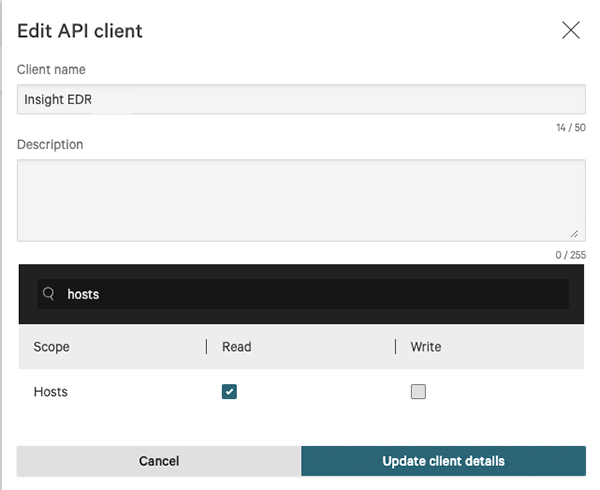
Users are required to create a properly scoped API Client within CrowdStrike's platform in order use the operation. API Clients can be created and configured via the API Clients and Keys page under Support.
The CrowdStrike Insight EDR CDF requires the following scope permission:
- Hosts - Read permission required.
Installation
Perform the following steps to install the integration:
The same steps can be used to upgrade the integration to a new version.
- Log into https://marketplace.threatq.com/.
- Locate and download the integration file.
- Navigate to the integrations management page on your ThreatQ instance.
- Click on the Add New Integration button.
- Upload the yaml file using one of the following methods:
- Drag and drop the file into the dialog box
- Select Click to Browse to locate the integration file on your local machine
- Select the individual feeds to install, when prompted, and then click Install.
ThreatQ will inform you if the feed already exists on the platform and will require user confirmation before proceeding. ThreatQ will also inform you if the new version of the feed contains changes to the user configuration. The new user configurations will overwrite the existing ones for the feed and will require user confirmation before proceeding.
The feed(s) will be added to the integrations page. You will still need to configure and then enable the feed(s).
Configuration
ThreatQuotient does not issue API keys for third-party vendors. Contact the specific vendor to obtain API keys and other integration-related credentials.
To configure the integration:
- Navigate to your integrations management page in ThreatQ.
- Select the Commercial option from the Category dropdown (optional).
If you are installing the integration for the first time, it will be located under the Disabled tab.
- Click on the integration entry to open its details page.
- Enter the following parameters under the Configuration tab:
CrowdStrike Insight EDR - Detections Parameters
Parameter Description API Hostname Select the appropriate CrowdStrike host. Options include: - US-1:
api.crowdstrike.com - US-2:
api.us-2.crowdstrike.com(Default) - EU-1:
api.eu-1.crowdstrike.com - US-GOV-1:
api.laggar.gcw.crowdstrike.com
CrowdStrike Client ID The CrowdStrike Insight EDR API Client ID to authenticate. CrowdStrike Client Secret The CrowdStrike Insight EDR API Client Secret to authenticate. Enable SSL Certificate Verification Enable this parameter if the feed should validate the host-provided SSL certificate. Disable Proxies Enable this parameter if the feed should not honor proxies set in the ThreatQ UI. Confidence Threshold (0-100) The minimum confidence a detection will need to meet to be ingested. The default setting is 0. Severity Threshold (0-100) The minimum severity a detection will need to meet to be ingested. The default setting is 0. Additional Filters (FQL) Enter a FQL query in the field provided to filter the hosts/devices down further. Ingested Data Select the data that will be ingested. Options include: - Assets
- Attack Patterns
- Events
- Incidents
- Indicators
At least one option must be selected. All options are selected by default.
CrowdStrike Insight EDR - Combined Detections Parameters
Parameter Description API Hostname Select the appropriate CrowdStrike host. Options include: - US-1:
api.crowdstrike.com - US-2:
api.us-2.crowdstrike.com(Default) - EU-1:
api.eu-1.crowdstrike.com - US-GOV-1:
api.laggar.gcw.crowdstrike.com
CrowdStrike Client ID The CrowdStrike Insight EDR API Client ID to authenticate. CrowdStrike Client Secret The CrowdStrike Insight EDR API Client Secret to authenticate. Enable SSL Certificate Verification Enable this parameter if the feed should validate the host-provided SSL certificate. Disable Proxies Enable this parameter if the feed should not honor proxies set in the ThreatQ UI. Confidence Threshold (0-100) The minimum confidence a detection will need to meet to be ingested. The default setting is 0. Severity Threshold (0-100) The minimum severity a detection will need to meet to be ingested. The default setting is 0. Additional Filters (FQL) Enter a FQL query in the field provided to filter the hosts/devices down further. Ingested Data Select the data that will be ingested. Options include: - Assets
- Attack Patterns
- Events
- Incidents
- Indicators
At least one option must be selected. All options are selected by default.
CrowdStrike Insight EDR - Hosts Parameters
Parameter Description API Hostname Select the appropriate CrowdStrike host. Options include: - US-1:
api.crowdstrike.com - US-2:
api.us-2.crowdstrike.com(Default) - EU-1:
api.eu-1.crowdstrike.com - US-GOV-1:
api.laggar.gcw.crowdstrike.com
CrowdStrike Client ID The CrowdStrike Insight EDR API Client ID to authenticate. CrowdStrike Client Secret The CrowdStrike Insight EDR API Client Secret to authenticate. Enable SSL Certificate Verification Enable this parameter if the feed should validate the host-provided SSL certificate. Disable Proxies Enable this parameter if the feed should not honor proxies set in the ThreatQ UI. Additional Filters (FQL) Enter a FQL query in the field provided to filter the hosts/devices down further. - US-1:
- Review any additional settings, make any changes if needed, and click on Save.
- Click on the toggle switch, located above the Additional Information section, to enable it.
ThreatQ Mapping
ThreatQuotient provides the following mapping for the CrowdStrike Insight EDR CDF.
CrowdStrike Insight EDR - Detections
CrowdStrike Insight EDR - Detections and Get Detections by IDs (Supplemental) feeds brings in aggregated detections, along with their behavioral events and related IOCs, into ThreatQ.
This feed retrieves the .resources[] key which is further on used in the Get Detections by IDs (Supplemental) supplemental feed call in order to fetch the rest of data.
GET https://{HOST}/alerts/queries/alerts/v2
Sample Response
{
    "meta": {
        "query_time": 0.016082104,
        "pagination": {
            "offset": 0,
            "limit": 100,
            "total": 3065
        },
        "powered_by": "msa-api",
        "trace_id": "e0f6d630-1558-42d9-86df-d495d9b7e535"
    },
    "resources": [
        "ldt:4c3db6145a704a179a6dacd924f6e8cc:73697616107",
        "ldt:4c3db6145a704a179a6dacd924f6e8cc:73695566300",
        "ldt:4c3db6145a704a179a6dacd924f6e8cc:73694280199"
    ],
    "errors": []
}
Get Detections by IDs (Supplemental)
The Get Detections by IDs supplemental feed fetches the full details for a given set of detection IDs.
POST https://{HOST}/alerts/entities/alerts/v2
Sample Response
{
    "meta": {
        "query_time": 0.016374054,
        "powered_by": "msa-api",
        "trace_id": "08a7c526-0fcc-44c0-bf8d-368b3a661cd7"
    },
    "resources": [
        {
            "cid": "e5d4a79a091448bfb80afc724b3cf952",
            "created_timestamp": "2021-08-31T00:20:57.828992776Z",
            "detection_id": "ldt:4c3db6145a704a179a6dacd924f6e8cc:73693643274",
            "device": {
                "device_id": "4c3db6145a704a179a6dacd924f6e8cc",
                "cid": "e5d4a79a091448bfb80afc724b3cf952",
                "agent_load_flags": "0",
                "agent_local_time": "2021-08-12T12:08:19.328Z",
                "agent_version": "6.27.14105.0",
                "bios_manufacturer": "Xen",
                "bios_version": "4.2.amazon",
                "config_id_base": "65994753",
                "config_id_build": "14105",
                "config_id_platform": "3",
                "external_ip": "54.89.138.42",
                "hostname": "WIN10DETECTION",
                "first_seen": "2021-02-09T16:06:00Z",
                "last_seen": "2021-08-31T00:08:11Z",
                "local_ip": "172.17.0.31",
                "mac_address": "02-7d-30-2b-bc-f7",
                "machine_domain": "csanfr.local",
                "major_version": "10",
                "minor_version": "0",
                "os_version": "Windows 10",
                "platform_id": "0",
                "platform_name": "Windows",
                "product_type": "1",
                "product_type_desc": "Workstation",
                "site_name": "Default-First-Site-Name",
                "status": "normal",
                "system_manufacturer": "Xen",
                "system_product_name": "HVM domU",
                "groups": [
                    "47582c7801a4431e8d81d85aae570cd4"
                ],
                "modified_timestamp": "2021-08-31T00:10:03Z",
                "instance_id": "i-084e546a6695e1412",
                "service_provider": "AWS_EC2",
                "service_provider_account_id": "390847698897"
            },
            "behaviors": [
                {
                    "device_id": "4c3db6145a704a179a6dacd924f6e8cc",
                    "timestamp": "2021-08-31T00:20:17Z",
                    "behavior_id": "5702",
                    "filename": "runningdiskpartmg16.exe",
                    "filepath": "\\Device\\HarddiskVolume2\\Users\\demo\\Desktop\\Malware\\runningdiskpartmg16.exe",
                    "alleged_filetype": "exe",
                    "cmdline": "c:\\Users\\demo\\Desktop\\Malware\\runningdiskpartmg16.exe -k",
                    "scenario": "NGAV",
                    "objective": "Falcon Detection Method",
                    "tactic": "Machine Learning",
                    "tactic_id": "CSTA0004",
                    "technique": "Sensor-based ML",
                    "technique_id": "CST0007",
                    "display_name": "",
                    "description": "This file meets the machine learning-based on-sensor AV protection's high confidence threshold for malicious files.",
                    "severity": 70,
                    "confidence": 70,
                    "ioc_type": "hash_sha256",
                    "ioc_value": "4d4b17ddbcf4ce397f76cf0a2e230c9d513b23065f746a5ee2de74f447be39b9",
                    "ioc_source": "library_load",
                    "ioc_description": "\\Device\\HarddiskVolume2\\Users\\demo\\Desktop\\Malware\\runningdiskpartmg16.exe",
                    "user_name": "WIN10DETECTION$",
                    "user_id": "S-1-5-18",
                    "control_graph_id": "ctg:4c3db6145a704a179a6dacd924f6e8cc:73693643274",
                    "triggering_process_graph_id": "pid:4c3db6145a704a179a6dacd924f6e8cc:656468848626",
                    "sha256": "4d4b17ddbcf4ce397f76cf0a2e230c9d513b23065f746a5ee2de74f447be39b9",
                    "md5": "d1c27ee7ce18675974edf42d4eea25c6",
                    "parent_details": {
                        "parent_sha256": "9077b1aa0afb8db329fded0e51085de1c51b22a986162f29037fca404a80d512",
                        "parent_md5": "",
                        "parent_cmdline": "C:\\Windows\\system32\\services.exe",
                        "parent_process_graph_id": "pid:4c3db6145a704a179a6dacd924f6e8cc:476751454426"
                    },
                    "pattern_disposition": 2304,
                    "pattern_disposition_details": {
                        "indicator": false,
                        "detect": false,
                        "inddet_mask": false,
                        "sensor_only": false,
                        "rooting": false,
                        "kill_process": false,
                        "kill_subprocess": false,
                        "quarantine_machine": false,
                        "quarantine_file": false,
                        "policy_disabled": true,
                        "kill_parent": false,
                        "operation_blocked": false,
                        "process_blocked": true,
                        "registry_operation_blocked": false,
                        "critical_process_disabled": false,
                        "bootup_safeguard_enabled": false,
                        "fs_operation_blocked": false,
                        "handle_operation_downgraded": false,
                        "kill_action_failed": false,
                        "blocking_unsupported_or_disabled": false,
                        "suspend_process": false,
                        "suspend_parent": false
                    }
                }
            ],
            "email_sent": true,
            "first_behavior": "2021-08-31T00:20:17Z",
            "last_behavior": "2021-08-31T00:20:18Z",
            "max_confidence": 70,
            "max_severity": 70,
            "max_severity_displayname": "High",
            "show_in_ui": true,
            "status": "new",
            "hostinfo": {
                "domain": ""
            },
            "seconds_to_triaged": 0,
            "seconds_to_resolved": 0,
            "behaviors_processed": [
                "pid:4c3db6145a704a179a6dacd924f6e8cc:656471670052:5702",
                "pid:4c3db6145a704a179a6dacd924f6e8cc:656474610435:5702",
                "pid:4c3db6145a704a179a6dacd924f6e8cc:656470648952:5702",
                "pid:4c3db6145a704a179a6dacd924f6e8cc:656469680329:5702",
                "pid:4c3db6145a704a179a6dacd924f6e8cc:656468848626:5702"
            ]
        }
    ],
    "errors": []
}
ThreatQuotient provides the following default mapping for this feed:
| Feed Data Path | ThreatQ Entity | ThreatQ Object Type or Attribute Key | Published Date | Examples | Notes |
|---|---|---|---|---|---|
.resources[].device.machine_domain + '\' + .resources[].device.hostname |
Related Asset.Value |
N/A |
.resources[].device.first_seen |
csanfr.local\WIN10DETECTION |
Will be ingested if the Assets user_field is checked. The local IP is stored as an attribute instead of being part of the asset value. |
.resources[].device.local_ip |
Related Asset.Attribute |
IP Address |
.resources[].device.first_seen |
172.17.0.31 |
N/A |
.resources[].device.hostname |
Related Asset.Attribute |
Hostname |
.resources[].device.first_seen |
WIN10DETECTION |
N/A |
.resources[].device.external_ip |
Related Asset.Attribute |
External IP Address |
.resources[].device.first_seen |
54.89.138.42 |
N/A |
.resources[].device.device_id |
Related Asset.Attribute |
CrowdStrike Device ID |
.resources[].device.first_seen |
4c3db6145a704a179a6dacd924f6e8cc |
N/A |
.resources[].device.os_version |
Related Asset.Attribute |
Operating System |
.resources[].device.first_seen |
Windows 10 |
N/A |
.resources[].device.product_type_desc |
Related Asset.Attribute |
Product Type |
.resources[].device.first_seen |
Workstation |
N/A |
.resources[].device.site_name |
Related Asset.Attribute |
Site Name |
.resources[].device.first_seen |
Default-First-Site-Name |
N/A |
.resources[].device.status |
Related Asset.Attribute |
Status |
.resources[].device.first_seen |
normal |
Updatable |
.resources[].device.service_provider |
Related Asset.Attribute |
Service Provider |
.resources[].device.first_seen |
AWS_EC2 |
N/A |
.resources[].device.detection_suppression_status |
Related Asset.Attribute |
Detection Suppression Status |
.resources[].device.first_seen |
unsuppressed |
Updatable |
.resources[].device.host_hidden_status |
Related Asset.Attribute |
Hidden Status |
.resources[].device.first_seen |
visible |
Updatable |
.resources[].device.ou |
Related Asset.Attribute |
Organizational Unit |
.resources[].device.first_seen |
Domain Controllers |
N/A |
.resources[].device.rfm_state |
Related Asset.Attribute |
Reduced Functionality Mode |
.resources[].device.first_seen |
True |
Converted to string. Updatable |
.resources[].device.provision_state |
Related Asset.Attribute |
Provision Status |
.resources[].device.first_seen |
True |
Converted to string. Updatable |
.resources[].device.zone_group |
Related Asset.Attribute |
Zone Group |
.resources[].device.first_seen |
us-east-1a |
N/A |
.resources[].filename |
Related Indicator.Value |
Filename |
.resources[].created_timestamp |
runningdiskpartmg16.exe |
The status of the indicator is Indirect. Will be ingested if the Indicators user_field is checked. |
.resources[].filepath |
Related Indicator.Value |
File Path |
.resources[].created_timestamp |
\Device\HarddiskVolume2\Users\demo\Desktop\Malware\runningdiskpartmg16.exe |
The status of the indicator is Indirect. Will be ingested if the Indicators user_field is checked. |
.resources[].md5 |
Related Indicator.Value |
MD5 |
.resources[].created_timestamp |
d1c27ee7ce18675974edf42d4eea25c6 |
The status of the indicator is Indirect. Will be ingested if the Indicators user_field is checked. |
.resources[].sha256 |
Related Indicator.Value |
SHA-256 |
.resources[].created_timestamp |
4d4b17ddbcf4ce397f76cf0a2e230c9d513b23065f746a5ee2de74f447be39b9 |
The status of the indicator is Indirect. Will be ingested if the Indicators user_field is checked. |
.resources[].quarantined_files[].sha256 |
Related Indicator.Attribute |
Quarantined |
.resources[].created_timestamp |
true |
If a detection contains a quarantined file whose SHA-256 matches an ingested hash indicator, the related hash indicator is marked with Quarantined: true. |
.resources[].alleged_filetype |
Related Indicator/Related Event.Attribute |
Alleged File Type |
.resources[].created_timestamp |
exe |
Added to .md5, .sha256 and .ioc_value |
.resources[].confidence |
Related Indicator/Related Event.Attribute |
Confidence |
.resources[].created_timestamp |
70 |
Added to .md5, .sha256 and .ioc_value. Updatable |
.resources[].severity |
Related Indicator/Related Event.Attribute |
Severity |
.resources[].created_timestamp |
70 |
Added to .md5, .sha256 and .ioc_value. Updatable |
.resources[].ioc_type |
Related Indicator.Type |
N/A |
.resources[].created_timestamp |
SHA-256 |
Mapped by using the detection table below |
.resources[].ioc_value |
Related Indicator.Value |
N/A |
.resources[].created_timestamp |
4d4b17ddbcf4ce397f76cf0a2e230c9d513b23065f746a5ee2de74f447be39b9 |
Will be ingested if the Indicators user_field is checked. |
.resources[].ioc_description |
Related Indicator.Description |
N/A |
.resources[].created_timestamp |
\Device\HarddiskVolume2\Users\demo\Desktop\Malware\runningdiskpartmg16.exe |
N/A |
.resources[].ioc_source |
Related Indicator.Attribute |
IOC Source |
.resources[].created_timestamp |
library_load |
N/A |
'CrowdStrike Detection: ' + .resources[].aggregate_id |
Incident.Value |
N/A |
.resources[].created_timestamp |
Severity Detection on WIN10DETECTION - ldt:4c3db6145a704a179a6dacd924f6e8cc:73693643276 |
Will be ingested if the Incidents user_field is checked. |
.resources[].incident.start |
Incident.Started_at |
N/A |
N/A |
2021-08-22T18:30:03Z |
N/A |
.resources[].incident.end |
Incident.Ended_at |
N/A |
N/A |
2021-08-22T18:30:03Z |
N/A |
.resources[].email_sent |
Incident.Attribute |
Email Sent |
.resources[].created_timestamp |
True |
Converted to string. |
.resources[].aggregate_id |
Incident.Attribute |
CrowdStrike Aggregate ID |
.resources[].created_timestamp |
ldt:4c3db6145a704a179a6dacd924f6e8cc:73619780939 |
N/A |
.resources[].status |
Incident.Attribute |
Status |
.resources[].created_timestamp |
new |
Updatable |
.resources[].seconds_to_resolved |
Incident.Attribute |
Seconds to Resolved |
.resources[].created_timestamp |
0 |
If value is not 0. Updatable |
.resources[].seconds_to_triaged |
Incident.Attribute |
Seconds to Triaged |
.resources[].created_timestamp |
70 |
If value is not 0. Updatable |
.resources[].technique_id + ' - ' + .resources[].technique |
Related Attack Pattern.Value |
N/A |
N/A |
CST0017 - Sensor-based ML |
If .resources[].technique_id is a known Mitre Attack, the already existing attack pattern is linked to the objects. The object will be ingested/linked if the Attack Patterns user_field is checked. |
.resources[].tactic |
Related Attack Pattern.Attribute |
Tactic |
.resources[].created_timestamp |
Machine Learning |
The attribute is added only to new attack patterns |
.resources[].scenario + ':' + .resources[].name + ' on ' + .resources[].device.hostname |
Related Event.Title |
N/A |
.resources[].timestamp |
Ngav: SpearPhishExecutableStack on WIN10DETECTION |
Will be ingested if the Events user_field is checked. The Event Type is Detection |
.resources[].description |
Related Event.Description |
N/A |
.resources[].created_timestamp |
This file meets the machine learning-based on-sensor AV protection's high confidence threshold for malicious files. |
N/A |
.resources[].display_name |
Related Event.Attribute |
Behavior |
.resources[].created_timestamp |
machine learning |
N/A |
.resources[].ioc_source |
Related Event.Attribute |
IOC Source |
.resources[].created_timestamp |
library_load |
N/A |
.resources[].objective |
Related Event.Attribute |
Behavior Objective |
.resources[].created_timestamp |
Falcon Detection Method |
N/A |
CrowdStrike Detection Type Mapping
The CrowdStrike Detection Type (as found in .resources[].behaviors[].ioc_type in the Get Detections by IDs Supplemental feed) to ThreatQ Type mapping is as follows:
| Crowdstrike Indicator Type | ThreatQ Indicator Type |
|---|---|
| domain | FQDN |
| filename | Filename |
| hash_md5 | MD5 |
| hash_sha256 | SHA-256 |
| registry_key | Registry Key |
CrowdStrike Insight EDR - Combined Detections
The CrowdStrike Insight EDR - Combined Detectionsoffset + limit <= 10000 pagination limit of the offset-based detections query feed.
The feed uses cursor-based pagination with the after token returned in meta.pagination.after. Where supported by the Combined Alerts API response, it preserves the user field mappings and ThreatQ object model used by the original detections feed.
POST https://{HOST}/alerts/combined/alerts/v1
Sample Response:
{
  "meta": {
    "query_time": 0.459262252,
    "pagination": {
      "total": 93959,
      "limit": 100,
      "after": "eyJ2ZXJzaW9uIjoidjEiLCJ0b3RhbF9oaXRzIjo5Mzk1OS..."
    }
  },
  "resources": [
    {
      "aggregate_id": "aggind:e179aa4e42ab44759d8d626aadb6462b:4295093562",
      "created_timestamp": "2026-06-02T06:56:28.352858153Z",
      "timestamp": "2026-06-02T06:55:13.158Z",
      "name": "OnWrite-MLSensor-Low",
      "display_name": "OnWrite-MLSensor-Low",
      "description": "A file written to the file-system meets the machine learning-based on-sensor AV protection's low confidence threshold for malicious files.",
      "scenario": "NGAV",
      "severity": 30,
      "severity_name": "Low",
      "confidence": 30,
      "status": "new",
      "filename": "link.exe",
      "filepath": "\\Device\\HarddiskVolume4\\Program Files\\Microsoft Visual Studio\\2022\\Professional\\VC\\Tools\\MSVC\\14.44.35207\\bin\\Hostx64\\x64\\link.exe",
      "md5": "649a42628af11e7484faa1ca0e20362d",
      "sha1": "0000000000000000000000000000000000000000",
      "sha256": "53357e2a6d0dde4609a8eb78ac738c18d22047befe837ce9a86f4f00450360b4",
      "ioc_type": "hash_sha256",
      "ioc_value": "53357e2a6d0dde4609a8eb78ac738c18d22047befe837ce9a86f4f00450360b4",
      "ioc_source": "file_write",
      "objective": "Falcon Detection Method",
      "priority_value": 58,
      "falcon_host_link": "https://falcon.crowdstrike.com/activity-v2/detections/...",
      "device": {
        "device_id": "e179aa4e42ab44759d8d626aadb6462b",
        "hostname": "DOIS-JENKINSWIN",
        "local_ip": "10.247.28.102",
        "external_ip": "67.217.87.42",
        "first_seen": "2026-06-02T06:38:23Z",
        "os_version": "Windows Server 2022",
        "product_type_desc": "Server",
        "service_provider": "OCI",
        "status": "normal"
      },
      "mitre_attack": [
        {
          "tactic_id": "CSTA0004",
          "tactic": "Machine Learning",
          "technique_id": "CST0007",
          "technique": "Sensor-based ML"
        }
      ],
      "source_products": [
        "Falcon Insight"
      ],
      "source_vendors": [
        "CrowdStrike"
      ]
    }
  ],
  "errors": []
}
ThreatQuotient provides the following default mapping for this feed:
| Feed Data Path | ThreatQ Entity | ThreatQ Object Type or Attribute Key | Published Date | Examples | Notes |
|---|---|---|---|---|---|
.resources[].device.machine_domain + '\' + .resources[].device.hostname |
Related Asset.Value |
N/A |
.resources[].device.first_seen |
jmreport.local\JMRPRDEUSRS01 |
Will be ingested if the Assets user field is checked. |
.resources[].device.detection_suppression_status |
Related Asset.Attribute |
Detection Suppression Status |
.resources[].device.first_seen |
false |
Ingested the same way as the original detections feed when the field is present. |
.resources[].device.host_hidden_status |
Related Asset.Attribute |
Hidden Status |
.resources[].device.first_seen |
visible |
Ingested the same way as the original detections feed when the field is present. |
.resources[].device.rfm_state |
Related Asset.Attribute |
Reduced Functionality Mode |
.resources[].device.first_seen |
True |
Converted to string and ingested the same way as the original detections feed when the field is present. |
.resources[].device.provision_state |
Related Asset.Attribute |
Provision Status |
.resources[].device.first_seen |
True |
Converted to string and ingested the same way as the original detections feed when the field is present. |
.resources[].device.zone_group |
Related Asset.Attribute |
Zone Group |
.resources[].device.first_seen |
Production |
Ingested the same way as the original detections feed when the field is present. |
.resources[].filename |
Related Indicator.Value |
Filename |
.resources[].created_timestamp |
dllhost.exe |
Indirect indicator. Will be ingested if the Indicators user field is checked. |
.resources[].md5 |
Related Indicator.Value |
MD5 |
.resources[].created_timestamp |
61b7ccf84d2b4251bd263e75cd103f89 |
Indirect indicator. Will be ingested if the Indicators user field is checked. |
.resources[].sha1 |
Related Indicator.Value |
SHA-1 |
.resources[].created_timestamp |
0000000000000000000000000000000000000000 |
Direct SHA-1 indicator from the alert object. |
.resources[].sha256 |
Related Indicator.Value |
SHA-256 |
.resources[].created_timestamp |
0fa66b69bf46300473fd37147fd0fe9d618d0f8d33a6987cdd65bcbd3a68e87e |
Indirect indicator. Will be ingested if the Indicators user field is checked. |
.resources[].file_sha256 |
Related Indicator.Value |
SHA-256 |
.resources[].created_timestamp |
97427508f98287d50b8001d36954fa547cdf73705d699c85de9f87c1c5ca909f |
Direct SHA-256 indicator from the file_sha256 field when present. |
.resources[].ioc_type |
Related Indicator.Type |
N/A |
.resources[].created_timestamp |
hash_sha256 |
Mapped by using the detection table below. |
'CrowdStrike Detection: ' + .resources[].aggregate_id |
Incident.Value |
N/A |
.resources[].created_timestamp |
CrowdStrike Detection: aggind:c763f8ba361246c7acf9225257571bd4:8591874482 |
Used for detections-style ind records when aggregate_id is present. |
'CrowdStrike Detection: ' + .resources[].lead_id |
Incident.Value |
N/A |
.resources[].created_timestamp |
CrowdStrike Detection: eaa0ed6ced642e73dd6d9d7aacd9e49ea63c7fa99c84a5f5b2d2275683899907 |
Used for automated-lead records when aggregate_id is not present. |
.resources[].incident.start |
Incident.Started_at |
N/A |
N/A |
2026-05-14T03:20:05Z |
Ingested the same way as the original detections feed when present. |
.resources[].incident.end |
Incident.Ended_at |
N/A |
N/A |
2026-05-14T03:23:57Z |
Ingested the same way as the original detections feed when present. |
.resources[].lead_id |
Incident.Attribute |
Lead ID |
.resources[].created_timestamp |
eaa0ed6ced642e73dd6d9d7aacd9e49ea63c7fa99c84a5f5b2d2275683899907 |
New field specific to automated-lead records. |
.resources[].lead_type |
Incident.Attribute |
Lead Type |
.resources[].created_timestamp |
simple |
New field specific to automated-lead records. |
.resources[].is_closed |
Incident.Attribute |
Is Closed |
.resources[].created_timestamp |
True |
Converted to string. New field specific to automated-lead records. |
.resources[].score |
Incident.Attribute |
Score |
.resources[].created_timestamp |
13 |
New field specific to automated-lead records. |
.resources[].falcon_host_link |
Incident.Attribute / Related Event.Attribute |
Source Link |
.resources[].created_timestamp |
https://falcon.crowdstrike.com/activity-v2/detections/... |
Added to incidents and events when present. |
.resources[].priority_value |
Incident.Attribute / Related Event.Attribute |
Priority Value |
.resources[].created_timestamp |
43 |
Added to incidents and events when present. Updatable. |
.resources[].severity_name |
Related Event.Attribute |
Severity Name |
.resources[].created_timestamp |
High |
Added only when present in the combined response. |
.resources[].scenario + ': ' + .resources[].name + ' on ' + .resources[].device.hostname |
Related Event.Title |
N/A |
.resources[].timestamp |
Suspicious Activity: FileSystemTamperFalconSensorDynamicConfiguration on PRD-AVA-BE04 |
Will be ingested if the Events user field is checked. Event type is Detection. |
CrowdStrike Detection Type Mapping
The following table lists the additional CrowdStrike indicator types supported by the feed and their corresponding ThreatQ indicator type mappings.
| Crowdstrike Indicator Type | ThreatQ Indicator Type |
|---|---|
| domain | FQDN |
| filename | Filename |
| hash_md5 | MD5 |
| hash_sha256 | SHA-256 |
| registry_key | Registry Key |
CrowdStrike Insight EDR - Hosts
CrowdStrike Insight EDR - Hosts and Get Host by IDs (Supplemental) feeds brings in aggregated detections into ThreatQ.
The CrowdStrike Insight EDR - Hosts feed retrieves the .resources[] key which is further on used in the Get Host by IDs (Supplemental) supplemental feed call in order to fetch the details.
GET https://{HOST}/detects/entities/summaries/GET/v1
{
    "meta": {
        "query_time": 0.016082104,
        "pagination": {
            "offset": 0,
            "limit": 100,
            "total": 3065
        },
        "powered_by": "msa-api",
        "trace_id": "e0f6d630-1558-42d9-86df-d495d9b7e535"
    },
    "resources": [
        "0b5abb999c1544f1af71983753ff8d22",
        "3eb0e8e03d1245eaa643046f84bc51f8",
        "3fd9b8a8a7ba426a9bf3aaa2ddfc5b02"
    ],
    "errors": []
}
Get Host by IDs (Supplemental)
The Get Host by IDs supplemental feed fetches the full details for a given host IDs.
POST https://{HOST}/devices/entities/devices/v2
Sample Response
{
  "meta": {
    "query_time": 0.005269768,
    "powered_by": "device-api",
    "trace_id": "d04ebb63-4aab-48ec-a7bc-5495bc6f0f03"
  },
  "resources": [
    {
      "device_id": "3fd9b8a8a7ba426a9bf3aaa2ddfc5b02",
      "cid": "e5d4a79a091448bfb80afc724b3cf952",
      "agent_load_flags": "0",
      "agent_local_time": "2021-10-21T22:05:09.512Z",
      "agent_version": "6.30.14406.0",
      "bios_manufacturer": "American Megatrends Inc.",
      "bios_version": "090008 ",
      "build_number": "19042",
      "config_id_base": "65994753",
      "config_id_build": "14406",
      "config_id_platform": "3",
      "cpu_signature": "329303",
      "external_ip": "20.58.113.63",
      "mac_address": "00-22-48-00-63-1f",
      "instance_id": "3c4c3d6f-fa6d-44d3-8a29-1e7d16ce5dfd",
      "service_provider": "AZURE",
      "service_provider_account_id": "ec5c2f3b-9a85-498b-b609-e81a8e6e2cbd",
      "hostname": "SENTINEL-C-02",
      "first_seen": "2021-06-01T07:48:08Z",
      "last_seen": "2021-10-26T10:11:57Z",
      "local_ip": "172.18.0.9",
      "machine_domain": "illusive-sacumen.com",
      "major_version": "10",
      "minor_version": "0",
      "os_version": "Windows 10",
      "os_build": "19042",
      "ou": [],
      "platform_id": "0",
      "platform_name": "Windows",
      "policies": [
        {
          "policy_type": "prevention",
          "policy_id": "fcde00f4eef9466c8578f2dc587b437a",
          "applied": true,
          "settings_hash": "adc849a6",
          "assigned_date": "2021-09-02T00:14:29.894848191Z",
          "applied_date": "2021-09-02T00:16:03.578241038Z",
          "rule_groups": []
        }
      ],
      "reduced_functionality_mode": "no",
      "device_policies": {
        "prevention": {
          "policy_type": "prevention",
          "policy_id": "fcde00f4eef9466c8578f2dc587b437a",
          "applied": true,
          "settings_hash": "adc849a6",
          "assigned_date": "2021-09-02T00:14:29.894848191Z",
          "applied_date": "2021-09-02T00:16:03.578241038Z",
          "rule_groups": []
        },
        "sensor_update": {
          "policy_type": "sensor-update",
          "policy_id": "5b568dec090c480b808830586c134441",
          "applied": true,
          "settings_hash": "65994753|3|2|automatic;101",
          "assigned_date": "2021-10-21T22:03:38.322395302Z",
          "applied_date": "2021-10-21T22:06:51.608393214Z",
          "uninstall_protection": "ENABLED"
        },
        "device_control": {
          "policy_type": "device-control",
          "policy_id": "25d6ae9765624a0b9c1ec577836a8925",
          "applied": true,
          "assigned_date": "2021-10-21T00:51:26.169208737Z",
          "applied_date": "2021-10-21T00:56:09.944670879Z"
        },
        "global_config": {
          "policy_type": "globalconfig",
          "policy_id": "dc483372e2474e2fb5efc99a49a80fc1",
          "applied": true,
          "settings_hash": "c6c03d6",
          "assigned_date": "2021-10-21T22:06:57.220323195Z",
          "applied_date": "2021-10-21T22:08:24.58680563Z"
        },
        "remote_response": {
          "policy_type": "remote-response",
          "policy_id": "ab8edf33dd1e4a178eac44f2b4fc2c25",
          "applied": true,
          "settings_hash": "f472bd8e",
          "assigned_date": "2021-06-01T07:49:34.07955937Z",
          "applied_date": "2021-06-01T07:49:53.428657794Z"
        },
        "firewall": {
          "policy_type": "firewall",
          "policy_id": "b07aa203e1b24a1581b5403390746a36",
          "applied": true,
          "assigned_date": "2021-10-21T00:51:26.169225468Z",
          "applied_date": "2021-10-21T00:56:10.455799263Z",
          "rule_set_id": "b07aa203e1b24a1581b5403390746a36"
        }
      },
      "groups": [],
      "group_hash": "e3b0c44298fc1c149afbf4c8996fb92427ae41e4649b934ca495991b7852b855",
      "product_type": "1",
      "product_type_desc": "Workstation",
      "provision_status": "Provisioned",
      "serial_number": "0000-0004-3449-1529-1657-8152-51",
      "service_pack_major": "0",
      "service_pack_minor": "0",
      "pointer_size": "8",
      "site_name": "Default-First-Site-Name",
      "status": "contained",
      "system_manufacturer": "Microsoft Corporation",
      "system_product_name": "Virtual Machine",
      "tags": [],
      "modified_timestamp": "2021-10-26T10:12:02Z",
      "slow_changing_modified_timestamp": "2021-10-26T10:05:23Z",
      "meta": {
        "version": "11755"
      },
      "zone_group": "Sentinel"
    }
  ],
  "errors": []
}
ThreatQuotient provides the following default mapping for this feed:
| Feed Data Path | ThreatQ Entity | ThreatQ Object Type or Attribute Key | Published Date | Examples | Notes |
|---|---|---|---|---|---|
.resources[].machine_domain + '\' + .resources[].hostname |
Asset.Value |
N/A |
.resources[].first_seen |
illusive-sacumen.com\SENTINEL-C-02 |
The local IP is stored as an attribute instead of being part of the asset value. |
.resources[].local_ip |
Asset.Attribute |
IP Address |
.resources[].first_seen |
172.17.0.31 |
N/A |
.resources[].hostname |
Asset.Attribute |
Hostname |
.resources[].first_seen |
WIN10DETECTION |
N/A |
.resources[].external_ip |
Asset.Attribute |
External IP Address |
.resources[].first_seen |
54.89.138.42 |
N/A |
.resources[]_id |
Asset.Attribute |
CrowdStrike Device ID |
.resources[].first_seen |
4c3db6145a704a179a6dacd924f6e8cc |
N/A |
.resources[].os_version |
Asset.Attribute |
Operating System |
.resources[].first_seen |
Windows 10 |
N/A |
.resources[].product_type_desc |
Asset.Attribute |
Product Type |
.resources[].first_seen |
Workstation |
N/A |
.resources[].site_name |
Asset.Attribute |
Site Name |
.resources[].first_seen |
Default-First-Site-Name |
N/A |
.resources[].status |
Asset.Attribute |
Status |
.resources[].first_seen |
normal |
Updatable |
.resources[].detection_suppression_status |
Asset.Attribute |
Detection Suppression Status |
.resources[].first_seen |
unsuppressed |
Updatable |
.resources[].service_provider |
Asset.Attribute |
Service Provider |
.resources[].first_seen |
AWS_EC2 |
N/A |
.resources[].host_hidden_status |
Asset.Attribute |
Host Hidden Status |
.resources[].first_seen |
visible |
Updatable |
.resources[].ou |
Asset.Attribute |
Organizational Unit |
.resources[].first_seen |
Domain Controllers |
N/A |
.resources[].rfm_state |
Asset.Attribute |
Reduced Functionality Mode |
.resources[].first_seen |
True |
Updatable |
.resources[].provision_state |
Asset.Attribute |
Provision Status |
.resources[].first_seen |
True |
Updatable |
.resources[].zone_group |
Asset.Attribute |
Zone Group |
.resources[].first_seen |
us-east-1a |
N/A |
.resources[].tags[] |
Asset.Tag |
N/A |
N/A |
FalconGroupingTags/testtag |
N/A |
Average Feed Run
Object counts and Feed runtime are supplied as generalities only - objects returned by a provider can differ based on credential configurations and Feed runtime may vary based on system resources and load.
CrowdStrike Insight EDR - Detections
| Metric | Result |
|---|---|
| Run Time | 1 minute |
| Assets | 1 |
| Asset Attributes | 9 |
| Attack Patterns | 4 |
| Attack Pattern Attributes | 3 |
| Events | 2 |
| Event Attributes | 10 |
| Incidents | 1 |
| Incident Attributes | 9 |
| Indicators | 9 |
| Indicator Attributes | 14 |
CrowdStrike Insight EDR - Hosts
| Metric | Result |
|---|---|
| Run Time | 1 minute |
| Assets | 3 |
| Asset Attributes | 41 |
Known Issues / Limitations
- The
CrowdStrike Insight EDR - Detectionsfeed uses offset-based pagination with theGET /alerts/queries/alerts/v2endpoint and cannot retrieve results beyond CrowdStrike'soffset + limit <= 10000API limit. Use theCrowdStrike Insight EDR - Combined Detectionsfeed for larger result sets because it uses cursor-based pagination with thePOST /alerts/combined/alerts/v1endpoint. - As of the release of version 1.0.3, Host Groups cannot be customized. All indicators will be applied globally.
Change Log
- Version 2.0.0
- Added the CrowdStrike Insight EDR - Combined Detections feed, which uses the
POST /alerts/combined/alerts/v1endpoint to support high-volume alert ingestion. - Added cursor-based pagination using the CrowdStrike
aftertoken to efficiently process large result sets. - Added a known issue documenting the 10,000-result API limit of the CrowdStrike Insight EDR - Detections feed and recommending the CrowdStrike Insight EDR - Combined Detections feed for larger result sets.
- Added the CrowdStrike Insight EDR - Combined Detections feed, which uses the
- Version 1.1.5
- Updated Asset ingestion to exclude local IP addresses from the value field.
- Removed ingestion of associated usernames as related indicators.
- Enhanced handling of hashes identified in
quarantined_filesby assigning the attributeQuarantined: true.
- Version 1.1.4
- Resolved an issue with the CrowdStrike Insight EDR - Detections feed where missing severity attributes caused feed run errors.
- Version 1.1.3
- Resolved an issue where the CrowdStrike Insight EDR – Detections feed would fail with the error message
UndefinedError('dict object' has no attribute 'confidence')when the response was missing attributes such asconfidence,technique_id, ordevice.
- Resolved an issue where the CrowdStrike Insight EDR – Detections feed would fail with the error message
- Version 1.1.2
- Updated the CrowdStrike Insight EDR – Detections feed to utilize the Alerts v2 API endpoint.
- Added the following new configuration parameters for all feeds:
- Enable SSL Certificate Verification - enable or disable verification of the server's SSL certificate.
- Disable Proxies - determine if the feed should honor proxy settings set in the ThreatQ UI.
- Added update rules for select attributes.
- Updated the minimum ThreatQ version to 5.12.0.
- Version 1.1.1 rev-a
- Guide Update - added a section, CrowdStrike Client API Configuration, to the Prerequisites section of the guide.
- Version 1.1.1
- Removed the CrowdStrike Insight EDR - IOC Export feed as it has now been incorporated into the CrowdStrike Insight EDR Action Bundle integration.
- Version 1.1.0
- CrowdStrike Insight EDR - IOC Export - Added the following new configuration options:
- Policy for MD5, SHA256 Indicators
- Policy for Domain, ipv4, ipv6 Indicators
- CrowdStrike Insight EDR - IOC Export - Added the following new configuration options:
- Version 1.0.5
- Updated the Get Host by IDs supplemental feed endpoint to v2.
- Version 1.0.4
- Added check to
CrowdStrike Insight EDR - IOC Exportin order to verify if indicators already exist in CrowdStrike. Trying to add an existing one will throw an error and will stop any of the indicators from being added.
- Added check to
- Version 1.0.3
- Updated the CrowdStrike Insight EDR - IOC Export endpoint's URL and body.
- Added Default Platform configuration parameter.
- Removed the Policy Type configuration parameter.
- Version 1.0.2 rev-a
- Updated Custom Object installation steps in the Prerequisites chapter.
- Version 1.0.2
- Fixed an issue where custom object files were missing from the integration download. Updated documentation with steps to install the Asset custom object - see the Prerequisites chapter.
- Added an Attack Pattern object from Behavior Techniques data in CrowdStrike Insight EDR - Detections Feed.
- Removed Behavior Technique and Behavior Tactic attributes.
- Removed the
Ingest Behavior Eventsoption from the CrowdStrike Insight EDR - Detections feed configuration. - Users can now select what data will be ingested in ThreatQ by selecting the appropriate option(s) in CrowdStrike Insight EDR - Detections feed configuration.
- Version 1.0.1
- Added a new API Host configuration parameter that will allow you to select a CrowdStrike host. See step 4 in the Configuration chapter for more information.
- Version 1.0.0
- Initial release
PDF Guides
| Document | ThreatQ Version |
|---|---|
| CrowdStrike Insight EDR CDF Guide v2.0.0 | 5.12.0 or Greater |
| CrowdStrike Insight EDR CDF Guide v1.1.5 | 5.12.0 or Greater |
| CrowdStrike Insight EDR CDF Guide v1.1.4 | 5.12.0 or Greater |
| CrowdStrike Insight EDR CDF Guide v1.1.3 | 5.12.0 or Greater |
| CrowdStrike Insight EDR CDF Guide v1.1.2 | 5.12.0 or Greater |
| CrowdStrike Insight EDR CDF Guide v1.1.1 | 4.50.0 or Greater |
| CrowdStrike Insight EDR CDF Guide v1.1.0 | 4.50.0 or Greater |
| CrowdStrike Insight EDR CDF Guide v1.0.5 | 4.50.0 or Greater |
| CrowdStrike Insight EDR CDF Guide v1.0.5 | 4.50.0 or Greater |
| CrowdStrike Insight EDR CDF Guide v1.0.4 | 4.50.0 or Greater |
| CrowdStrike Insight EDR CDF Guide v1.0.3 | 4.50.0 or Greater |
| CrowdStrike Insight EDR CDF Guide v1.0.2 | 4.50.0 or Greater |
| CrowdStrike Insight EDR CDF Guide v1.0.1 | 4.50.0 or Greater |