CTM360 CyberBlindSpot CDF
The web format of this guide reflects the most current release. Guides for older iterations are available in PDF format.
Integration Details
ThreatQuotient provides the following details for this integration:
| Current Integration Version | 1.0.1 |
| Compatible with ThreatQ Versions | >= 4.58.1 |
| Support Tier | ThreatQ Supported |
Introduction
The CTM360 CyberBlindSpot CDF integration ingests external threat exposure data, including incidents and related indicators of compromise, compromised payment card information, and breached account credentials. This data provides visibility into digital risk, fraud activity, and credential exposure, enabling organizations to identify affected assets and take timely remediation actions.
The integration provides the following feeds:
- CTM360 CyberBlindSpot - ingests incidents with related indicators of compromise.
- CTM360 CyberBlindspot Card Leaks - ingests compromised cards.
- CTM360 CyberBlindSpot Breached Credentials - ingests compromised accounts.
The integration ingests the following system objects:
- Compromised Accounts (custom object)
- Compromised Cards (custom object)
- Events - type Incident
- Indicators - FQDNs and URLs
Prerequisites
The following is required to install and use the integration:
- An API key for CTM360 CyberBlindSpot.
- The Compromised Accounts and Compromised Cards custom objects installed on the ThreatQ platform.
Compromised Account and Compromised Card Custom Object
The integration requires the compromised account and compromised card custom objects be installed on the ThreatQ instance prior to installing the CDF. The required files have been bundled with the CDF marketplace download.
Use the steps provided to install the custom objects.
When installing the custom objects, be aware that any in-progress feed runs will be cancelled, and the API will be in maintenance mode.
- Download the integration bundle from the ThreatQ Marketplace.
- Unzip the bundle and locate the custom object files.
The custom object files will typically consist of a JSON definition file, install.sh script, and a images folder containing the svg icons.
- SSH into your ThreatQ instance.
- Set your install pathway environment variable. This command will retrieve the install pathway from your configuration file and set it as variable for use during this installation process.
INSTALL_CONF="/etc/threatq/platform/install.conf"
if [ -f "$INSTALL_CONF" ]; then source "$INSTALL_CONF"
fi
MISC_DIR="${INSTALL_BASE_PATH:-/var/lib/threatq}/misc" - Navigate to the tmp folder using the environment variable:
cd $MISC_DIR
- Upload the custom object files, including the images folder.
The directory structure should resemble the following:
- install.sh
- <custom_object_name>.json
- images (directory)
- <custom_object_name>.svg
- Run the following command:
kubectl exec -it deployment/api-schedule-run -n threatq -- sh /var/lib/threatq/misc/install.sh /var/lib/threatq/misc
The installation script will automatically put the application into maintenance mode, move the files to their required directories, install the custom object, update permissions, bring the application out of maintenance mode, and restart dynamo.
- Delete the install.sh, definition json file, and images directory from step 6 after the object has been installed as these files are no longer needed.
- Download the integration zip file from the ThreatQ Marketplace and unzip its contents.
- SSH into your ThreatQ instance.
- Navigate to tmp directory:
cd /tmp/
- Create a new directory:
mkdir ctm360_cdf
- Upload the bolster.json and install.sh script into this new directory.
- Create a new directory called images within the ctm360_cdf directory.
mkdir images
- Upload the
compromised_card.svgandaccount.svgfiles. - Navigate to the /tmp/ctm360_cdf.
The directory should resemble the following:
- tmp
- ctm360_cdf
- bolster.json
- install.sh
- images
- account.svg
- compromised_card.svg
- ctm360_cdf
- tmp
- Run the following command to ensure that you have the proper permissions to install the custom object:
chmod +x install.sh
- Run the following command:
sudo ./install.sh
You must be in the directory level that houses the install.sh and json files when running this command.
The installation script will automatically put the application into maintenance mode, move the files to their required directories, install the custom object, update permissions, bring the application out of maintenance mode, and restart dynamo.
- Remove the temporary directory, after the custom object has been installed, as the files are no longer needed:
rm -rf ctm360_cdf
Installation
The integration requires that the Compromised Account and Compromised Card custom objects be installed on your ThreatQ instance prior to installing the CDF. Failure to install the custom objects will result in the CDF installation process failing.
Perform the following steps to install the integration:
The same steps can be used to upgrade the integration to a new version.
- Log into https://marketplace.threatq.com/.
- Locate and download the integration zip file.
- Extract and install the required custom objects if you have not done so already.
- Navigate to the integrations management page on your ThreatQ instance.
- Click on the Add New Integration button.
- Upload the integration yaml file using one of the following methods:
- Drag and drop the file into the dialog box
- Select Click to Browse to locate the file on your local machine
- Select the individual feeds to install, when prompted and click Install.
ThreatQ will inform you if the feed already exists on the platform and will require user confirmation before proceeding. ThreatQ will also inform you if the new version of the feed contains changes to the user configuration. The new user configurations will overwrite the existing ones for the feed and will require user confirmation before proceeding.
The feed will be added to the integrations page. You will still need to configure and then enable the feed.
Configuration
ThreatQuotient does not issue API keys for third-party vendors. Contact the specific vendor to obtain API keys and other integration-related credentials.
To configure the integration:
- Navigate to your integrations management page in ThreatQ.
- Select the Commercial option from the Category dropdown (optional).
If you are installing the integration for the first time, it will be located under the Disabled tab.
- Click on the integration entry to open its details page.
- Enter the following parameters under the Configuration tab:
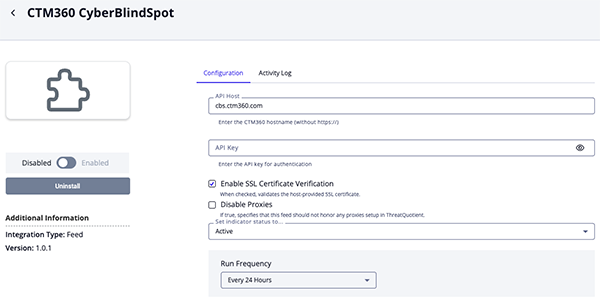
CTM360 CyberBlindSpot Parameters
Parameter Description API Host Your CTM360 hostname without https://. API Key Your CTM360 API Key. Enable SSL Certificate Verification Enable this parameter if the feed should validate the host-provided SSL certificate. Disable Proxies Enable this parameter if the feed should not honor proxies set in the ThreatQ UI.
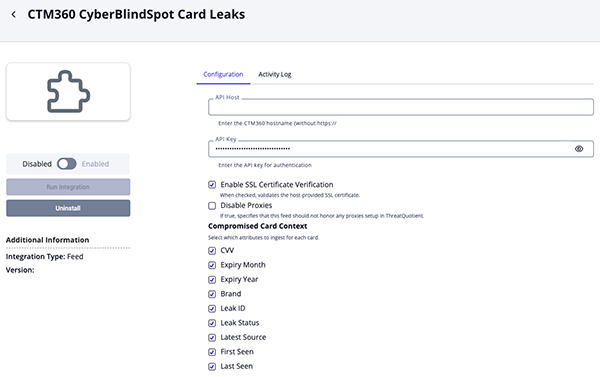
CTM360 CyberBlindSpot Card Leaks Parameters
Parameter Description API Host Your CTM360 hostname without https://. API Key Your CTM360 API Key. Enable SSL Certificate Verification Enable this parameter if the feed should validate the host-provided SSL certificate. Disable Proxies Enable this parameter if the feed should not honor proxies set in the ThreatQ UI. Compromised Card Context Select which attributes to ingest for each card. Options include: - CVV (default)
- Expiry Month (default)
- Expiry Year (default)
- Brand (default)
- Leak ID (default)
- Leak Status (default)
- Latest Source (default)
- First Seen (default)
- Last Seen (default)
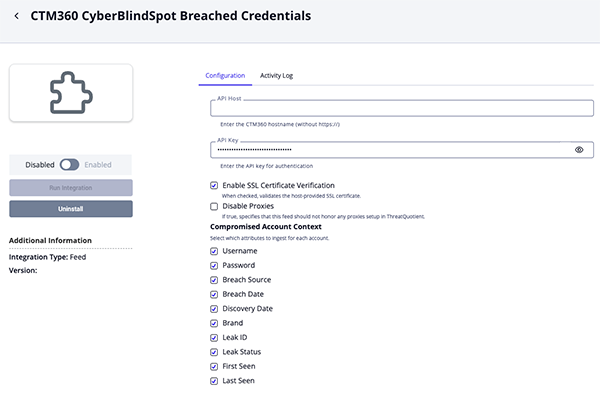
CTM360 CyberBlindSpot Breached Credentials Parameters
Parameter Description API Host Your CTM360 hostname without https://. API Key Your CTM360 API Key. Enable SSL Certificate Verification Enable this parameter if the feed should validate the host-provided SSL certificate. Disable Proxies Enable this parameter if the feed should not honor proxies set in the ThreatQ UI. Compromised Account Context Select which attributes to ingest for each account. Options include: - Username (default)
- Password
- Breach Source (default)
- Breach Date (default)
- Discovery Date (default)
- Brand (default)
- Leak ID (default)
- Leak Status (default)
- First Seen (default)
- Last Seen (default)
Compromised Account Relationship Context Select which related indicators are linked to the Compromised Account object based on the Compromised Account Relationship Context. Options include: - Email Address (default)
- FQDN
- Review any additional settings, make any changes if needed, and click on Save.
- Click on the toggle switch, located above the Additional Information section, to enable it.
ThreatQ Mapping
CTM360 CyberBlindSpot
The CTM360 CyberBlindSpot feed returns incidents and related IOCs (FQDN and URL).
GET https://cbs.ctm360.com/api/v2/incidents
Sample Response:
{
  "statusCode": 200,
  "success": true,
  "message": "Success",
  "incident_list": [
    {
      "id": "COMX414652011967",
      "subject": "https://pastebin.com/grgCciX8",
      "severity": "High",
      "type": "Exposed Email Address",
      "class": "URL",
      "status": "Member Feedback",
      "coa": "Takedown",
      "remarks": "New Exposed Email Address with severity High found",
      "created_date": "02-03-2023 04:35:36 PM",
      "updated_date": "02-03-2023 04:35:36 PM",
      "brand": "ISS Enterprise"
    },
    {
      "id": "COMX417109338865",
      "subject": "https://www.instagram.com/iss_elegant_enterprise",
      "severity": "Low",
      "type": "Brand Impersonation",
      "class": "URL",
      "status": "Under Analyst Review",
      "coa": "Monitoring",
      "remarks": "New Brand Impersonation with severity Low found",
      "created_date": "02-03-2023 02:06:22 PM",
      "updated_date": "02-03-2023 02:06:22 PM",
      "brand": "ISS Enterprise"
    }
  ]
}
ThreatQuotient provides the following default mapping for this feed:
| Feed Data Path | ThreatQ Entity | ThreatQ Object Type or Attribute Key | Published Date | Examples | Notes |
|---|---|---|---|---|---|
incident_list[].subject |
Indicators |
FQDN or URL |
https://pastebin.com/5uQpwnff |
N/A | |
{{data.remarks}} ({{data.subject}}) |
Event |
event.title |
New Exposed Email Address with severity High found (https://pastebin.com/5uQpwnff) |
N/A | |
incident_list[].id |
Event Attributes |
Incident ID |
COMX412588498478 |
N/A | |
incident_list[].severity |
Event Attributes |
Severity |
High |
N/A | |
incident_list[].brand |
Event Attributes |
Brand |
ISS Enterprise |
N/A | |
incident_list[].status |
Event Attributes |
Status |
Member Feedback |
N/A | |
incident_list[].type |
Event Attributes |
Type |
Exposed Email Address |
N/A | |
incident_list[].coa |
Indicator Attributes |
Course of Action |
Takedown |
N/A |
CTM360 CyberBlindSpot Card Leaks
The CTM360 CyberBlindSpot Card Leaks feed ingests compromised card data as compromised account objects.
GET https://cbs.ctm360.com/api/v2/leaks/card_leaks
Sample Response:
{
  "statusCode": 200,
  "success": true,
  "message": "Success",
  "hits": [
    {
      "first_seen": "19-11-2025 10:29:27 AM",
      "last_seen": "19-11-2025 10:29:27 AM",
      "card_number": "5296072643336804",
      "cvv": "236",
      "expiry_month": 6,
      "expiry_year": 2025,
      "brand": "ISS Enterprise",
      "leak_id": "LC-E6FF4929A",
      "leak_status": "new",
      "latest_source": "https://t.me/rimuruproject/b34d8b73"
    }
  ],
  "count": 140
}
ThreatQuotient provides the following default mapping for this feed:
| Feed Data Path | ThreatQ Entity | ThreatQ Object Type or Attribute Key | Published Date | Examples | Notes | |
|---|---|---|---|---|---|---|
hits[].card_number |
Card.Value |
N/A |
hits[].first_seen |
5296072643336804 |
N/A | |
hits[].cvv |
Card.Attribute |
CVV |
hits[].first_seen |
236 |
User-configurable | |
hits[].expiry_month |
Card.Attribute |
Expiry Month |
hits[].first_seen |
6 |
User-configurable | |
hits[].expiry_year |
Card.Attribute |
Expiry Year |
hits[].first_seen |
2025 |
User-configurable | |
hits[].brand |
Card.Attribute |
Brand |
hits[].first_seen |
ISS Enterprise |
User-configurable | |
hits[].leak_id |
Card.Attribute |
Leak ID |
hits[].first_seen |
LC-E6FF4929A |
User-configurable | |
hits[].leak_status |
Card.Attribute |
Leak Status |
hits[].first_seen |
new |
User-configurable, Updatable | |
hits[].latest_source |
Card.Attribute |
Latest Source |
hits[].first_seen |
https://t.me/rimuruproject/b34d8b73 |
User-configurable | |
hits[].first_seen |
Card.Attribute |
First Seen |
hits[].first_seen |
19-11-2025 10:29:27 AM |
User-configurable | |
hits[].last_seen |
Card.Attribute |
Last Seen |
hits[].last_seen |
19-11-2025 10:29:27 AM |
User-configurable, Updatable |
CTM360 CyberBlindSpot Breached Credentials
The CTM360 CyberBlindSpot feed ingests breached credentials as compromise account objects.
GET https://cbs.ctm360.com/api/v2/leaks/breached_credentials
Sample Response:
{
  "statusCode": 200,
  "success": true,
  "message": "Success",
  "hits": [
    {
      "first_seen": "19-01-2025 03:50:26 PM",
      "last_seen": "19-01-2025 03:50:26 PM",
      "breach_date": "19-01-2025 03:50:26 PM",
      "discovery_date": "19-01-2026 08:23:17 AM",
      "breach_source": [
        "Trello"
      ],
      "domain": "gatling.io",
      "email": "tmeneret@gatling.io",
      "username": "tristanmeneret",
      "password": null,
      "brand": "ISS Enterprise",
      "leak_id": "BC-5158C8D4E",
      "leak_status": "under_review"
    }
  ],
  "count": 408709
}
ThreatQuotient provides the following default mapping for this feed:
| Feed Data Path | ThreatQ Entity | ThreatQ Object Type or Attribute Key | Published Date | Examples | Notes |
|---|---|---|---|---|---|
hits[].email |
Compromised Account Value |
N/A |
hits[].first_seen |
tmeneret@gatling.io |
If email is missing, use username |
hits[].email |
Related Indicator Value |
Email Address |
hits[].first_seen |
tmeneret@gatling.io |
User-configurable, Related to Compromised Account |
hits[].username |
Compromised Account Value |
N/A |
hits[].first_seen |
tristanmeneret |
Used when email is missing |
hits[].domain |
Related Indicator Value |
FQDN |
hits[].first_seen |
gatling.io |
User-configurable, Related to Compromised Account |
hits[].password |
Account Attribute |
Password |
hits[].first_seen |
N/A |
User-configurable |
hits[].breach_source[] |
Account Attribute |
Breach Source |
hits[].first_seen |
Trello |
User-configurable |
hits[].breach_date |
Account Attribute |
Breach Date |
hits[].breach_date |
19-01-2025 03:50:26 PM |
User-configurable |
hits[].discovery_date |
Account Attribute |
Discovery Date |
hits[].discovery_date |
19-01-2026 08:23:17 AM |
User-configurable |
hits[].brand |
Account Attribute |
Brand |
hits[].first_seen |
ISS Enterprise |
User-configurable |
hits[].leak_id |
Account Attribute |
Leak ID |
hits[].first_seen |
BC-5158C8D4E |
User-configurable |
hits[].leak_status |
Account Attribute |
Leak Status |
hits[].first_seen |
under_review |
User-configurable, Updatable |
hits[].first_seen |
Account Attribute |
First Seen |
hits[].first_seen |
19-01-2025 03:50:26 PM |
User-configurable |
hits[].last_seen |
Account Attribute |
Last Seen |
hits[].last_seen |
19-01-2025 03:50:26 PM |
User-configurable, Updatable |
Average Feed Run
Object counts and Feed runtime are supplied as generalities only - objects returned by a provider can differ based on credential configurations and Feed runtime may vary based on system resources and load.
CTM360 CyberBlindSpot Card Leaks
| Metric | Result |
|---|---|
| Run Time | 1 minutes |
| Compromised Card | 137 |
| Card Attributes | 1,236 |
CTM360 CyberBlindSpot Breached Credentials
| Metric | Result |
|---|---|
| Run Time | 6 minutes |
| Compromised Account | 4,859 |
| Account Attributes | 49,994 |
Change Log
- Version 1.0.1 rev-a
- Guide Update - updated custom object installation steps for ThreatQ v6 instances.
- Version 1.0.1
- Added a new configuration option, Disable Proxies, to the CTM360 CyberBlindSpot feed.
- Added two new feeds:
- CTM360 CyberBlindSpot Breached Credentials
- CTM360 CyberBlindSpot Card Leaks
- The integration now requires the installation of the Compromised Card and Compromised Account custom objects.
- Version 1.0.0
- Initial release
PDF Guides
| Document | ThreatQ Version |
|---|---|
| CTM360 CyberBlindSpot CDF Guide v1.0.1 | 4.58.1 or Greater |
| CTM360 CyberBlindSpot CDF Guide v1.0.0 | 4.58.1 or Greater |