CISA Reports CDF
The web format of this guide reflects the most current release. Guides for older iterations are available in PDF format.
Integration Details
ThreatQuotient provides the following details for this integration:
| Current Integration Version | 2.0.8 |
| Compatible with ThreatQ Versions | >= 6.3.0 |
| Support Tier | ThreatQ Supported |
Introduction
The CISA Reports CDF consumes data provided by the CISA to notify organizations about threats that exist on the Internet.
The integration provides the following feed:
- CISA Reports - ingests reports from the xml source as well as related system objects.
The integration ingests the following system object types:
- Files
- Incidents
- Indicators
- Reports
- TTPs
Installation
Perform the following steps to install the integration:
The same steps can be used to upgrade the integration to a new version.
- Log into https://marketplace.threatq.com/.
- Locate and download the integration file.
- Navigate to the integrations management page on your ThreatQ instance.
- Click on the Add New Integration button.
- Upload the integration file using one of the following methods:
- Drag and drop the file into the dialog box
- Select Click to Browse to locate the integration file on your local machine
ThreatQ will inform you if the feed already exists on the platform and will require user confirmation before proceeding. ThreatQ will also inform you if the new version of the feed contains changes to the user configuration. The new user configurations will overwrite the existing ones for the feed and will require user confirmation before proceeding.
- The feed will be added to the integrations page. You will still need to configure and then enable the feed.
Configuration
ThreatQuotient does not issue API keys for third-party vendors. Contact the specific vendor to obtain API keys and other integration-related credentials.
To configure the integration:
- Navigate to your integrations management page in ThreatQ.
- Select the OSINT option from the Category dropdown (optional).
If you are installing the integration for the first time, it will be located under the Disabled tab.
- Click on the integration entry to open its details page.
- Enter the following parameters under the Configuration tab:
Parameter Description Verify SSL When enabled, the integration will validate the host-provided SSL certificate. This option is enabled by default. Parse Tags Enable this option to automatically add tags to the report object. This option is enabled by default. Parse for Selected Indicators Select the indicator types to be parsed for reports. Options include - CVEs (default)
- MD5 Hashes (default)
- SHA-1 Hashes (default)
- SHA-256 Hashes (default)
- SHA-512 Hashes (default)
- IP Addresses (default)
- Email Addresses (default)
This parameter does not apply to parsed STIX files.
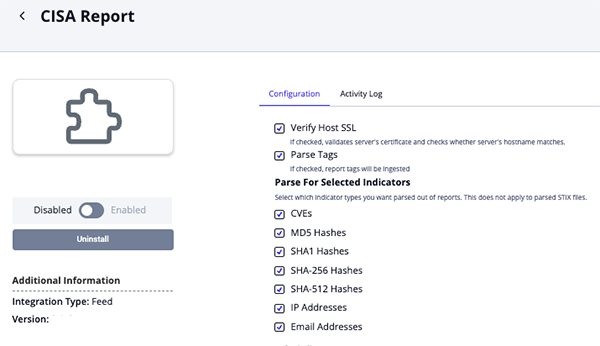
- Review any additional settings, make any changes if needed, and click on Save.
- Click on the toggle switch, located above the Additional Information section, to enable it.
ThreatQ Mapping
CISA Reports
The CISA Reports endpoint ingests reports from the xml feed as well as system objects related to the report.
GET https://www.cisa.gov/cybersecurity-advisories/analysis-reports.xml
Depending on the description length, the CDF may or may not attempt to fetch the article's HTML data via the link. The HTML data will be used in-place of the bad description. That request will be made to the following link:
GET https://www.cisa.gov/news-events/analysis-reports/<report_id>
Sample Response:
<?xml version="1.0" encoding="utf-8"?>
<rss version="2.0" xml:base="https://www.cisa.gov/">
	<channel>
		<title>CISA Analysis Reports</title>
		<link>https://www.cisa.gov/</link>
		<description/>
		<language>en</language>
		<item>
			<title><a href="/news-events/analysis-reports/ar22-272a" hreflang="en">MAR-10365227-2.v1 </a></title>
            <link>https://www.cisa.gov/news-events/analysis-reports/ar22-272a</link>
			<description>Original release date: October 31, 2019 ... </description>
			<pubDate>Thu, 31 Oct 2019 14:57:45 +0000</pubDate>
			<dc:creator>CISA</dc:creator>
			<guid isPermaLink="false">/node/9076</guid>
		</item>
		...
	</channel>
</rss>
ThreatQuotient provides the following default mapping for this feed:
| Feed Data Path | ThreatQ Entity | ThreatQ Object Type or Attribute Key | Published Date | Examples | Notes |
|---|---|---|---|---|---|
.rss.channel.item[].title |
Report.title |
N/A |
.rss.channel.item[].pubDate |
MAR-10365227-2.v1 – North Korean Trojan: HOPLIGHT |
N/A |
.rss.channel.item[].description |
Report.description |
N/A |
N/A |
Original release date: October 31, 2019 ... |
Base64 encoded image binaries are removed and descriptions are truncated at 65535 characters |
N/A |
Report.attribute |
Report type |
.rss.channel.item[].pubDate |
CISA Report |
N/A |
.rss.channel.item[].link |
Report.attribute |
URL |
.rss.channel.item[].pubDate |
https://www.cisa.gov/news-events/analysis-reports/ar22-272a |
N/A |
N/A |
Report.attribute |
NCAS feed name |
.rss.channel.item[].pubDate |
Analysis Reports |
N/A |
.rss.channel.item[].description |
Related Indicator.value |
IP Address, CVE, MD5, SHA-1, SHA-256, SHA-512, or Email Address |
.rss.channel.item[].pubDate |
N/A |
Indicators are parsed out of the description |
.rss.channel.item[].description |
Report.Tags |
N/A |
N/A |
N/A |
Tags are parsed out of the description. Ingested when Parse Tags section is enabled. |
.rss.channel.item[].description |
Related File |
Malware Analysis Report |
.rss.channel.item[].pubDate |
N/A |
PDF links are parsed out of the description, downloaded, and related as an attachment |
.rss.channel.item[].description |
Related File |
STIX |
.rss.channel.item[].pubDate |
N/A |
STIX links are parsed out of the description, downloaded, and related as an attachment |
N/A |
Related Indicator/TTP/Incident.value |
N/A |
N/A |
N/A |
STIX files are parsed for their indicators, TTPs, Incidents, and Tags |
Average Feed Run
Object counts and Feed runtime are supplied as generalities only - objects returned by a provider can differ based on credential configurations and Feed runtime may vary based on system resources and load.
| Metric | Result |
|---|---|
| Run Time | 2 minutes |
| Files | 7 |
| Reports | 10 |
| Report Attributes | 30 |
| Indicators | 45 |
| Incidents | 16 |
| TTPs | 2 |
Change Log
- Version 2.0.8 rev-a
- Versioning Update - updated the minimum supported ThreatQ version for this integration to 6.3.0 to support recent changes to CISA's content delivery infrastructure. See the Advisory - CISA Integrations Compatibility notice for more details.
- Version 2.0.8
- Updated tag parsing to correctly ingest multiple tags from a single paragraph as separate tags.
- Version 2.0.7
- Implemented fixes to address issues with tag handling and IP address parsing to ensure accurate data processing and consistency.
- Version 2.0.6
- Enhanced the integration by adding support for email address extraction and ingestion of tags from report bodies.
- Added a new option,
Email Addresses, to the Parse for Selected Indicators configuration parameter.
- Version 2.0.5
- Improved the resilience of the STIX link and attachment handling pipeline, preventing application crashes when required data is missing.
- Resolved a
NoneTypeiteration error during STIX parsing by initializing safe default values.
- Version 2.0.4
- Resolved a parsing issue with the RSS feed regarding the
pubDate.
- Resolved a parsing issue with the RSS feed regarding the
- Version 2.0.3
- Resolved a title parsing issue that was caused by a provider change to the
<title>XML format.
- Resolved a title parsing issue that was caused by a provider change to the
- Version 2.0.2
- Updated the integration's endpoint based on website migration updates by the provider.
- Rebranded to integration from US-CERT Reports to CISA Reports.
- Version 2.0.1
- Added the ability to parse Tags.
- Fixed an issue where the wrong TTP objects were parsed.
- Version 2.0.0
- Initial Release. This endpoint used to be included in the US-CERT integration. That integration has been deprecated and its endpoints split into four separate CDFs.
PDF Guides
| Document | ThreatQ Version |
|---|---|
| CISA Reports CDF Guide v2.0.8 | 6.3.0 or Greater |
| CISA Reports CDF Guide v2.0.7 | 4.52.0 or Greater |
| CISA Reports CDF Guide v2.0.6 | 4.52.0 or Greater |
| CISA Reports CDF Guide v2.0.5 | 4.52.0 or Greater |
| CISA Reports CDF Guide v2.0.4 | 4.52.0 or Greater |
| CISA Reports CDF Guide v2.0.3 | 4.52.0 or Greater |
| CISA Reports CDF Guide v2.0.2 | 4.52.0 or Greater |
| US-CERT Reports CDF Guide v2.0.1 | 4.52.0 or Greater |
| US-CERT Reports CDF Guide v2.0.0 | 4.52.0 or Greater |