Abnormal Security Threat Intel Blog CDF
The web format of this guide reflects the most current release. Guides for older iterations are available in PDF format.
Integration Details
ThreatQuotient provides the following details for this integration:
| Current Integration Version | 2.0.0 |
| Compatible with ThreatQ Versions | >= 5.5.0 |
| Support Tier | ThreatQ Supported |
Introduction
The Abnormal Security Threat Intel Blog CDF enables analysts to ingest the latest security news and research from the Abnormal Security team in the form of advisories, bulletins, and analyses posted on the Abnormal Security blog.
The integration provides the following feed:
- Abnormal Security Threat Intel Blog - ingests Abnormal Security Threat Intel blogs as ThreatQ reports and related CVEs.
The integration ingests the following object types:
- Indicators
- Reports
- Vulnerabilities
Installation
Perform the following steps to install the integration:
The same steps can be used to upgrade the integration to a new version.
- Log into https://marketplace.threatq.com/.
- Locate and download the integration yaml file.
- Navigate to the integrations management page on your ThreatQ instance.
- Click on the Add New Integration button.
- Upload the integration yaml file using one of the following methods:
- Drag and drop the file into the dialog box
- Select Click to Browse to locate the file on your local machine
ThreatQ will inform you if the feed already exists on the platform and will require user confirmation before proceeding. ThreatQ will also inform you if the new version of the feed contains changes to the user configuration. The new user configurations will overwrite the existing ones for the feed and will require user confirmation before proceeding.
The feed will be added to the integrations page. You will still need to configure and then enable the feed.
Configuration
ThreatQuotient does not issue API keys for third-party vendors. Contact the specific vendor to obtain API keys and other integration-related credentials.
To configure the integration:
- Navigate to your integrations management page in ThreatQ.
- Select the OSINT option from the Category dropdown (optional).
If you are installing the integration for the first time, it will be located under the Disabled tab.
- Click on the integration entry to open its details page.
- Enter the following parameters under the Configuration tab:
Parameter Description Blog Types Select the blog types to fetch and ingest into ThreatQ. Options include: - Threat Intel (default)
- Attack Stories (default)
- Credential Phishing (default)
- Vendor Email Compromise
- Business Email Compromise
- Account Takeover
Parsed IOC Types Select the IOC types you would like to automatically parse from the content. The only option available at this time is CVE.Ingest CVEs As Select the entity type to ingest CVE IDs as into the ThreatQ platform. Options include: - Vulnerabilities (default)
- Indicators
This parameter is only accessible if the
CVEoption is selected for the Parsed IOC Types parameter.Enable SSL Certificate Verification Enable this parameter if the feed should validate the host-provided SSL certificate. Disable Proxies Enable this parameter if the feed should not honor proxies set in the ThreatQ UI.
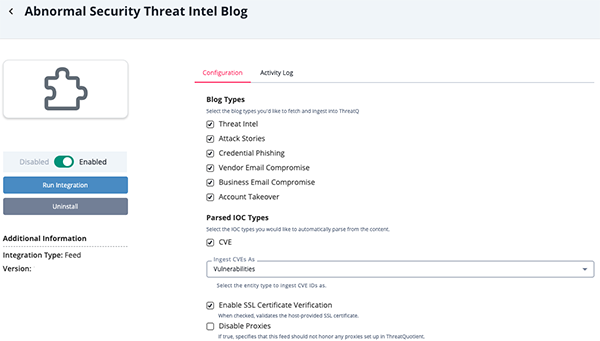
- Review any additional settings, make any changes if needed, and click on Save.
- Click on the toggle switch, located above the Additional Information section, to enable it.
ThreatQ Mapping
Abnormal Security Threat Intel Blog
The Abnormal Security Threat Intel Blog feed pulls blog posts from Abnormal Security's website and ingests them into ThreatQ as report objects.
GET https://abnormal.ai/threat-intelligence/blog
The detailed blog response returns the post data under the .pageProps.blogPost key.
Sample Request (truncated):
{
     "report": [
      {
        "value": "ARToken: The Device Code Phishing Platform Built for Full Microsoft 365 Takeover",
        "description": "<div><p>Most phishing works by tricking someone into typing a password on a fake page. ARToken doesn't bother.</p><p>ARToken is a Microsoft 365 account takeover phishing-as-a-service platform, first observed in July 2026.</p><figure>img src=\"https://images.contentstack.io/v3/assets/blt7299c7d8ec45054b/bltbb6408fd33f2623e/6a6a8bbf69c58b5750092607/ARToken-1-Dashboard_(1).webp\" style=\"max-width: 100%; height: auto;\" </></figure><p>It abuses the Microsoft OAuth 2.0 device-authorization grant to steal access and refresh tokens.</p></div>",
        "published_at": "2026-07-30 00:00:00+00:00",
        "attributes": [
          {
            "name": "External Reference",
            "value": "https://abnormal.ai/blog/artoken-the-device-code-phishing-platform-built-for-full-microsoft-365-takeover",
            "published_at": "2026-07-30 00:00:00+00:00"
          },
          {
            "name": "Author",
            "value": "Callie Baron, Ryan Devendorf",
            "published_at": "2026-07-30 00:00:00+00:00"
          },
          {
            "name": "Published At",
            "value": "2026-07-30",
            "published_at": "2026-07-30 00:00:00+00:00"
          }
        ],
        "tags": [
          {
            "name": "threat-intel"
          }
        ]
      }
    ]
}
ThreatQuotient provides the following default mapping for this feed based on the .pageProps.blogPost JSON keys:
| Feed Data Path | ThreatQ Entity | ThreatQ Object Type or Attribute Key | Published Date | Examples | Notes |
|---|---|---|---|---|---|
.title |
Report.Title |
N/A |
.date |
ARToken: The Device Code Phishing Platform Built for Full Microsoft 365 Takeover |
N/A |
.article_content |
Report.Description |
N/A |
N/A |
Full HTML body with paragraphs, headings, and images |
N/A |
.url |
Report.Attribute |
External Reference |
.date |
https://abnormal.ai/blog/artoken-the-device-code-phishing-platform-built-for-full-microsoft-365-takeover |
N/A |
.date |
Report.Attribute |
Published At |
.date |
2026-07-30 |
N/A |
.category |
Report.Tag |
N/A |
.date |
threat-intel |
N/A |
.author |
Report.Attribute |
Author |
.date |
Callie Baron, Ryan Devendorf |
Uses metadata when available, with fallback if unavailable |
.article_content |
Related Indicator/Vulnerability |
CVE |
.date |
CVE-2023-41232 |
User-configurable. Parsed from article HTML when present |
Average Feed Run
Object counts and Feed runtime are supplied as generalities only - objects returned by a provider can differ based on credential configurations and Feed runtime may vary based on system resources and load.
| Metric | Result |
|---|---|
| Run Time | 1 minute |
| Reports | 3 |
| Report Attributes | 9 |
| Vulnerabilities | 1 |
Known Issues / Limitations
- The feed utilizes since and until dates to make sure entries are not re-ingested if they haven't been updated.
- If you need to ingest historical blog posts, run the feed manually by setting the since date back.
- The feed will only return at maximum, the most recent 24 posts.
- ThreatQuotient recommends running this integration every 7 days based on the publication pace of the site.
Change Log
- Version 2.0.0
- Updated the Abnormal feed endpoint to use the new blog page URL.
- Version 1.0.1
- Updated the feed to support the latest Abnormal Security Blog API structure.
- Updated the build ID discovery source to
https://abnormal.ai/blog. - Modified blog listing parsing to use the
blogPostsobject in place ofposts. - Modified blog detail parsing to use the
blogPostobject in place ofpost. - Enhanced blog content parsing with additional validation and error-handling mechanisms to improve reliability and resilience.
- Version 1.0.0
- Initial release
PDF Guides
| Document | ThreatQ Version |
|---|---|
| Abnormal Security Threat Intel Blog CDF Guide v2.0.0 | 5.5.0 or Greater |
| Abnormal Security Threat Intel Blog CDF Guide v1.0.1 | 5.5.0 or Greater |
| Abnormal Security Threat Intel Blog CDF Guide v1.0.0 | 5.5.0 or Greater |