ThreatQ STIX 2.1 Export Action
The web format of this guide reflects the most current release. Guides for older iterations are available in PDF format.
Integration Details
ThreatQuotient provides the following details for this integration:
| Current Integration Version | 1.0.2 |
| Compatible with ThreatQ Versions | >= 6.13.0 |
| ThreatQ TQO License Required | Yes |
| Support Tier | ThreatQ Supported |
Introduction
The ThreatQ STIX 2.1 Export Action enables teams to export threat intelligence from the ThreatQ platform in the STIX 2.1 standard format for use in downstream tools, partner sharing, and broader intelligence workflows. By packaging data in a widely adopted, structured, and consistent schema, this action helps streamline automation, improve interoperability across systems, and support more effective collaboration for threat detection and response.
The integration provides the following action:
- ThreatQ - Export STIX 2.1 Indicators - exports threat intelligence data from ThreatQ in the STIX 2.1 format to a specified TAXII collection within an API root.
The integration is compatible with indicator objects and does not enrich or ingest additional system objects into ThreatQ.
This action is intended for use with ThreatQ TDR Orchestrator (TQO). An active TQO license is required for this feature.
Prerequisites
- An active ThreatQ TDR Orchestrator (TQO) license.
- A data collection containing at least one indicator:
- A TAXII server that supports STIX 2.1 and has an "inbox" functionality to receive exported data
Installation
Perform the following steps to install the integration:
The same steps can be used to upgrade the integration to a new version.
- Log into https://marketplace.threatq.com/.
- Locate and download the action zip file.
- Navigate to the integrations management page on your ThreatQ instance.
- Click on the Add New Integration button.
- Upload the action zip file using one of the following methods:
- Drag and drop the zip file into the dialog box
- Select Click to Browse to locate the zip file on your local machine
ThreatQ will inform you if the action already exists on the platform and will require user confirmation before proceeding. ThreatQ will also inform you if the new version of the action contains changes to the user configuration. The new user configurations will overwrite the existing ones for the action and will require user confirmation before proceeding.
You will still need to configure the action.
Configuration
ThreatQuotient does not issue API keys for third-party vendors. Contact the specific vendor to obtain API keys and other integration-related credentials.
To configure the integration:
- Navigate to your integrations management page in ThreatQ.
- Select the Actions option from the Category dropdown (optional).
- Click on the action entry to open its details page.
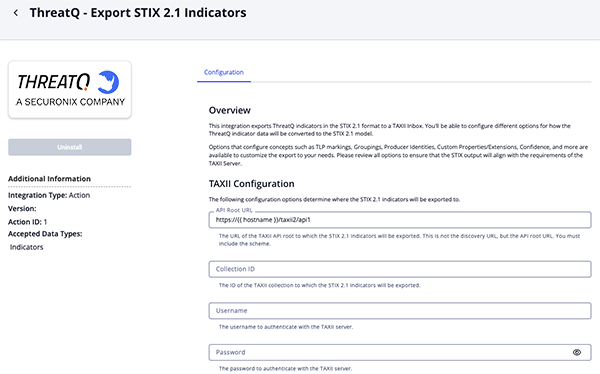
- Enter the following parameters under the Configuration tab:
The configurations set on this page will be used as the default settings when inserting this action into a new workflow. Updating the configurations on this page will not update any instances of this action that have already been deployed to a workflow. In that scenario, you must update the action’s configurations within the workflow itself.
Parameter Description API Root URL The the TAXII API root URL, schema included, for where the STIX 2.1 indicators will be exported.
Example:https://{{ hostname }}/taxii2/api1)Confirm that you are using the API root URL and not the discovery URL.
Collection ID Enter the ID of the TAXII collection to which the STIX 2.1 indicators will be exported. Username Enter the username to authenticate with the TAXII server. Password Enter the password to authenticate with the TAXII server. STIX Configuration Section STIX Object Type Selection Select how the indicators to be formatted in the STIX 2.1 export. Options include: - Export as STIX Cyber Observables (SCO)
- Export as STIX Indicator Patterns (Indicator Objects) (default)
Depending on the selected object type, some configuration parameters may not be accessible. In accordance with the STIX 2.1 specification, certain parameters, including
created_by_ref,revoked, andconfidence, are not available for STIX Cyber-observable Objects (SCOs).Custom Extensions Select the additional pieces of context to add as custom extensions to the STIX objects. Options include: - Score (default)
- Status
- Tags (default)
- Attributes
Tags will be added as labels for SDOs and tags will be added to the extension for SCOs. Custom properties will be added under the
extension-definition--7ca3da18-e794-4bae-99c5-a285277dbcf0property extension.Attribute Whitelist Enter a line-separated list of attribute names to include in the STIX export. If left empty, all attributes will be included. This parameter is only accessible if the
Attributesoption is selected for the Custom Extensions configuration parameter.Use Producer Identity Enable this parameter to have the createdby_reffield populated with the ID of the ThreatQ user who created the indicator. This parameter is disabled by default.This parameter is only accessible if the
Indicator Objectoption is selected for the STIX Object Type Selection configuration parameter.Producer Identity Name Enter the organization name exported in the producer Identity SDO. CTIS and other TAXII consumers may display this Identity name as the contributor. Enter Services Australiato meet the ASD contributor requirement. The default value isThreatQ.Enable CTIS-Compliant Bundle Enable this parameter to include a CTIS-formatted reportSDO and the ThreatQ produceridentityin the export, and to apply CTIS-compatible bundle references and markings.Producer Identity TLP Select the TLP designation to apply to the ThreatQ Identity Producer object, which will be reflected in the Identity SDO’s object_marking_refs` field.This parameter is only accessible if the Use Producer Identity configuration parameter has been enabled.
Group Objects Enable this parameter to have your STIX objects be grouped together using a Grouping SDO. This parameter is disabled by default. The Grouping will inherit the most-restrictive TLP from the indicators if the
Use TLP from Indicator Sourcesoption is selected for the Traffic Light Protocol (TLP) V2.0 configuration parameter.Report / Grouping Name Enter a descriptive title for the CTIS Report and, if grouping is enabled, the Grouping object. For example, Phishing Website/IP Malicious Domain IOCs. The default value isThreatQ High Confidence Indicators.This parameter is only accessible if the Group Objects configuration parameter has been enabled.
Grouping Description Enter a description for the Grouping object. This parameter is only accessible if the Group Objects configuration parameter has been enabled.
Grouping Context Select a context for the Grouping object. Options include: - Unspecified (default)
- Suspicious Activity
- Malware Analysis
This parameter is only accessible if the Group Objects configuration parameter has been enabled.
Grouping Confidence Method Select a method for calculating the confidence of the Grouping object. Options include: - Maximum Confidence of Objects (default)
- Average Confidence of Objects
- Minimum Confidence of Objects
- Specific Confidence Value
This parameter is only accessible if the Group Objects configuration parameter has been enabled.
Grouping Confidence Score Enter a specific confidence value for the Grouping object (0-100). This parameter is only accessible if the
Specific Confidence Valueoption is selected for the Grouping Confidence Method configuration parameter.Use Score as Confidence Enable this parameter to have the score indicator converted to a 0-100 confidence value in the STIX object. If disabled, the score will still be added as a custom property (when enabled). Indicators without scores will receive a confidence of 0. This parameter is enabled by default. Apply Confidence to SCOs (Out of Spec) Enable this parameter to have a confidence field to SCO objects based on the score of the indicator. This implementation is outside the STIX 2.1 specification, as SCOs do not natively include a confidence field; however, certain TAXII servers and consumers may require this field to support data contributions. This parameter is only accessible if the Use Score as Confidence configuration parameter has been enabled.
Export Description Enable this parameter to have the first description exported with the STIX objects. For SDOs, the descriptionfield will be used, while for SCOs, the custom extension's description field will be used. No description will be exported if this parameter is disabled. This parameter is enabled by default.Strip HTML Tags from Description Enable this parameter to strip out any HTML tags in the description before exporting the STIX object. This parameter is enabled be default as the STIX specification does not mention richtext support. This parameter is only accessible if the Export Description configuration parameter has been enabled.
Set Revoked if Whitelisted Enable this parameter to have indicators marked as revoked if they have a Whitelistedstatus in ThreatQ. This parameter is enabled by default.This parameter is only accessible if the
Indicator Objectoption is selected for the STIX Object Type Selection configuration parameter.Set Revoked if Expired Enable this parameter to mark indicators as revoked if they have an Expiredstatus in ThreatQ. This parameter is disabled by default.This parameter is only accessible if the
Indicator Objectoption is selected for the STIX Object Type Selection configuration parameter.TLP Configuration Section Traffic Light Protocol (TLP) v2.0 Select the TLP v2.0 level to apply to the STIX objects. This export utilizes TLP v2.0, which includes the following light designations: - Don't Apply TLP (default)
- Use TLP from Indicator Sources (ThreatQ v6.13+ only)
TLP will be inherited from the indicator's sources. This option requires requires ThreatQ v6.13+.
- TLP Red
- TLP Amber+Strict
- TLP Amber
- TLP Green
- TLP Clear
If the indicator has multiple sources with different TLPs, the least-restrictive TLP will be used.
Traffic Light Protocol (TLP) Fallback Select a fallback level to utilize if you have selected the Use TLP from Indicator Sourcesoption for the Traffic Light Protocol (TLP) v2.0 configuration field. This fallback TLP level will be applied to indicators that do not have a TLP assigned from their sources. Options include:- TLP Red
- TLP Amber+Strict
- TLP Amber
- TLP Green
- TLP Clear
This parameter is only accessible if the
Use TLP from Indicator Sourcesoption is selected for the Traffic Light Protocol (TLP) v2.0 configuration parameter.Workflow Options Objects Per Run The number of objects to process per run of the workflow. The default value is 1,000.
- Review any additional settings, make any changes if needed, and click on Save.
Actions
The following action is available:
| Action | Description | Object Type | Object Subtype |
|---|---|---|---|
| Export STIX 2.1 Indicators | Exports indicators to a configured TAXII collection | Indicators | ASN, FQDN, Email Address, IP Address, IPv6 Address, MAC Address, Mutex, URL, Username, Registry Key, MD5, SHA-1, SHA-256, SHA-512 |
Export STIX 2.1 Indicators
The Export STIX 2.1 Indicators action enables organizations to export threat intelligence from ThreatQ in STIX 2.1 format to a designated TAXII collection within a specified API root. The action supports exporting indicators as either Indicator SDOs or STIX Cyber Observable (SCO) objects, providing flexibility to meet downstream system requirements.
Configuration options allow administrators to tailor the export to their operational needs, including how TLP markings are applied, whether indicators are grouped under a STIX Grouping object, the assignment of a producer Identity, and other controls that ensure compatibility and alignment with external TAXII server expectations.
There is no mapping table as this action does not enrich or ingest additional threat data into the ThreatQ platform.
Change Log
- Version 1.0.2
- Added the Producer Identity Name configuration parameter to specify the producer Identity used for contributor attribution.
- Added the ability to configure the title used for CTIS Report and Grouping objects.
- Updated the following configuration parameter labels:
- Use ThreatQ Identity as Producer is now Use Producer Identity.
- ThreatQ Identity TLP is now Producer Identity TLP.
- Grouping Name is now Report / Grouping Name.
- Version 1.0.1
- Added CTIS-compatible bundle defaults and support for grouping exported objects.
- Added the
Enable CTIS-Compliant Bundleconfiguration parameter. When enabled, the export includes a CTIS-formattedreportSDO and ThreatQ produceridentity, and applies the required CTIS-compatible object references and markings.
- Version 1.0.0
- Initial release
PDF Guides
| Document | ThreatQ Version |
|---|---|
| ThreatQ STIX 2.1 Export Action Guide v1.0.2 | 6.13.0 or Greater |
| ThreatQ STIX 2.1 Export Action Guide v1.0.1 | 6.13.0 or Greater |
| ThreatQ STIX 2.1 Export Action Guide v1.0.0 | 6.13.0 or Greater |