ShadowDragon MalNet Action
The web format of this guide reflects the most current release. Guides for older iterations are available in PDF format.
Integration Details
ThreatQuotient provides the following details for this integration:
| Current Integration Version | 1.0.0 |
| Compatible with ThreatQ Versions | >= 5.12.1 |
| ThreatQ TQO License Required | Yes |
| Support Tier | ThreatQ Supported |
Introduction
The ShadowDragon MalNet action enriches FQDNs, IP addresses, and file hashes with contextual threat intelligence from the ShadowDragon MalNet service, enabling analysts to quickly identify malware relationships, assess infection scope, and accelerate investigation and response efforts.
The integration provides the following action:
- ShadowDragon MalNet - Enrich IOCs - enriches FQDNs, IP addresses, MD5 hashes, and SHA-256 hashes with user selected contextual data from the ShadowDragon MalNet API.
The integration is compatible with and enriches the following indicators types:
- FQDN
- IP Address
- MD5
- SHA-256
This action is intended for use with ThreatQ TDR Orchestrator (TQO). An active TQO license is required for this feature.
Prerequisites
- A ShadowDragon MalNet API Key.
- An active ThreatQ TDR Orchestrator (TQO) license.
- A ThreatQ data collection containing at least one of the following indicator types:
- FQDN
- IP Address
- MD5
- SHA-256
Installation
Perform the following steps to install the integration:
The same steps can be used to upgrade the integration to a new version.
- Log into https://marketplace.threatq.com/.
- Locate and download the action zip file.
- Navigate to the integrations management page on your ThreatQ instance.
- Click on the Add New Integration button.
- Upload the action zip file using one of the following methods:
- Drag and drop the zip file into the dialog box
- Select Click to Browse to locate the zip file on your local machine
ThreatQ will inform you if the action already exists on the platform and will require user confirmation before proceeding. ThreatQ will also inform you if the new version of the action contains changes to the user configuration. The new user configurations will overwrite the existing ones for the action and will require user confirmation before proceeding.
You will still need to configure the action.
Configuration
ThreatQuotient does not issue API keys for third-party vendors. Contact the specific vendor to obtain API keys and other integration-related credentials.
To configure the integration:
- Navigate to your integrations management page in ThreatQ.
- Select the Actions option from the Category dropdown (optional).
- Click on the action entry to open its details page.
- Enter the following parameters under the Configuration tab:
The configurations set on this page will be used as the default settings when inserting this action into a new workflow. Updating the configurations on this page will not update any instances of this action that have already been deployed to a workflow. In that scenario, you must update the action’s configurations within the workflow itself.
Parameter Description API Key Enter your ShadowDragon MalNet API Key. Enrich Domains with Selected Context Select which pieces of context to pull in when enriching domain indicators. Options include: - Reputation (default)
- Geolocation
- Samples (File Hashes)
- Events
- WHOIS
- Nameservers
- Related IPs
- Malware-requested URLs
Each selection will use one additional API call.
Enrich IPs with Selected Context Select which pieces of context to pull in when enriching IP indicators. Options include: - Reputation (default)
- Geolocation
- Samples (File Hashes)
- Events
- Related Domains
- Malware-requested URLs
Each selection will use one additional API call.
Enrich File hashes with Selected Context Select which pieces of context to pull in when enriching File Hashes indicators. Options include: - Details
- DNS Lookups
- HTTP Requests
- Events
Each selection will use one additional API call.
Fetch IDS Signatures for Events Enable this parameter to fetch and ingest IDS signatures related to any IDS events returned in the enrichment data. This parameter is enabled by default. Mark Indicators as Active for Selected Categories Select which reputation categories should mark an indicator as Active in ThreatQ when ingested. Options include: - CnC - Known Trojan Command and Control Server (default)
- Bot - System that has been observed checking in to a known botnet (default)
- Spam - Observed source of Spam (default)
- Drop - Drop site for logs or stolen credentials (default)
- Spyware CnC - System observed being used by adware and spyware to report user activity (default)
- Online Gaming - Gambling and related gaming sites
- Drive By Src - Observed source of a Driveby exploit kit or a redirector into an exploit kit (default)
- Streaming Media - POLICY Streaming Media Source
- Chat Server - Observed chat server including protocols such as jabber IRC MSN etc
- Tor Node - POLICY Tor Node
- RBN - Known Bad Net (default)
- Malvertiser - Known Malvertiser (default)
- Compromised - Known compromised or Hostile (default)
- SCADA Device - A Known SCADA Device
- P2P - P2P Node
- Proxy - Proxy Host
- IP Check - IP Check Services
- Social Media - Social Media sites and servers
- Utility - Known Good Public Utility
- DDoS Target - Target of a DDoS
- Scanner - Host Performing Scanning (default)
- SCADA Attacker - A Known SCADA Device Attacker (default)
- Brute Forcer - SSH or other brute forcer (default)
- Fake AV - Fake AV and AS Products (default)
- Dyn DNS - Domain or IP Related to a Dynamic DNS Entry or Request
- Undesirable - Undesirable but not illegal
- Abused TLD - Abused or free TLD Related
- Self-Signed SSL - Self Signed SSL or other suspicious encryption
- Blackhole - Blackhole or Sinkhole systems
- Remote Access Service - GoToMyPC and similar remote access services
- P2P CnC - Distributed CnC Nodes (default)
- Shared Hosting - Known Shared Hosting server
- Parking - Domain or SEO Parked
- VPN - VPN Server
- EXE Source - Observed serving executables (default)
- Mobile Device - Known mobile device traffic source
- Mobile CnC - Known CnC for Mobile specific Family (default)
- Mobile Spyware CnC - Spyware CnC specific to mobile devices (default)
- Skype Supernode - Observed Skype Bootstrap or Supernode
- Bitcoin Related - Bitcoin Mining and related
- DDoS Attacker - DDoS Source (default)
- Web Crawler - Known Web Crawling Infrastructure and Robots
Category Score Threshold to Mark Indicators as Active Specify the score threshold required within the selected category to mark an indicator as Active in ThreatQ. Setting the value to 0marks all indicators in the selected categories as Active. This setting provides more granular control over which indicators are designated as Active. The default value is0.Mark Utility Category Indicators as Whitelisted Enable this parameter to ingest indicators categorized as Utilityand assign them aWhitelistedstatus. This parameter is disabled by default.Selected Geolocation Context to Ingest Select which geolocation context fields to ingest from the MalNet enrichment data. Options include: - Country
- Country Code (default)
- Region
- City
Select WHOIS Context to Ingest Select which WHOIS context fields to ingest from the MalNet enrichment data. Options include: - Registrar (default)
- Registrar Country
- Registrar Website
- Registrant Name
- Registrant Email
Selecting Supporting Context to Ingest Select which supporting context fields to ingest from the MalNet enrichment data. Options include: - First Seen
- Last Seen
IDS Signature Type Select the type of IDS signatures to ingest when fetching signatures for events. Options include: - Snort (default)
- Suricata
Objects Per Run The number of objects to process per run of the workflow. The default value is 1000.
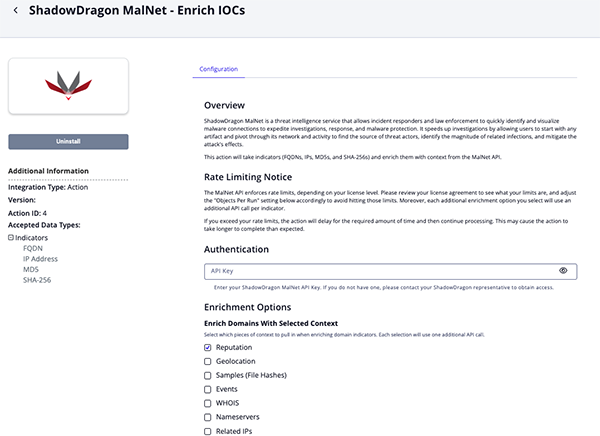
- Review any additional settings, make any changes if needed, and click on Save.
Actions
The following action is available:
| Action | Description | Object Type | Object Subtype |
|---|---|---|---|
| ShadowDragon MalNet - Enrich IOCs | Enriches IOCs with context from ShadowDragon MalNet. | Indicator | FQDN, IP Address, MD5, SHA-256 |
ShadowDragon MalNet - Enrich IOCs
The ShadowDragon MalNet - Enrich IOCs action enriches indicators—such as FQDNs, IP addresses, MD5 hashes, and SHA-256 hashes—with user-selected context from the ShadowDragon MalNet API.
GET https://api.malnet.shadowdragon.io/{{ indicator_type }}/{{ indicator_value }}/{{ enrichment_type }}
The returned data structure will vary based on the indicator type and enrichment type selected. The mapping table below will prefix the data path with the enrichment type.
ThreatQuotient provides the following default mapping for this action:
| Feed Data Path | ThreatQ Entity | ThreatQ Object Type or Attribute Key | Published Date | Examples | Notes |
|---|---|---|---|---|---|
reputation.data[].category |
Indicator.Attribute | Category | N/A | CnC |
N/A |
reputation.data[].score |
Indicator.Attribute | Threat Level | N/A | Malicious |
Threat Levels are based on the Proofpoint category mapping found at: https://tools.emergingthreats.net /docs/ET%20Intelligence% 20Rep%20List%20Tech%20 Description.pdf |
details.data.md5sum |
Indicator.Value | MD5 | N/A | N/A | N/A |
details.data.sha256 |
Indicator.Value | SHA-256 | N/A | N/A | N/A |
details.data.file_type |
Indicator.Attribute | File Type | N/A | PE32 executable (GUI) Intel 80386, for MS Windows |
N/A |
details.data.file_size |
Indicator.Attribute | File Size | N/A | 13716 |
N/A |
geo.data[].country |
Indicator.Attribute | Country | N/A | Canada |
N/A |
geo.data[].country_code |
Indicator.Attribute | Country code | N/A | CA |
N/A |
geo.data[].region |
Indicator.Attribute | Region | N/A | North America |
N/A |
geo.data[].city |
Indicator.Attribute | City | Ontario |
N/A | N/A |
domains.data[].domain |
Indicator.Value | FQDN | N/A | N/A | N/A |
domains.data[].first_seen |
Indicator.Attribute | First Seen | N/A | N/A | N/A |
domains.data[].last_seen |
Indicator.Attribute | Last Seen | N/A | N/A | N/A |
dns.data[].domain |
Indicator.Value | FQDN | N/A | N/A | N/A |
http.data[].url |
Indicator.Value | URL | N/A | N/A | N/A |
nameservers.data[].server |
Indicator.Value | FQDN | N/A | N/A | N/A |
nameservers.data[].first_seen |
Indicator.Attribute | First Seen | N/A | N/A | N/A |
nameservers.data[].last_seen |
Indicator.Attribute | Last Seen | N/A | N/A | N/A |
nameservers.data[].* |
Indicator.Attribute | Type | N/A | Value hard-coded to Nameserver to indicate the IOC is a nameserver domain. |
N/A |
samples.data[].source |
Indicator.Value | MD5, SHA-256 | N/A | Type determined by sample's hash length | N/A |
ips.data[].source |
Indicator.Value | IP Address | N/A | N/A | N/A |
ips.data[].first_seen |
Indicator.Attribute | First Seen | N/A | N/A | N/A |
ips.data[].last_seen |
Indicator.Attribute | Last Seen | N/A | N/A | N/A |
urls.data[] |
Indicator.Value | URL, URL Path | N/A | Type determined by URL value structure | N/A |
whois.data.registrar.name |
Indicator.Attribute | Registrar | N/A | N/A | N/A |
whois.data.registrant.name |
Indicator.Attribute | Registrant | N/A | N/A | N/A |
whois.data.registrar.country |
Indicator.Attribute | Registrar Country | N/A | N/A | N/A |
whois.data.registrar.website |
Indicator.Attribute | Registrar Website | N/A | N/A | N/A |
whois.data.registrant.email |
Indicator.Attribute | Registrant Email | N/A | N/A | N/A |
events.data[].* |
Indicator.Description | N/A | N/A | IDS Events are added to the enriched indicator's description | N/A |
sids.data.sig_name |
Related Signature.Name | Snort | N/A | ET MALWARE DcRAT/Sheet RAT CnC Checkin Using MessagePack | N/A |
Enriched Data
Object counts and action runtime are supplied as generalities only - objects returned by a provider can differ based on credential configurations and action runtime may vary based on system resources and load.
| Metric | Result |
|---|---|
| Run Time | 1 minute |
| Indicators | 50 |
| Indicator Attributes | 165 |
Known Issues / Limitations
- Rate Limit Notice - The MalNet API enforces rate limits based on your license level. Review your license agreement to understand your specific limits and adjust the Objects Per Run configuration parameter accordingly to avoid exceeding them. Additionally, each enrichment option selected results in an additional API call per indicator. If rate limits are exceeded, the action will pause for the required duration and then resume processing, which may extend the overall execution time.
Change Log
- Version 1.0.0
- Initial release
PDF Guides
| Document | ThreatQ Version |
|---|---|
| ShadowDragon MalNet Action Guide v1.0.0 | 5.12.1 or Greater |