SentinelOne Action Bundle
The web format of this guide reflects the most current release. Guides for older iterations are available in PDF format.
Integration Details
ThreatQuotient provides the following details for this integration:
| Current Integration Version | 2.0.2 |
| Compatible with ThreatQ Versions | >= 6.13.0 |
| ThreatQ TQO License Required | Yes |
| Support Tier | ThreatQ Supported |
Introduction
The SentinelOne Action Bundle integrates ThreatQ with the SentinelOne Singularity platform, enabling analysts to operationalize threat intelligence and automate response actions directly from ThreatQ. Through this integration, users can manage hash-based restrictions and exclusions, perform threat mitigation actions, and export indicators of compromise (IOCs) to SentinelOne Threat Intelligence, helping to accelerate detection and response workflows while strengthening endpoint protection.
The bundle supports the management of SHA-1 and SHA-256 hashes, threat mitigation activities, and the export of supported indicators, including file hashes, IP addresses, domains, and URLs, to SentinelOne. By combining ThreatQ intelligence with SentinelOne enforcement capabilities, organizations can more effectively investigate, enrich, and respond to threats across their security ecosystem.
Configuration information and credentials must be obtained from the SentinelOne platform. These actions are designed to support both automated workflows and large-scale operational deployments.
The SentinelOne Action Bundle provides the following actions:
- SentinelOne Blacklist or Whitelist – Adds SHA-1 and SHA-256 hashes to SentinelOne restrictions (blacklist) or exclusions (whitelist).
- SentinelOne Mitigate Threats – Executes mitigation actions against threats managed by SentinelOne.
- SentinelOne Delete Hashes – Removes SHA-1 and SHA-256 hashes from SentinelOne restrictions or exclusions.
- SentinelOne Threat Intelligence - IOC Export – Exports supported indicators from ThreatQ to the SentinelOne Threat Intelligence database.
The action bundle is compatible with the following indicator types:
- FQDN
- File Path
- IP Address
- IPv6 Address
- MD5
- SHA-1
- SHA-256
- URL
All actions return enriched indicator data and any associated attributes available from SentinelOne.
This action is intended for use with ThreatQ TDR Orchestrator (TQO). An active TQO license is required for this feature.
Prerequisites
- An active ThreatQ TDR Orchestrator (TQO) license.
- A data collection containing at least one of the following indicator types:
- FQDN
- File Path
- IP Address
- IPv6 Address
- MD5
- SHA-1
- SHA-256
- URL
- Your SentinelOne SiteID.
- Your SentinelOne API Key.
- Your SentinelOne Hostname.
Installation
Perform the following steps to install the integration:
The same steps can be used to upgrade the integration to a new version.
- Log into https://marketplace.threatq.com/.
- Locate and download the action bundle zip file.
- Navigate to the integrations management page on your ThreatQ instance.
- Click on the Add New Integration button.
- Upload the zip file using one of the following methods:
- Drag and drop the file into the dialog box
- Select Click to Browse to locate the integration file on your local machine
ThreatQ will inform you if the action already exists on the platform and will require user confirmation before proceeding. ThreatQ will also inform you if the new version of the action contains changes to the user configuration. The new user configurations will overwrite the existing ones for the action and will require user confirmation before proceeding.
You will still need to configure the action.
Configuration
ThreatQuotient does not issue API keys for third-party vendors. Contact the specific vendor to obtain API keys and other integration-related credentials.
To configure the integration:
- Navigate to your integrations management page in ThreatQ.
- Select the Actions option from the Category dropdown (optional).
- Click on the action entry to open its details page.
- Enter the following parameters under the Configuration tab:
The configurations set on this page will be used as the default settings when inserting this action into a new workflow. Updating the configurations on this page will not update any instances of this action that have already been deployed to a workflow. In that scenario, you must update the action’s configurations within the workflow itself.
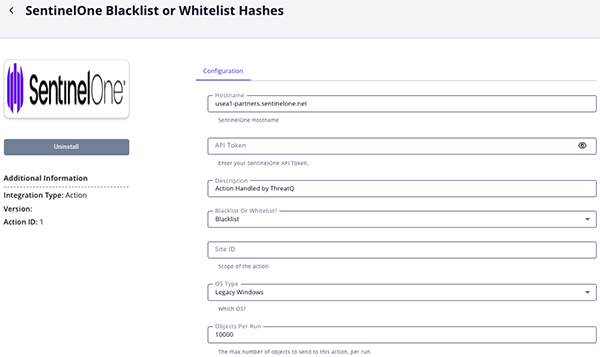
SentinelOne Blacklist or Whitelist Parameters
Parameter Description Hostname Your SentinelOne Hostname. The default value is http://usea1-partners.sentinelone.net/.API Token Your SentinelOne API Token. Description Enter a description to be added to the indicators. The default description is Action Handled by ThreatQ. Blacklist or Whitelist? Select whether the specified hash should be added to SentinelOne restrictions (blacklist) or exclusions (whitelist). Site ID The scope of the action. OS Type Select the OS type to use. Options include: - Legacy Windows
- Windows
- Mac
- Linux
Objects Per Run The number of objects to send to this action per run. The max value for this parameter is 50,000.
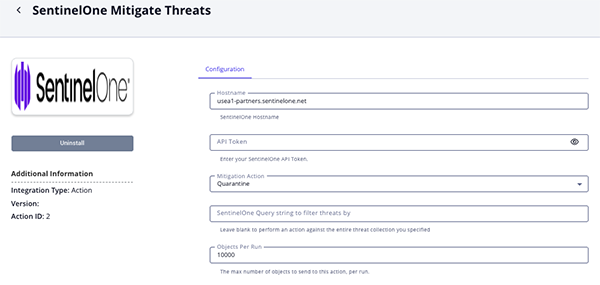
SentinelOne Mitigate Threats Parameters
Parameter Description Hostname Your SentinelOne Hostname. The default value is http://usea1-partners.sentinelone.net/.API Token Your SentinelOne API Token. Mitigation Action Select the mitigation action for SentinelOne. Options include: - Quarantine
- Kill
- Remediate
- Rollback Remediate
- Disconnect from Network
- Un_Quarantine
SentinelOne Query string to filter threats by Add additional filter criteria for SentinelOne. You can leave this parameter blank to run the action against the entire threat collection you have specified. Objects Per Run The number of objects to send to this action per run. The max value for this parameter is 50,000.
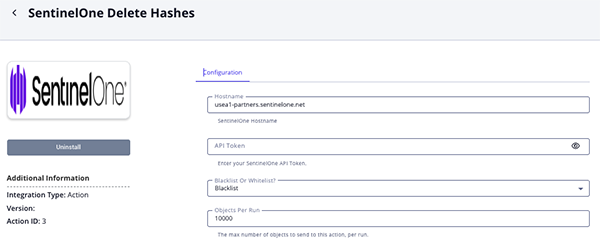
SentinelOne Delete Hashes Parameters
Parameter Description Hostname Your SentinelOne Hostname. The default value is http://usea1-partners.sentinelone.net/.API Token Your SentinelOne API Token. Blacklist or Whitelist? Select which list to remove hashes from in SentinelOne. Options include Blacklist and Whitelist. Objects Per Run The number of objects to send to this action per run. The max value for this parameter is 50,000.
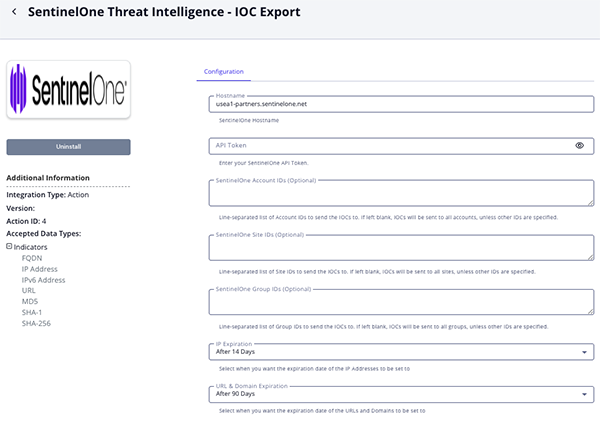
SentinelOne Threat Intelligence - IOC Export Parameters
Parameter Description Hostname Your SentinelOne Hostname. The default value is http://usea1-partners.sentinelone.net/.API Token Your SentinelOne API Token. SentinelOne Account IDs Optional - Enter a line-separated list of Account IDs to which IOCs will be sent. If left blank, IOCs will be distributed to all accounts unless a more specific scope is defined. SentinelOne Site IDs Optional - Enter a line-separated list of Site IDs to which IOCs will be sent. If left blank, IOCs will be distributed to all sites unless a more specific scope is defined. SentinelOne Group IDs Optional - Enter a line-separated list of Group IDs to which IOCs will be sent. If left blank, IOCs will be distributed to all groups unless a more specific scope is defined. IP Expiration Select an expiration setting for IP Address and IPv6 Address indicators. Options include: - After 7 Days
- After 14 Days (default)
- After 30 Days
URL & Domain Expiration Select an expiration setting for URL and Domain indicators. Options include: - After 7 Days
- After 14 Days
- After 30 Days
- After 90 Days (default)
- After 180 Days
File Hash Expiration Select an expiration setting for MD5, SHA-1, and SHA-256 indicators. Options include: - After 7 Days
- After 14 Days
- After 30 Days
- After 90 Days
- After 180 Days (default)
ThreatQ Hostname/IP Address Specify the ThreatQ hostname or IP address used to generate the reference backlink to the indicator. Objects Per Run The number of objects to send to this action per run.
- Review any additional settings, make any changes if needed, and click on Save.
Actions
The bundle provides the following actions:
| Action | Description | Object Type | Object Subtype |
|---|---|---|---|
| SentinelOne Blacklist or Whitelist Hashes | Adds SHA-1 hashes to either the blacklist or the whitelist on the SentinelOne platform. | Indicators | SHA-1, SHA-256 |
| SentinelOne Mitigate Threats | Allows an analyst to perform mitigation actions on indicators on the SentinelOne platform. | Indicators | SHA-1, File Paths |
| SentinelOne Delete Hashes | Removes SHA-1 hashes from either the blacklist or the whitelist on the SentinelOne platform. | Indicators | SHA-1, SHA-256 |
| SentinelOne Threat Intelligence - IOC Export | Export indicators from ThreatQ to SentinelOne Threat Intelligence | Indicators | FQDN, IP Address, IPv6 Address, URL, MD5, SHA-1, SHA-256 |
SentinelOne Blacklist or Whitelist Hashes
The SentinelOne BlackList or Whitelist Hashes function adds SHA-1 and SHA-256 hashes to either the Blacklist or Whitelist (specified by the user) on the SentinelOne platform.
POST https://{{hostname}}/web/api/v2.1/threats/mitigate/{{mitigation_type}}
Sample Request:
{
  "data": {},
  "filter": {
    "contentHash__contains": [
      "1af5d01cbcfa335c0f0983386d178dc09956e1cc"
    ],
    "query": "string",
    "filePath__contains": [
    ]
  }
}
Sample Response:
{
    "data": {
        "affected": 1
    }
}
ThreatQuotient provides the following default mapping for this function:
| Feed Data Path | ThreatQ Entity | ThreatQ Object Type or Attribute Key | Published Date | Examples | Notes |
|---|---|---|---|---|---|
.data.osType |
Indicator.Attribute | Blacklisted / Whitelisted in SentinelOne | N/A | macos |
Value generated by the request and not by the response. |
SentinelOne Mitigate Threats
The SentinelOne BlackList Mitigate Threats function provides you with the ability to perform mitigation actions on indicators on the SentinelOne platform.
POST https://{{hostname}}/web/api/v2.1/threats/mitigate/{{mitigation_type}}
Sample Request:
{
  "data": {},
  "filter": {
    "contentHash__contains": [
      "1af5d01cbcfa335c0f0983386d178dc09956e1cc"
    ],
    "query": "string",
    "filePath__contains": [
    ]
  }
}
Sample Response:
{
    "data": {
        "affected": 1
    }
}
ThreatQuotient provides the following default mapping for this function:
| Feed Data Path | ThreatQ Entity | ThreatQ Object Type or Attribute Key | Published Date | Examples |
|---|---|---|---|---|
.data.affected |
Indicator.Attribute | Computers Affected by mitigation: | N/A | Computers Affected by mitigation: 1 |
SentinelOne Delete Hashes
The SentinelOne Delete Hashes action searches SentinelOne restrictions and exclusions for matching SHA-1 and SHA-256 hashes and removes any matching entries.
GET https://{{hostname}}/web/api/v2.1/{{action_type}}?value__contains={{indicator_values}}&includeChildren=true
Sample Response:
{
    "data": [
        {
            "createdAt": "2021-10-26T15:05:00.042035Z",
            "description": "Action handled Via ThreatQ",
            "id": "1275336012951168745",
            "includeChildren": false,
            "includeParents": false,
            "notRecommended": "NONE",
            "osType": "windows",
            "scope": {
                "siteIds": [
                    "123987123987"
                ]
            },
            "scopeName": "site",
            "scopePath": "Global\\Threat Quotient\\Default site",
            "source": "user",
            "type": "black_hash",
            "updatedAt": "2021-10-26T15:05:00.041536Z",
            "userId": "12345678909875",
            "userName": "Our User",
            "value": "7eb2197d6fd80c31bd04d3a7fb8c725eb9789013"
        }
    ],
    "pagination": {
        "nextCursor": null,
        "totalItems": 1
    }
}
Supplemental Call
The following are request and response examples for the supplemental call to delete the hash from the SentinelOne list.
DELETE https://{{hostname}}/web/api/v2.1/{{action_type}}
Sample Request
{
    "data":{
        "ids":"1275336012951168745"
    }
}
Sample Response
{
    "data": {
        "affected": 1
    }
}
SentinelOne Threat Intelligence - IOC Export
The SentinelOne Threat Intelligence - IOC Export action uploads supported indicators from ThreatQ to the SentinelOne Threat Intelligence database. It supports account, site or group scoping, sets the expiration date based on the indicator type and action configuration, and serializes all ThreatQ indicator attributes into the SentinelOne metadata field.
This action does not ingest provider data back into ThreatQ. It reports the processed indicators with the Exported to SentinelOne Threat Intelligence attribute in the workflow report.
POST https://{{hostname}}/web/api/v2.1/threat-intelligence/iocs
Sample Body:
{
  "data": [
    {
      "value": "google.com",
      "type": "DNS",
      "source": "ThreatQ",
      "validUntil": "2026-07-21T13:50:54.0Z",
      "creationTime": "2025-08-06T18:09:05.0Z",
      "description": "<p>Its google!</p>",
      "method": "EQUALS",
      "reference": ["https://example.threatq.com/indicators/18746/details"],
      "externalId": "18746",
      "metadata": "{\"attributes\": [], \"source\": \"ThreatQ\", \"tags\": [\"Sent1\"]}",
      "mitreTactic": [],
      "threatActors": ["APT28", "APT29"],
      "category": []
    }
  ],
  "filter": {
    "siteIds": ["1265270650002898721"]
  }
}
Sample Response:
{
  "data": [
    {
      "batchId": "atmtn0000000733f82af50e259426039ffe85",
      "creationTime": "2025-08-06T18:09:05Z",
      "description": "<p>Its google!</p>",
      "externalId": "18746",
      "metadata": "{\"attributes\": [], \"source\": \"ThreatQ\", \"tags\": [\"Sent1\"]}",
      "method": "EQUALS",
      "reference": ["https://example.threatq.com/indicators/18746/details"],
      "scope": "site",
      "source": "ThreatQ",
      "threatActors": ["APT28", "APT29"],
      "type": "DNS",
      "updatedAt": "2026-04-22T13:50:55.084425Z",
      "uploadTime": "2026-04-22T13:50:55.084425Z",
      "uuid": "bc5a77ecb2aac81e5aad5179de646074",
      "validUntil": "2026-07-21T13:50:54Z",
      "value": "google.com"
    }
  ]
}
Enriched Data
Object counts and action runtime are supplied as generalities only - objects returned by a provider can differ based on credential configurations and action runtime may vary based on system resources and load.
SentinelOne Blacklist or Whitelist Hashes
| Metric | Result |
|---|---|
| Run Time | 2 minutes |
| Indicators | 17 |
| Indicator Attributes | 14 |
Known Issues / Limitations
- Threat intelligence data cannot be configured or viewed through the SentinelOne Management Console and is accessible only via the API. See SentinelOne's documentation for more details.
Change Log
- Version 2.0.2
- Fixed an issue with the IOC Export action that prevented configured SentinelOne Site IDs from being included correctly in export requests
- Version 2.0.1
- Enhanced the SentinelOne Blacklist or Whitelist and SentinelOne Delete Hashes actions to support SHA-256 hashes in addition to existing hash types.
- Version 2.0.0
- Added new action, SentinelOne Threat Intelligence - IOC Export, which uploads supported indicators from ThreatQ to the SentinelOne Threat Intelligence database.
- Updated the integration’s authentication method to use API key–based authentication.
- Replaced the Username and Password configuration parameters with the API Key parameter.
- Updated the minimum ThreatQ version to 6.13.0.
- Version 1.0.0
- Initial release
PDF Guides
| Document | ThreatQ Version |
|---|---|
| SentinelOne Action Bundle Guide v2.0.2 | 6.13.0 or Greater |
| SentinelOne Action Bundle Guide v2.0.1 | 6.13.0 or Greater |
| SentinelOne Action Bundle Guide v2.0.0 | 6.13.0 or Greater |
| SentinelOne Action Bundle Guide v1.0.0 | 5.6.0 or Greater |