Resecurity Action
The web format of this guide reflects the most current release. Guides for older iterations are available in PDF format.
Integration Details
ThreatQuotient provides the following details for this integration:
| Current Integration Version | 1.0.0 |
| Compatible with ThreatQ Versions | >= 5.29.0 |
| ThreatQ TQO License Required | Yes |
| Support Tier | ThreatQ Supported |
Introduction
The Resecurity Action integration enriches indicators with threat intelligence data from Resecurity, a cybersecurity provider offering a unified platform for Cyber Threat Intelligence (CTI), Digital Risk Management, and Endpoint Protection.
The integration provides the following action:
- Resecurity Data Breaches Enrichment - enriches indicators with information about data breaches.
The integration is compatible with the following indicator types:
- Emails
- FQDNs
The integration enriched the following object types:
- Indicators
- Reports
This action is intended for use with ThreatQ TDR Orchestrator (TQO). An active TQO license is required for this feature.
Prerequisites
- An active ThreatQ TDR Orchestrator (TQO) license.
- A Resecurity API Key.
- A ThreatQ data collection containing at least one of the following indicator types:
- FQDN
Installation
Perform the following steps to install the integration:
The same steps can be used to upgrade the integration to a new version.
- Log into https://marketplace.threatq.com/.
- Locate and download the action zip file.
- Navigate to the integrations management page on your ThreatQ instance.
- Click on the Add New Integration button.
- Upload the action zip file using one of the following methods:
- Drag and drop the zip file into the dialog box
- Select Click to Browse to locate the zip file on your local machine
ThreatQ will inform you if the action already exists on the platform and will require user confirmation before proceeding. ThreatQ will also inform you if the new version of the action contains changes to the user configuration. The new user configurations will overwrite the existing ones for the action and will require user confirmation before proceeding.
You will still need to configure the action.
Configuration
ThreatQuotient does not issue API keys for third-party vendors. Contact the specific vendor to obtain API keys and other integration-related credentials.
To configure the integration:
- Navigate to your integrations management page in ThreatQ.
- Select the Actions option from the Category dropdown (optional).
- Click on the action entry to open its details page.
- Enter the following parameters under the Configuration tab:
The configurations set on this page will be used as the default settings when inserting this action into a new workflow. Updating the configurations on this page will not update any instances of this action that have already been deployed to a workflow. In that scenario, you must update the action’s configurations within the workflow itself.
Parameter Description API Key Enter the API Key to authenticate with the Resecurity API. Enable SSL Certificate Verification Enable this parameter if the action should validate the host-provided SSL certificate. Disable Proxies Enable this parameter if the action should not honor proxies set in the ThreatQ UI. Email Address Context Filter Select which pieces of context to bring into ThreatQ with each Email Address. Options include: - Username (default)
- Company (default)
- Country (default)
- City
- Industry
- Job Title
Breach Report Context Filter Select which pieces of context to bring into ThreatQ with each Breach Report. Options include: - Compromised Data (default)
- Geography (default)
- Accounts (default)
- Score (default)
Objects per run Maximum number of objects to process per run. The default value is 5000.
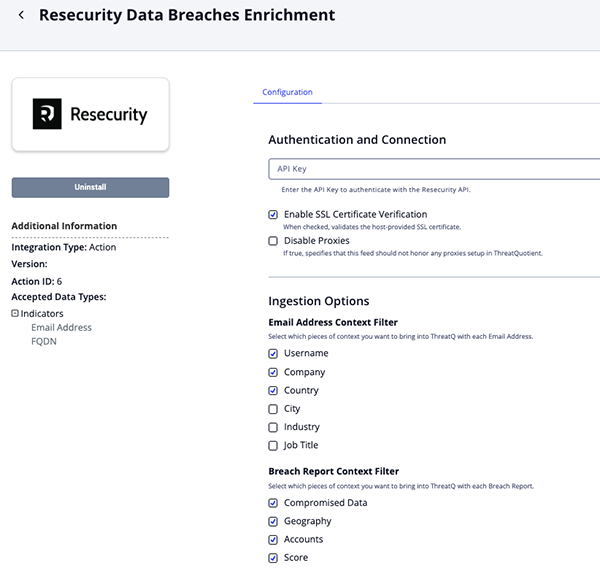
- Review any additional settings, make any changes if needed, and click on Save.
Actions
The following action is available:
| Action | Description | Object Type | Object Subtype |
|---|---|---|---|
| Resecurity Data Breaches Enrichment | Enriches indicators with information about data breaches | Indictor | Email Address, FQDN |
Resecurity Data Breaches Enrichment
The Resecurity Data Breaches Enrichment action queries Resecurity for known data breaches associated with a specified email address or domain. Identified breaches are ingested into ThreatQ as Reports linked to the provided email or domain. When an email address is used, the action also ingests any additional available information related to that address.
GET https://app.resecurity.com/api/breaches/index
Sample Parameters:
{
  "query": "threatq.com",
  "per-page": 50
}
Sample Response:
[
  {
    "email": "michel.huffaker@threatq.com",
    "id": 19643651173,
    "info": {
      "address1": "11400 COMMERCE PARK DR SUITE 200",
      "address2": "",
      "city": "RESTON",
      "company_name": "THREATQUOTIENT",
      "company_revenue": "$10-49 Million",
      "company_size": "100-249",
      "company_size_integer": "",
      "company_url": "THREATQ.COM",
      "country": "US",
      "data_file": "PAMPANGA.TALDISCOVERY.US.10.11.19",
      "data_source": "Pampanga",
      "dex_title": "",
      "direct_dial": "",
      "direct_dial_ext": "",
      "ext": "",
      "first_name": "MICHEL",
      "hg_customer_id": "0",
      "hq_address": "",
      "hq_city": "",
      "hq_company_name": "",
      "hq_country": "",
      "hq_phone": "",
      "hq_state": "",
      "hq_zip": "",
      "id": "69767803",
      "industry": "Software, Internet and Technology",
      "job_area": "General Management",
      "job_function": "General Management",
      "job_level": "Director Level",
      "job_title": "DIRECTOR THREAT INTELLIGENCE",
      "last_name": "HUFFAKER",
      "member_id": "",
      "ml_title": "Senior Management (SVP/GM/Director)",
      "phone": "7035749885",
      "sic_primary": "7371",
      "sic_secondary": "",
      "silo": "Business",
      "state": "VA",
      "zip": "20191"
    },
    "ip": "",
    "password": null,
    "password_hash": null,
    "salt": null,
    "source": {
      "accounts": 121877048,
      "actor_name": null,
      "add_date": 1731363713,
      "attack_vector": null,
      "category": 1,
      "collect_date": 1712872800,
      "compromised_data": [
        "Email addresses"
      ],
      "description": null,
      "geography": [
        "Canada"
      ],
      "id": 17775,
      "meta": [
        "Large-scale breach (1M+ victims)"
      ],
      "name": "pureincubation.com contacts",
      "score": 100,
      "ttp": [],
      "url": null
    },
    "source_id": 17775,
    "username": "MICHEL HUFFAKER"
  }
]
ThreatQuotient provides the following default mapping for this action:
| Feed Data Path | ThreatQ Entity | ThreatQ Object Type or Attribute Key | Published Date | Examples | Notes |
|---|---|---|---|---|---|
.source.name |
Report.Value | Report | .source.collect_date |
Data Breach: pureincubation.com contacts |
Prepended with Data Breach: |
.source.description |
Report.Description | N/A | N/A | N/A | N/A |
.source.compromised_data |
Report.Attribute | Compromised Data | .source.collect_date |
Email addresses |
User-configurable. |
.source.geography |
Report.Attribute | Geography | .source.collect_date |
Canada |
User-configurable. |
.source.accounts |
Report.Attribute | Accounts | .source.collect_date |
121877048 |
User-configurable. Updatable. |
.source.score |
Report.Attribute | Score | .source.collect_date |
100 |
User-configurable. Updatable. |
.email |
Related Indicator.Value | Email Address | N/A | michel.huffaker@threatq.com |
N/A |
.username |
Related Indicator.Attribute | Username | N/A | MICHEL HUFFAKER |
User-configurable. |
.info.company_name |
Related Indicator.Attribute | Company | N/A | THREATQUOTIENT |
User-configurable. |
.info.country |
Related Indicator.Attribute | Country | N/A | US |
User-configurable. |
.info.city |
Related Indicator.Attribute | City | N/A | RESTON |
User-configurable. |
.info.industry |
Related Indicator.Attribute | Industry | N/A | Software, Internet and Technology |
User-configurable. |
.info.job_title |
Related Indicator.Attribute | Job Title | N/A | DIRECTOR THREAT INTELLIGENCE |
User-configurable. |
The following fields are added to the description of an Email address:.info.address1, .info.city, .info.country, .info.company_name, .info.company_revenue, .info.company_url, .info.country, .info.data_file, .info.data_source, .info.first_name, .info.industry, .info.job_area, .info.job_level, .info.last_name.
Enriched Data
Object counts and action runtime are supplied as generalities only - objects returned by a provider can differ based on credential configurations and action runtime may vary based on system resources and load.
| Metric | Result |
|---|---|
| Run Time | 3 minutes |
| Indicators | 300 |
| Indicator Attributes | 2,400 |
| Report | 100 |
| Report Attributes | 400 |
Known Issues / Limitations
- The
AccountsandScoreattributes are updatable; however, their final values are non-deterministic, as they depend on the order in which the API data is ingested into the database. - The
ReportandEmaildescriptions are also updatable, and their final values may vary for the same reason. - To avoid exceeding relationship limits, ingestion is capped at 100 pages (up to 5,000 indicators) for each input indicator.
Change Log
- Version 1.0.0
- Initial release
PDF Guides
| Document | ThreatQ Version |
|---|---|
| Resecurity Action Guide v1.0.0 | 5.29.0 or Greater |