Recorded Future Sandbox Action
The web format of this guide reflects the most current release. Guides for older iterations are available in PDF format.
Integration Details
ThreatQuotient provides the following details for this integration:
| Current Integration Version | 1.0.0 |
| Compatible with ThreatQ Versions | >= 5.12.1 |
| ThreatQ TQO License Required | Yes |
| Support Tier | ThreatQ Supported |
Introduction
The Recorded Future Sandbox Action integration enables ThreatQ users to seamlessly leverage Recorded Future’s sandboxing capabilities directly within their threat intelligence workflows. By integrating sandbox detonation and analysis into the platform, this action supports automated investigation and enrichment of suspicious indicators.
The Recorded Future Sandbox provides a secure environment for analyzing URLs and related indicators through dynamic detonation and behavioral analysis. It generates detailed reports and indicators of compromise (IOCs), enabling organizations to rapidly identify, investigate, and respond to emerging threats, including zero-day activity.
The integration allows intelligence teams to automatically submit indicators such as URLs, FQDNs, and IP addresses to the Recorded Future Sandbox for detonation. Following analysis, results can be ingested back into ThreatQ using the Recorded Future Sandbox CDF, supporting a continuous and automated threat intelligence workflow.
The integration provides the following action:
- Recorded Future Sandbox - Submit URLs - submits URL samples to the Recorded Future Sandbox for detonation and analysis.
The integration is compatible with the following indicator types:
- FQDNs
- IP Addresses
- URLs
This action is intended for use with ThreatQ TDR Orchestrator (TQO). An active TQO license is required for this feature.
Prerequisites
- An active ThreatQ TDR Orchestrator (TQO) license.
- A Recorded Future Sandbox License.
- A Recorded Future Sandbox API Key.
- A data collection containing at least one of the following indicator types:
- FQDNs
- IP Addresses
- URLs
Installation
Perform the following steps to install the integration:
The same steps can be used to upgrade the integration to a new version.
- Log into https://marketplace.threatq.com/.
- Locate and download the action zip file.
- Navigate to the integrations management page on your ThreatQ instance.
- Click on the Add New Integration button.
- Upload the action zip file using one of the following methods:
- Drag and drop the zip file into the dialog box
- Select Click to Browse to locate the zip file on your local machine
ThreatQ will inform you if the action already exists on the platform and will require user confirmation before proceeding. ThreatQ will also inform you if the new version of the action contains changes to the user configuration. The new user configurations will overwrite the existing ones for the action and will require user confirmation before proceeding.
You will still need to configure the action.
Configuration
ThreatQuotient does not issue API keys for third-party vendors. Contact the specific vendor to obtain API keys and other integration-related credentials.
To configure the integration:
- Navigate to your integrations management page in ThreatQ.
- Select the Actions option from the Category dropdown (optional).
- Click on the action entry to open its details page.
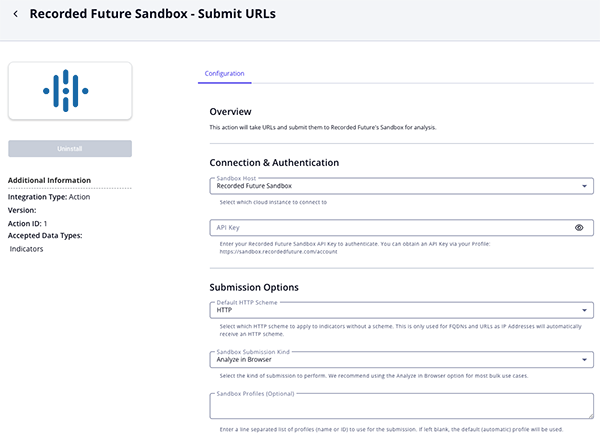
- Enter the following parameters under the Configuration tab:
The configurations set on this page will be used as the default settings when inserting this action into a new workflow. Updating the configurations on this page will not update any instances of this action that have already been deployed to a workflow. In that scenario, you must update the action’s configurations within the workflow itself.
Parameter Description Sandbox Host Select which Sandbox cloud host to connect to with the action. Available options include: - Recorded Future Sandbox (default)
- Recorded Future Triage (Private)
- Recorded Future Triage (Public)
API Key Enter your API Key for the selected Sandbox Host. Default HTTP Scheme Select the HTTP scheme to apply to indicators that do not include one. The default value is HTTP.This setting applies only to FQDNs and URLs, as IP addresses are automatically assigned an HTTP scheme.
Sandbox Submission Kind Select the type of submission to perform. Options include: - Analyze in Browser (default)
- Fetch & Execute File
For most bulk use cases, the Analyze in Browser option is recommended.
Sandbox Profiles Optional - enter a line-separated list of profiles (name or ID) to use for the submission. If no value is provided, the default (automatic) profile will be applied. Objects Per Run Enter the number of objects to process per run of the workflow. The default value is 1000.Enable SSL Certificate Verification Enable this parameter if the action should validate the host-provided SSL certificate. Disable Proxies Enable this parameter if the action should not honor proxies set in the ThreatQ UI.
- Review any additional settings, make any changes if needed, and click on Save.
Actions
The following action is available:
| Action | Description | Object Type | Object Subtype |
|---|---|---|---|
| Recorded Future Sandbox - Submit URLs | Submits URL samples to the Recorded Future Sandbox for detonation | Indicators | URL, FQDN, IP Address |
Recorded Future Sandbox - Submit URLs
The Recorded Future Sandbox - Submit URLs action submits indicators such as URLs, IP addresses, and FQDNs to the Recorded Future Sandbox for detonation and analysis. If an indicator does not include a URL scheme, for example FQDNs or IP addresses, the action will automatically infer and apply one based on the indicator’s attributes and user defined configuration.
The integration also supports the use of custom Recorded Future Sandbox profiles, enabling users to control how samples are detonated. This allows teams to define tailored submission workflows and apply different detonation strategies across distinct sets of indicators.
POST https://{{ host }}/api/v0/samples
Sample Response:
{
  "id": "240711-sb38vsk79w",
  "status": "pending",
  "kind": "url",
  "url": "http://newskingdomz.live",
  "submitted": "2024-07-11T14:57:57Z"
}
ThreatQuotient provides the following default mapping for this action:
| Feed Data Path | ThreatQ Entity | ThreatQ Object Type or Attribute Key | Published Date | Examples | Notes |
|---|---|---|---|---|---|
.id |
Attribute |
Submission ID |
N/A |
240711-sb38vsk79w |
N/A |
.rf_sandbox_url_scheme |
Attribute |
Scheme |
N/A |
http |
N/A |
Enriched Data
Object counts and action runtime are supplied as generalities only - objects returned by a provider can differ based on credential configurations and action runtime may vary based on system resources and load.
| Metric | Result |
|---|---|
| Run Time | 1 minute |
| Indicators | 3 |
| Indicator Attributes | 3 |
Known Issues / Limitations
- The action does not support the submission of files for detonation.
Change Log
- Version 1.0.0
- Initial release
PDF Guides
| Document | ThreatQ Version |
|---|---|
| Recorded Future Sandbox Action Guide v1.0.0 | 5.12.1 or Greater |