Intel 471 Reports Action Bundle
The web format of this guide reflects the most current release. Guides for older iterations are available in PDF format.
Integration Details
ThreatQuotient provides the following details for this integration:
| Current Integration Version | 2.0.0 |
| Compatible with ThreatQ Versions | >= 6.5.0 |
| ThreatQ TQO License Required | Yes |
| Support Tier | ThreatQ Supported |
Introduction
The Intel 471 Reports Action Bundle enables ThreatQ analysts to enrich existing threat intelligence with contextual information from Intel 471's intelligence reporting portfolio. The bundle provides access to multiple Intel 471 report types, including FINTEL, Geopolitical, Information, Breach Alert, and Spot Reports, allowing analysts to quickly identify relevant reporting associated with adversaries, malware, and indicators.
The integration provides the following actions:
- Intel 471 FINTEL Reports Enrichment - queries data against Intel 471 FINTEL reports.
- Intel 471 Geopolitical Reports Enrichment - queries data against Intel 471 Geopolitical reports.
- Intel 471 Information Reports Enrichment - queries data against Intel 471 Information reports.
- Intel 471 Breach Alerts Enrichment - queries data against Intel 471 Breach Alerts.
- Intel 471 Spot Reports Enrichment - queries data against Intel 471 Spot Reports.
The actions are compatible with the following object types:
- Adversaries
- Indicators
- Malware
The actions return the following enriched system objects:
- Adversaries
- Attack Patterns
- Indicators
- Malware
- Reports
This action is intended for use with ThreatQ TDR Orchestrator (TQO). An active TQO license is required for this feature.
Prerequisites
- An active ThreatQ TDR Orchestrator (TQO) license.
- A data collection containing at least one of the following object types:
- Adversary
- Indicator
See the Actions chapter for a list of indicators types required per action.
- Malware
- An Intel 471 Client ID and Secret.
- The ThreatQ MITRE Enterprise ATT&CK CDF, MITRE Mobile CDF, and MITRE PRE-ATT&CK feeds should be installed on your ThreatQ instance. These three feeds are provided by the MITRE ATT&CK CDF integration, which is available on the ThreatQ Marketplace.
MITRE ATT&CK attack patterns must have already been ingested by a previous run of the MITRE ATT&CK feeds in order for the MITRE TIDs extracted from Actor Profiles to be mapped to the corresponding MITRE ATT&CK attack patterns.
Installation
Perform the following steps to install the integration:
The same steps can be used to upgrade the integration to a new version.
- Log into https://marketplace.threatq.com/.
- Locate and download the action zip file.
- Navigate to the integrations management page on your ThreatQ instance.
- Click on the Add New Integration button.
- Upload the action zip file using one of the following methods:
- Drag and drop the zip file into the dialog box
- Select Click to Browse to locate the zip file on your local machine
ThreatQ will inform you if the action already exists on the platform and will require user confirmation before proceeding. ThreatQ will also inform you if the new version of the action contains changes to the user configuration. The new user configurations will overwrite the existing ones for the action and will require user confirmation before proceeding.
You will still need to configure the action(s).
Configuration
ThreatQuotient does not issue API keys for third-party vendors. Contact the specific vendor to obtain API keys and other integration-related credentials.
To configure the integration:
- Navigate to your integrations management page in ThreatQ.
- Select the Actions option from the Category dropdown (optional).
- Click on the action entry to open its details page.
- Enter the following parameters under the Configuration tab:
The configurations set on this page will be used as the default settings when inserting this action into a new workflow. Updating the configurations on this page will not update any instances of this action that have already been deployed to a workflow. In that scenario, you must update the action’s configurations within the workflow itself.
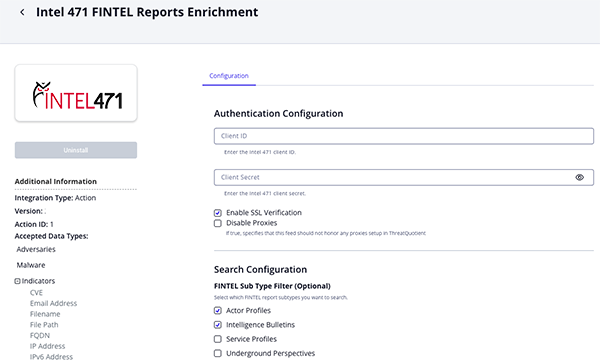
FINTEL Reports Enrichment Parameters
Parameter Description Client ID Enter your Intel 471 Client ID. Client Secret Enter your Intel 471 Client Secret. Enable SSL Verification Enable or Disable Host SSL certificate verification. Disable Proxies Enable this option if the action should not honor proxies set in the ThreatQ UI. Count Per Page Specify the maximum number of records to retrieve per request. Accepted values range from 1to1000. The default value is100.Sub Type Filter (Optional) Select which FINTEL report sub-types to search. Options include: - actor_profile (Default)
- intelligence_bulletin (Default)
- service_profile
- underground_perspective
- underground_pulse
- whitepaper
- threat_brief
- breach_report
- intelligence_summary
- malware_campaign
- fintel_blog
Attribute Filter Select which pieces of context to ingest into ThreatQ. Options include: - Victims (Default)
- Country Information (Default)
- Admiralty Codes (Default)
- Motivations (Default)
- Portal URL (Default)
- GIRs
- Victim Country
- Victim Industry
- Region Information
- Confidence Level
- Source Characterization
- Sensitive Source
- First Activity
- Last Activity
Ingest Tags Enable this parameter to ingest tags associated with the data. This parameter is enabled by default. Fetch GIR Names Enable this parameter to resolve GIR identifiers to their corresponding names. When disabled, GIRs are retained in their raw format (for example, 3.1.1). When enabled, the integration retrieves and uses the associated GIR names (for example,5.2.1 - Initial Access Tactic). This parameter is enabled by default.Relationship Filter Select which relationship context to ingest into ThreatQ. Options include: - Actor Subject Of Report (Default)
- Actor Or Group (Default)
- Handle Entities (Default)
- Malware Families (Default)
Indicator Filter Select which related indicators to ingest into ThreatQ. Options include: - Malicious URL (Default)
- Malicious Domain (Default)
- IP Address (Default)
- CVE (Default)
- MD5 (Default)
- SHA1 (Default)
- SHA256 (Default)
- Actor Domain (Default)
- Actor Website (Default)
- URL (Default)
- File Type (Default)
- File Name (Default)
- Email Address (Default)
- Jabber Usernames (Default)
- Telegram Usernames (Default)
URL Status (Non-Malicious) Select the status to assign to URL indicators. The default value is Indirect, as URLs are not always inherently malicious and may require additional analysis before being classified as a threat. Options include:- Indirect (Default)
- Active
- Review
- Whitelisted
Actor Domain Status Select the status to assign to actor domain indicators. The default value is Indirect, as actor-associated domains are not always malicious and may be used for legitimate or non-malicious purposes. Options include:- Indirect (Default)
- Active
- Review
- Whitelisted
Actor Website Status Select the status to assign to actor website indicators. The default value is Indirect, as actor-associated websites are not always malicious and may serve legitimate, informational, or benign purposes. Options include:- Indirect (Default)
- Active
- Review
- Whitelisted
Objects Per Run The number of objects to process per run of the workflow.
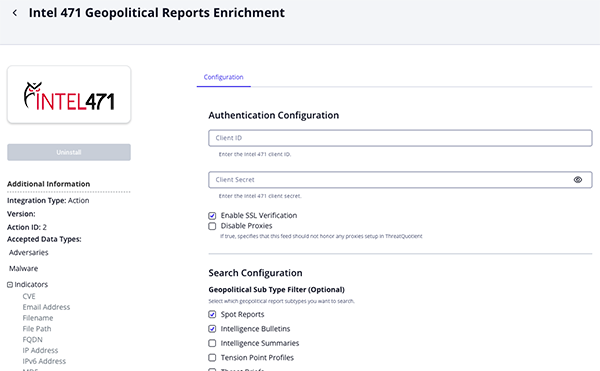
Geopolitical Reports Enrichment Parameters
Parameter Description Client ID Enter your Intel 471 Client ID. Client Secret Enter your Intel 471 Client Secret. Enable SSL Verification Enable or Disable Host SSL certificate verification. Disable Proxies Enable this option if the action should not honor proxies set in the ThreatQ UI. Country (Optional) Filter reports by country. Sub Type Filter (Optional) Select which geopolitical report sub-types to search. Options include: - spot_report (Default)
- intelligence_bulletin (Default)
- intelligence_summary
- tension_point_profile
- threat_brief
- significant_activity_report
- intelligence_estimate
- adversary_profile
Count Per Page Specify the maximum number of records to retrieve per request. Geopolitical reports are capped at 100.Attribute Filter Select which pieces of context to ingest into ThreatQ. Options include: - Victims (Default)
- Region Information (Default)
- Country Information (Default)
- Portal URL (Default)
- GIRs
- Victim Country
- Victim Industry
- Sensitive Source
Ingest Tags Enable this parameter to ingest tags associated with the data. This parameter is enabled by default. Fetch GIR Names Enable this parameter to resolve GIR identifiers to their corresponding names. When disabled, GIRs are retained in their raw format (for example, 3.1.1). When enabled, the integration retrieves and uses the associated GIR names (for example,5.2.1 - Initial Access Tactic). This parameter is enabled by default.Relationship Filter Select which relationship context to ingest into ThreatQ. Options include: - Actor Subject Of Report (Default)
- Actor Or Group (Default)
- Handle Entities (Default)
- Malware Families (Default)
Indicator Filter Select which related indicators to ingest into ThreatQ. Options include: - Malicious URL (Default)
- Malicious Domain (Default)
- IP Address (Default)
- CVE (Default)
- MD5 (Default)
- SHA1 (Default)
- SHA256 (Default)
- Actor Domain (Default)
- Actor Website (Default)
- URL (Default)
- File Type (Default)
- File Name (Default)
- Email Address (Default)
- Jabber Usernames (Default)
- Telegram Usernames (Default)
URL Status (Non-Malicious) Select the status to assign to URL indicators. The default value is Indirect, as URLs are not always inherently malicious and may require additional analysis before being classified as a threat. Options include:- Indirect (Default)
- Active
- Review
- Whitelisted
Actor Domain Status Select the status to assign to actor domain indicators. The default value is Indirect, as actor-associated domains are not always malicious and may be used for legitimate or non-malicious purposes. Options include:- Indirect (Default)
- Active
- Review
- Whitelisted
Actor Website Status Select the status to assign to actor website indicators. The default value is Indirect, as actor-associated websites are not always malicious and may serve legitimate, informational, or benign purposes. Options include:- Indirect (Default)
- Active
- Review
- Whitelisted
Objects Per Run The number of objects to process per run of the workflow.
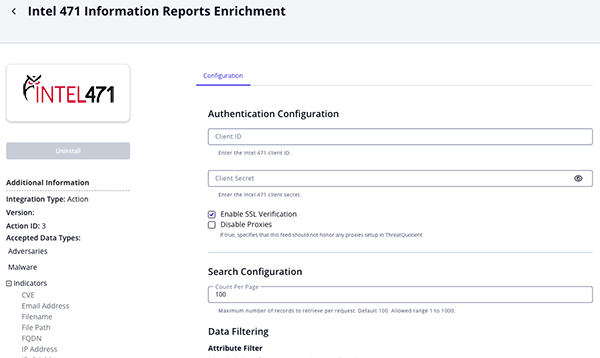
Information Reports Enrichment Parameters
Parameter Description Client ID Enter your Intel 471 Client ID. Client Secret Enter your Intel 471 Client Secret. Enable SSL Verification Enable or Disable Host SSL certificate verification. Disable Proxies Enable this option if the action should not honor proxies set in the ThreatQ UI. Count Per Page Specify the maximum number of records to retrieve per request. Accepted values range from 1to1000. The default value is100.Attribute Filter Select which pieces of context to ingest into ThreatQ. Options include: - Victims (Default)
- Country Information (Default)
- Admiralty Codes (Default)
- Motivations (Default)
- Portal URL (Default)
- GIRs
- Victim Country
- Victim Industry
- Region Information
- Source Characterization
- Sensitive Source
- First Activity
- Last Activity
Ingest Tags Enable this parameter to ingest tags associated with the data. This parameter is enabled by default. Fetch GIR Names Enable this parameter to resolve GIR identifiers to their corresponding names. When disabled, GIRs are retained in their raw format (for example, 3.1.1). When enabled, the integration retrieves and uses the associated GIR names (for example,5.2.1 - Initial Access Tactic). This parameter is enabled by default.Relationship Filter Select which relationship context to ingest into ThreatQ. Options include: - Actor Subject Of Report (Default)
- Actor Or Group (Default)
- Handle Entities (Default)
- Malware Families (Default)
Indicator Filter Select which related indicators to ingest into ThreatQ. Options include: - Malicious URL (Default)
- Malicious Domain (Default)
- IP Address (Default)
- CVE (Default)
- MD5 (Default)
- SHA1 (Default)
- SHA256 (Default)
- Actor Domain (Default)
- Actor Website (Default)
- URL (Default)
- File Type (Default)
- File Name (Default)
- Email Address (Default)
- Jabber Usernames (Default)
- Telegram Usernames (Default)
URL Status (Non-Malicious) Select the status to assign to URL indicators. The default value is Indirect, as URLs are not always inherently malicious and may require additional analysis before being classified as a threat. Options include:- Indirect (Default)
- Active
- Review
- Whitelisted
Actor Domain Status Select the status to assign to actor domain indicators. The default value is Indirect, as actor-associated domains are not always malicious and may be used for legitimate or non-malicious purposes. Options include:- Indirect (Default)
- Active
- Review
- Whitelisted
Actor Website Status Select the status to assign to actor website indicators. The default value is Indirect, as actor-associated websites are not always malicious and may serve legitimate, informational, or benign purposes. Options include:- Indirect (Default)
- Active
- Review
- Whitelisted
Objects Per Run The number of objects to process per run of the workflow.
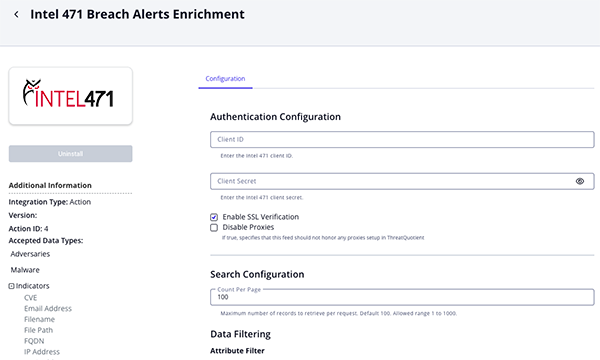
Breach Alerts Enrichment Parameters
Parameter Description Client ID Enter your Intel 471 Client ID. Client Secret Enter your Intel 471 Client Secret. Enable SSL Verification Enable or Disable Host SSL certificate verification. Disable Proxies Enable this option if the action should not honor proxies set in the ThreatQ UI. Count Per Page Specify the maximum number of records to retrieve per request. Accepted values range from 1to1000. The default value is100.Attribute Filter Select which pieces of context to ingest into ThreatQ. Options include: - GIRs
- Victims (Default)
- Victim Industries (Default)
- Victim Countries (Default)
- Confidence Level (Default)
- First Activity Date
- Last Activity Date
Fetch GIR Names When enabled, GIR names will be fetched and used. Example: 5.2.1 - Initial Access Tactic.
When disabled, GIRs names will be left in their raw format. Example: 3.1.1.Relationship Filter Select which relationship context to ingest into ThreatQ. Options include: - Actors Subject of Report (Default)
- Actor or Group (Default)
- Handles Entities (Default)
- Malware Families (Default)
Indicator Filter Select which indicators to ingest into ThreatQ. Options include: - Malicious URLs (Default)
- Malicious Domains (Default)
- IP Addresses (Default)
- CVE IDs (Default)
- MD5 Hashes (Default)
- SHA-1 Hashes (Default)
- SHA-256 Hashes (Default)
- Actor Domains (Default)
- Actor Websites (Default)
- URLs (Default)
- File Type (Default)
- File Names (Default)
- Email Address (Default)
- Jabber Usernames (Default)
- Telegram Usernames (Default)
URL Status (Non-Malicious) Select the status to use for URLs. Options include: - Indirect (default)
- Active
- Review
- Whitelisted
The Indirect option is selected by default because the URLs are typically not malicious.
Actor Domain Status Select the status to use for actor domains. Options include: - Indirect (default)
- Active
- Review
- Whitelisted
The Indirect option is selected by default because the actor domains are typically not malicious.
Actor Website Status Select the status to use for actor websites. Options include: - Indirect (default)
- Active
- Review
- Whitelisted
The Indirect option is selected by default because the actor websites are typically not malicious.
Objects Per Run The number of objects to process per run of the workflow.
Spot Reports Enrichment Parameters
Parameter Description Client ID Enter your Intel 471 Client ID. Client Secret Enter your Intel 471 Client Secret. Enable SSL Verification Enable or Disable Host SSL certificate verification. Disable Proxies Enable this option if the action should not honor proxies set in the ThreatQ UI. Count Per Page Specify the maximum number of records to retrieve per request. Accepted values range from 1to1000. The default value is100.Attribute Filter Select which pieces of context to ingest into ThreatQ. Options include: - Victims (Default)
- Confidence Level (Default)
- GIRs
- Victim Country
- Victim Industry
- Sensitive Source
- Portal URL
- First Activity Date
- Last Activity Date
Fetch GIR Names When enabled, GIR names will be fetched and used. Example: 5.2.1 - Initial Access Tactic.
When disabled, GIRs names will be left in their raw format. Example: 3.1.1.Relationship Filter Select which relationship context to ingest into ThreatQ. Options include: - Actors Subject of Report (Default)
- Actor or Group (Default)
- Handles Entities (Default)
- Malware Families (Default)
Indicator Filter Select which indicators to ingest into ThreatQ. Options include: - Malicious URL (Default)
- Malicious Domain (Default)
- IP Address (Default)
- CVE (Default)
- MD5 (Default)
- SHA1 (Default)
- SHA256 (Default)
- Actor Domain (Default)
- Actor Website (Default)
- URL (Default)
- File Type (Default)
- File Name (Default)
- Email Address (Default)
- Jabber Usernames (Default)
- Telegram Usernames (Default)
URL Status (Non-Malicious) Select the status to use for URLs. Options include: - Indirect (default)
- Active
- Review
- Whitelisted
The Indirect option is selected by default because the URLs are typically not malicious.
Actor Domain Status Select the status to use for actor domains. Options include: - Indirect (default)
- Active
- Review
- Whitelisted
The Indirect option is selected by default because the actor domains are typically not malicious.
Actor Website Status Select the status to use for actor websites. Options include: - Indirect (default)
- Active
- Review
- Whitelisted
The Indirect option is selected by default because the actor websites are typically not malicious.
Objects Per Run The number of objects to process per run of the workflow.
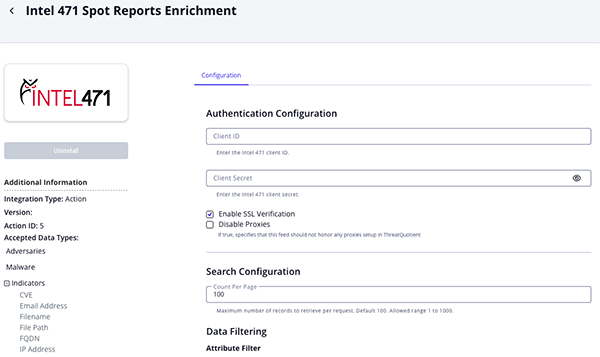
- Review any additional settings, make any changes if needed, and click on Save.
Actions
The following actions are available:
| Action | Description | Object Type | Object Subtype |
|---|---|---|---|
| Intel 471 FINTEL Reports Enrichment | This action queries data against Intel 471 FINTEL reports | Indicator, Adversary, Malware | Indicators - CVE, Email Address, Filename, File Path, FQDN, IP Address, IPv6 Address, MD5, SHA-1, SHA-256, URL |
| Intel 471 Geopolitical Reports Enrichment | This action queries data against Intel 471 Geopolitical reports | Indicator, Adversary, Malware | Indicators - CVE, Email Address, Filename, File Path, FQDN, IP Address, IPv6 Address, MD5, SHA-1, SHA-256, URL |
| Intel 471 Information Reports Enrichment | This action queries data against Intel 471 Information reports | Indicator, Adversary, Malware | Indicators - CVE, Email Address, Filename, File Path, FQDN, IP Address, IPv6 Address, MD5, SHA-1, SHA-256, URL |
| Intel 471 Breach Alerts Enrichment | Queries data against Intel 471 Breach Alerts. | Indicator, Adversary, Malware | Indicators - CVE, Email Address, Filename, File Path, FQDN, IP Address, IPv6 Address, MD5, SHA-1, SHA-256, URL |
| Intel 471 Spot Reports Enrichment | Queries data against Intel 471 Spot Reports. | Indicator, Adversary, Malware | Indicators - CVE, Email Address, Filename, File Path, FQDN, IP Address, IPv6 Address, MD5, SHA-1, SHA-256, URL |
Intel 471 FINTEL Reports Enrichment
The Intel 471 FINTEL Reports Enrichment action enables analysts to retrieve intelligence from Intel 471 FINTEL reports and enrich ThreatQ objects with additional context.
Stream endpoint: GET https://api.intel471.cloud/integrations/intel-report/v1/reports/fintel/stream
Per-report detail endpoint: GET https://api.intel471.cloud/integrations/intel-report/v1/reports/fintel/{id}
Sample Response:
{
  "id": "report--57981044-4889-55fd-a0e1-b3c370212a2b",
  "type": "fintel",
  "sub_type": "underground_perspective",
  "title": "TeamPCP threat group allegedly compromises Bitwarden password management service",
  "information_ts": "2026-04-28T00:00:00Z",
  "creation_ts": "2026-04-28T20:46:35Z",
  "released_ts": "2026-04-28T20:46:35Z",
  "last_updated_ts": "2026-04-29T07:34:03Z",
  "entities": [
    {
      "type": "Handle",
      "value": "TeamPCP"
    },
    {
      "type": "ActorDomain",
      "value": "audit.checkmarx.cx"
    },
    {
      "type": "FileName",
      "value": "@bitwarden/cli@2026.4.0"
    },
    {
      "type": "IPAddress",
      "value": "94.154.172.43"
    },
    {
      "type": "SHA256",
      "value": "18f784b3bc9a0bcdcb1a8d7f51bc5f54323fc40cbd874119354ab609bef6e4cb"
    }
  ],
  "locations": [
    {
      "region": "North America",
      "country": "United States",
      "link": "impacts"
    }
  ],
  "classification": {
    "girs": [
      {
        "path": "1.1.5",
        "name": "Information-stealer malware"
      },
      {
        "path": "5.5.5",
        "name": "Supply chain attack tactic"
      },
      {
        "path": "6.1.8.1",
        "name": "Technology industry"
      }
    ]
  },
  "body": "Bitwarden reported a compromise of its CLI npm package version 2026.4.0. Malicious files such as bw_setup.js and bw1.js were added, and telemetry was sent to audit.checkmarx.cx.",
  "sources": [
    {
      "type": "internal",
      "title": "TeamPCP",
      "links": {
        "verity_api": {
          "href": "https://api.intel471.cloud/integrations/intel-report/v1/reports/fintel/report--014d7640-c614-5927-aab9-db569f3eec5c"
        },
        "verity_portal": {
          "href": "https://verity.intel471.com/intelligence/fintelReportView/report--014d7640-c614-5927-aab9-db569f3eec5c"
        }
      },
      "source_type": "Actor Profile"
    }
  ],
  "attachments": [
    {
      "file_name": "Figure 1.png",
      "url": "https://api.intel471.cloud/integrations/intel-report/v1/reports/fintel/report--57981044-4889-55fd-a0e1-b3c370212a2b/attachments/example"
    }
  ]
}
ThreatQuotient provides the following default mapping for this action:
| Feed Data Path | ThreatQ Entity | ThreatQ Object Type or Attribute Key | Published Date | Examples | Notes |
|---|---|---|---|---|---|
.title, .id |
Report.Value |
N/A |
.released_ts |
TeamPCP threat group allegedly compromises Bitwarden password management service |
N/A |
.body, .sources[] |
Report.Description |
N/A |
N/A |
On April 23, 2026, the Bitwarden open source password... |
N/A |
report description HTML when sub_type == actor_profile |
Attack Pattern.Value |
N/A |
N/A |
T1584 |
Extracted from the parsed report description. |
.id |
Report.Attribute |
Report ID |
N/A |
report--57981044-4889-55fd-a0e1-b3c370212a2b |
N/A |
.type |
Report.Attribute |
Report Family |
N/A |
FINTEL |
N/A |
.sub_type |
Report.Attribute |
Report Type |
N/A |
UNDERGROUND_PERSPECTIVE |
N/A |
.classification.girs[] |
Report.Attribute |
GIR |
N/A |
1.1.5 - Information-stealer malware |
User configurable |
.locations[].region |
Report.Attribute |
Impacted Region |
N/A |
North America |
User configurable |
.locations[].country |
Report.Attribute |
Impacted Country |
N/A |
United States |
User configurable |
.victims[].name |
Report.Attribute |
Victim |
N/A |
Bitwarden Inc. |
User configurable |
.is_sensitive_source |
Report.Attribute |
Sensitive Source |
N/A |
true |
User configurable |
.links.verity_portal.href |
Report.Attribute |
Portal URL |
N/A |
Intel 471 portal URL |
User configurable |
Intel 471 Geopolitical Reports Enrichment
The Intel 471 Geopolitical Reports Enrichment action enables analysts to query Intel 471 Geopolitical reports and enrich ThreatQ objects with relevant geopolitical intelligence.
Stream endpoint: GET https://api.intel471.cloud/integrations/intel-report/v1/reports/geopol/stream
Per-report detail endpoint: GET https://api.intel471.cloud/integrations/intel-report/v1/reports/geopol/{id}
Sample Response:
{
  "id": "report--89599916-472a-57e0-be28-fc67f606cb79",
  "type": "geopol_report",
  "sub_type": "intelligence_summary",
  "title": "Weekly intelligence report: April 27, 2026",
  "information_ts": "2026-04-27T00:00:00Z",
  "creation_ts": "2026-04-28T17:05:44Z",
  "released_ts": "2026-04-28T17:05:44Z",
  "last_updated_ts": "2026-04-30T17:06:14Z",
  "entities": [
    {
      "type": "Handle",
      "value": "Mustang Panda"
    },
    {
      "type": "Handle",
      "value": "Twill Typhoon"
    }
  ],
  "locations": [
    {
      "region": "Asia",
      "country": "China",
      "link": "originated from"
    },
    {
      "region": "Middle East",
      "country": "Iran",
      "link": "originated from"
    },
    {
      "region": "North America",
      "country": "United States",
      "link": "originated from"
    },
    {
      "region": "Middle East",
      "country": "Israel",
      "link": "impacts"
    }
  ],
  "classification": {
    "girs": [
      {
        "path": "1.1.3",
        "name": "Remote access trojan (RAT) malware"
      },
      {
        "path": "5.1.4",
        "name": "Spear-phishing tactic"
      },
      {
        "path": "5.2.7",
        "name": "Command and control tactic"
      },
      {
        "path": "5.4.4",
        "name": "Espionage"
      }
    ]
  },
  "links": {
    "verity_api": {
      "href": "https://api.intel471.cloud/integrations/intel-report/v1/reports/geopol/report--89599916-472a-57e0-be28-fc67f606cb79"
    },
    "verity_portal": {
      "href": "https://verity.intel471.com/intelligence/geopolReportView/report--89599916-472a-57e0-be28-fc67f606cb79"
    }
  },
  "body": "Overview: Political and legal developments continued amid the global economic impact of the unresolved Iran war, while cyber activity from China, Iran, and Russia remained relevant to the reporting period."
}
ThreatQuotient provides the following default mapping for this action:
| Feed Data Path | ThreatQ Entity | ThreatQ Object Type or Attribute Key | Published Date | Examples | Notes |
|---|---|---|---|---|---|
.title, .id |
Report.Value |
N/A |
.released_ts |
Russian President... |
N/A |
.significant_activity.summary, .body, .sources[], .attachments[] |
Report.Description |
N/A |
N/A |
On April 27, 2026... |
N/A |
.id |
Report.Attribute |
Report ID |
N/A |
report--83cd... |
N/A |
.type |
Report.Attribute |
Report Family |
N/A |
GEOPOL |
N/A |
.sub_type |
Report.Attribute |
Report Type |
N/A |
SIGNIFICANT_ACTIVITY_REPORT |
N/A |
.classification.girs[] |
Report.Attribute |
GIR |
N/A |
6.1.6.2 - National government |
User configurable |
.locations[].region, .locations[].country |
Report.Attribute |
Originated From Region / Originated From Country |
N/A |
Russia (Europe) |
User configurable |
.locations[].region, .locations[].country |
Report.Attribute |
Active Region / Active Country |
N/A |
Russia (Europe) |
User configurable |
.locations[].region |
Report.Attribute |
Impacted Region |
N/A |
Middle East |
User configurable |
.locations[].country |
Report.Attribute |
Impacted Country |
N/A |
Iran |
User configurable |
.victims[].name |
Report.Attribute |
Victim |
N/A |
N/A |
User configurable |
.is_sensitive_source |
Report.Attribute |
Sensitive Source |
N/A |
N/A |
User configurable |
.links.verity_portal.href |
Report.Attribute |
Portal URL |
N/A |
Intel 471 portal URL |
User configurable |
.significant_activity.event_tag |
Report.Tag |
N/A |
N/A |
political |
User configurable |
Intel 471 Information Reports Enrichment
The Intel 471 Information Reports Enrichment action enables analysts to query Intel 471 Information reports and enrich ThreatQ objects with relevant intelligence.
Stream endpoint: GET https://api.intel471.cloud/integrations/intel-report/v1/reports/info/stream
Per-report detail endpoint: GET https://api.intel471.cloud/integrations/intel-report/v1/reports/info/{id}
Sample Response:
{
  "id": "report--f9a6b8f4-f931-5781-856e-f435af22074e",
  "type": "info_report",
  "title": "Russian actor, bulletproof hoster yalishanda adds 30 front-end proxies to fast-flux offering",
  "information_ts": "2024-11-14T00:00:00Z",
  "creation_ts": "2024-11-14T14:22:04Z",
  "released_ts": "2024-11-14T14:22:04Z",
  "last_updated_ts": "2024-11-14T14:22:04Z",
  "assessment": {
    "admiralty_code": "B2"
  },
  "motivation": [
    "CC"
  ],
  "actor_subject_of_report": [
    {
      "handle": "yalishanda",
      "aliases": []
    }
  ],
  "entities": [
    {
      "type": "Handle",
      "value": "yalishanda"
    },
    {
      "type": "IPAddress",
      "value": "103.80.86.15"
    },
    {
      "type": "IPAddress",
      "value": "103.80.86.42"
    },
    {
      "type": "MaliciousURL",
      "value": "dukaline.site"
    },
    {
      "type": "EmailAddress",
      "value": "medialand.regru@gmail.com"
    },
    {
      "type": "ActorDomain",
      "value": "b.dnspod.com"
    }
  ],
  "classification": {
    "girs": [
      {
        "path": "3.1.1",
        "name": "Bulletproof hosting (BPH) services"
      }
    ]
  },
  "executive_summary": "As of 10 a.m. GMT, Nov. 14, 2024, yalishanda’s fast-flux network stood at 232 total hosts. The actor hosted phishing campaigns targeting BMO, National Bank of Canada, RBC, and TD Bank customers.",
  "attachments": [
    {
      "file_name": "2024-11-14_yalishanda.csv",
      "mime_type": "text/csv",
      "file_size": 1118712
    }
  ],
  "links": {
    "verity_api": {
      "href": "https://api.intel471.cloud/integrations/intel-report/v1/reports/info/report--f9a6b8f4-f931-5781-856e-f435af22074e"
    },
    "verity_portal": {
      "href": "https://verity.intel471.com/intelligence/infoReportView/report--f9a6b8f4-f931-5781-856e-f435af22074e"
    }
  }
}
ThreatQuotient provides the following default mapping for this action:
| Feed Data Path | ThreatQ Entity | ThreatQ Object Type or Attribute Key | Published Date | Examples | Notes |
|---|---|---|---|---|---|
.title, .id |
Report.Value |
N/A |
.released_ts |
Actor nameek (aka lynxx0x) offers underground travel services |
N/A |
.executive_summary, .researcher_comments, .body_translated, .body |
Report.Description |
N/A |
N/A |
On March 8, 2026, the actor nameek posted the... |
N/A |
.id |
Report.Attribute |
Report ID |
N/A |
report--e712c94b-354c-51d2-ac6f-4125ffbd614b |
N/A |
.type |
Report.Attribute |
Report Family |
N/A |
INFOREP |
N/A |
.type |
Report.Attribute |
Report Type |
N/A |
INFOREP |
N/A |
.classification.girs[] |
Report.Attribute |
GIR |
N/A |
1.3.8 - Malware spamming |
User configurable |
.locations[].region |
Report.Attribute |
Impacted Region |
N/A |
Asia |
User configurable |
.locations[].country |
Report.Attribute |
Impacted Country |
N/A |
Japan |
User configurable |
.assessment.admiralty_code |
Report.Attribute |
Admiralty Reliability |
N/A |
F |
Uses 1st character of the code |
.assessment.admiralty_code |
Report.Attribute |
Admiralty Credibility |
N/A |
6 |
Uses 2nd character of the code |
.motivation[] |
Report.Attribute |
Motivation |
N/A |
CC |
User configurable |
.source_characterization |
Report.Attribute |
Source |
N/A |
Information was derived from the Exploit forum... |
User configurable |
.victims[].name |
Report.Attribute |
Victim |
N/A |
N/A |
User configurable |
.is_sensitive_source |
Report.Attribute |
Sensitive Source |
N/A |
false |
User configurable |
.links.verity_portal.href |
Report.Attribute |
Portal URL |
N/A |
Intel 471 portal URL |
User configurable |
Intel 471 Breach Alerts Enrichment
The Intel 471 Breach Alerts Enrichment action queries ThreatQ objects against Intel 471 Breach Alerts intelligence stream.
Stream endpoint: GET https://api.intel471.cloud/integrations/intel-report/v1/reports/breach-alert/stream
Per-report detail endpoint: GET https://api.intel471.cloud/integrations/intel-report/v1/reports/breach-alert/{id}
Sample Response:
{
  "id": "report--49e247e4-2a50-5994-9c04-cd4fecbf324d",
  "type": "breach_alert",
  "title": "Lawson Software (Thailand) Co. Ltd. possibly compromised by actor/group The Gentlemen on Apr 23, 2026",
  "information_ts": "2026-04-23T00:00:00Z",
  "creation_ts": "2026-04-24T20:14:56Z",
  "released_ts": "2026-04-24T20:14:56Z",
  "last_updated_ts": "2026-04-24T20:14:56Z",
  "entities": [
    {
      "type": "Handle",
      "value": "The Gentlemen"
    }
  ],
  "actor_or_group": "The Gentlemen",
  "victims": [
    {
      "name": "Lawson Software (Thailand) Co. Ltd.",
      "country": "Thailand",
      "region": "Asia",
      "revenue": " US $5 million",
      "industries": [
        {
          "industry": "IT or technology consulting industry",
          "sector": "Professional services and consulting sector"
        }
      ]
    }
  ],
  "classification": {
    "girs": [
      {
        "path": "1.1.1",
        "name": "Ransomware malware"
      },
      {
        "path": "1.2.2",
        "name": "Ransomware-as-a-service (RaaS)"
      },
      {
        "path": "5.5.3",
        "name": "Information or data breach"
      },
      {
        "path": "5.5.4",
        "name": "Blackmail and extortion"
      },
      {
        "path": "6.2.2.31",
        "name": "Thailand"
      }
    ]
  },
  "confidence": {
    "level": "medium",
    "description": "The intelligence picture is developing, cannot be corroborated or has some limitations."
  },
  "body": "On April 23, 2026, operators of The Gentlemen ransomware-as-a-service program claimed to compromise Lawson Software (Thailand) Co. Ltd. at lawson.co.th, but did not provide proof at the time of reporting.",
  "links": {
    "verity_api": {
      "href": "https://api.intel471.cloud/integrations/intel-report/v1/reports/breach-alert/report--49e247e4-2a50-5994-9c04-cd4fecbf324d"
    },
    "verity_portal": {
      "href": "https://verity.intel471.com/intelligence/breachAlertReportView/report--49e247e4-2a50-5994-9c04-cd4fecbf324d"
    }
  }
}
ThreatQuotient provides the following default mapping for this action:
| Feed Data Path | ThreatQ Entity | ThreatQ Object Type or Attribute Key | Published Date | Examples | Notes |
|---|---|---|---|---|---|
.title, .id |
Report.Value |
N/A |
.released_ts |
Victim data leaked by Akira |
N/A |
.body, .sources[] |
Report.Description |
N/A |
N/A |
On April 23, 2026... |
N/A |
.id |
Report.Attribute |
Report ID |
N/A |
report--... |
N/A |
.type |
Report.Attribute |
Report Family |
N/A |
BREACH_ALERT |
N/A |
.type |
Report.Attribute |
Report Type |
N/A |
BREACH_ALERT |
N/A |
.classification.girs[] |
Report.Attribute |
GIR |
N/A |
1.1.1 - Ransomware malware |
User configurable |
.victims[].name |
Report.Attribute |
Victim |
N/A |
Victim Org |
User configurable |
.confidence.level |
Report.Attribute |
Confidence Level |
N/A |
medium |
User configurable |
.is_sensitive_source |
Report.Attribute |
Sensitive Source |
N/A |
N/A |
User configurable |
.links.verity_portal.href |
Report.Attribute |
Portal URL |
N/A |
Intel 471 portal URL |
User configurable |
.actor_or_group |
Adversary.Value |
N/A |
.released_ts |
The Gentlemen |
User configurable |
Intel 471 Spot Reports Enrichment
The Intel 471 Spot Reports Enrichment action queries ThreatQ objects against Intel 471 Spot Reports intelligence stream.
Stream endpoint: GET https://api.intel471.cloud/integrations/intel-report/v1/reports/spot/stream
Per-report detail endpoint: GET https://api.intel471.cloud/integrations/intel-report/v1/reports/spot/{id}
Sample Response:
{
  "id": "report--dc7d5b66-d36d-563f-9ff8-4e43276fda24",
  "type": "spot_report",
  "title": "ShinyHunters group launches #FederalB0yz aka #FBIHunters Telegram channel to expose competing threat actors",
  "information_ts": "2026-04-27T00:00:00Z",
  "creation_ts": "2026-04-28T14:08:56Z",
  "released_ts": "2026-04-28T14:08:56Z",
  "last_updated_ts": "2026-04-29T13:30:09Z",
  "entities": [
    {
      "type": "Handle",
      "value": "ShinyHunters"
    },
    {
      "type": "Handle",
      "value": "SP1D3R HUNTERS"
    },
    {
      "type": "Handle",
      "value": "Mr. Raccoon"
    },
    {
      "type": "Handle",
      "value": "UNC6671"
    },
    {
      "type": "Handle",
      "value": "UNC6783"
    },
    {
      "type": "Telegram",
      "value": "@fb1hunt3rz"
    }
  ],
  "classification": {
    "girs": [
      {
        "path": "3.3",
        "name": "Dedicated criminal infrastructure"
      },
      {
        "path": "5.5.4",
        "name": "Blackmail and extortion"
      }
    ]
  },
  "body": "On April 24, 2026, ShinyHunters launched the Telegram channel \"#FederalB0yz\" under the username @fb1hunt3rz and claimed it would expose competing threat actors, including alleged details about Mr. Raccoon.",
  "sources": [
    {
      "type": "internal",
      "title": "Telegram channel",
      "links": {
        "verity_portal": {
          "href": "https://verity.intel471.com/sources/messaging-services/thread/room--fec53450-debb-5f54-acc4-0cb0613885cc"
        }
      }
    }
  ],
  "is_sensitive_source": true,
  "links": {
    "verity_api": {
      "href": "https://api.intel471.cloud/integrations/intel-report/v1/reports/spot/report--dc7d5b66-d36d-563f-9ff8-4e43276fda24"
    },
    "verity_portal": {
      "href": "https://verity.intel471.com/intelligence/spotReportView/report--dc7d5b66-d36d-563f-9ff8-4e43276fda24"
    }
  }
}
ThreatQuotient provides the following default mapping for this action:
| Feed Data Path | ThreatQ Entity | ThreatQ Object Type or Attribute Key | Published Date | Examples | Notes |
|---|---|---|---|---|---|
.title, .id |
Report.Value |
N/A |
.released_ts |
Vidar logs mention target |
N/A |
.body, .sources[] |
Report.Description |
N/A |
N/A |
Short report text |
N/A |
.id |
Report.Attribute |
Report ID |
N/A |
report--... |
N/A |
.type |
Report.Attribute |
Report Family |
N/A |
SPOTREP |
N/A |
.type |
Report.Attribute |
Report Type |
N/A |
SPOTREP |
N/A |
.classification.girs[] |
Report.Attribute |
GIR |
N/A |
GIR path/name |
User configurable |
.victims[].name |
Report.Attribute |
Victim |
N/A |
N/A |
User configurable |
.is_sensitive_source |
Report.Attribute |
Sensitive Source |
N/A |
true |
User configurable |
.links.verity_portal.href |
Report.Attribute |
Portal URL |
N/A |
Intel 471 portal URL |
User configurable |
Enriched Data
Object counts and action runtime are supplied as generalities only - objects returned by a provider can differ based on credential configurations and action runtime may vary based on system resources and load.
Intel 471 FINTEL Reports Enrichment
| Metric | Result |
|---|---|
| Run Time | 10 minutes |
| Adversaries | 81 |
| Adversary Attributes | 500 |
| Attack Patterns | 23 |
| Indicators | 5,959 |
| Indicator Attributes | 18 |
| Malware | 25 |
| Report | 100 |
| Report Attributes | 2,034 |
Intel 471 Geopolitical Reports Enrichment
| Metric | Result |
|---|---|
| Run Time | 9 minutes |
| Adversaries | 81 |
| Adversary Attributes | 100 |
| Attack Patterns | 8 |
| Indicators | 523 |
| Indicator Attributes | 18 |
| Malware | 12 |
| Report | 182 |
| Report Attributes | 2,974 |
Intel 471 Information Reports Enrichment
| Metric | Result |
|---|---|
| Run Time | 12 minutes |
| Adversaries | 92 |
| Adversary Attributes | 245 |
| Attack Patterns | 42 |
| Indicators | 523 |
| Indicator Attributes | 18 |
| Malware | 20 |
| Report | 156 |
| Report Attributes | 1,974 |
Intel 471 Breach Alerts Enrichment
| Metric | Result |
|---|---|
| Run Time | 11 minutes |
| Adversaries | 76 |
| Adversary Attributes | 300 |
| Attack Patterns | 10 |
| Indicators | 512 |
| Indicator Attributes | 18 |
| Malware | 16 |
| Report | 142 |
| Report Attributes | 2,974 |
Intel 471 Spot Reports Enrichment
| Metric | Result |
|---|---|
| Run Time | 13 minutes |
| Adversaries | 81 |
| Adversary Attributes | 500 |
| Attack Patterns | 42 |
| Indicators | 345 |
| Indicator Attributes | 18 |
| Malware | 55 |
| Report | 182 |
| Report Attributes | 3,974 |
Known Issues / Limitations
- Geopolitical Report Retrieval Limits – The Intel 471 Geopolitical reporting API limits requests to a maximum page size of 100 records per request.
- Pagination Handling – Geopolitical report pagination uses a cursor-based mechanism. Integrations must continue requesting subsequent pages until either the
reportsfield is no longer present in the response or thereportsarray is returned empty. Both conditions should be evaluated to ensure complete data retrieval. - Large Content Size Restrictions – Reports containing extensive descriptions, numerous inline images, or large attachments may exceed ThreatQ platform or database size limitations. In these cases, oversized inline content may be removed from the report description to allow successful ingestion while preserving the report record and associated intelligence.
- API usage is limited to your Intel 471 rate limit. Be conscious of that limit and adjust the Objects Per Run configurations accordingly. An API call is made for each object.
- Images will be removed if the description is too long. This is due to a ThreatQ platform limitation.
- MITRE ATT&CK data is loaded from the cache memory that is refreshed every 24 hours.
Change Log
- Version 2.0.0
- Added three new enrichment actions:
- Intel 471 FINTEL Reports Enrichment – Retrieves and enriches ThreatQ objects with data from Intel 471 FINTEL reports.
- Intel 471 Geopolitical Reports Enrichment – Retrieves and enriches ThreatQ objects with data from Intel 471 Geopolitical reports.
- Intel 471 Information Reports Enrichment – Retrieves and enriches ThreatQ objects with data from Intel 471 Information reports.
- Updated the Intel 471 Breach Alerts Enrichment and Intel 471 Spot Reports Enrichment actions to leverage the latest Intel 471 Cloud Report APIs, improving report retrieval and enrichment capabilities.
- Removed the Intel 471 Reports Enrichment action. Report enrichment workflows are now organized into dedicated report-family actions, providing more targeted access to Intel 471 report types.
- Updated the integration authentication method to use Client ID and Client Secret credentials.
- Added three new enrichment actions:
- Version 1.0.0
- Initial release
PDF Guides
| Document | ThreatQ Version |
|---|---|
| Intel 471 Reports Action Bundle Guide v2.0.0 | 6.5.0 or Greater |
| Intel 471 Reports Action Bundle Guide v1.0.0 | 6.5.0 or Greater |