IBM QRadar Action Bundle
The web format of this guide reflects the most current release. Guides for older iterations are available in PDF format.
Integration Details
ThreatQuotient provides the following details for this integration:
| Current Integration Version | 1.1.0 |
| Compatible with ThreatQ Versions | >= 5.6.0 |
| ThreatQ TQO License Required | Yes |
| Support Tier | ThreatQ Supported |
Introduction
The IBM QRadar Action Bundle for ThreatQ enables analysts to seamlessly integrate and enrich threat intelligence data with insights from IBM QRadar. This bundle allows users to query QRadar for additional context on Indicators of Compromise (IOCs) and incorporate relevant event information into ThreatQ.
The integration provides the following actions:
- IBM QRadar Action - performs a lookup within QRadar to find logs related to an indicator.
- IBM QRadar Get Description For Events - requests and ingests IBM QRadar Offense Analyst Notes as descriptions for the events previously retrieved by the IBM QRadar Action.
The action is compatible with the following object types:
- Events
- Indicators
- Email Address
- FQDN
- IP Address
- URL
The action returns enriched indicator and event object types.
This action is intended for use with ThreatQ TDR Orchestrator (TQO). An active TQO license is required for this feature.
Prerequisites
- An active ThreatQ TDR Orchestrator (TQO) license.
- A QRadar Host and SEC Token
- A data collection containing at least one of the following object types:
- Events
- Indicators
- Email Address
- FQDN
- IP Address
- URL
Installation
Perform the following steps to install the integration:
The same steps can be used to upgrade the integration to a new version.
- Log into https://marketplace.threatq.com/.
- Locate and download the action zip file.
- Navigate to the integrations management page on your ThreatQ instance.
- Click on the Add New Integration button.
- Upload the action zip file using one of the following methods:
- Drag and drop the zip file into the dialog box
- Select Click to Browse to locate the zip file on your local machine
- Select the actions to install, when prompted, and then click on Install.
ThreatQ will inform you if the action already exists on the platform and will require user confirmation before proceeding. ThreatQ will also inform you if the new version of the action contains changes to the user configuration. The new user configurations will overwrite the existing ones for the action and will require user confirmation before proceeding.
The action(s) will now be installed. You will still need to configure the action(s).
Configuration
ThreatQuotient does not issue API keys for third-party vendors. Contact the specific vendor to obtain API keys and other integration-related credentials.
To configure the integration:
- Navigate to your integrations management page in ThreatQ.
- Select the Actions option from the Category dropdown (optional).
- Click on the action entry to open its details page.
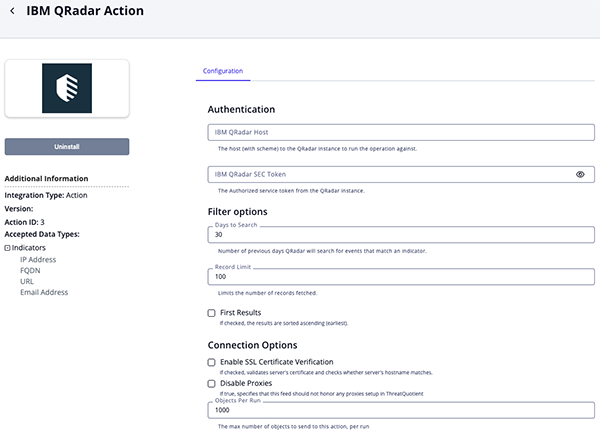
- Enter the following parameters under the Configuration tab:
The configurations set on this page will be used as the default settings when inserting this action into a new workflow. Updating the configurations on this page will not update any instances of this action that have already been deployed to a workflow. In that scenario, you must update the action’s configurations within the workflow itself.
IBM QRadar Action Parameters Table
Parameter Description IBM QRadar Host The host (with scheme) to the QRadar instance to run the operation against. IBM QRadar SEC Token The Authorized service token from the QRadar instance. Days to Search Number of previous days QRadar will search for events that match an indicator. Record Limit Limits the number of records fetched. First Results If enabled, the results are sorted ascending (earliest). Enable SSL Certificate Verification Enable this parameter if the action should validate the host-provided SSL certificate. Disable Proxies Enable this parameter if the action should not honor proxies set in the ThreatQ UI. Objects Per Run The max number of objects to send to this action, per run.
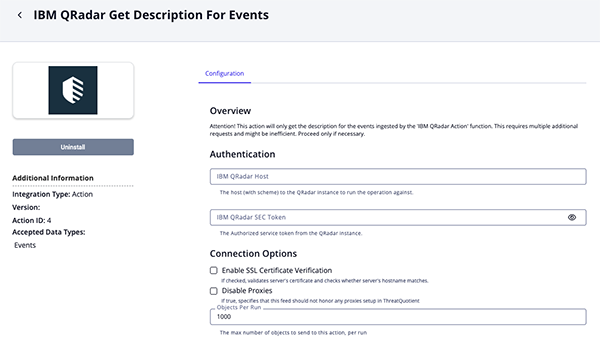
IBM QRadar Get Description for Events Parameters Table
Parameter Description IBM QRadar Host The host (with scheme) to the QRadar instance to run the operation against. IBM QRadar SEC Token The Authorized service token from the QRadar instance. Enable SSL Certificate Verification Enable this parameter if the action should validate the host-provided SSL certificate. Disable Proxies Enable this parameter if the action should not honor proxies set in the ThreatQ UI. Objects Per Run The max number of objects to send to this action, per run.
- Review any additional settings, make any changes if needed, and click on Save.
Actions
The following actions are available:
| Action | Description | Object Type | Object Subtype |
|---|---|---|---|
| IBM QRadar Action | Send Query to IBM QRadar for the IOC and get back the results | Indicators | Email Address, IP Address, FQDN, URL |
| IBM QRadar Get Description For Events | Requests IBM QRadar Offense Analyst Notes and ingests them as events description. The collection targeted by this function must be composed of Event objects that were ingested into ThreatQ by the IBM QRadar Action. | Events | N/A |
IBM QRadar Action
The IBM QRadar Action send a query to IBM QRadar for a given IOC and retrieves the results.
POST https://'{{qradar_host}}/api/ariel/searches?query_expression=SELECT LOGSOURCENAME(logsourceid), * FROM events + WHERE UTF8(payload) ILIKE '{{object.value}}' AND CATEGORYNAME(category) != 'SIM User Action' +ORDER BY starttime {{'ASC' if first_result else 'DESC'}} LIMIT {{record_limit}} LAST {{days_to_search}} DAYS
Sample Response:
{
    "cursor_id": "a4a5781f-b88d-4108-91c3-4d724d9675be",
    "status": "WAIT",
    "compressed_data_file_count": 0,
    "compressed_data_total_size": 0,
    "data_file_count": 0,
    "data_total_size": 0,
    "index_file_count": 0,
    "index_total_size": 0,
    "processed_record_count": 0,
    "desired_retention_time_msec": 86400000,
    "progress": 0,
    "progress_details": [],
    "query_execution_time": 0,
    "query_string": "SELECT LOGSOURCENAME(logsourceid), * FROM events   WHERE sourceip = '10.114.3.34' OR destinationip = '10.114.3.34'  ORDER BY starttime DESC LIMIT 0 LAST 1 DAYS",
    "record_count": 0,
    "size_on_disk": 0,
    "save_results": false,
    "completed": false,
    "subsearch_ids": [],
    "snapshot": null,
    "search_id": "a4a5781f-b88d-4108-91c3-4d724d9675be"
}
ThreatQuotient provides the following default mapping for this action:
| Feed Data Path | ThreatQ Entity | ThreatQ Object Type or Attribute Key | Published Date | Examples | Notes |
|---|---|---|---|---|---|
| .search_id | Indicator.Attribute | IBM QRadar Search ID | N/A | a4a5781f-b88d-4108-91c3-4d724d9675be |
N/A |
| .status | Indicator.Attribute | IBM QRadar Search Status | N/A | WAIT |
If the value is different than 'COMPLETED' it updates the value |
These attributes are temporary and will be removed once the action returns results (event).
Retrieve Sighting Information (Supplemental)
GET https://{{qradar_host}}/api/ariel/searches/{{search_id}}/results
Sample Response
{
  "events": [
    {
      "logsourcename_logsourceid": "Health Metrics-2 :: qradar75",
      "starttime": 1720263000505,
      "protocolid": 255,
      "sourceip": "10.114.3.34",
      "logsourceid": 69,
      "qid": 94000001,
      "sourceport": 0,
      "eventcount": 1,
      "magnitude": 5,
      "identityip": "0.0.0.0",
      "destinationip": "127.0.0.1",
      "destinationport": 0,
      "category": 8052,
      "username": null
    },
    {
      "logsourcename_logsourceid": "Health Metrics-2 :: qradar75",
      "starttime": 1720263000505,
      "protocolid": 255,
      "sourceip": "10.114.3.34",
      "logsourceid": 69,
      "qid": 94000001,
      "sourceport": 0,
      "eventcount": 1,
      "magnitude": 5,
      "identityip": "0.0.0.0",
      "destinationip": "127.0.0.1",
      "destinationport": 0,
      "category": 8052,
      "username": null
    }
  ]
}
ThreatQuotient provides the following default mapping for this supplemental action:
| Feed Data Path | ThreatQ Entity | ThreatQ Object Type or Attribute Key | Published Date | Examples | Notes |
|---|---|---|---|---|---|
| adar Sighting - IOC.value | Event.Title | Sighting | N/A | IBM QRadar Sighting - boriz400.com |
Event title is created using collection IOC value |
.events[0].starttime |
Event.Attribute | First Sighting | N/A | 2024-07-07 07:26:39+00:00 |
We use a timestamp filter to convert the epoch time to date |
.events[len(events)-1].starttime |
Event.Attribute | Last Sighting | N/A | 2024-07-08 06:50:33+00:00 |
We use a timestamp filter to convert the epoch time to date |
| len(events) | Event.Attribute | Total Sightings | N/A | 36 |
The value gets updated if new data is found |
| N/A | Event.Attribute | IBM QRadar Search Query | N/A | SELECT LOGSOURCENAME(logsourceid), * FROM events WHERE UTF8(payload) ILIKE '{{object.value}}' AND CATEGORYNAME(category) != 'SIM User Action' ORDER BY starttime {{'ASC' if first_result else 'DESC'}} LIMIT {{record_limit}} LAST {{days_to_search}} DAYS |
N/A |
.events[].sourceip |
Event.Attribute | IBM QRadar Source IP | N/A | 10.114.3.34 |
N/A |
IBM QRadar Get Description for Events
The IBM QRadar Get Description for Events action retrieves Offense Analyst Notes from IBM QRadar and ingests them as descriptions for events obtained through the main IBM QRadar Action.
The action's first step collects offense source addresses associated with IP addresses ingested as IBM QRadar Source IP attributes.
GET https://{{qradar_host}}/api/siem/source_addresses?filter=source_ip={source_ip}
Sample Response:
[
    {
        "event_flow_count": 53290499,
        "local_destination_address_ids": [],
        "first_event_flow_seen": 1761059057046,
        "last_event_flow_seen": 1761560576819,
        "source_ip": "10.114.3.161",
        "magnitude": 0,
        "id": 18,
        "offense_ids": [
            10,
            11
        ],
        "domain_id": 1,
        "network": "other"
    }
]
The action's second step uses the corresponding offense IDs to request and import the Analyst Notes for each related offense.
GET https://{{qradar_host}}/api/siem/offenses/{offense_id}/notes
Sample Response
[
    {
        "note_text": "This is a note for destination IP 10.114.3.161 - Should go to TQ Description as well",
        "create_time": 1761193541394,
        "id": 52,
        "username": "admin"
    }
]
ThreatQuotient provides the following default mapping for this action:
| Feed Data Path | ThreatQ Entity | ThreatQ Object Type or Attribute Key | Published Date | Examples | Notes |
|---|---|---|---|---|---|
.username, .create_time, .note_text |
Event.Description | N/A | N/A | Analyst's: admin note on: 2025-10-23 04:25:41+00:00; This is a note for destination IP 10.114.3.161 - Should go to TQ Description as well |
Data is formatted and saved in the collection event description. |
Enriched Data
Object counts and action runtime are supplied as generalities only - objects returned by a provider can differ based on credential configurations and action runtime may vary based on system resources and load.
IBM QRadar Action
| Metric | Result |
|---|---|
| Run Time | 1 minute |
| Indicators | 6 |
| Events | 6 |
| Event Attributes | 18 |
IBM QRadar Get Description for Events
| Metric | Result |
|---|---|
| Events | 6 |
Use Case Example
IBM QRadar Action
- A Threat Analyst identifies a collection of supported objects he/she would like to enrich.
- The Threat Analyst adds the IBM QRadar Action to a Workflow.
- The Threat Analyst configures the action with the desired parameters, and enables the Workflow.
- The Workflow executes all Actions in the graph, including IBM QRadar.
- The Workflow enriches the objects with IBM QRadar data.
IBM QRadar Get Description for Events
- A threat Analyst identifies a collection of events ingested by the IBM QRadar Action and sends it to IBM QRadar to retrieve related Offenses Analyst Notes and ingest them as event description.
- The Threat Analyst adds the IBM QRadar Action to a Workflow and configures it with desired parameters.
- The Workflow will take the
IBM QRadar Search IDattribute from each event and request the offenses notes related to the provided source IP. - The workflow processes the Analyst Notes and enriches the events setting them as description.
Known Issues / Limitations
-
The IBM QRadar Action has three different scenarios depending on the attributes of the object:
-
The action runs and searches for
IBM QRadar Search IDandIBM QRadar Search Statusattributes. If not present, create a new search and add those attributes to the Indicator. -
The
IBM QRadar Search IDandIBM QRadar Search Statusattributes are present butIBM QRadar Search Statusis different from COMPLETE. Recheck the status of the search. -
The
IBM QRadar Search IDandIBM QRadar Search Statusattributes are present andIBM QRadar Search Statusis COMPLETE. The search is complete and fetches the results. If there's a result, an event will be created. TheIBM QRadar Search IDandIBM QRadar Search Statusattributes are deleted.
-
-
Before rerunning the action, ensure that adequate time has been provided for the database to complete all value updates.
Change Log
- Version 1.1.0
- Resolved an issue where incomplete searches left Indicators with temporary IBM QRadar Search ID attributes that resulted in 404 errors.
- Resloved an issue where temporary attributes (IBM QRadar Search Status and IBM QRadar Search ID) were not removed upon search completion.
- Added a new action: IBM QRadar Get Description for Events. This action enables the ingestion of IBM QRadar Analyst Notes into events retrieved by the IBM QRadar Action function.
- Renamed the integration to the IBM Radar Action Bundle.
- Version 1.0.0
- Initial release
PDF Guides
| Document | ThreatQ Version |
|---|---|
| IBM QRadar Action Bundle Guide v1.1.0 | 5.6 or Greater |
| IBM QRadar Action Guide v1.0.0 | 5.6 or Greater |