GreyNoise Action Bundle
The web format of this guide reflects the most current release. Guides for older iterations are available in PDF format.
Integration Details
ThreatQuotient provides the following details for this integration:
| Current Integration Version | 1.2.0 |
| Compatible with ThreatQ Versions | >= 5.12.1 |
| ThreatQ TQO License Required | Yes |
| Support Tier | ThreatQ Supported |
Introduction
The GreyNoise Action Bundle for ThreatQ enables analysts to use GreyNoise Enterprise for automated enrichment and investigations.
The action bundle provides the following actions:
- GreyNoise - IP Quick Check - performs a quick noise check on the IPs of the selected data collection.
- GreyNoise - CVE Enrichment - enriches selected CVEs with GreyNoise data.
- GreyNoise - IP Context - enriches select IPs with GreyNoise's full contextual data.
The integration is both compatible with and returns IP Address type indicators. Additionally, the GreyNoise - CVE Enrichment action is also compatible and enriches CVE type indicators and vulnerabilities.
This action is intended for use with ThreatQ TDR Orchestrator (TQO). An active TQO license is required for this feature.
Prerequisites
- An active ThreatQ TDR Orchestrator (TQO) license.
- A data collection containing:
- All actions except the CVE Enrichment action - IP Address type indicators.
- The GreyNoise CVE Enrichment action - CVE type indicators and Vulnerability objects
Installation
Perform the following steps to install the integration:
The same steps can be used to upgrade the integration to a new version.
- Log into https://marketplace.threatq.com/.
- Locate and download the action bundle zip file.
- Navigate to the integrations management page on your ThreatQ instance.
- Click on the Add New Integration button.
- Upload the zip file using one of the following methods:
- Drag and drop the zip file into the dialog box
- Select Click to Browse to locate the zip file on your local machine
- Select the actions to install, when prompted, and click on the Install button.
ThreatQ will inform you if the action already exists on the platform and will require user confirmation before proceeding. ThreatQ will also inform you if the new version of the action contains changes to the user configuration. The new user configurations will overwrite the existing ones for the action and will require user confirmation before proceeding.
The action(s) have been installed on your ThreatQ instance. You will still need to configure the action(s).
Configuration
ThreatQuotient does not issue API keys for third-party vendors. Contact the specific vendor to obtain API keys and other integration-related credentials.
To configure the integration:
- Navigate to your integrations management page in ThreatQ.
- Select the Actions option from the Category dropdown (optional).
- Click on the action entry to open its details page.
- Enter the following parameters under the Configuration tab:
The configurations set on this page will be used as the default settings when inserting this action into a new workflow. Updating the configurations on this page will not update any instances of this action that have already been deployed to a workflow. In that scenario, you must update the action’s configurations within the workflow itself.
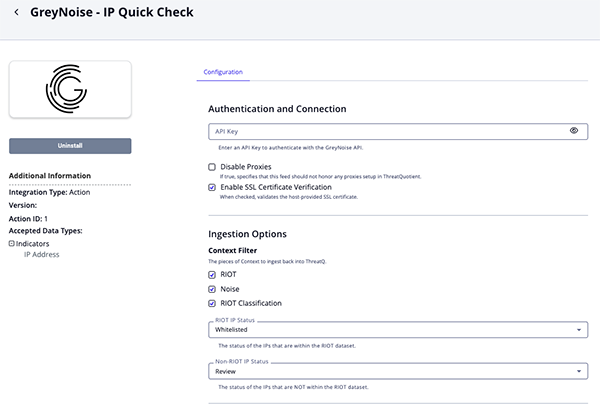
IP Quick Check Parameters
Parameter Description GreyNoise API Key API Key for authentication with the IPInfo API Disable Proxies Enable this option to have the action ignore proxies settings set in the ThreatQ UI. Enable SSL Certificate Verification Enable this option to verify the provider's SSL certificate. Context Filter Select the pieces of Context to ingest back into ThreatQ. Options include: - RIOT
- Noise
- Noise Code
RIOT IP Status Select the status of the IP Addresses that are within the RIOT dataset. Options include: - Whitelisted
- Review
- Active
Non-RIOT IP Status Select the status of the IP Addresses that are not within the RIOT dataset. Options include: - Whitelisted
- Review
- Active
Objects Per Run Maximum number of Objects to Submit per workflow run.
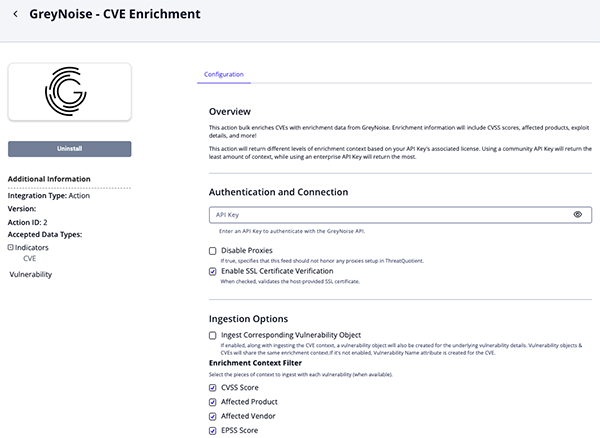
CVE Enrichment Parameters
Parameter Description GreyNoise API Key API Key for authentication with the IPInfo API Disable Proxies Enable this option to have the action ignore proxies settings set in the ThreatQ UI. Enable SSL Certificate Verification Enable this option to verify the provider's SSL certificate. Ingest Corresponding Vulnerability Object If enabled, along with ingesting the CVE context, a vulnerability object will also be created for the underlying vulnerability details. Vulnerability objects & CVEs will share the same enrichment context. If it's not enabled, Vulnerability Nameattribute is created for the CVE.Enrichment Context Filter Select the pieces of context to ingest with each vulnerability (when available). Options include: - CVSS Score (default)
- Affected Product (default)
- Affected Vendor (default)
- EPSS Score (default)
- Is CISA KEV (default)
- Has Exploit (default)
- Attack Vector (default)
Objects Per Run Enter the maximum number of objects to submit per workflow run.
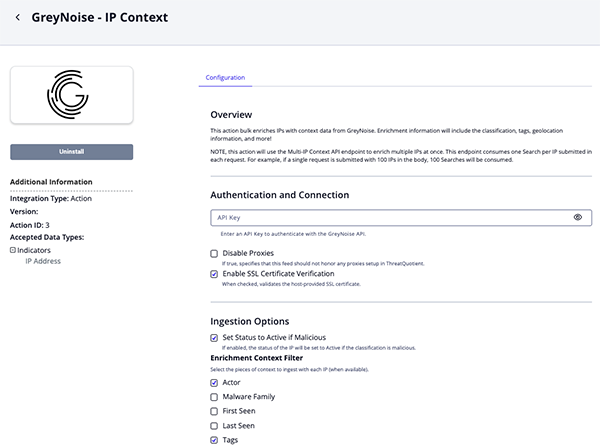
IP Context Parameters
Parameter Description GreyNoise API Key API Key for authentication with the IPInfo API Disable Proxies Enable this option to have the action ignore proxies settings set in the ThreatQ UI. Enable SSL Certificate Verification Enable this option to verify the provider's SSL certificate. Set Status to Active if Malicious Enable this parameter to have the status of the IP will be set to Active if the classification is malicious. Enrichment Context Filter Select the pieces of context to ingest with each vulnerability (when available). Options include: - Actor
- Malware Family
- First Seen
- Last Seen
- Tags
- Classification
- CVEs
- Is Bot
- Is TOR
- Is VPN
- Is Spoofable
- VPN Service
- ASN
- Region
- Organization
- Category
- Operating System
- Destination Country
- Destination Country Code
- Source Country
- Source Country Code
- Source City
- RDNS
- Scanned Paths
- Scanned Ports
- RIOT
- RIOT Category
- Service Name
- Trust Level
- External Reference
- Last Updated
Add Raw Data Information to Description Enable this parameter to add the scanned ports and paths to the description. Enabling this parameter may significantly increase the description size.
Objects Per Run Enter the maximum number of objects to submit per workflow run.
- Review any additional settings, make any changes if needed, and click on Save.
Actions
The action bundle provides the following actions:
| Function | Description | Object Type | Object Subtype |
|---|---|---|---|
| GreyNoise - IP Quick Check | Quickly checks if IPs in a data collection are noise or not (also checks RIOT) | Indicator | IP Address |
| GreyNoise - CVE Enrichment | Enriches CVEs with GreyNoise data | Indicator, Vulnerability | Indicator - CVE |
| GreyNoise - IP Context | Enriches IPs with GreyNoise's full contextual data | Indicator | IP Address |
IP Quick Check
The GreyNoise - IP Quick Check action checks IPs to see if they are within GreyNoise's RIOT dataset (a known benign service).
POST https://api.greynoise.io/v3/noise/ip?quick=true
Sample Body:
{
  "ips": [
    "20.163.15.34"
  ]
}
Sample Response:
[
  {
    "business_service_intelligence": {
      "found": false,
      "trust_level": ""
    },
    "internet_scanner_intelligence": {
      "classification": "malicious",
      "found": true
    },
    "ip": "20.163.15.34"
  }
]
ThreatQuotient provides the following default mapping for this action:
| Feed Data Path | ThreatQ Entity | ThreatQ Object Type or Attribute Key | Published Date | Examples | Notes |
|---|---|---|---|---|---|
| .ip | Indicator.Value | IP Address | N/A | 20.163.15.34 |
N/A |
| .business_service_intelligence.found | Indicator.Attribute | RIOT | N/A | false |
Updatable |
| .internet_scanner_intelligence.found | Indicator.Attribute | Noise | N/A | true |
Updatable |
| .internet_scanner_intelligence.classification | Indicator.Attribute | RIOT Classification | N/A | malicius |
Updatable |
CVE Enrichment
The GreyNoise - CVE Enrichment action performs CVE ID lookups to enrich CVEs with GreyNoise data.
POST https://api.greynoise.io/v3/cves
Sample Body:
{
  "cves": [
    "CVE-2024-23897"
  ]
}
Sample Response:
{
  "id": "CVE-2024-23897",
  "details": {
    "vulnerability_name": "Jenkins Command Line Interface (CLI) Path Traversal Vulnerability",
    "vulnerability_description": "Jenkins 2.441 and earlier, LTS 2.426.2 and earlier does not disable a feature of its CLI command parser that replaces an '@' character followed by a file path in an argument with the file's contents, allowing unauthenticated attackers to read arbitrary files on the Jenkins controller file system.",
    "cve_cvss_score": 9.8,
    "product": "Jenkins Command Line Interface (CLI)",
    "vendor": "Jenkins",
    "published_to_nist_nvd": true
  },
  "timeline": {
    "cve_published_date": "2024-01-24T18:15:09Z",
    "cve_last_updated_date": "2024-05-14T15:01:24Z",
    "first_known_published_date": "2024-01-30T00:00:00Z",
    "cisa_kev_date_added": "2024-08-19T00:00:00Z"
  },
  "exploitation_details": {
    "attack_vector": "NETWORK",
    "exploit_found": true,
    "exploitation_registered_in_kev": true,
    "epss_score": 0.97225
  },
  "exploitation_stats": {
    "number_of_available_exploits": 48,
    "number_of_threat_actors_exploiting_vulnerability": 2,
    "number_of_botnets_exploiting_vulnerability": 0
  },
  "exploitation_activity": {
    "activity_seen": false,
    "benign_ip_count_1d": 0,
    "benign_ip_count_10d": 0,
    "benign_ip_count_30d": 0,
    "threat_ip_count_1d": 0,
    "threat_ip_count_10d": 0,
    "threat_ip_count_30d": 0
  }
}
ThreatQuotient provides the following default mapping for this action:
| Feed Data Path | ThreatQ Entity | ThreatQ Object Type or Attribute Key | Published Date | Examples | Notes |
|---|---|---|---|---|---|
.details.vulnerability_name |
Vulnerability Value | N/A | .timeline.cve_published_date |
Jenkins Command Line Interface (CLI) Path Traversal Vulnerability |
User-configurable; |
.details.vulnerability_name |
Indicator Attribute | Vulnerability Name |
.timeline.cve_published_date |
Jenkins Command Line Interface (CLI) Path Traversal Vulnerability |
If Ingest Corresponding Vulnerability Object is unchecked; |
exploited |
Indicator/Vulnerability TAG | N/A | .timeline.cve_published_date |
exploited |
If .exploitation_details.exploitation_registered_in_kev or .exploitation_details.exploit_found is True |
.details.cve_cvss_score |
Indicator/Vulnerability Attribute | CVSS Score |
.timeline.cve_published_date |
9.8 |
Updatable; User-configurable; |
.details.product |
Indicator/Vulnerability Attribute | Affected Product |
.timeline.cve_published_date |
Jenkins Command Line Interface (CLI) |
User-configurable; |
.details.vendor |
Indicator/Vulnerability Attribute | Affected Vendor |
.timeline.cve_published_date |
Jenkins |
User-configurable; |
.exploitation_details.attack_vector |
Indicator/Vulnerability Attribute | Attack Vector |
.timeline.cve_published_date |
NETWORK |
User-configurable; |
.exploitation_details.exploit_found |
Indicator/Vulnerability Attribute | Has Exploit |
.timeline.cve_published_date |
true |
Updatable; User-configurable; |
.exploitation_details.exploitation_registered_in_kev |
Indicator/Vulnerability Attribute | Is CISA KEV |
.timeline.cve_published_date |
true |
Updatable; User-configurable; |
.exploitation_details.epss_score |
Indicator/Vulnerability Attribute | EPSS Score |
.timeline.cve_published_date |
0.97225 |
Updatable; User-configurable; |
.timeline.*, .exploitation_stats.*, .exploitation_activity.* |
Indicator/Vulnerability Description | N/A | N/A | N/A | Various fields concatenated to build description HTML |
IP Context
The GreyNoise - IP Context action enriches IPs with GreyNoise's full contextual data such as geolocation information and classification.
POST https://api.greynoise.io/v3/noise/multi/context
Sample Body:
{
  "ips": [
    "1.1.1.1"
  ]
}
Sample Response:
{
  "data": [
    {
      "actor": "unknown",
      "bot": false,
      "classification": "malicious",
      "cve": [],
      "first_seen": "2024-08-19",
      "ip": "45.63.52.184",
      "last_seen": "2024-08-19",
      "metadata": {
        "asn": "AS20473",
        "category": "hosting",
        "city": "Los Angeles",
        "country": "United States",
        "country_code": "US",
        "destination_countries": ["Canada"],
        "destination_country_codes": ["CA"],
        "organization": "The Constant Company, LLC",
        "os": "",
        "rdns": "45.63.52.184.vultrusercontent.com",
        "region": "California",
        "sensor_count": 1,
        "sensor_hits": 5,
        "source_country": "United States",
        "source_country_code": "US",
        "tor": false
      },
      "published_at": "2024-08-19 00:00:00+00:00",
      "raw_data": {
        "hassh": [],
        "ja3": [],
        "scan": [
          {
            "port": 983,
            "protocol": "TCP"
          }
        ],
        "web": {}
      },
      "seen": true,
      "spoofable": true,
      "tags": [],
      "vpn": false,
      "vpn_service": ""
    }
  ]
}
ThreatQuotient provides the following default mapping for this action:
| Feed Data Path | ThreatQ Entity | ThreatQ Object Type or Attribute Key | Published Date | Examples | Notes |
|---|---|---|---|---|---|
.ip |
Indicator.Value | IP Address | .first_seen |
1.1.1.1 |
N/A |
.business_service_intelligence.explanation |
Indicator.Description | N/A | N/A | Public DNS services are used as alternatives ... |
N/A |
.business_service_intelligence.description |
Indicator.Description | N/A | N/A | Cloudflare, Inc. is an American web infrastructure ... |
N/A |
.internet_scanner_intelligence.raw_data.{scan.port, .scan.protocol, .http.path} |
Indicator.Description | N/A | N/A | N/A | If Add Raw Data Information To Description is enabled. |
.internet_scanner_intelligence.tags[].name |
Indicator.Tags | N/A | N/A | Apple iOS Lockdownd Crawler |
User-configurable. |
.internet_scanner_intelligence.actor |
Indicator.Attribute | Actor | .first_seen |
APT9 |
User-configurable. If this is 'unknown', it will be ignored. |
.internet_scanner_intelligence.classification |
Indicator.Attribute | Classification | .first_seen |
malicious |
User-configurable. |
.internet_scanner_intelligence.metadata.rdns |
Indicator.Attribute | rDNS | .first_seen |
crawl-66-249-79-17.googlebot.com |
User-configurable |
.internet_scanner_intelligence.metadata.source_country |
Indicator.Attribute | Source Country | .first_seen |
Italy |
User-configurable |
.internet_scanner_intelligence.metadata.source_country_code |
Indicator.Attribute | Country Code | .first_seen |
IT |
User-configurable |
.internet_scanner_intelligence.metadata.source_city |
Indicator.Attribute | Source City | .first_seen |
Milan |
User-configurable |
.internet_scanner_intelligence.metadata.destination_countries[] |
Indicator.Attribute | Destination Country | .first_seen |
Germany |
User-configurable |
.internet_scanner_intelligence.metadata.destination_country_codes[] |
Indicator.Attribute | Destination Country Code | .first_seen |
DE |
User-configurable |
.internet_scanner_intelligence.metadata.organization |
Indicator.Attribute | Organization | .first_seen |
Data Communication Business Group |
User-configurable |
.internet_scanner_intelligence.metadata.asn |
Indicator.Attribute | ASN | .first_seen |
AS3462 |
User-configurable |
.internet_scanner_intelligence.tor |
Indicator.Attribute | Is Tor | .first_seen |
False |
User-configurable. This is converted to string. Updatable. |
.internet_scanner_intelligence.metadata.os |
Indicator.Attribute | Operating System | .first_seen |
Windows 7/8 |
User-configurable |
.internet_scanner_intelligence.metadata.category |
Indicator.Attribute | Category | .first_seen |
isp |
User-configurable |
.internet_scanner_intelligence.raw_data.http.path[] |
Indicator.Attribute | Scanned Path | .first_seen |
/bootstrap/3.3.6/css/bootstrap.min.css |
User-configurable |
.internet_scanner_intelligence.raw_data.scan[].port |
Indicator.Attribute | Scanned Port | .first_seen |
80 |
User-configurable |
.internet_scanner_intelligence.bot |
Indicator.Attribute | Is Bot | .first_seen |
False |
User-configurable. This is converted to string. Updatable. |
.internet_scanner_intelligence.vpn |
Indicator.Attribute | Is VPN | .first_seen |
False |
User-configurable. This is converted to string. Updatable. |
.internet_scanner_intelligence.spoofable |
Indicator.Attribute | Is Spoofable | .first_seen |
True |
User-configurable. This is converted to string. Updatable |
.internet_scanner_intelligence.vpn_service |
Indicator.Attribute | VPN Service | .first_seen |
Cisco |
User-configurable |
.internet_scanner_intelligence.tags[] |
Indicator.Attribute | Malware Family | .first_seen |
Emotet |
User-configurable. If the value is present in the table below Greynoise Malware Tags Mapping |
.business_service_intelligence.name |
Indicator.Attribute | Service Name | .first_seen |
Google Public DNS |
User-configurable. |
.business_service_intelligence.trust_level |
Indicator.Attribute | Trust Level | .first_seen |
Trustworthy |
User-configurable. Mapped according to Greynoise Trust Mapping |
.business_service_intelligence.reference |
Indicator.Attribute | External Reference | .first_seen |
https://one.one.one.one |
User-configurable. |
.business_service_intelligence.last_updated |
Indicator.Attribute | Last Updated | .first_seen |
2025-12-05T09:11:03Z |
User-configurable. Updatable. |
.business_service_intelligence.business_ti.found |
Indicator.Attribute | RIOT | .first_seen |
True |
User-configurable. Updatable. Converted to string. |
.business_service_intelligence.business_ti.category |
Indicator.Attribute | RIOT Category | .first_seen |
public_dns |
User-configurable. |
.internet_scanner_intelligence.cves[] |
Related Indicator.Vulnerability | CVE/Vulnerability | .first_seen |
CVE-2020-1234 |
User-configurable. Ingested according to Ingest CVEs As. |
GreyNoise Malware Tags Mapping
The following is how GreyNoise Malware tags are mapped as attributes in ThreatQ.
| GreyNoise Tag | ThreatQ Attribute |
|---|---|
| emotet | Emotet |
| trickbot | TrickBot |
| mirai | Mirai |
| looks like conficker | Conficker |
| d3c3mb3r botnet | D3C3MB3R Bot |
| looks like eternalblue | EternalBlue |
| zmeu worm | ZmEu |
| e6 group | E6 |
| zte router worm | ZTE Router Worm |
| ssh bruteforcer | SSH Bruteforcer |
| androxgh0st | Androxgh0st |
| zyxel router worm | Zyxel Router Worm |
GreyNoise Trust Mapping
The following is how GreyNoise trust levels are mapped as attributes in ThreatQ.
| GreyNoise Trust Level | ThreatQ Attribute |
|---|---|
| 1 | Trustworthy |
| 2 | Somewhat Trustworthy |
Enriched Data
Object counts and action runtime are supplied as generalities only - objects returned by a provider can differ based on credential configurations and action runtime may vary based on system resources and load.
IP Quick Check
| Metric | Result |
|---|---|
| Run Time | 1 minute |
| Indicators | 25 |
| Indicator Attributes | 73 |
CVE Enrichment
| Metric | Result |
|---|---|
| Run Time | 1 minute |
| Indicators | 5 |
| Indicator Attributes | 35 |
| Vulnerabilities | 4 |
| Vulnerability Attributes | 29 |
IP Context
| Metric | Result |
|---|---|
| Run Time | 1 minute |
| Indicators | 9 |
| Indicator Attributes | 163 |
Use Case Example
- IP Quick Check - you have a list of IPs and want to see if any of them have been observed scanning or attacking devices on the internet.
- CVE Enrichment - you have a list of CVEs and want to enrich them with additional context from GreyNoise to better understand the risk associated with each CVE.
- IP Context - you have a list of IPs and want to enrich them with additional context from GreyNoise to better understand whether or not they are just noise or are actually malicious.
Change Log
- Version 1.2.0
- Updated the integration to use GreyNoise API v3.
- Removed the following actions:
- GreyNoise - Find Similar IPs - the API endpoint was deprecated by the vendor.
- GreyNoise - RIOT - functions have been integrated into the GreyNoise - IP Context action.
- Added a new configuration parameter for the GreyNoise - IP Context action:
- Add Raw Data Information to Description - gives you the option to add the scanned ports and paths to the description.
- Added additional options for the Enrichment Context Filter configuration parameter for the GreyNoise - IP Context action.
- Version 1.1.0
- Added two new actions: GreyNoise CVE Enrichment and GreyNoise IP Context.
- Added the follow configuration options to all actions:
- Disable Proxies - enable this option to have the action ignore proxy settings set in the ThreatQ UI.
- Enable SSL Verification - enable this option to verify the provider's SSL certificate.
- Version 1.0.0
- Initial release
PDF Guides
| Document | ThreatQ Version |
|---|---|
| GreyNoise Action Bundle Guide v1.2.0 | 5.12.1 or Greater |
| GreyNoise Action Bundle Guide v1.1.0 | 5.12.1 or Greater |
| GreyNoise Action Bundle Guide v1.0.0 | 5.12.1 or Greater |