DomainTools Action
The web format of this guide reflects the most current release. Guides for older iterations are available in PDF format.
Integration Details
ThreatQuotient provides the following details for this integration:
| Current Integration Version | 1.1.0 |
| Compatible with ThreatQ Versions | >= 5.12.1 |
| ThreatQ TQO License Required | Yes |
| Support Tier | ThreatQ Supported |
Introduction
The DomainTools Action for ThreatQ allows users to perform automated bulk lookups against DomainTools' Iris API. This API provides information such as risk scores, popularity ranks, threats, and more. Ultimately, the enrichment data provided by this action can be used to make more informed decisions when prioritizing the domains for further investigation or blacklisting.
The integration provides the following action:
- DomainTools Iris - Enrich Domains - enriches domains using the Iris Enrich/Investigate APIs.
The action is compatible with FQDN type indicators.
The action returns enriched FQDN and IP Address type indicators.
This action is intended for use with ThreatQ TDR Orchestrator (TQO). An active TQO license is required for this feature.
Prerequisites
- An active ThreatQ TDR Orchestrator (TQO) license.
- A DomainTools Username and API.
- A DomainTools license for the Iris Enrich/Investigate APIs.
- A data collection containing FQDN indicators.
Installation
Perform the following steps to install the integration:
The same steps can be used to upgrade the integration to a new version.
- Log into https://marketplace.threatq.com/.
- Locate and download the action zip file.
- Navigate to the integrations management page on your ThreatQ instance.
- Click on the Add New Integration button.
- Upload the action zip file using one of the following methods:
- Drag and drop the zip file into the dialog box
- Select Click to Browse to locate the zip file on your local machine
ThreatQ will inform you if the action already exists on the platform and will require user confirmation before proceeding. ThreatQ will also inform you if the new version of the action contains changes to the user configuration. The new user configurations will overwrite the existing ones for the action and will require user confirmation before proceeding.
You will still need to configure the action.
Configuration
ThreatQuotient does not issue API keys for third-party vendors. Contact the specific vendor to obtain API keys and other integration-related credentials.
To configure the integration:
- Navigate to your integrations management page in ThreatQ.
- Select the Actions option from the Category dropdown (optional).
- Click on the action entry to open its details page.
- Enter the following parameters under the Configuration tab:
The configurations set on this page will be used as the default settings when inserting this action into a new workflow. Updating the configurations on this page will not update any instances of this action that have already been deployed to a workflow. In that scenario, you must update the action’s configurations within the workflow itself.
Parameter Description API Username Your DomainTools API Username. API Key Your DomainTools API Key. API Selection Select which API to enrich from. This will align with the DomainTools package your organization has purchased and what your license allows. Options include: Iris Enrich and Iris Investigate. Minimum Risk Score Threshold Enter a number indicating the minimum risk score to return enrichment data for a given IOC. Entering 0 will ingest enrichment for all submitted IOCs. (default: 25) General Attribute Filtering Select the attributes to include in the context enrichment of each indicator. Options include: - Risk Score
- Threat Type
- Country Code
- Is Active
- Alexa Rank
- Popularity Rank
- Creation Date
- Expiration Date
- Site Response Code
- Site Title
- Server Type
Normalize Risk Score Enable this parameter to convert the overall DomainTools Risk Score into a human-readable Normalized Riskattribute. This option supports ThreatQ scoring policies that use discrete values. This parameter is enabled by default.Risk Score Normalization Enter a pipe-delimited CSV mapping containing Minimum,Maximum, andNormalized Valuecolumns. The default value is:0,39,Low\|40,79,Medium\|80,94,High\|95,100,CriticalHosting Attribute Filtering Select the hosting attributes to include in the context enrichment of each indicator. Options include: MX Hosts and Nameservers. Relationship Filtering Select the relationships to include in the context enrichment of each indicator. Associated IPs is the only option available for this configuration parameter. Status Options - These options allow you to control the statuses of the ingested indicators. You can set default statuses for them, as well as overrides for when the risk score exceeds a certain threshold. This will allow you to more dynamically control what becomes Active vs. what still needs to be reviewed.
Default Domain Status Select the default status to set on Domains that are created by this action. Options include: Review, Active, and Indirect. Default IP Status Select the default status to set on IPs that are created by this action. Options include: Review, Active, and Indirect. Override Default Status if Risk Score is Above Threshold Enable this option to give indicators a different status if their risk score is above a specific threshold. This option is enabled by default. Minimum Risk Score to Override Default Status Enter a number indicating the minimum risk score to set a different status for the ingested indicators. The default value is 50. Domain Status if Risk Score is Above Threshold Select the status to set on Domains that are created by this action if their risk score is above the threshold. Options include: Review, Active, and Indirect. Objects Per Run The max number of objects to send to this action, per run. This number should scale with your API rate limit. The default value is 10000.
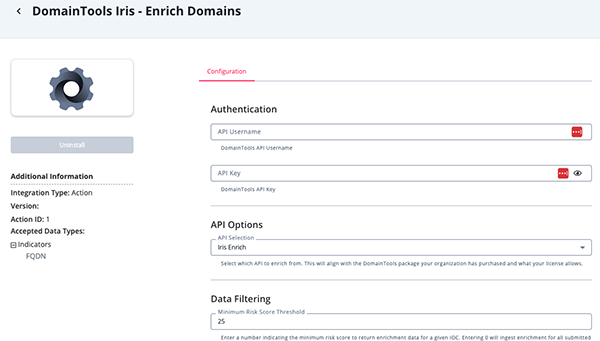
- Review any additional settings, make any changes if needed, and click on Save.
Actions
The following action is available:
| Action | Description | Object Type | Object Subtype |
|---|---|---|---|
| DomainTools Iris - Enrich Domains | This action enriches domains using the Iris Enrich/Investigate APIs. | Indicators | FQDN |
DomainTools Iris - Enrich Domains
The DomainTools Iris - Enrich Domains action enriches the input domains using the Iris Enrich/Investigate APIs. Context such as the domain's risk score, popularity rank, and threats will be returned into ThreatQ as attributes. You also can configure the integration to bring in additional context such as MX records, NS records, reverse IPs, and more.
GET https://api.domaintools.com/v1/iris-enrich/ GET https://api.domaintools.com/v1/iris-investigate/
Sample Response:
{
  "response": {
    "limit_exceeded": false,
    "has_more_results": false,
    "message": "Enjoy your data.",
    "results_count": 1,
    "total_count": 1,
    "results": [
      {
        "domain": "kscupdate.com",
        "whois_url": "https://whois.domaintools.com/kscupdate.com",
        "adsense": {
          "value": "",
          "count": 0
        },
        "alexa": "",
        "popularity_rank": "",
        "active": false,
        "google_analytics": {
          "value": "",
          "count": 0
        },
        "ga4": [],
        "gtm_codes": [],
        "fb_codes": [],
        "hotjar_codes": [],
        "baidu_codes": [],
        "yandex_codes": [],
        "matomo_codes": [],
        "statcounter_project_codes": [],
        "statcounter_security_codes": [],
        "admin_contact": {
          "name": {
            "value": "Redacted for Privacy",
            "count": 13976556
          },
          "org": {
            "value": "Privacy service provided by Withheld for Privacy ehf",
            "count": 26541364
          },
          "street": {
            "value": "Kalkofnsvegur 2",
            "count": 15606008
          },
          "city": {
            "value": "Reykjavik",
            "count": 15635545
          },
          "state": {
            "value": "Capital Region",
            "count": 27979376
          },
          "postal": {
            "value": "101",
            "count": 15635860
          },
          "country": {
            "value": "is",
            "count": 28039803
          },
          "phone": {
            "value": "3544212434",
            "count": 15598476
          },
          "fax": {
            "value": "",
            "count": 0
          },
          "email": [
            {
              "value": "3b3d95bb9f3d4706ab96070d181619d6.protect@withheldforprivacy.com",
              "count": 1
            }
          ]
        },
        "billing_contact": {
          "name": {
            "value": "",
            "count": 0
          },
          "org": {
            "value": "",
            "count": 0
          },
          "street": {
            "value": "",
            "count": 0
          },
          "city": {
            "value": "",
            "count": 0
          },
          "state": {
            "value": "",
            "count": 0
          },
          "postal": {
            "value": "",
            "count": 0
          },
          "country": {
            "value": "",
            "count": 0
          },
          "phone": {
            "value": "",
            "count": 0
          },
          "fax": {
            "value": "",
            "count": 0
          },
          "email": []
        },
        "registrant_contact": {
          "name": {
            "value": "Redacted for Privacy",
            "count": 13976556
          },
          "org": {
            "value": "Privacy service provided by Withheld for Privacy ehf",
            "count": 26541364
          },
          "street": {
            "value": "Kalkofnsvegur 2",
            "count": 15606008
          },
          "city": {
            "value": "Reykjavik",
            "count": 15635545
          },
          "state": {
            "value": "Capital Region",
            "count": 27979376
          },
          "postal": {
            "value": "101",
            "count": 15635860
          },
          "country": {
            "value": "is",
            "count": 28039803
          },
          "phone": {
            "value": "3544212434",
            "count": 15598476
          },
          "fax": {
            "value": "",
            "count": 0
          },
          "email": [
            {
              "value": "3b3d95bb9f3d4706ab96070d181619d6.protect@withheldforprivacy.com",
              "count": 1
            }
          ]
        },
        "technical_contact": {
          "name": {
            "value": "Redacted for Privacy",
            "count": 13976556
          },
          "org": {
            "value": "Privacy service provided by Withheld for Privacy ehf",
            "count": 26541364
          },
          "street": {
            "value": "Kalkofnsvegur 2",
            "count": 15606008
          },
          "city": {
            "value": "Reykjavik",
            "count": 15635545
          },
          "state": {
            "value": "Capital Region",
            "count": 27979376
          },
          "postal": {
            "value": "101",
            "count": 15635860
          },
          "country": {
            "value": "is",
            "count": 28039803
          },
          "phone": {
            "value": "3544212434",
            "count": 15598476
          },
          "fax": {
            "value": "",
            "count": 0
          },
          "email": [
            {
              "value": "3b3d95bb9f3d4706ab96070d181619d6.protect@withheldforprivacy.com",
              "count": 1
            }
          ]
        },
        "create_date": {
          "value": "2023-09-25",
          "count": 268640
        },
        "expiration_date": {
          "value": "2024-09-25",
          "count": 764604
        },
        "email_domain": [
          {
            "value": "withheldforprivacy.com",
            "count": 14959106
          }
        ],
        "soa_email": [
          {
            "value": "dns@cloudflare.com",
            "count": 62959786
          }
        ],
        "ssl_email": [],
        "additional_whois_email": [
          {
            "value": "abuse@namecheap.com",
            "count": 44723965
          }
        ],
        "ip": [
          {
            "address": {
              "value": "172.67.175.217",
              "count": 1359
            },
            "asn": [
              {
                "value": 13335,
                "count": 47095995
              }
            ],
            "country_code": {
              "value": "us",
              "count": 197000302
            },
            "isp": {
              "value": "CloudFlare Inc.",
              "count": 40175752
            }
          }
        ],
        "mx": [],
        "name_server": [
          {
            "host": {
              "value": "donna.ns.cloudflare.com",
              "count": 150627
            },
            "domain": {
              "value": "cloudflare.com",
              "count": 50465465
            },
            "ip": [
              {
                "value": "108.162.192.151",
                "count": 126242
              }
            ]
          }
        ],
        "domain_risk": {
          "risk_score": 100,
          "components": [
            {
              "name": "proximity",
              "risk_score": 100
            },
            {
              "name": "threat_profile",
              "risk_score": 72,
              "threats": ["phishing"],
              "evidence": ["domain name", "name server", "registrar"]
            }
          ]
        },
        "redirect": {
          "value": "www.kaspersky.ru",
          "count": 11
        },
        "redirect_domain": {
          "value": "kaspersky.ru",
          "count": 14
        },
        "registrant_name": {
          "value": "Redacted for Privacy",
          "count": 13985389
        },
        "registrant_org": {
          "value": "Privacy service provided by Withheld for Privacy ehf",
          "count": 26623684
        },
        "registrar": {
          "value": "NAMECHEAP INC",
          "count": 16839368
        },
        "registrar_status": ["clienttransferprohibited"],
        "spf_info": "",
        "ssl_info": [
          {
            "hash": {
              "value": "ce2ac7c0ec5413e5a5e3e38deb06a7c8829af6c5",
              "count": 1
            },
            "subject": {
              "value": "CN=kscupdate.com",
              "count": 1
            },
            "organization": {
              "value": "",
              "count": 0
            },
            "email": [],
            "alt_names": [
              {
                "value": "kscupdate.com",
                "count": 0
              }
            ],
            "sources": {
              "active": 1698129700000
            },
            "common_name": {
              "value": "kscupdate.com",
              "count": 1
            },
            "issuer_common_name": {
              "value": "GTS CA 1P5",
              "count": 17564085
            },
            "not_after": {
              "value": 20231224,
              "count": 572340
            },
            "not_before": {
              "value": 20230925,
              "count": 755678
            },
            "duration": {
              "value": 90,
              "count": 128018286
            }
          }
        ],
        "tld": "com",
        "website_response": 200,
        "data_updated_timestamp": "2023-12-12T22:07:01.792000",
        "website_title": {
          "value": "Защитные решения кибербезопасности для дома и бизнеса | Лаборатория Касперского",
          "count": 2
        },
        "server_type": {
          "value": "nginx",
          "count": 15449368
        },
        "first_seen": {
          "value": "2023-09-25T17:33:31Z",
          "count": 0
        },
        "tags": []
      }
    ],
    "missing_domains": []
  }
}
ThreatQuotient provides the following default mapping for this action:
Mapping is based on each item within the results array.
| Feed Data Path | ThreatQ Entity | ThreatQ Object Type or Attribute Key | Published Date | Examples | Notes |
|---|---|---|---|---|---|
.domain_risk.risk_score |
Attribute |
Risk Score |
.create_date |
100 |
Updatable; User-configurable |
.domain_risk.risk_score |
Attribute |
Normalized Risk |
.create_date |
Critical |
Updatable; User-configurable; Derived using the Risk Score Normalization Mapping |
.domain_risk.components[].risk_score |
Attribute |
Malware Risk Score |
.create_date |
71 |
Updatable; User-configurable; When the component name is threat_profile_malware |
.domain_risk.components[].risk_score |
Attribute |
Phishing Risk Score |
.create_date |
71 |
Updatable; User-configurable; When the component name is threat_profile_phishing |
.domain_risk.components[].risk_score |
Attribute |
Spam Risk Score |
.create_date |
71 |
Updatable; User-configurable; When the component name is threat_profile_spam |
.domain_risk.risk_score |
Attribute |
Risk Score |
.create_date |
100 |
Updatable; User-configurable |
.domain_risk.components[].threats[] |
Attribute |
Threat Type |
.create_date |
phishing |
User-configurable |
.server_type.value |
Attribute |
Server Type |
.create_date |
phishing |
User-configurable |
.ip[].country_code[].value |
Attribute |
Country Code |
.create_date |
US |
User-configurable |
.expiration_date.value |
Attribute |
Expiration Date |
.create_date |
N/A |
Updatable; User-configurable |
.create_date.value |
Attribute |
Creation Date |
.create_date |
N/A |
User-configurable |
.website_response |
Attribute |
Site Response Code |
.create_date |
200 |
Updatable; User-configurable |
.website_title.value |
Attribute |
Site Title |
.create_date |
N/A |
User-configurable |
.alexa |
Attribute |
Alexa Rank |
.create_date |
5121 |
Updatable; User-configurable |
.popularity_rank |
Attribute |
Popularity Rank |
.create_date |
5121 |
Updatable; User-configurable |
.mx[].host.value |
Attribute |
MX Host |
.create_date |
N/A |
User-configurable |
.name_server[].host.value |
Attribute |
Nameserver |
.create_date |
N/A |
User-configurable |
.ip[].address.value |
Indicator |
IP Address |
.create_date |
N/A |
User-configurable |
.active |
Attribute |
Is Active |
.create_date |
false |
Updatable; User-configurable |
Enriched Data
Object counts and action runtime are supplied as generalities only - objects returned by a provider can differ based on credential configurations and action runtime may vary based on system resources and load.
| Metric | Result |
|---|---|
| Run Time | 1 minute |
| Indicators | 12 |
| Indicator Attributes | 72 |
Known Issues / Limitations
- Rate limits are automatically applied by the action depending on which API endpoint is used.
- If Iris Enrich is selected, the action will rate limit to 60 requests per minute (in batches of 100), which will result in a maximum of 6,000 enriched indicators per minute.
- If Iris Investigate is selected, the action will rate limit to 10 requests per minute (in batches of 100), which will result in a maximum of 1,000 indicators being enriched per minute.
Change Log
- Version 1.1.0
- Added optional risk score normalization, allowing the overall DomainTools Risk Score to be converted into a
Normalized Riskattribute for use with ThreatQ scoring policies. - Added the following configuration parameters:
- Normalize Risk Score — Enables the conversion of the overall DomainTools Risk Score into a human-readable
Normalized Riskattribute. - Risk Score Normalization — Defines the normalization ranges using a pipe-delimited CSV mapping with
Minimum,Maximum, andNormalized Valuecolumns.
- Normalize Risk Score — Enables the conversion of the overall DomainTools Risk Score into a human-readable
- Added optional risk score normalization, allowing the overall DomainTools Risk Score to be converted into a
- Version 1.0.0
- Initial release
PDF Guides
| Document | ThreatQ Version |
|---|---|
| DomainTools Action Guide v1.1.0 | 5.12.1 or Greater |
| DomainTools Action Guide v1.0.0 | 5.12.1 or Greater |